Site Package Overview - akumina/AkuminaDev GitHub Wiki
Overview
The Deployment Manager (or Site Creator) App is allows the creation of sites and/or deployment of artifacts within those sites. Here is an example of a site deployed using a site package, the foundation site:

These are called "Site Packages", and are available for selection via the deployment manager:
Site packages can also deployed using continuous integration via a console app.

Each site package has properties defined, which allow the end user to enter the value in the process of creating or deploying a site. These properties can be simple types such as a textbox, checkbox, dropdown, etc, or more complex such as an image upload, as shown below:

The site package is a collection of steps that get executed by the Deployment Manager; those steps in turn execute instructions. It is a programmable framework using the SDK and for more information look at the SDK documentation here.
Site Package folders
The Site Package instructions are located in AppManager path/SiteDefinitions/ - and inside each folder are the instructions needed for the common steps in the site packages.
NOTE: not every site package will use all of the folders.
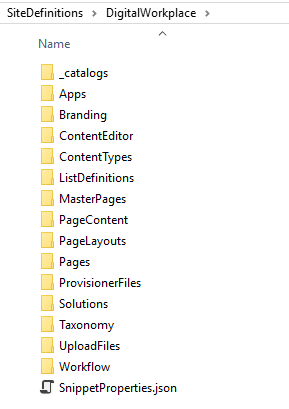
| Folder | Description |
|---|---|
| _catalogs | Items to be placed into the master page gallery, such as a search display template at /_catalogs\masterpage\Display Templates\Search . |
| Apps | AppManager app definitions, that get created when a site package is deployed. |
| Branding | JavaScript and CSS artifacts that get deployed into the /Style Library/DigitalWorkplace/ directory. |
| ContentEditor | AppManager system default. |
| ContentTypes | SharePoint content types to be deployed. |
| ListDefinitions | SharePoint list, library, calendar, etc definitions. |
| MasterPages | SharePoint Masterpages to be deployed. |
| PageContent | Content definition for SharePoint pages - ex, the zones, controls, and content. |
| PageLayouts | SharePoint page layouts to be deployed. |
| Pages | SharePoint pages in the site package (without content) |
| ProvisionerFiles | Any supporting Javascript, Css, and other artifacts to customie the end user experience inside the Deployment Manager. For example, if selection of a dropdown changes another field, that is located here. |
| SecurityGroups | Groups that get created for the site. |
| Solutions | WSP solutions that get placed into the solutions gallery and deployed automatically. |
| Taxonomy | SharePoint Taxonomy term store definitions that are deployed. |
| UploadFiles | Each top level folder represents a document library (or equivalent); inside the folders represents the files and folders to deploy to that location. |
| Workflow | Workflow definitions. |