msa import publishers pts - ajtruckle/meeting-schedule-assistant-support GitHub Wiki
From PTS
Use this importer when you maintain publisher information in the Public Talks (PTS) application. It reads the PTS database directly and allows you to add new publishers to Meeting Schedule Assistant.
The importer only available when the Public Talks application is installed.
What This Importer Does
The PTS Publisher importer reads the Public Talks database and displays a list of publishers who are not yet in your Publishers Database.
From this list, you can:
- Select which publishers to import
- Set their gender
- Choose how they are serving (Unbaptized Publisher, Publisher, or Pioneer)
- Indicate whether they are appointed (Elder or Ministerial Servant)
- Set their availability for midweek and weekend meetings
Only the publishers you tick are imported.
Existing publishers are skipped automatically.
This importer does not modify existing publishers, assignments, or meeting schedules.
Opening the Importer
From the Import Menu
Import → Publishers → From PTS
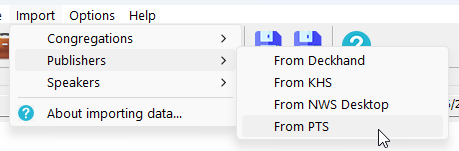
Figure 115. Selecting the PTS importer.
Importer Window Example
This is an example of the Importing Publishers from PTS window.
It shows the list of publishers found in the Public Talks database who are not yet in Meeting Schedule Assistant.
You can tick the names you want to import and adjust their gender, serving role, appointment status, and availability.
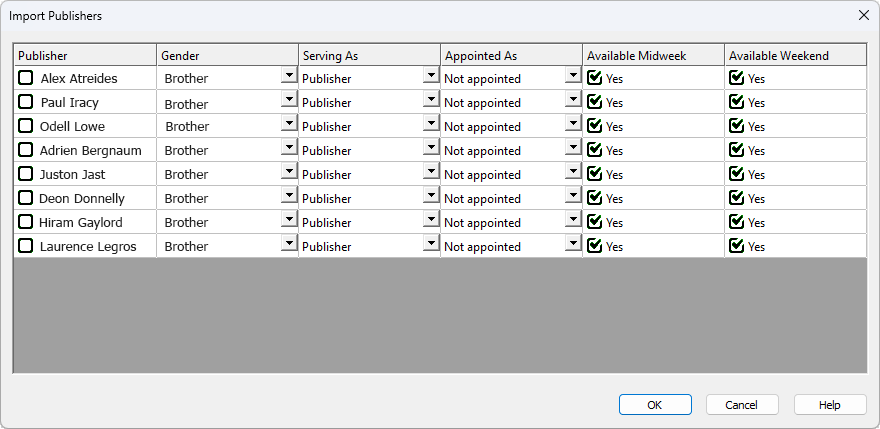
Figure 116. The PTS Publisher importer showing new publishers and editable details.
Import Steps
1. Open the importer
The importer reads the Public Talks database and lists publishers not already in Meeting Schedule Assistant.
2. Select publishers to import
Tick the checkbox next to each name you want to import.
You can adjust their gender, serving role, appointment status, and availability before importing.
3. Complete the import
Click OK to add the selected publishers to your Publishers Database. A confirmation message appears when the import is complete.
Summary
The PTS Publisher importer provides a simple way to bring publisher information from the Public Talks database into Meeting Schedule Assistant. It supports:
- Importing publisher names
- Their gender
- Their serving role (Unbaptized Publisher, Publisher, Pioneer)
- Their appointed status (Elder or Ministerial Servant)
- Their availability for midweek and weekend meetings
Only new publishers are added.
Existing publishers are skipped.
After processing the list, a confirmation message indicates that the selected publishers have been imported.
Back to Publisher Importers