How to convert link into Hyperlink in Telegram - affiliatesolutionhelp/tutorial GitHub Wiki
What is this feature?
We've integrated a new feature into our Affiliate Solution that automatically converts links into hyperlinks within Telegram. This enhancement proves particularly beneficial when dealing with lengthy URLs, preventing your messages from appearing cluttered. With this feature, your messages maintain a cleaner, more concise appearance, making it easier for your subscribers to read through the content within limited space. Take a look on below image
How to convert link into Hyperlink in Telegram?
This guide provides step-by-step instructions on how to convert a link into a hyperlink in Telegram. By following these steps, users can easily create clickable links within Telegram messages.
1. Visit Affiliate Solution Website

2. Click "Setting" menu

3. Click "Post Settings" menu

4. Click "Convert links into hyperlink" in telegram section

5. Add hyperlink text you want to display.
Example: You can add Buy Now, Grab Now, Shop Now etc.

6. Click "Save" button

7. Go to Telegram Application
Select Express Bot
Send /Restart bot command to restart bot
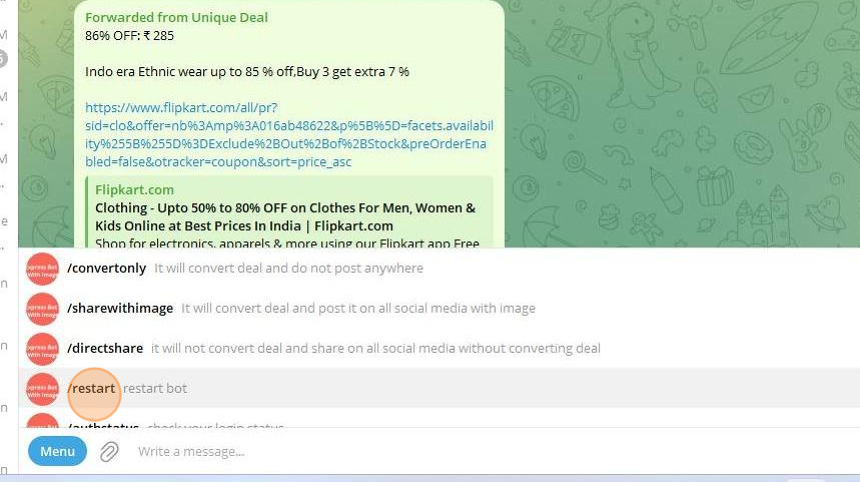
8. Forward message into Express bot to test if it is working

9. Let's check Telegram Channel, You will see magic there !!
Link is converted into hyper link

10. You can also make this link bold as well
Go to Post Settings menu

11. Type like below
<b>Shop Now</b>
IMPORTANT: Please make sure you have added correct HTML tag, else it will not post message on Telegram

12. Click "Save" button

13. RESTART YOUR EXPRESS BOT
14. Now let's forward message in express bot

15. Let's check Telegram Channel, You will see the Bold hyperlink in your channel.
