Clean Message Setup - affiliatesolutionhelp/tutorial GitHub Wiki
What is clean Message?
Clean message will convert message into your own creative format. Send only product link in Express bot and it will transform into magic
Take a look on below image
How to Set up?
1. Click here:

2. Click "Post Settings"

3. Select Send clean message check box
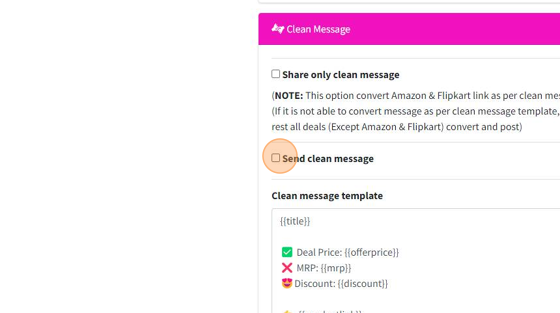
4. Let's understand the placeholder
{{title}} - Product tile
{{mrp}} - Product MRP
{{offerprice}} - Product Offer Price
{{discount}} - Product Discount
{{productlink}} - Product Link
{{websitelink}} - WordPress website link
{{cycliclink}} - User jump to Amazon/Flipkart from your website
{{domain}} - Website domain name (example: Amazon, Flipkart)
{{category}} - Product Category
{{brandname}} - Product Brand Name
{{features}} - Product Features
5. Specify your Message format as per your need

6. Exception keywords - If message contain an exception keyword, system will not convert deal into clean message format and post as source format

7. Click "Save"

8. Settings saved

9. Logout from Affiliate Solution

10. Click "Sign In"

11. Let's test our clean message
12. Click "Post Deal"

13. Click "Deal Message"*

14. Type your clean message Select check Telegram & WordPress in Share options
IMPORTANT NOTE: Without WordPress & Blogger clean message will not work

15. See the Magic below Your clean message has been posted

16. Now let's understand the Exception keyword

17. Type a new deal message which contain exception keyword
For Example: I have added loot exception keyword in below message, in this case it will post message as per source format but not in clean message format

18. Click on "Post Deal" button

19. You can see that message posted as per source format, but not in clean message format

20. Let's understand what is "Share only clean message" option
This option will post clean message only for Amazon & Flipkart main product, in case of multiple products, it will skip and not post message on your social media.
Other than Amazon & Flipkart store, all deal message will post as per source format
21. Let's do some practical stuff
22. Click "Share only clean message"

23. Click "Save"

24. Logout from Affiliate Solution website
25. Click "Sign In"

26. Click "Post Deal"

27. Click "Deal Message"*

28. Let's post Myntra deal
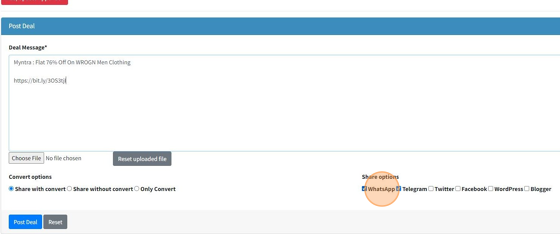
29. Select Telegram & WordPress check box in Share options

30. Click "Post Deal"

31. Deal has been posted with source format because it is not belongs to Amazon & Flipkart main product page
