Swagger, Swagger UI - Yash-777/MyWorld GitHub Wiki
Adding Swagger (now known as OpenAPI) to your API helps generate interactive API documentation. The setup process depends on the programming language and framework you're using.
Please let me know your tech stack (e.g., Node.js + Express, Python + Flask, Java + Spring Boot, .NET Core, etc.). But here’s a quick summary of how to add Swagger for the most common stacks:
Java + Spring Boot
✅ 1. Add the Correct Dependency : If you're using Spring Boot 2.x or 3.x, use the right version of springdoc-openapi-ui.
✅ springdoc-openapi-ui is for Spring Boot 2.x |
✅ springdoc-openapi-starter-webmvc-ui is for Spring Boot 3.x+ |
<dependency>
  <groupId>org.springdoc</groupId>
  <artifactId>springdoc-openapi-ui</artifactId>
  <version>1.7.0</version>
</dependency> |
<dependency>
    <groupId>org.springdoc</groupId>
    <artifactId>springdoc-openapi-starter-webmvc-ui</artifactId>
    <version>2.5.0</version>
</dependency> |
✅ 2. Expose the Swagger UI: After restarting the app, Swagger UI should be available at:
http://localhost:8080/swagger-ui.html
or
http://localhost:8080/swagger-ui/index.html
✅ 3. Sample Controller (Ensure You Have Endpoints) Swagger only shows up if there are REST endpoints defined.
@RestController
@RequestMapping("/api")
public class HelloController {

    @GetMapping("/hello")
    public String sayHello() {
        return "Hello World";
    }
}
✅ 4. Optional: Annotate with OpenAPI Info You can add this to your main class or a config class:
@OpenAPIDefinition(
    info = @Info(
        title = "My API",
        version = "1.0",
        description = "My API Documentation"
    )
)
@SpringBootApplication
public class MyApp {
    public static void main(String[] args) {
        SpringApplication.run(MyApp.class, args);
    }
}
✅ 5. Check for Conflicting Web Security (Spring Security Users)
If you have Spring Security configured, you may need to whitelist Swagger paths.
@Configuration
public class SecurityConfig {
    @Bean
    public SecurityFilterChain filterChain(HttpSecurity http) throws Exception {
        http
            .authorizeHttpRequests()
            .requestMatchers(
                "/swagger-ui/**",
                "/v3/api-docs/**"
            ).permitAll()
            .anyRequest().authenticated()
            .and().httpBasic();

        return http.build();
    }
}
Swagger UI allows anyone — be it your development team or your end consumers — to visualize and interact with the API’s resources without having any of the implementation logic in place. It’s automatically generated from your OpenAPI (formerly known as Swagger) Specification, with the visual documentation making it easy for back end implementation and client side consumption.
- Browser support: Swagger UI works in the latest versions of Chrome, Safari, Firefox, and Edge.
- Basic Structure
Swagger Dependency: If not already present
<dependency>
    <groupId>org.springdoc</groupId>
    <artifactId>springdoc-openapi-starter-webmvc-ui</artifactId>
    <version>2.5.0</version>
</dependency>
Global Swagger Configuration (Optional Enhancements)
You can keep a minimal configuration — grouping now happens automatically based on @Tag.
/**
 * Swagger Configuration – Auto-grouped using @Tag annotations.
 *
 * ✅ No need to define multiple GroupedOpenApi beans.
 * ✅ Each @Tag(name="...") creates a separate Swagger section automatically.
 */
@OpenAPIDefinition(
        info = @Info(
                title = "My World API",
                version = "1.0",
                description = "API documentation grouped by module and feature using @Tag annotations."
        )
)
@Configuration
public class SwaggerConfig {
}
👉 http://localhost:8080/myworld/swagger-ui.html
swagger ui to club some endpoints into a group & create multi-level grouping using java:
🧱 Swagger UI display Structure: 🧩 GOAL - You want to automatically group endpoints in Swagger UI like:
User Module
 → Users
 → Authentication
Product Module
 → Products
 → Categories
🧱 Directory Structure for Controllers
Organize your controllers by module:
src/main/java/com/myworld/controller/
 ├── user/
 │    ├── UserController.java       → /api/users/**
 │    └── AuthController.java       → /api/auth/**
 └── product/
      ├── ProductController.java    → /api/products/**
      └── CategoryController.java   → /api/categories/**
🧠 By using @Tag annotations on your controllers. 🪄 Optional: Add "Module" prefix for hierarchical feel.
You can create visual hierarchy (multi-level look) just by naming convention:
@Tag(name = "User Module - Users", description = "Manage users")
@Tag(name = "User Module - Authentication", description = "Login & signup APIs")
@Tag(name = "Product Module - Products", description = "Product operations")
@Tag(name = "Product Module - Categories", description = "Category operations")
Prefix Tag Names (Recommended Visual Grouping)
Only visually nested (not technically)
@Tag(name = "Online Module: XML", description = "XML Validator API")
@RestController
@RequestMapping("/xml")
public class XmlValidatorController { }

@Tag(name = "Online Module: JSON", description = "JSON Validator API")
@RestController
@RequestMapping("/json")
public class JsonValidatorController { }

@Tag(name = "Online Module: Text", description = "Text Validator API")
@RestController
@RequestMapping("/text")
public class TextAnalysisController { }
Result in Swagger UI
Online Module: JSON
Online Module: Text
Online Module: XML
You can use colon (:), dash (-), or arrow (→) for consistent look.
One shared tag on each controller
You just make sure all controllers share the same @Tag name and description, e.g.:
@Tag(name = "Online Module", description = "Online Module APIs for JSON, XML, Text")
@RestController
@RequestMapping("/json")
public class JsonValidatorController {
    // JSON APIs here
}

@Tag(name = "Online Module", description = "Online Module APIs for JSON, XML, Text")
@RestController
@RequestMapping("/text")
public class TextAnalysisController {
    // Text APIs here
}

@Tag(name = "Online Module", description = "Online Module APIs for JSON, XML, Text")
@RestController
@RequestMapping("/xml")
public class XmlValidatorController {
    // XML APIs here
}
Result:
In Swagger/OpenAPI UI, these 3 controllers will be grouped under one tag called "Online Module".
Online Module
  ├── XML
  ├── JSON
  └── Text
| ReadyAPI | Request Editor Interface |
|---|---|
| ReadyAPI allows teams to create, manage, and execute automated functional, security, and performance tests in one centralized interface – accelerating API quality for Agile and DevOps software teams. | 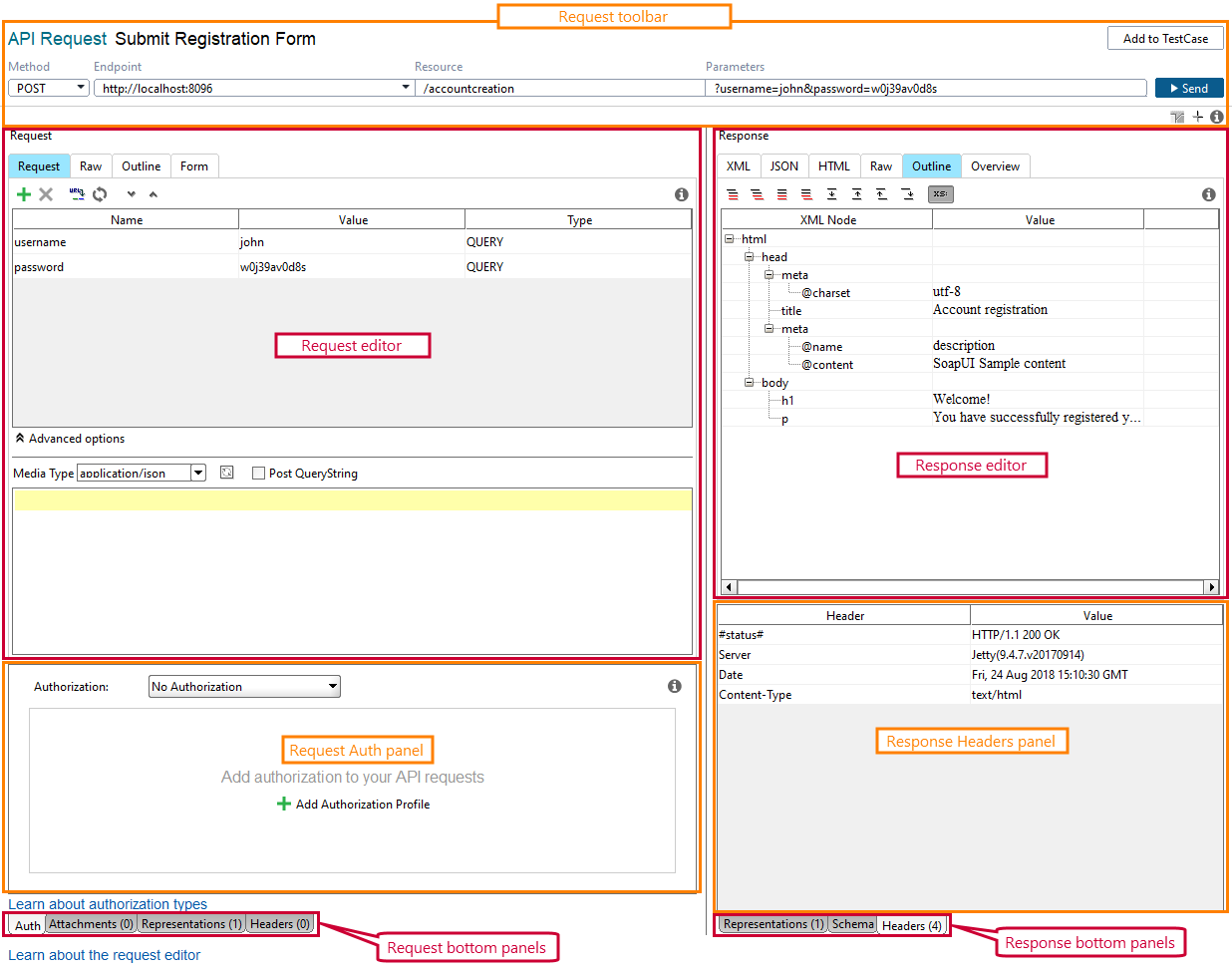 |