Adding an external package - XMPieLab/uStore-NG GitHub Wiki
Adding an external package or library is similar to adding a package to any other React project. An external package/library can be, for example, one of the following:
- React compliant library or framework
- JavaScript code wrapped with React
- JavaScript library that can be imported into a React project
- CSS only library
Installation of an external package can be done with npm (the theme supports it by default). This is the recommended option to use.
If npm refuses to install a package because of a peer dependency conflict on React, see Packages that cap at React 18 below.
Let's add a welcome notification which pops up when a user logs into the store. The suitable library for this is react-toastify. Following the installation instructions, we’ll install the package using:
npm install react-toastify
The package should be installed without errors.
Now let's add the code from the library documentation to the homepage. Open the src/routes/Home.js file and add an import statement to these files:
import { ToastContainer, toast } from 'react-toastify';
import 'react-toastify/dist/ReactToastify.css';
In the same file, add into the render function the ToastContainer component:
render () {
…
    return (
      	<Layout {...this.props} className="home">
        <ToastContainer />
        <div className="promotion-wrapper">
…
Add a function called notify. You may add additional settings as described in the documentation, such as position, autoClose, etc.
notify = () => toast.info("Welcome to the online store", {
    position: toast.POSITION.TOP_CENTER,
    autoClose: 3000,
    hideProgressBar: true
  });
Then, in componentDidMount function add a call to the notify function:
componentDidMount () {
…
    this.notify()
}
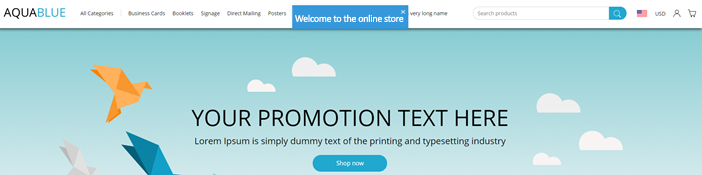
Take a look at your browser to see the result. When the homepage loads, the notification pops up at the top and disappears after 3 seconds:
Packages that cap at React 18
From uStore 26.3 the storefront runs on React 19. Some React libraries still declare a peer range ending at React 18 and will refuse to install next to it. Add an overrides entry so the package resolves to the project's pinned React:
"overrides": {
  "some-react-18-package": { "react": "$react", "react-dom": "$react-dom" }
}
$react refers to the root react dependency, so the override never drifts from the pin when the theme is upgraded.
Do not install with --legacy-peer-deps. It only silences the warning while still permitting a nested React install — two React runtimes in one page, and every hook in the nested copy throws. It also has to be repeated on every machine and in CI, whereas overrides travels in package.json.
If a package genuinely breaks on React 19 rather than merely declaring an old peer range, it has to be replaced, not overridden.
Training video
For a detailed example, watch the Adding other React Components video on XMPie Campus.