Tests - WilliamsiNFINITE/FlutterTheSpec GitHub Wiki
This wiki shows how to setup the developping environment to be able in particular to run the different tests for the application.
Click to see the configuration used for running the tests
 - Windows 10 Famille 64 bits
 - AMD Ryzen 7 5800H (Octo-Core 3.2 GHz / 4.4 GHz Turbo - 16 Threads - Cache 16 Mo)
 - NVIDIA GeForce RTX 3050 Ti Studio 4Go GDDR6
 - 16 Go DDR4
Github Actions is used to complete static analisis of the code. In this project, the jobs megalinter and sonarcloud will verify different elements like synthax errors, code standards, code smells, etc... As shown below, when the jobs is complete, the console will print a small report to give the status of the code.
+----SUMMARY-----+--------------------------+---------------+-------+-------+--------+--------------+
| Descriptor     | Linter                   | Mode          | Files | Fixed | Errors | Elapsed time |
+----------------+--------------------------+---------------+-------+-------+--------+--------------+
| ✅ ACTION      | actionlint               | list_of_files |     3 |       |      0 |        0.03s |
| ❌ COPYPASTE   | jscpd                    | project       |   n/a |       |     36 |        3.18s |
| ✅ CREDENTIALS | secretlint               | project       |   n/a |       |      0 |         1.2s |
| ❌ CSS         | stylelint                | list_of_files |     6 |     5 |      1 |        1.41s |
| ✅ DOCKERFILE  | dockerfilelint           | file          |     1 |       |      0 |        0.27s |
| ✅ DOCKERFILE  | hadolint                 | file          |     1 |       |      0 |        0.07s |
| ✅ GIT         | git_diff                 | project       |   n/a |       |      0 |        0.05s |
| ❌ HTML        | htmlhint                 | list_of_files |     2 |       |      6 |         0.3s |
| ❌ JAVASCRIPT  | eslint                   | list_of_files |     3 |     0 |      6 |        3.55s |
| ❌ JAVASCRIPT  | standard                 | list_of_files |     3 |     2 |      1 |        2.22s |
| ✅ JSON        | eslint-plugin-jsonc      | list_of_files |     7 |     1 |      0 |         2.7s |
| ❌ JSON        | jsonlint                 | file          |     7 |       |      1 |        2.34s |
| ✅ JSON        | prettier                 | list_of_files |     7 |     4 |      0 |        1.79s |
| ✅ JSON        | v8r                      | file          |     7 |       |      0 |        9.22s |
| ✅ MARKDOWN    | markdownlint             | list_of_files |     1 |     0 |      0 |        0.42s |
| ✅ MARKDOWN    | markdown-link-check      | list_of_files |     1 |       |      0 |        1.52s |
| ✅ MARKDOWN    | markdown-table-formatter | list_of_files |     1 |     0 |      0 |         0.3s |
| ❌ SPELL       | cspell                   | list_of_files |    84 |       |    426 |        3.78s |
| ✅ SPELL       | misspell                 | list_of_files |    84 |     9 |      0 |        0.14s |
| ✅ TSX         | eslint                   | list_of_files |    34 |     3 |      0 |        5.08s |
| ✅ TYPESCRIPT  | eslint                   | list_of_files |    25 |     0 |      0 |        3.32s |
| ❌ TYPESCRIPT  | standard                 | list_of_files |    25 |    24 |      1 |        4.91s |
| ✅ YAML        | prettier                 | list_of_files |     3 |     3 |      0 |        0.69s |
| ✅ YAML        | v8r                      | file          |     3 |       |      0 |        2.39s |
| ✅ YAML        | yamllint                 | list_of_files |     3 |       |      0 |         0.2s |
+----------------+--------------------------+---------------+-------+-------+--------+--------------+
Moreover, megalinter will produce artifacts which consist in a zip file containing a report for each linter used during the job as depicted below. Finally, Github Actions can also run our tests suites before building and deploying the application if required.
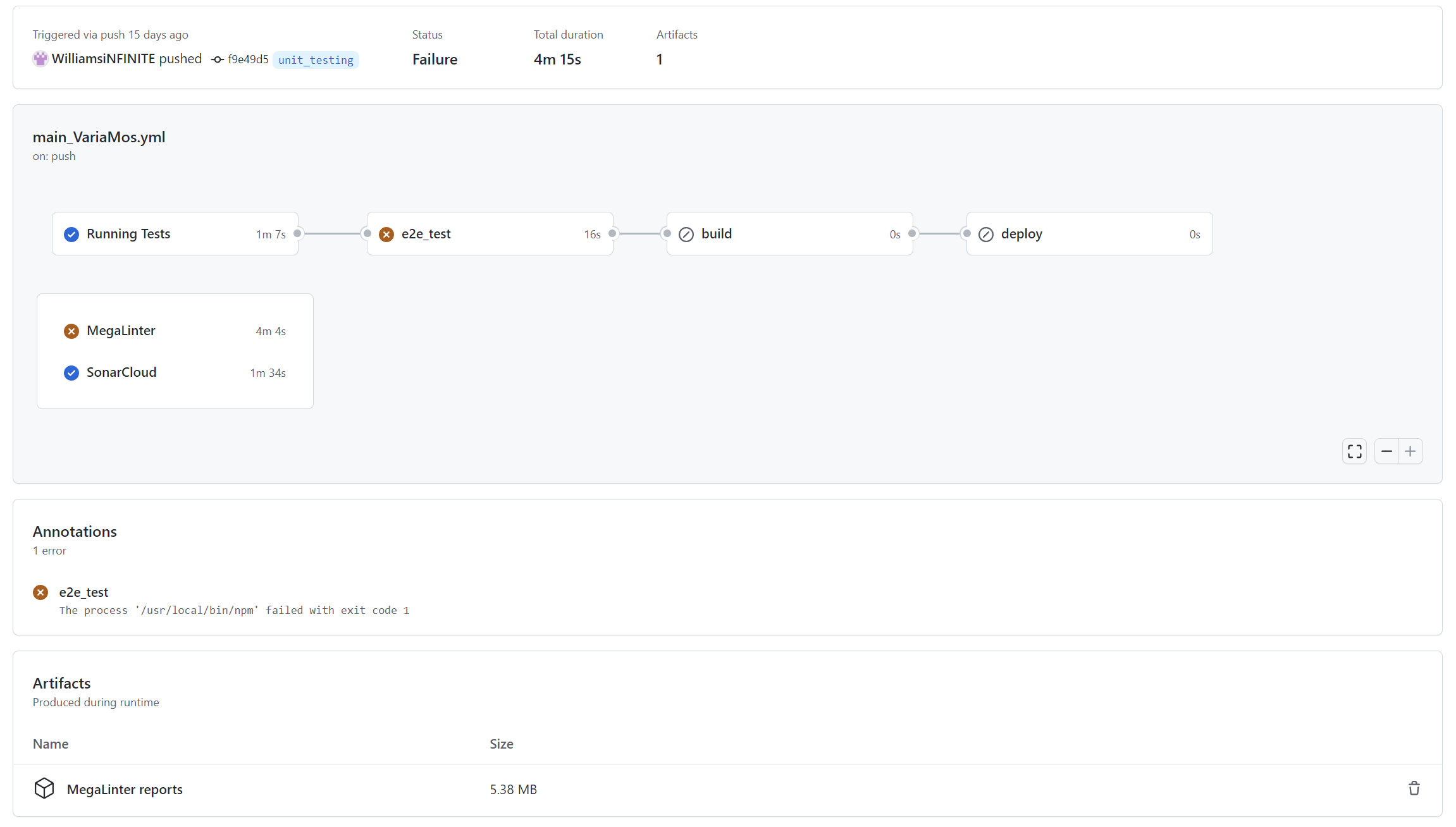
It is possible to choose when to run the workflows. For instance, in the file .github/workflows/megalinter.yaml, the workflow will be executed on each push/pull-request on the branch 'main' or will be executed manually.
on:
  # Triggers the workflow on push or pull request events but only for the "main" branch
  push:
    branches: ["main"]
  pull_request:
    branches: ["main"]

  # Allows you to run this workflow manually from the Actions tab
  workflow_dispatch:
If you clone or fork this repository, you will have to manually activate Github Actions. Go to the dedicated tab 'Actions' then click on 'I understand my workflows, go ahead and enable them'.
Then you will be able to run the different workflows
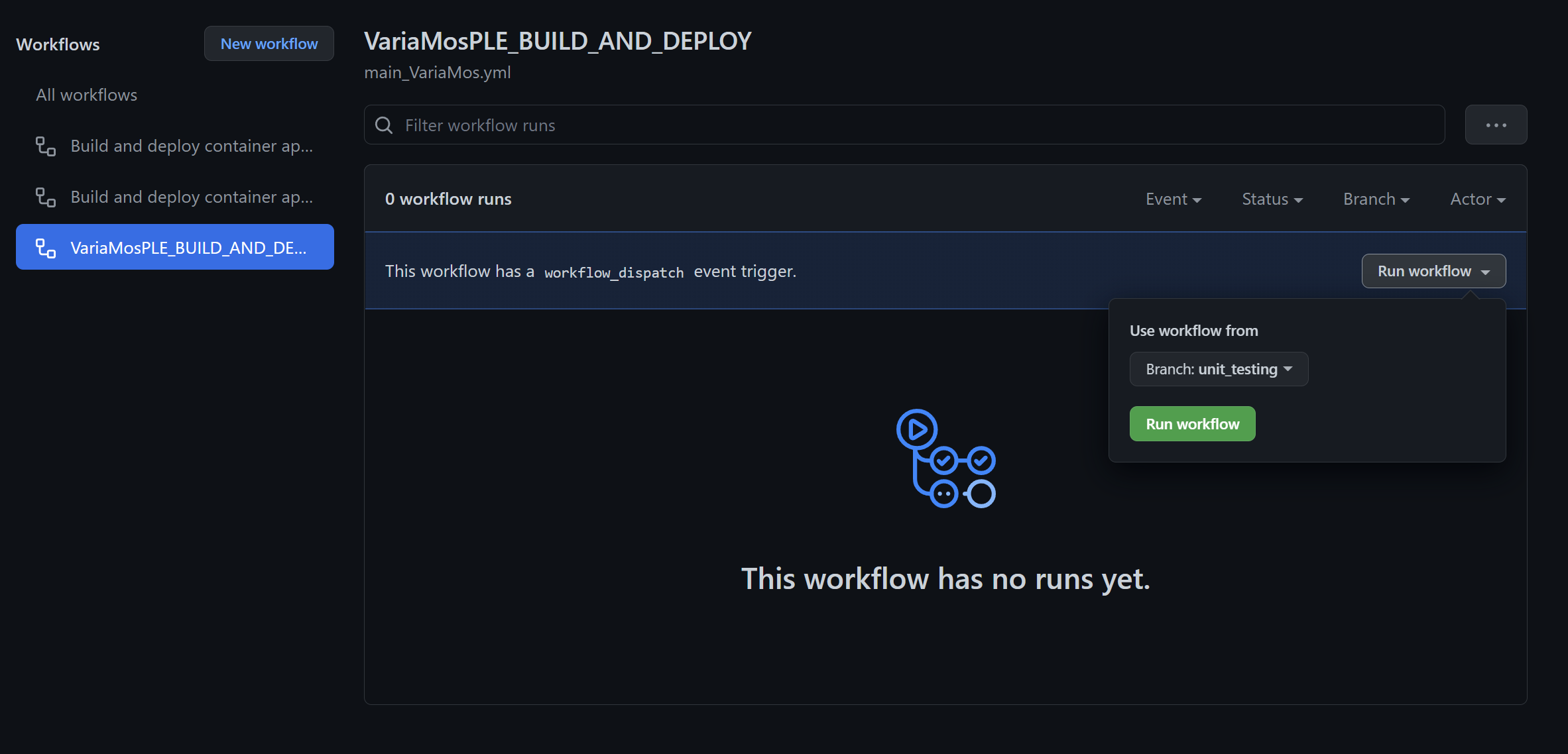
Each following jobs can be found in the file .github/workflows/megalinter.yaml. The easiest way to disable a job is to comment it.
There are the differents steps in this jobs :
- Checkout Code, to checkout the code
- Megalinter, to analyse ('lint') the code
- Archive production artifacts, to create the downloadable artifacts which contain the report for each linter that has been used during the analysis
In this job, you can set env variables to configure the analysis. For instance, to enable only eslint for typescript the syntax will be the following :
jobs:
  megalinter:
    name: MegaLinter
    runs-on: ubuntu-latest
    steps:
      - name: Checkout Code
#...
      - name: Dependencies
#...
      - name: MegaLinter
        env:
          ENABLE_LINTERS: TYPESCRIPT_ES
To learn more about how to configure megalinter please visit Megalinter official documentation.
This job will run the unit & integration tests with coverage
This job will run the end-to-end tests.
This job builds the app
This job deploys the app