How It Works - VladimirSiv/pytransflow GitHub Wiki
pytransflow is a simple library for record-level processing using flows of transformations defined as YAML files.
This section describes the bigger picture and how things are connected within pytransflow. For hands on and some examples, please see Getting Started
pytransflow has the following main components
-
Flow- Main object that is responsible for initiating everything that is required for record processing. Initiating aFlowis an entry point to using pytransflow. Methodprocessstarts the processing of input records. Conceptually,Flowis a collection ofTransformationobjects, but it also covers high level concepts such areFlowVariable,FlowPipeline,FlowFailScenarioetc. -
Transformation- Contains logic for processing a record. It can act on a single field, multiple fields, nested fields, interact with external services, transform fields in-place or output them to different fields. Transformations are executed sequentially within aFlowPipeline, more on that later. -
Record- Record is an object that stores key-value pairs, like dictionary. It's the main unit of data storage and is used to carry data throughFlowPipelinewhile transformations act on it. There is also a concept ofFailedRecord, which stores information about theRecordthat failed to be processed, transformation that failed, and error message -
Analyzer- Before a transformation is executed on aRecord, we perform some checks and analysis if transformation can be applied. This includes confirming that the transformation requirements are satisfied i.e. required fields are present in the record, transformation condition expression is satisfied, output fields are not present or can be overwritten etc. -
Controller- Interacts withAnalyzerandTransformation. It handles when something fails during the processing of a record and returns aFailedRecord.
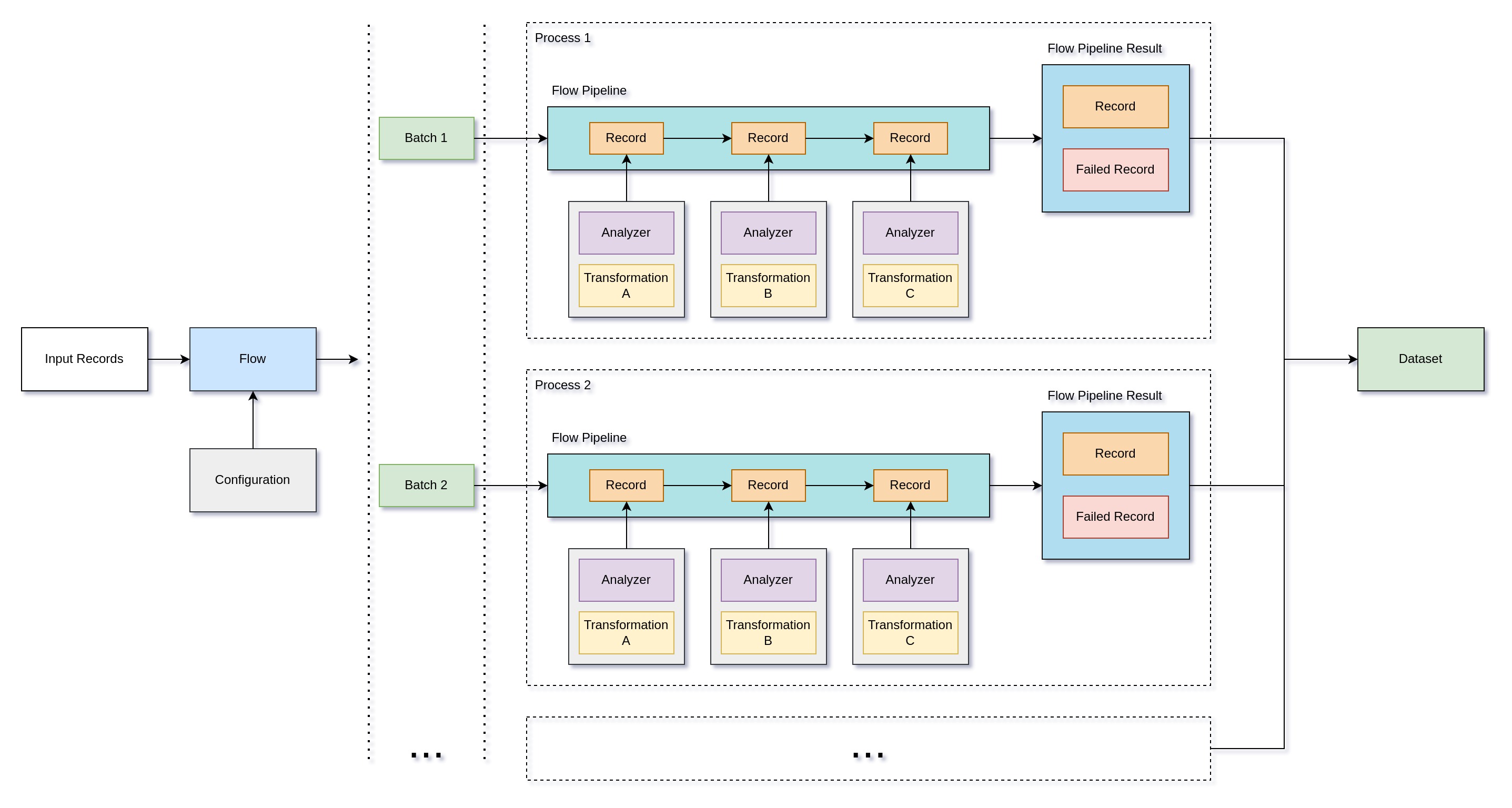
The following diagram depicts a simple overview of pytransflow structure

The flow configuration is defined in a YAML file, and it has the following structure
flow_param_1: a
flow_param_2: b
...
transformations:
    transformation_1:
        param_1: a
        param_2: b
    transformation_2:
        param_1: c
        param_2: d
    ...
Loading of these YAML files can be illustrated in the following fashion

Looking at the diagram, we can see multiple concepts related to flow configuration
-
FlowConfigurationLoader- Finds and parses the flow configuration YAML file -
FlowConfigurationSchema- Configuration schema that is validated before setting Flow configuration -
FlowConfiguration- Main class that holds configuration for a flow. During its initialization, it also resolves transformation configuration usingTransformationCatalogue. -
TransformationCatalogue- Holds mappings of transformation names to its Transformation configuration schema and transformation implementation -
FlowVariables- Variables that are defined on a flow level and can be used through the flow -
FlowFailScenario- Scenario when we want to fail a flow, for example, number of failed records is greater than some threshold -
FlowStatistics- Holds information about what happened during the processing -
FlowPipeline- Implements a concept of a pipeline. Input records are submitted to the pipeline, one by one andFlowPipelineResultis returned. Pipelines can act differently depending on how the flow is configured. Transformations are applied to a record and in case something fails, pipeline will return aFailedRecord, ifinstant_failis enabled the whole flow will fail.
All transformations have condition parameter allowing execution of
transformations only if the condition is met. If condition is not met, the
unprocessed record will be routed to output datasets.
transformations:
  - transformation:
      ...
      condition: @a/b/c == 'B'
Here we are testing if {"a": {"b": {"c": "B", ...}, ...}, ...} is true.
Conditional expression can use record fields, prefixed by @, and flow
variables, prefixed by !:, see
Flow Variables.
Evaluation of condition expressions is done using
simpleeval library. It can be
extended with custom function using SimpleEval provided in
pytransflow, for more information please see
Custom Evaluation.
These conditions can be also applied for output datasets, if condition is met, record will be routed.
Transformations get records from one or multiple input datasets, likewise the processed records will be routed to one or multiple output datasets.
transformations:
  - transformation:
      ...
      input_datasets:
        - a
        - b
      output_datasets:
        - c
        - d
This configuration looks like this
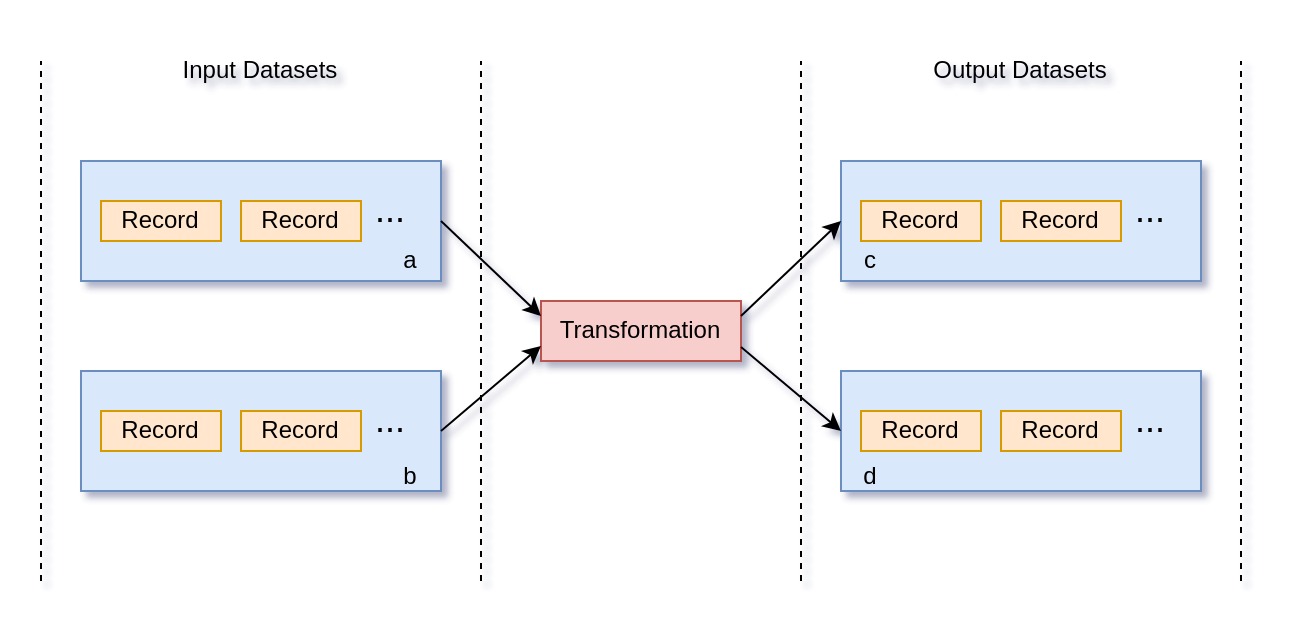
All processed records are routed to output datasets c and d. However, we
can control which record goes where using a conditional routing. There are two
ways to specify conditional route:
output_datasets:
  - <dataset-name>: <condition>
or
output_datasets:
  - name: <dataset>
    condition: <condition>
For each record, the condition will be evaluated for all output datasets and routed to those where the condition is met. If condition is not specified, it will be always routed.
Ignore errors logic allows you to safely handle errors that happened during processing. These errors are expected and can be disregarded. There are two kinds of ignore errors:
- Returns unprocessed record - Error that happened means that we cannot process a record and we just return input record
- Returns processed record - Error that happened was ignored and we can continue with transforming the record. For example, if output field already exists in the record, this should throw an error say that transformation cannot output its value since the field is already there. Ignoring it would be that we can safely overwrite the field, which returns a processed record
Ignore errors can be specified for all transformations
...
transformations:
  - transformation:
      ...
      ignore_errors:
        - output_already_exists
        - field_wrong_type
        - custom_exception
        ...
      ...
...
If error happens but the error is not ignored, it will be routed to
failed records. Additionally if instant_fail is enable, it will fail the
whole flow immediately.
Besides creating custom transformation, users can also add custom exceptions, for more information on that, please see Custom Transformations.
Flow configuration is defined using YAML files. This configuration is then
parsed in FlowConfigurationLoader instance and an instance of
FlowConfiguration is created. FlowSchema defines the schema of flow
configuration and what kinds of parameters we can use, for example
-
description- Description of the flow -
path_separator- Sets field path separator for all transformations in the flow. This path separator will be used to access nested record fields. -
instant_fail- Stops the whole flow if a single transformation fails -
transformations- List of transformations that will be applied on each record -
variables- Defines flow level variables that can be used in any transformation during the processing -
fail_scenarios- Defines in which scenarios we want to fail the flow after processing. For example, when the percentage of failed records is above some threshold. -
parallel- If enabled, the flow execution will be done using multiprocessing, each process will run its own pipeline, and the data will be joined at the end to produce as single dataset result. Defaults to False, i.e. single process -
cores- Number of cores which will be used to execute a Flow in multiprocessing mode -
batch- Batch size i.e. number of records that will be processed in a single process when the multiprocessing mode is enabled
and many more, check pytransflow.core.flow.schema.FlowSchema for more
information.
Let's use the following flow configuration for illustration purposes
parallel: True
batch: 2
cores: 2
path_separator: ","
fail_scenarios:
  percentage_of_failed_records: 50
  number_of_failed_records: 4
  datasets_present:
    - l
  datasets_not_present:
    - x
variables:
  a: B
transformations:
  - add_field:
      name: a
      value: b
  - prefix:
      field: a
      output: a
      value: test
      condition: "@b,c == !:a"
      ignore_errors:
        - output_already_exists
      output_datasets:
        - k
  - add_field:
      name: test/a/b
      value: { "a": "b" }
      input_datasets:
        - k
      output_datasets:
        - x
        - z
If you run this flow with input record {"b": {"c": "B"}}, you'll get the
following dataset
{'x': [{'b': {'c': 'B'}, 'a': 'testb', 'test/a/b': {'a': 'b'}}],
 'z': [{'b': {'c': 'B'}, 'a': 'testb', 'test/a/b': {'a': 'b'}}]}
If you are not sure how to run this flow, please see Getting Started for more information and guidance on how to run pytransflow
If you check FlowSchema, you'll see that transformations parameter is
defined as transformations: List[Dict[str, Any]]. Meaning, flow configuration
is not imposing any configuration for transformations. However, during the
initialization of FlowConfiguration, this list of dictionaries will be
resolved to actual Transformation classes using the key which corresponds to
transformation name in TransformationCatalogue.
TransformationCatalogue is a mapping of <transformation-name> to its
Transformation and TransformationSchema classes. TransformationSchema is
used for configuration validation, while Transformation defines actual
transformation logic implementation. In other words, while parsing and
instantiating FlowConfiguration, each dictionary in transformations
parameter will be fetched from TransformationCatalogue and validated based
on key value i.e. <transformation-name>.
This logic allows users to define custom transformations by adding new
entries to TransformationCatalogue before instantiating a Flow. For more
details, please see Custom-Transformations.
All transformation schemas inherit from TransformationSchema, which has the
following parameters
-
input_datasets- Since transformations can have records from multiple input datasets. This arguments specifies the list of input datasets which records will be processed. -
output_datasets- List of output datasets where the processed records will be routed -
ignore_errors- List of ignore failures that will be ignored if transformation encounters them during the processing -
condition- Defines a condition for applying a transformation. If condition is met the transformation will be applied, otherwise it will be skipped -
required_in_record- This parameter is used to specify the fields that are required in the record. These fields are then checked by the Analyzer before the transformation is applied. Users should never set this parameter explicitly, it will be set dynamically based on transformation schema. -
output_fields- This parameter is used to specify the output fields. The presence of these fields will be checked by the Analyzer and theOutputAlreadyExistsExceptionwill be thrown if not ignored. Users should never specify this parameter explicitly, it will be set dynamically based on transformation schema.
This means that all transformations will have input_datasets,
output_datasets, ignore_errors, and condition parameters by default.
Allowing users to deal only with implementation logic.
Let's use PostfixTransformationSchema for illustration purposes
from typing import Optional
from typing_extensions import Self
from pydantic import Field, model_validator
from pytransflow.core.transformation import TransformationSchema


class PostfixTransformationSchema(TransformationSchema):
    """Implements Postfix Transformation Schema"""

    field: str = Field(
        title="Input Field",
        description="Input field where the data to be processed is stored",
        json_schema_extra={"required_in_record": True},
    )
    value: str = Field(
        title="Value",
        description="Defines prefix value",
    )
    keep_original: bool = Field(
        default=False,
        title="Keep Original",
        description="If True the original field will be kept, otherwise it will be deleted",
    )
    output: Optional[str] = Field(
        default=None,
        title="Output field",
        description="Output field where the processed data will be stored",
        json_schema_extra={"output_field": True},
    )

    @model_validator(mode="after")
    def configure(self) -> Self:
        """Configures Postfix Transformation Schema"""
        if self.output is None:
            self.output = self.field
            self.ignore_errors.append("output_already_exists")
        self.set_dynamic_fields()
        return self
Besides adding new parameters to transformation schema like field, value,
keep_original, output, users can use model_validator(mode="after") to
fine tune the logic and dynamically set fields.
Additionally, json_schema_extra is used to specify output_field and
required_in_record for certain fields. This is later used in Analyzer before
the transformation is executed. For example, if field has
json_schema_extra={"required_in_record": True}, it's value will be required
in the record before transformation is executed.
These functionalities come from pydantic, which pytransflow utilizes to enable straightforward usage and smooth integration with its operational logic.
Global configuration parameters define variables that are used through
the pytransflow's codebase. For example, $FLOWS_PATH defines where the
flows are stored, it can be either absolute path or relative.
All parameters have default values, which users can change using
pyproject.toml or .pytransflowrc.
During the loading of pytransflow library and initialization of Flow
object, pytransflow will trigger TransflowConfigurationLoader. This class
will search for pyproject.toml or .pytransflowrc and load the configuration
if it's present. pyproject.toml has precedence over .pytransflowrc.
Once the configuration files are loaded, it will create
TransflowConfiguration singleton, which is used through the code.
Check Global Configuration page for more information about the parameters and how to set them.
If we don't want to deal with failed records we can enable instant fail logic
...
instant_fail: True
...
transformations:
  ...
Enabling it will cause the flow to fail immediately when a single failed record is recorded. This is useful when don't expect errors or failed records in a pipeline. Since it fails immediately, it will stop further unnecessary processing and notify errors straight away.
Flows can have variables which are available to all transformation in a flow. They can be set in a flow configuration
...
flow_variables:
  a: B
...
transformations:
  ...
or directly from a transformation's transform method.
self.variables.delete_variable()
self.variables.get_variable()
self.variables.set_variable()
self.variables.update_variable()
Note: This should be used with caution, especially when parallelization is enabled, since it can introduce unexpected results.
These variables can be used in condition expressions using !: prefix
...
variables:
  d: "A"
...
transformations:
  - transformation:
      ...
condition: "@a == !:d"We can define scenarios when we want a flow to fail. These scenarios are related to the end state of processing. For example, we can define a scenario where we want to fail a flow if number of failed records is greater than some threshold.
These scenarios are evaluated against the end state and using FlowStatistics.
This class is meant to gather and process statistics related to a flow,
for example, percentage of failed records. Then we can easily create a
scenario where we don't want to have a successful flow if % of failed records
is above some threshold.
For example
fail_scenarios:
  percentage_of_failed_records: 50
transformations:
  - add_field:
      name: a
      value: 1
For more information and available flow fail scenarios, please see Flow Fail Scenarios.
Schemas should be defined under $SCHEMAS_PATH as python files. The schema
class should inherit from pydantic's BaseModel. pytransflow leverages
pydantic's advanced features for schema validation, which removes
unnecessary fields and converts data types to align with the schema definition.
If something fails, the record will not pass the validation and an exception
will be raised.
Schemas are loaded when a validation transformation is called
transformations:
  - add_field:
      name: a
      value: b
  - validate:
      schema_name: test.TestSchema
schema_name is defined using <filename>.<class-name>.

pytransflow can be run in parallel. Flow configuration takes the following parameters that will enable the parallelization
...
parallel: True
batch: 2
cores: 2
...
transformations:
  - transformation:
    ...
  ...
batch and cores are optional. If not set, cores will default to
available cores on a machine using os.cpu_count(). Number of batches,
defines how many records we want to send to each core. If not defined,
it will default to len(input_records) / cores.
Each core will run its own FlowPipeline and process records from a single
batch, after gathering processed and failed records, we join results
from multiple pipelines and produce a single result Dataset.