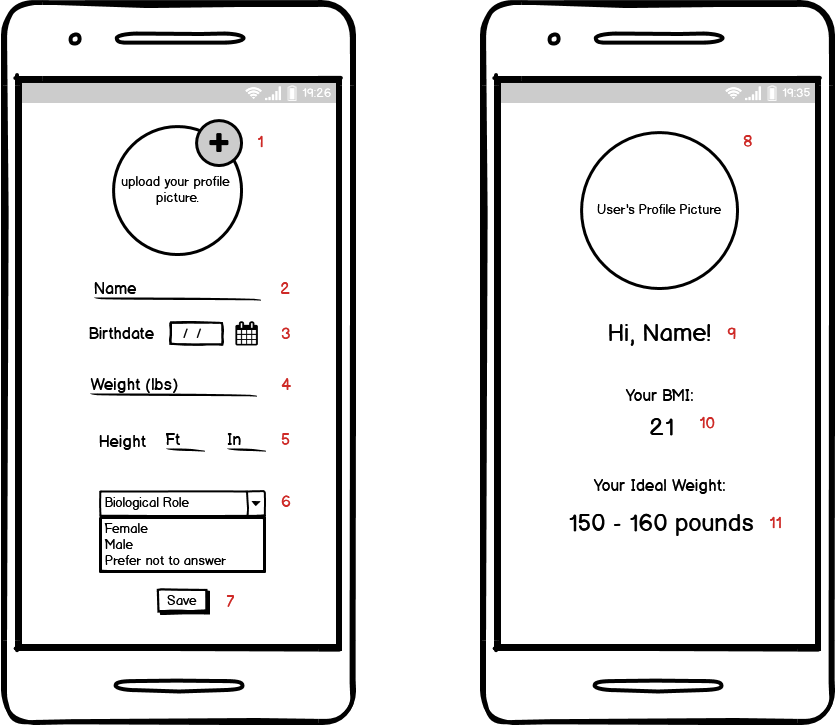
Tapping this, or just the circle where the profile picture will go, opens up the functionality to take a picture to save as the profile.
After taking and saving the picture, if possible, the picture should appear in this circle.
String, user's name (can be their actual name / full name / just a username)
The user either inputs manually their birthdate, or selects from a calendar if feasible.
We will need functionality which uses the given birthdate to calculate age.
Note: if this turns out to be too difficult to incorporate in such a short time, we can always replace this with a field which simply says 'age'
This is a number. can allow decimals (rather than an integer)
Feet and Inches are separate fields because I they can get passed into the API call as something like ${feetVariable}-${inchesVariable} or, in other terms, '5-10' for five feet ten inches.
User selects one option. IF we wanted a prefer not to answer, we could just by default feed the function one of the two sexes, without the user having to sort themselves into a box.
This button causes the user's data to be saved locally. It is then accessed by the API call in order to be displayed on the second activity.
SECOND ACTIVITY - DISPLAY DATA
Circle displays user image. No interactive parts here, just displays the profile picture uploaded in the previous activity.
User's name shows up instead of "Name"
IMPLEMENTED IN JADE'S API CALL BRANCH (Jadetest) - Displays the user's BMI number, retrieved from API call.
IMPLEMENTED IN JADE'S API CALL BRANCH (Jadetest) - Displays the user's ideal weight, retrieved from API call.