How it works - VHDLTool/sonar-VHDLRC GitHub Wiki
Server, scanner, project - How it works?
First of all, the rc-scanner is able to interact with ZamiaCAD Rulechecker and Yosys open synthesis suite.
1. Regarding ZamiaCAD processing
When you start the server #ServerSide
By default, only "implemented" rules are active in the default quality profile. You are able to deactivate or customize these rules as many time as you like directly within the Sonarqube User Interface.
The built in handbook in the .jar plugin is parsed and SonarQube rules are uploaded to the database of the server through the API.
when you hit rc-scanner #rc-ScannerSide
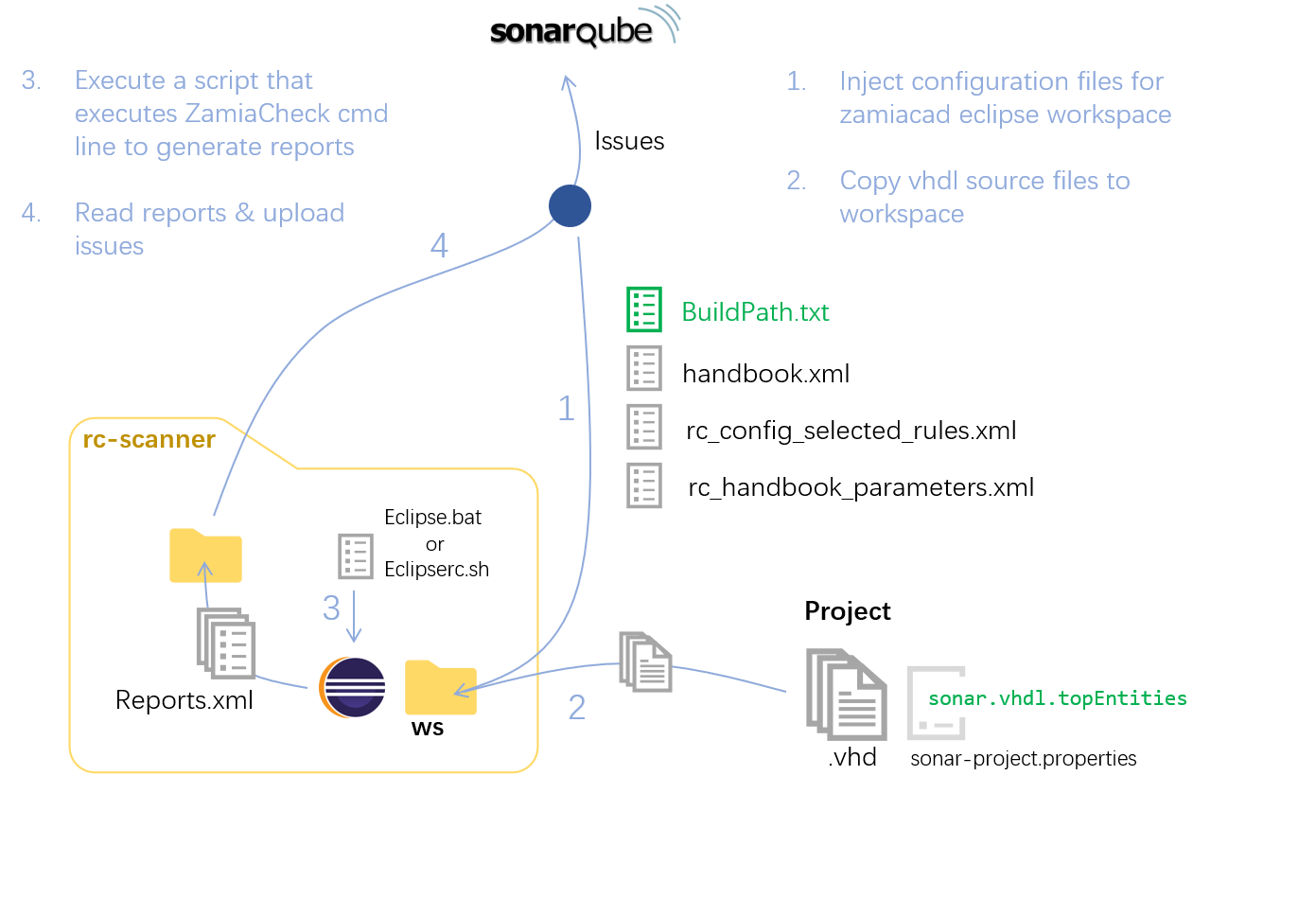
2. Regarding Yosys synthesis processing
When you start the server #ServerSide
In the same way, Yosys implemented rules are activated by default. You are able to deactivate or customize these rules as many time as you like directly within the Sonarqube User Interface.
vhdlrc-plugin works in the dedicated "build_dir" project directory to generate all needed binaries files.
Then, based on parameters set in the Adminsitration/VHDL-RC tab (files list and top level entity name), the plugin elaborate the design and perform a synthesis.
Once this step is done, vhdlrc-plugin run a script for each implemented rules and generate a log file to identify all issues raised.
Finally, issues are imported and displayed in Sonarqube.