Configure the Zamia workspace - VHDLTool/sonar-VHDLRC GitHub Wiki
Create a Zamia project in zamia named project, it should have the following Structure :
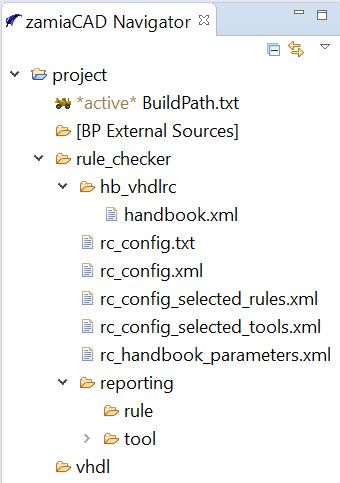
Configure the rc_config.txt as follow:
rc_config.txt
# description: The VHDL TOOL shall permit for users to select VHDL files to be parsed and checked within a VLSI project.
# A VLSI project may be composed of several directories, each containing all types of files: RTL code, Testbench code
#  and scripting files for example.

# /  to select all vhdl files
# /SRC/ to select all vhdl files in SRC directory and sub-directories
# /SRC/1_TOP.vhd to select specific file

/vhdl/
Configure the rc_config.xml as follow:
rc_config.xml
<?xml version="1.0" encoding="UTF-8" standalone="no"?>
<vhdlTool>
<!--
The goal of this file is to configure the RuleChecker with various location and files.
It is created by the RC HMI when a new project is created.
To be compliant to both Linux and Windows environments, all folders and files paths are relative to the project folder using Linux notation.
Note for Windows users: in case the Handbook folder is not in the same drive than the VHDL project, the path is kept absolute.
The file can be manually edited if necessary.
-->

<!--
	<root_directory>
		<alias>HANDBOOK_ROOT</alias>
		<path>project/rule_checker/hb_vhdlrc/</path>
	</root_directory>
-->


	<handBook>
		<handBook_fileName>./rule_checker/hb_vhdlrc/handbook.xml</handBook_fileName>
	</handBook>


	<verifiers_parameters>$ROOT/rule_checker/rc_handbook_parameters.xml</verifiers_parameters>

	<log>
		<tool_directory>$LOG_ROOT/rule_checker/reporting/tool/</tool_directory>
		<tool_fileName>rc_report_tool.xml</tool_fileName>
		<rule_directory>$LOG_ROOT/rule_checker/reporting/rule/</rule_directory>
		<rule_fileName>rc_report_rule.xml</rule_fileName>
	</log>
</vhdlTool>