Build VHDL RC - VHDLTool/sonar-VHDLRC GitHub Wiki
Build environment
java 1.8 : You need to install jdk 1.8.
If you use eclipse (jdk developper includes maven):
- select the pom.xml file
- right click and choose Run as maven build...
- in jre tab select your JDK
see https://www.baeldung.com/maven-eclipse-jdk-configuration for detailled configuration
Donwload the source code
git clone https://github.com/Linty-Services/VHDL-RC.git
or get the source code in the lastest release
Load your own configuration for zamiacad
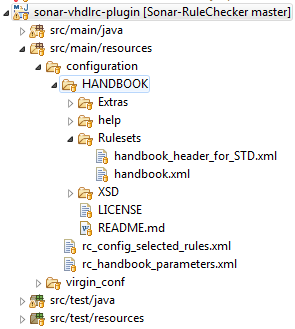
In $VHDL_RC_HOME/sonar-vhdlrc-plugin/src/main/resources/configuration put your own :
- rc_config_selected_rules.xml
- rc_handbook_parameters.xml
- In
/HANDBOOK:
Replace existing files with the content of your handbook
The handbook xml ruleset must be namedhandbook.xml
Build the plugin
In a terminal at VHDL-RC/sonar-vhdlrc-plugin/ launch :
mvn clean package install
In eclipse:
- right click on the pom.xml file
- choose run as maven install
- Get the generated jar at
/sonar-vhdlrc-plugin/target:
sonar-vhdlrc-plugin-1.X-SNAPSHOT.jar (Not the -source.jar!) - Put it in
sonarqube-6.7.x/etensions/plugins, removing any previous versions of the same plugins.
Want to automatize this step ? -> check the develop page