Software Composition - Timmeey86/Mindustry GitHub Wiki
Mindustry Component Overview
Component Overview
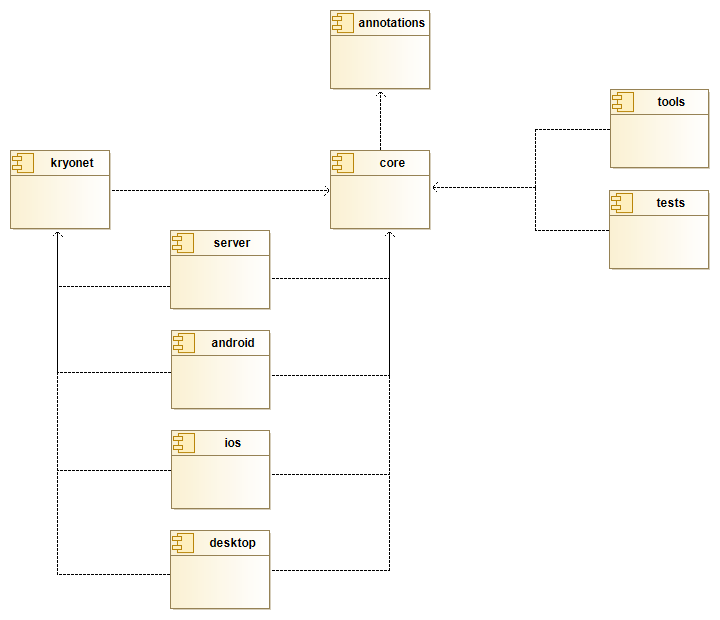
The source code of Mindustry is distributed into the following components (= the Gradle projects) in order to support the Modularity quality goal:
Component Description
| Component | Description |
|---|---|
| Annotations | Contains Java Annotation Processors which simplify things like calling remote methods on the server. |
| Core | Contains most code of Mindustry. Classes which are specific to a certain platform do not belong here. Core classes do however know if they are being executed in a desktop, mobile or tablet environment. |
| Tools | Contains various scripts which can be executed as a Gradle task. This is not used at runtime. |
| Tests | Contains (so far a small number of) unit tests for Mindustry. |
| Kryonet | Contains classes for basic TCP/UDP communication between Clients and Servers. |
| Server | Contains code specific to headless servers which only provide a command line interface instead of a GUI. |
| Desktop | Contains code specific to Windows or Unix desktop environments. |
| Android | Contains code specific to Android phones or tablets. |
| iOS | Contains code specific to Apple iPhones or iPads. |
Mindustry Core Package
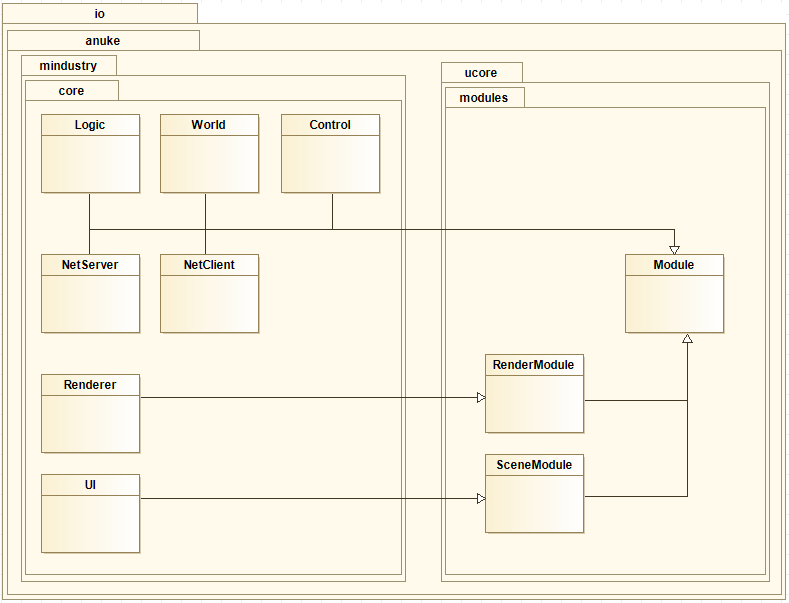
Core Modules
These modules are created through the
io.anuke.mindustry.Mindustry::init()
method at startup on every platform.
In case of a headless server, only the Logic, World, Control and NetServer modules are used.
The created instances are stored in the context of the static Vars class for easy access to them from everywhere. Since Reusability is not one of Mindustry's core quality goals, the benefits of this approach outweigh the drawbacks.
Core Module Overview
Core Module description
If you are able to provide a better description for any of these modules, feel free to edit them directly or send suggestions in the Discord #development channel.
| Module | Responsibility |
|---|---|
| Logic | This module is responsible coordination of high-level game logic for entities and waves. Additionally, it handles game state events, but does not store any game state itself. |
| World | This module is responsible for loading and providing information on maps. |
| Control | This module is responsible for input handling, save handling, player management and keybind mapping. |
| Renderer | This module is responsible for drawing the game world except for the UI overlay. |
| UI | This module is responsible for drawing the user interface, i.e. any kind of overlay in front of the game world. |
| NetServer | This module is responsible for accepting and processing connections and data from clients. |
| NetClient | This module is responsible for sending data to the server and processing input from the server. |