Custom player models - TDMP-Team/TDMP-Lua-Modding-API GitHub Wiki
Adding custom player models is extremely easy and doesn't requires TDMP to be installed/launched, what makes it easier to work with
Player model has two XML files: Regular model and for ragdoll (both templates which you should use you can find in Teardown/mods/TDMP/vox/player/ or in the end of this page you can find files of example model).
Both XML files have strict rule for adding special(important) tags which would help TDMP (and other TDMP compatible mods) know what part of a body is a hand, leg, who "owns" that part of a body and etc.
Regular model's XML file can have any name. In this example it would be called stig.xml.
There's a code snippet of regular model:
<prefab version="1">
	<group>
		<group name='Torso' pos='0.0 1.0 0.0' prop0='collide=false'>
			<body name='Torso' tags='playerBody_torso=1 player SteamId=none' pos='0.05 0.8 0.0' dynamic='true'>
				<vox pos='-0.05 -0.8 0.0' rot='0.0 0.0 0.0' file='MOD/stig.vox' tags='player nocull' object='body'/>
			</body>
		</group>
		<group name='Legs' pos='0.1 0.2 0.0' prop0='collide=false'>
			<body name='Right Leg Top' tags='playerBody_right_leg_top=1 player SteamId=none' pos='-0.2 0.9 0.0' rot='0.0 180.0 0.0' dynamic='true'>
				<vox pos='0.0 -0.4 0.0' rot='0.0 -180.0 0.0' file='MOD/stig.vox' tags='player nocull' object='Leg_R'/>
			</body>
			<body name='Right Leg Bottom' tags='playerBody_right_leg_bot=1 player SteamId=none' pos='-0.2 0.5 0.0' rot='0.0 180.0 0.0' dynamic='true'>
				<vox pos='0.0 -0.5 -0.1' rot='0.0 180.0 0.0' file='MOD/stig.vox' tags='player nocull' object='foot_R'/>
			</body>
			<body name='Left Leg Top' tags='playerBody_left_leg_top=1 player SteamId=none' pos='0.1 0.9 0.0' rot='0.0 180.0 0.0' dynamic='true'>
				<vox pos='0.0 -0.4 0.0' rot='0.0 180.0 0.0' file='MOD/stig.vox' tags='player nocull' object='Leg_L'/>
			</body>
			<body name='Left Leg Bottom' tags='playerBody_left_leg_bot=1 player SteamId=none' pos='0.1 0.5 0.0' rot='0.0 180.0 0.0' dynamic='true'>
				<vox pos='0.0 -0.5 -0.1' rot='0.0 -180.0 0.0' file='MOD/stig.vox' tags='player nocull' object='foot_L'/>
			</body>
		</group>
		<group name='Head' pos='0.0 1.7 0.0' prop0='collide=false'>
			<body name='Head' tags='playerBody_head=1 player SteamId=none' pos='0.05 0.1 -0.05' rot='0.0 -180.0 0.0' dynamic='true'>
				<vox pos='0.05 -0.1 -0.1' rot='0.0 -180.0 0.0' file='MOD/stig.vox' tags='player nocull' object='head_3'/>
			</body>
		</group>
		<group name='Arms' pos='0.1 0.9 0.0' prop0='collide=false'>
			<body name='Right Arm Top' tags='playerBody_right_arm_top=1 player SteamId=none' pos='-0.4 0.7 0.0' rot='0.0 180.0 0.0' dynamic='true'>
				<vox pos='0.0 -0.3 0.0' rot='0.0 180.0 0.0' file='MOD/stig.vox' tags='player nocull' object='Uarm_R'/>
			</body>
			<body name='Right Arm Bottom' tags='playerBody_right_arm_bot=1 player SteamId=none' pos='-0.4 0.4 0.0' rot='0.0 180.0 0.0' dynamic='true'>
				<vox pos='0.0 -0.4 0.0' rot='0.0 180.0 0.0' file='MOD/stig.vox' tags='player nocull' object='larm_R'/>
			</body>
			<body name='Left Arm Top' tags='playerBody_left_arm_top=1 player SteamId=none' pos='0.3 0.7 0.0' rot='0.0 180.0 0.0' dynamic='true'>
				<vox pos='-0.0 -0.3 0.0' rot='0.0 180.0 0.0' file='MOD/stig.vox' tags='player nocull' object='Uarm_L'/>
			</body>
			<body name='Left Arm Bottom' tags='playerBody_left_arm_bot=1 player SteamId=none' pos='0.3 0.4 0.0' rot='0.0 180.0 0.0' dynamic='true'>
				<vox pos='-0.0 -0.4 0.0' rot='0.0 180.0 0.0' file='MOD/stig.vox' tags='player nocull' object='larm_L'/>
			</body>
		</group>
	</group>
</prefab>
As you can probably note that strict(important) tags are: playerBody_torso, playerBody_right_leg_top, playerBody_right_leg_bot, playerBody_left_leg_top, playerBody_left_leg_bot, playerBody_head, playerBody_right_arm_top, playerBody_right_arm_bot, playerBody_left_arm_top, playerBody_left_arm_bot, SteamId=none and player. Also each <group> has prop0='collide=false', what makes model not-physical.
Ragdoll using exact the same XML except it uses playerCorpse tag instead of player, and <group> isn't using prop0='collide=false' anymore. Also ragdoll's XML file must use _ragdoll at the end of the file's name, i.e.: stig_ragdoll.xml
<prefab version="1">
	<group>
		<group name='Torso' pos='0.0 1.0 0.0'>
			<body name='Torso' tags='playerBody_torso=1 playerCorpse SteamId=none' pos='0.05 0.8 0.0' dynamic='true'>
				<vox pos='-0.05 -0.8 0.0' rot='0.0 0.0 0.0' file='MOD/stig.vox' tags='playerCorpse nocull' object='body'/>
			</body>
		</group>
		<group name='Legs' pos='0.1 0.2 0.0'>
			<body name='Right Leg Top' tags='playerBody_right_leg_top=1 playerCorpse SteamId=none' pos='-0.2 0.9 0.0' rot='0.0 180.0 0.0' dynamic='true'>
				<vox pos='0.0 -0.4 0.0' rot='0.0 -180.0 0.0' file='MOD/stig.vox' tags='playerCorpse nocull' object='Leg_R'/>
				<joint collide="true"/>
			</body>
			<body name='Right Leg Bottom' tags='playerBody_right_leg_bot=1 playerCorpse SteamId=none' pos='-0.2 0.5 0.0' rot='0.0 180.0 0.0' dynamic='true'>
				<vox pos='0.0 -0.5 -0.1' rot='0.0 180.0 0.0' file='MOD/stig.vox' tags='playerCorpse nocull' object='foot_R'/>
				<joint pos="0.0 0.1 0.0" collide="false"/>
			</body>
			<body name='Left Leg Top' tags='playerBody_left_leg_top=1 playerCorpse SteamId=none' pos='0.1 0.9 0.0' rot='0.0 180.0 0.0' dynamic='true'>
				<vox pos='0.0 -0.4 0.0' rot='0.0 180.0 0.0' file='MOD/stig.vox' tags='playerCorpse nocull' object='Leg_L'/>
				<joint collide="true"/>
			</body>
			<body name='Left Leg Bottom' tags='playerBody_left_leg_bot=1 playerCorpse SteamId=none' pos='0.1 0.5 0.0' rot='0.0 180.0 0.0' dynamic='true'>
				<vox pos='0.0 -0.5 -0.1' rot='0.0 -180.0 0.0' file='MOD/stig.vox' tags='playerCorpse nocull' object='foot_L'/>
				<joint pos="0.0 0.1 0.0" collide="false"/>
			</body>
		</group>
		<group name='Head' pos='0.0 1.7 0.0'>
			<body name='Head' tags='playerBody_head=1 playerCorpse SteamId=none' pos='0.05 0.1 -0.05' rot='0.0 -180.0 0.0' dynamic='true'>
				<vox pos='0.05 -0.1 -0.1' rot='0.0 -180.0 0.0' file='MOD/stig.vox' tags='playerCorpse nocull' object='head_3'/>
				<joint pos="0.0 -0.1 -0.05"/>
			</body>
		</group>
		<group name='Arms' pos='0.1 0.9 0.0'>
			<body name='Right Arm Top' tags='playerBody_right_arm_top=1 playerCorpse SteamId=none' pos='-0.4 0.7 0.0' rot='0.0 180.0 0.0' dynamic='true'>
				<vox pos='0.0 -0.3 0.0' rot='0.0 180.0 0.0' file='MOD/stig.vox' tags='playerCorpse nocull' object='Uarm_R'/>
				<joint pos="-0.1 0.0 0.0" rot="0 90" collide="true"/>
			</body>
			<body name='Right Arm Bottom' tags='playerBody_right_arm_bot=1 playerCorpse SteamId=none' pos='-0.4 0.4 0.0' rot='0.0 180.0 0.0' dynamic='true'>
				<vox pos='0.0 -0.4 0.0' rot='0.0 180.0 0.0' file='MOD/stig.vox' tags='playerCorpse nocull' object='larm_R'/>
				<joint/>
			</body>
			<body name='Left Arm Top' tags='playerBody_left_arm_top=1 playerCorpse SteamId=none' pos='0.3 0.7 0.0' rot='0.0 180.0 0.0' dynamic='true'>
				<vox pos='-0.0 -0.3 0.0' rot='0.0 180.0 0.0' file='MOD/stig.vox' tags='playerCorpse nocull' object='Uarm_L'/>
				<joint pos="0.1 0.0 0.0" rot="0 90" collide="true"/>
			</body>
			<body name='Left Arm Bottom' tags='playerBody_left_arm_bot=1 playerCorpse SteamId=none' pos='0.3 0.4 0.0' rot='0.0 180.0 0.0' dynamic='true'>
				<vox pos='-0.0 -0.4 0.0' rot='0.0 180.0 0.0' file='MOD/stig.vox' tags='playerCorpse nocull' object='larm_L'/>
				<joint/>
			</body>
		</group>
	</group>
</prefab>To add your model to the model list, you have to add these XML files in spawn.txt in TDMP Models category. Do not add it to any another category, it must be exact the same name so TDMP can automatically find your model and add it to the models list.
Our example mod's spawn.txt would look like this:
stig.xml : TDMP Models/Stig
stig_ragdoll.xml : TDMP Models/Stig Ragdoll
Now, after launching TDMP and getting into models list, we can find our model here:
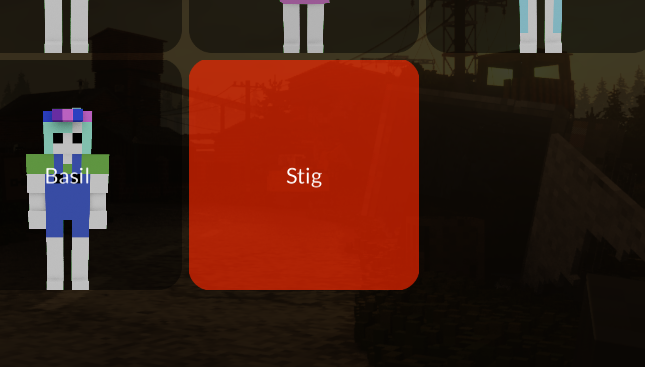
Sadly we can't add custom icon at least yet, so custom models would have random color.
As you can see, adding custom models is extremely easy and doesn't requires any additional scripting, what makes it also compatible with vanilla game. Final files from this example you can find here: https://github.com/DangerKiddy/TDMP-Lua-Modding-API/tree/main/Custom%20player%20model%20example