Maps - SuIT-pub/Mind-the-School GitHub Wiki
Audience: Developers and modders who add a location to the campus map, build a second map (for example a special map for an event), or switch the player between maps.
Scope: The map overview (
map_overview), the map registry (maps.rpy:Map,MapManager,map_manager) and the map buildings shown on a map (buildings/building.rpy:Building,BuildingManager). What happens inside a location (its event pools and action menu) is covered in Events §6.
Add a location to the campus map:
label load_mymod:
    $ set_current_mod('mymod_key')

    $ register_buildings(Building(
        "mymod_greenhouse",                          # key = label name = location key
        "images/background/greenhouse_<state>.webp", # sprite, <state> filled per state
        610, 340,                                    # position on the map image
        [ManualCondition(True)],                     # open conditions (any)
        [],                                          # close conditions (any)
        ["8"],                                       # keyboard shortcut(s)
    ))
    $ map_manager.add_building_to_map("school", building_manager.get_building("mymod_greenhouse"))
    return

label mymod_greenhouse():                            # clicked on the map → this label
    call call_available_event(mymod_greenhouse_general_event) from _mymod_gh_1
    ...
Add a whole second map and send the player there:
$ map_manager.load_map(Map("beach_camp", "images/background/beach_camp_map.webp",
    "camp_tents", "camp_campfire", "camp_volleyball"))

$ set_current_map("beach_camp")    # next map_overview shows the beach map
...
$ set_current_map("school") # back to the campus- How the pieces fit
- Maps
- Switching maps
- Buildings
- Opening and closing buildings
- The location label
- Load order and saves
- Modding
- Rules
- Known gaps
- API
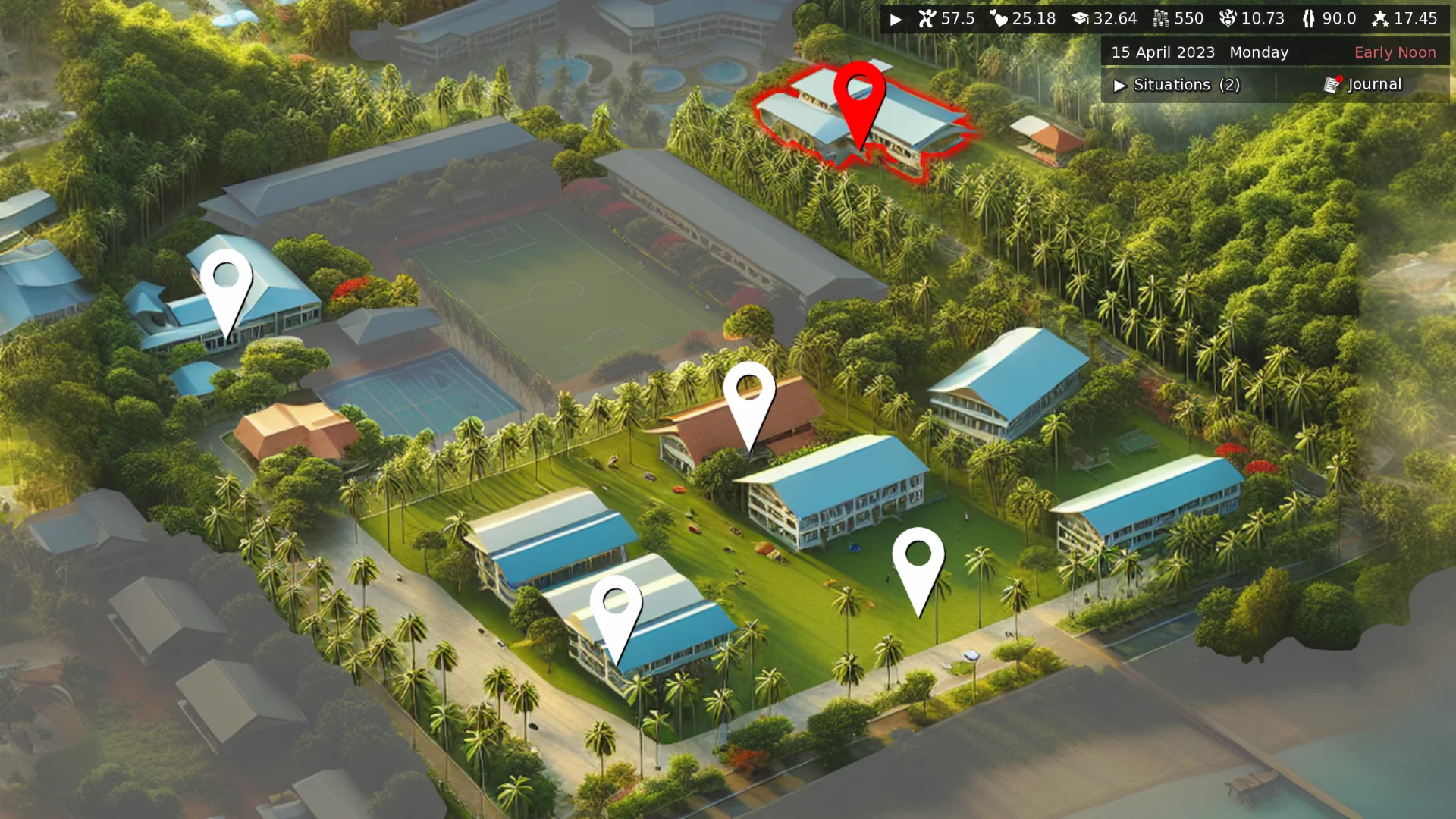
The school map (map_overview): background from the current Map, stats/situations HUD, one pin per building. The red pin marks a building with an available event.
map_manager ──get_current_map()──▶ Map  (key, background image, building keys)
                                    │
                                    ▼ get_buildings()
building_manager ─────────────────▶ Building (sprite, position, open/close, shortcut)
                                    │ click
                                    ▼
                           label <building key>  →  event pools of that location
| Layer | Holds | Registry | Saved? |
|---|---|---|---|
| Map | background image + which building keys appear on it | map_manager |
no, rebuilt by load_maps on every start / load |
| Building | sprite, position, open/close conditions, shortcut |
building_manager (global, all maps) |
definitions rebuilt by load_buildings
|
| Current map | the key of the map shown right now | gameData["current_map"] |
yes |
The map overview screens don't know which map they draw. They read everything from the current map, so a new map needs no new screen, label or special case:
In overview.rpy
|
Reads |
|---|---|
map_overview |
show expression map_manager.get_current_map().get_map_path() as map_image |
school_overview_buttons |
get_current_map().get_buildings() → one image button per building |
school_overview_map (journal background) |
get_current_map().get_map_path() |
school_overview_images |
same as the buttons, without interaction |
Highlights and "event available" markers are already keyed by location key
(highlight_register, event.rpy), not by map. A building on any map gets them
automatically once its storages are registered with register_highlighting.
| Arg | Meaning |
|---|---|
key |
unique map id ("school", "beach_camp") |
map_path |
background image; prefixed with the active mod's folder at construction |
*building_keys |
keys of the buildings shown on this map, in drawing order |
Register with map_manager.load_map(Map(...)). The call is gated on the active mod:
a disabled mod's map is not registered.
The base game registers one map in label load_maps (maps.rpy):
label load_maps:
    $ set_current_mod('base')
    $ map_manager.clear_maps()
    $ map_manager.load_map(Map("school", "images/background/school_map.webp",
        "school_building", "school_dormitory", "labs", "sports_field", "beach",
        "staff_lodges", "gym", "swimming_pool", "cafeteria", "bath", "kiosk",
        "courtyard", "office_building"))
The "school" map must always exist. It is the fallback for every lookup:
get_map with an unknown key, and get_current_map with no or an unknown
current_map, both return it.
Map.get_buildings() resolves the keys through building_manager and skips keys
that have no building (a typo, or a building of a mod that is disabled), so a
missing building never crashes the map screen.
$ set_current_map("beach_camp")set_current_map(key) (helper.rpy) stores the key in gameData["current_map"].
- An unknown key is ignored and logged as an error (category
map), so a typo never leaves the player on a broken map. - In a replay nothing is written (
set_game_datais a no-op there), so gallery replays never move the player to another map. - The change shows up on the next
map_overview. Typically an event sets the map and then ends withend_event("map_overview", **kwargs).
get_current_map() (helper) / map_manager.get_current_map() return the current
Map and never write. Screens call them during prediction, which runs many
times; a write there would fight rollback and prediction.
Note: switching the map only changes what is shown and clickable. Events in
time_check_eventsand other global pools still run on any map. To restrict which events may run while a special map is active, set an event flag together with the map (set_current_map("beach")+set_current_flag("camp")), see Events §5.
Building(key, image, x_pos, y_pos, open_conditions, close_conditions,
keyboard_shortcuts=None, *options)| Arg | Meaning |
|---|---|
key |
location key. Also the label name that runs on click, the key in highlight_register, and the prefix of the game-data collections key:open / key:closed
|
image |
sprite path with a <state> placeholder; mod-prefixed at construction |
x_pos, y_pos
|
position on the map image the building is drawn on |
open_conditions |
the building is open if any of them is fulfilled |
close_conditions |
the building is closed if any of them is fulfilled (wins over open) |
keyboard_shortcuts |
e.g. ["1"]; digits also bind the keypad key |
NoEmptyOption() |
skip the lookup for an empty sprite (buildings already painted into the map art) |
Register with register_buildings(Building(...), ...) (mod-gated). Registering a
building does not put it on a map: the map's building list decides that
(§2, §8).
building.get_image(state) fills <state> (png ↔ webp fallback, see
Images):
| State | Shown when |
|---|---|
idle |
open, nothing special |
available |
open and an event is available here |
red |
open and a highlighted (story) event is ready |
white |
hover |
empty |
closed; only drawn if the file exists and NoEmptyOption isn't set |
The tooltip is building.get_name(with_shortcut=True): the key in title case plus
the primary shortcut ("School Building [1]").
is_open() = any open condition and no close condition. On top of the
conditions you pass, every building automatically listens to two game-data
collections:
| Collection | Effect while not empty |
|---|---|
<key>:open |
building counts as open |
<key>:closed |
building counts as closed |
Several systems can hold the same building open or closed at once; each adds its own reason key, and the building reacts to whether the list is empty:
add_building_collection_key("cafeteria", "open", "cafeteria_repaired")
remove_building_collection_key("cafeteria", "open", "cafeteria_repaired")
add_all_buildings_collection_key("closed", "storm_day")    # every registered building
From events, situations and unlockables use the effects instead; they revert
cleanly (Effects): BuildingOpenEffect(key), BuildingCloseEffect(key).
Gate content on it with BuildingCondition(key) (Conditions).
Clicking a building runs label building(name) (overview.rpy), which hides the
map screens and does call expression name. So every building key needs a label
of the same name. The usual shape (see buildings/beach.rpy):
init -1 python:
    set_current_mod('base')
    beach_general_event = EventStorage("beach_general", "beach",
        fallback = Event(2, "beach.after_general_check"))
    register_highlighting(beach_general_event)
    beach_events = {}

label beach():
    call call_available_event(beach_general_event) from beach_4

label .after_general_check(**kwargs):
    call call_event_menu("What to do at the Beach?", beach_events,
        default_fallback, character.subtitles, bg_image = beach_bg_images,
        fallback_text = "There is nothing to see here.") from beach_3
    jump beach
Pools, priorities and the action menu: Events §3 and §6.
start / after_load
  … load_items, load_situations, load_unlockables
  load_buildings      → building_manager filled
  load_maps           → map_manager cleared and filled ("school")
  … start_methods     → mod loaders: their buildings, maps, add_building_to_map
-
map_manageris created ininitand only mutated afterwards, so Ren'Py never writes it into a save. Every start and every load rebuilds it from code. Changing a map's image or building list needs no save migration. - Only
gameData["current_map"]is saved. A save whose map no longer exists (mod removed) falls back to"school". - Mod loaders run after
load_maps, so a mod can always add to the school map. Becauseload_mapsclears the registry, a mod must re-add its buildings on every load: put the calls in theregister_start_methodloader, not in aninitblock.
A building on the campus map:
$ register_buildings(Building("mymod_greenhouse", ...))
$ map_manager.add_building_to_map("school", building_manager.get_building("mymod_greenhouse"))
add_building_to_map(map_key, building) takes the Building object, appends its key
to that map (no duplicates) and does nothing if the map isn't registered.
Warning:
register_buildingsalone is not enough anymore. A building that is registered but on no map's list is never drawn.
A map of your own:
$ set_current_mod('mymod_key')
$ map_manager.load_map(Map("mymod_island", "images/island_map.webp", "mymod_pier", "mymod_hut"))
The background path is redirected into your mod folder, like every other path (Images). Use mod-prefixed keys for maps and buildings. Full mod setup: Modding.
-
Building keys are global. They are label names,
highlight_registerkeys and game-data prefixes, so they must be unique across all maps. - Positions belong to one map image. A building can sit on two maps only if it is at the same spot on both images.
-
Never remove the
"school"map. It is the fallback for every lookup. -
Switch maps with
set_current_map, never by writinggameDatadirectly (it validates the key and is replay-safe). -
Hide the map by its tag
map_image.begin_event(event.rpy) anddisplay_background_image(paperdoll.rpy) already dorenpy.hide("map_image"), so the map never covers a paperdoll background at zorder-100.
| Gap | Effect |
|---|---|
Ambient sound is hard-wired in map_overview
|
every map plays the forest (day) / night ambience |
tutorial.rpy and the intro labels in daily_check.rpy (scene school_map) use the campus image directly |
intended for campus-only tutorials and intro scenes; they ignore the current map. school_map resolves through Ren'Py's automatic image name for images/background/school_map.webp
|
school_overview_images is defined but not used anywhere |
no effect |
| Global event pools run on every map | the map does not gate events by itself; pair it with an event flag (Events §5) |
building_manager is assigned in label load_buildings
|
unlike map_manager it is pickled into saves; definitions are re-registered by key on load, but a building removed from code stays in old saves |
Map(key, map_path, *building_keys) — get_map_path() · get_building_keys() ·
get_building(key) · get_buildings() (skips unknown keys).
map_manager (MapManager) — load_map(Map) (mod-gated) · has_map(key) ·
get_map(key) (falls back to "school") · get_current_map() (read-only) ·
add_building_to_map(map_key, building) · clear_maps().
Helpers (helper.rpy) — set_current_map(key) · get_current_map().
Buildings — Building(...) · register_buildings(*buildings) ·
building_manager.get_building(key) / get_buildings() / is_open(key) ·
add_building_collection_key(key, state, entry) /
remove_building_collection_key(...) · add_all_buildings_collection_key(state, entry) /
remove_all_buildings_collection_key(...) · get_location_title(key).
Effects / conditions — BuildingOpenEffect · BuildingCloseEffect ·
BuildingCondition.
-
game/scripts/maps.rpy—Map,MapManager,map_manager,label load_maps -
game/scripts/helper.rpy—set_current_map,get_current_map -
game/scripts/buildings/building.rpy—Building,BuildingManager,register_buildings, collection helpers,label load_buildings -
game/scripts/overview.rpy—map_overview,label building, the map screens -
game/scripts/event.rpy—highlight_register,register_highlighting,begin_event(hidesmap_image) -
game/script.rpy—call load_mapsin the start / after-load wave -
game/scripts/buildings/*.rpy— one location label per building (e.g.beach.rpy)