Items and Inventory - SuIT-pub/Mind-the-School GitHub Wiki
Audience: Developers who add items, hand them out from events, gate content on owning something, or sell things in the office-computer shop.
Scope: The item system in
inventory.rpy: item definitions (ItemData/ShopItemData), the save-backedinventory_manager, the shop → cart → delivery flow, the two item conditions, and the journal inventory page. Potions as a gameplay driver are lore, see Lore; this page covers only the container they will live in.
Define the item once in a loader, then give, check and take it from events:
# 1. define (inside label load_items, or your mod's loader)
$ load_item(ItemData(
    "lab_glassware",                     # key: stable, saved, never rename
    "Glassware",                         # display name
    [                                    # description: str or list of lines
        "Glassware that can be used to store liquids.",
        "",
        "Quest item: Headmaster's Lab Intro",
    ],
    "images/items/glassware.webp",       # icon (mod-prefixed, png/webp fallback)
))

# 2. give (inside an event)
$ inventory_manager.add_item("lab_glassware")            # +1, shows a notify toast
$ inventory_manager.add_item(Item("lab_glassware", 3))   # +3

# 3. gate on it
Event(2, "lab_intro_6", ItemCondition("lab_glassware"))
Event(2, "lab_intro_x", NOT(ItemCondition("lab_glassware")))

# 4. take it away
$ inventory_manager.remove_item("lab_chemicals", 1)      # -1
$ inventory_manager.remove_item("lab_chemicals") # remove the whole stack- Two layers: definition vs. stack
- Defining items
- Giving, checking, taking
- Conditions
- The shop and deliveries
- The journal inventory page
- Saves, reloads and mods
- Known gaps
- API
- Conventions
| Layer | Class | Lives in | Saved? | Holds |
|---|---|---|---|---|
| Definition |
ItemData / ShopItemData
|
inventory_manager.item_data (+ shop_item_data) |
rebuilt on every start / load | name, description, image, (price, limits) |
| Stack | Item |
inventory_manager.inventory |
yes |
key + amount only |
An Item is just "N of key X". Everything the player reads (name, text, icon) is
looked up from the definition by key at display time (item.data(),
item.get_name(), …). So you can rewrite an item's name, description or icon in
load_items and old saves pick the change up on the next load.
The key is the contract. It is what the save stores, what ItemCondition
checks and what the shop cart and delivery queue reference. Don't rename a
shipped key.
Items are registered in label load_items (inventory.rpy), which runs in the
start / after-load wave (script.rpy). Each definition goes through load_item(...).
| Arg | Type | Notes |
|---|---|---|
key |
str |
unique id, snake_case, prefixed by feature (lab_…) |
name |
str |
shown in the journal, shop, notify toast |
description |
str or list[str]
|
a list renders one text per line; "" gives a blank line |
image |
str |
path relative to the mod root (images/items/…); see below |
Image resolution. The path is prefixed with the active mod's folder at
construction (get_mod_path(active_mod_key) + image). get_image() runs it
through find_loadable_image, so .png ↔ .webp both resolve. If nothing
loads, the item falls back to images/journal/empty_image.webp and doesn't crash.
Details: Images. Base-game icons live in game/images/items/.
Description convention. First line(s) = what the thing is. If it's tied to a
quest chain, add a blank line and Quest item: <chain name>, same as the lab items.
A ShopItemData is an ItemData that also shows up in the
office computer shop. load_item registers it in both
item_data and shop_item_data.
| Arg | Meaning |
|---|---|
price |
dollars per unit; 0 or less shows Free (green) and costs nothing |
max_possession |
the shop won't let the cart push owned + in cart past this |
max_purchase |
lifetime limit: the shop won't let bought + in cart pass this. bought comes from the save-backed item_purchases
|
Current example:
$ load_item(ShopItemData(
    "lab_chemicals",
    "Chemicals",
    ["Chemicals that can be used to create potions.", "", "Quest item: Headmaster's Lab Intro"],
    "images/items/lab-chemicals.webp",
    150,
))label load_items:
$ set_current_mod('base') # claim context: image prefix + gating
python:
global inventory_manager
if inventory_manager is None:
inventory_manager = InventoryManager()
inventory_manager.init() # wipes item_data / shop_item_data (NOT the inventory)
$ load_item(...) # all definitionscheck_missing_items() is not called here. script.rpy runs it once after the
start_methods loop, so mod loaders have registered their items before stacks
without a definition are pruned (see §7).
All calls go through the global inventory_manager.
| Call | Effect |
|---|---|
add_item("key") |
+1 of key
|
add_item(Item("key", n)) |
+n of key
|
remove_item("key", n) |
−n; the stack is deleted when it reaches 0 |
remove_item("key") |
deletes the whole stack (amount=-1) |
has_item("key") |
True if any amount is owned |
get_item_count("key") |
owned amount, 0 if none |
get_item("key") |
the Item stack or None
|
Behaviour worth knowing:
-
Replays are inert.
add_itemandremove_itemreturn immediately whileis_replay()is true, so gallery replays never duplicate or eat items. You don't need to guard event code yourself. -
add_itemnotifies. Every call pushes"Added Nx Name"throughadd_notify_message. One call per pickup reads best; don't loopadd_item("x")five times, giveItem("x", 5). -
add_itemdoesn't check the key. Giving an undefined key creates a stack whoseget_name()fails, and the next load'scheck_missing_itemsdeletes it. Define first. -
remove_itemwith0or a negative other than-1does nothing. Removing more than you own just deletes the stack (no negative counts). - Plain
Itemobjects stay in the save. There's no per-unit state; if you need "used / unused" or "brewed with X", make that a separate key.
label lab_intro_brew_test(**kwargs):
    $ begin_event(**kwargs)
    ...
    $ inventory_manager.remove_item("lab_chemicals", 1)
    $ inventory_manager.add_item("lab_test_potion")
    ...
    $ end_event("map_overview", **kwargs)
Pair it with conditions so the event only fires when the ingredients are there and the result isn't already owned:
Event(2, "lab_intro_brew_test",
    ItemCondition("lab_chemicals"),
    NOT(ItemCondition("lab_test_potion")),
)Both live in conditions.rpy and are listed in Conditions under
Money & items.
| Constructor | True when |
|---|---|
ItemCondition(item_key, amount=1, *options) |
get_item_count(item_key) >= amount |
DeliveryCondition(*options) |
a delivery in item_delivery is due (date ≤ today) |
ItemCondition composes like any condition (NOT(...), OR(...), options such as
OptionalOption()). Its to_desc_text prints "You have N Name(s)" in green/red
for hint UIs; it also works when the player owns none ("You have 0 …").
The player buys ShopItemData items on the office computer (office building →
computer → Shopping). Items aren't handed over at checkout; they ship.
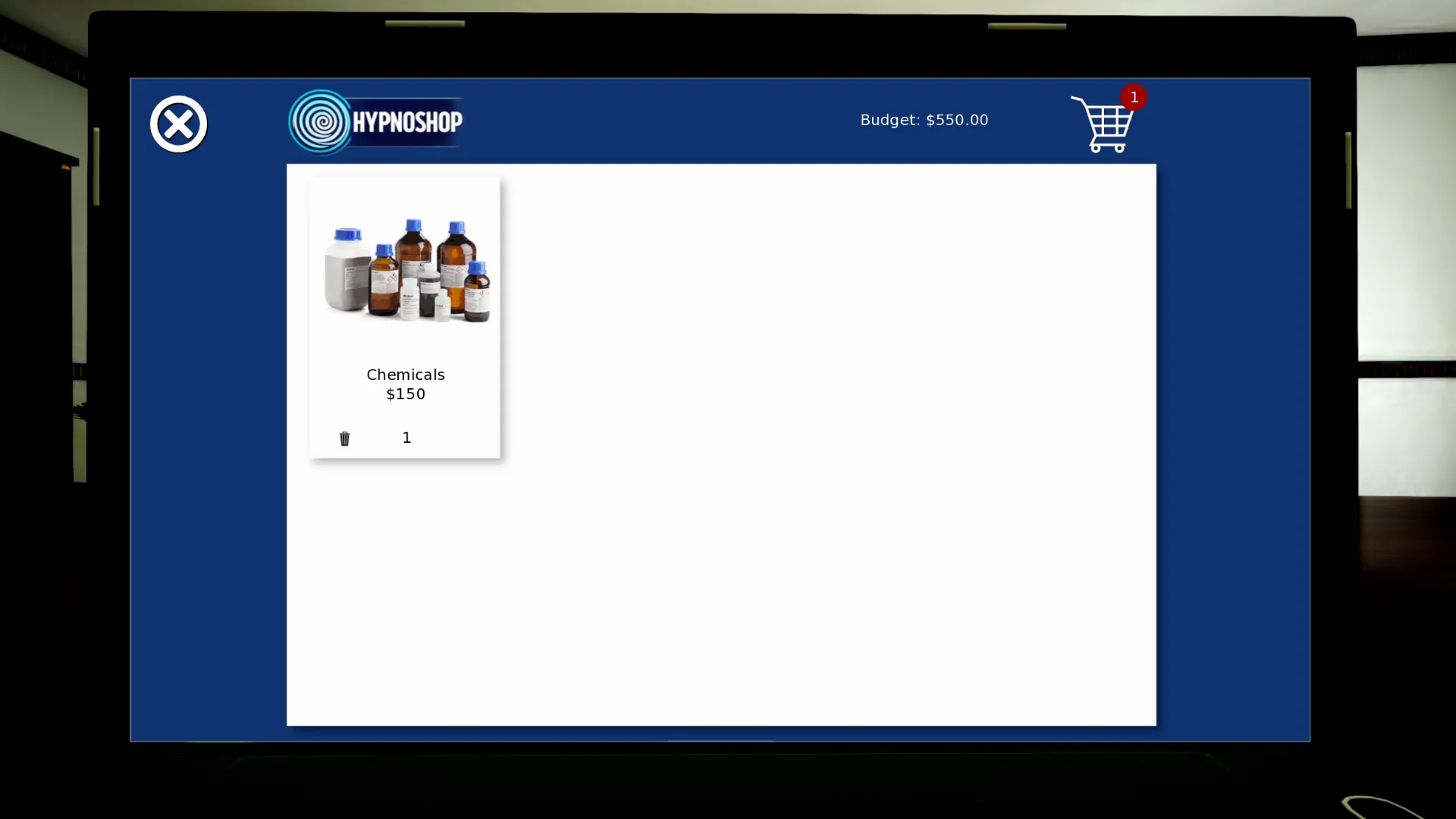
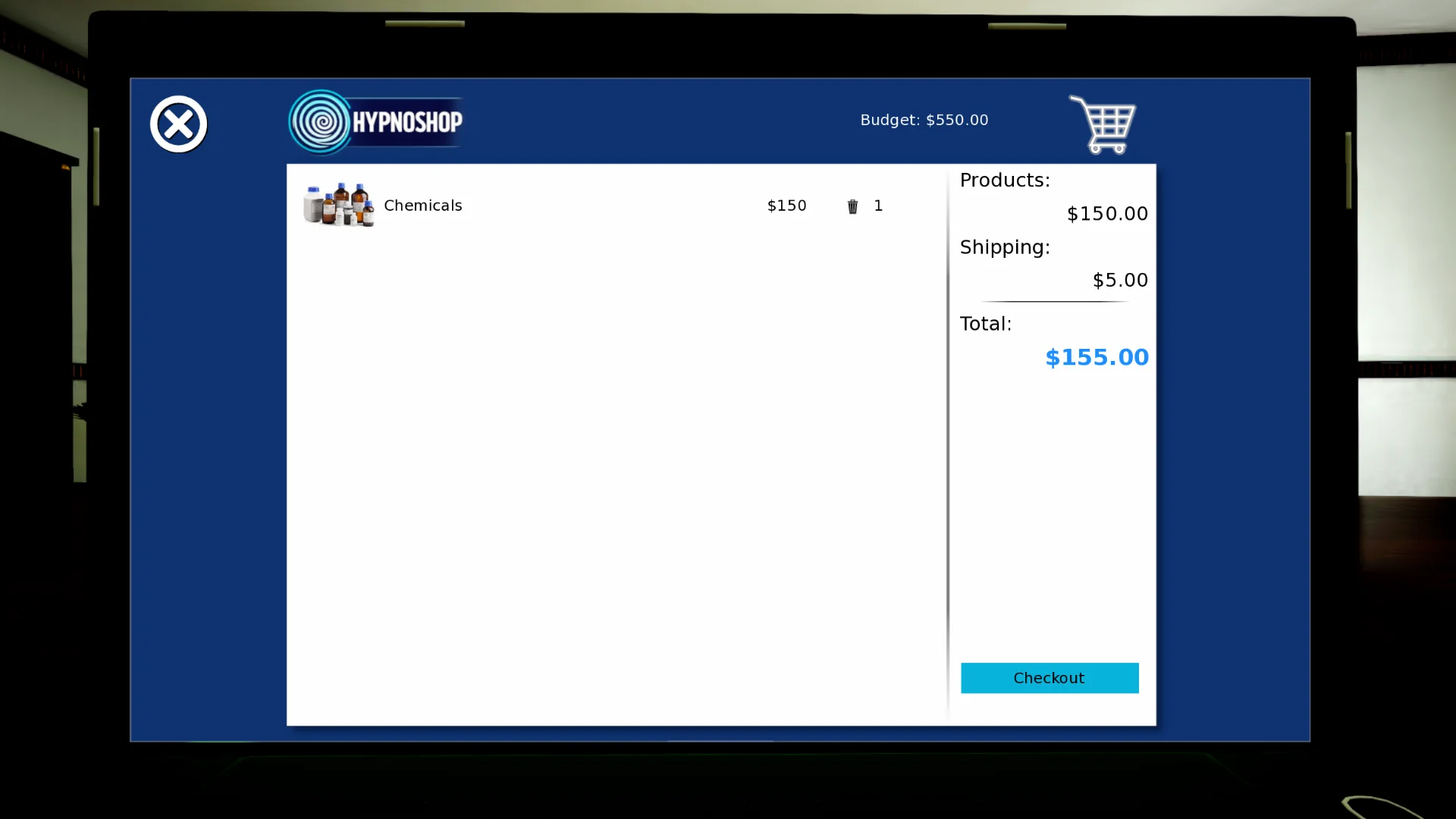
Left: the shop grid, the red badge counts the cart. Right: the cart with products + flat shipping (SHOP_SHIPPING_COST) = total.
shop screen ──add to cart──▶ shopping_cart {key: n}
   │                              │
   └─ cart screen ── Checkout ────┘
         money −= products + shipping     (get_shopping_cart_totals)
         item_purchases[key] += n         (lifetime count for max_purchase)
         item_delivery["D.M.YYYY" of today+3] += [key, key, …]
                                          │
   time_check_events: TimeCondition(weekday="1-4", daytime=1) + DeliveryCondition()
                                          ▼
   office_building_computer_shopping_delivery_event
         Emiko: "a package came for you."  → add_item(Item(key, 1)) per unit
         remove_old_deliveries()
| Piece | Where |
|---|---|
entry event (Event(3, "office_building_computer_shopping_event") in office_building_computer_event["shopping"]) |
inventory.rpy (registration), office_building.rpy (label; resets shopping_cart = {}) |
office_building_computer_shopping_screen |
product grid, 4 per row; Add to Cart / − n + / Out of Stock
|
office_building_computer_shopping_cart_screen |
line items, subtotal, shipping, total, Checkout (disabled if budget < total) |
get_shopping_cart_totals() / SHOP_SHIPPING_COST
|
(products, shipping) for the cart; shipping is $5, only when something costs money. Used by screen and checkout |
office_building_computer_shopping_screen_checkout |
charges products + shipping, counts item_purchases, queues the delivery for today + 3 days
|
office_building_computer_shopping_delivery_event |
priority 2 in time_check_events, morning of Mon–Thu (weekday="1-4", daytime=1) |
Stock rule (per card): a product is buyable while
owned + in_cart < max_possession and bought + in_cart < max_purchase.
The grid always lists every shop item (ignore_possession=True, ignore_purchase=True)
and shows Out of Stock rather than hiding it.
Delivery timing: due is "date ≤ today", so a parcel landing on a weekend is delivered the next Monday morning. Everything that's due arrives in one event.
Save-backed globals (values.rpy): inventory_manager, shopping_cart,
item_delivery ({"D.M.YYYY": [key, …]}), item_purchases ({key: units bought}).
- Add the
ShopItemData(...)inload_items(or your mod loader). - Drop the icon at the given path (square; the grid shows it at 235×235, the journal at 500×500).
- Gate whatever the item unlocks with
ItemCondition("your_key").
screen journal_inventory(display, page) in journal.rpy, opened via
open_journal(2, …) or open_journal(10, …) (both pages render the same screen).
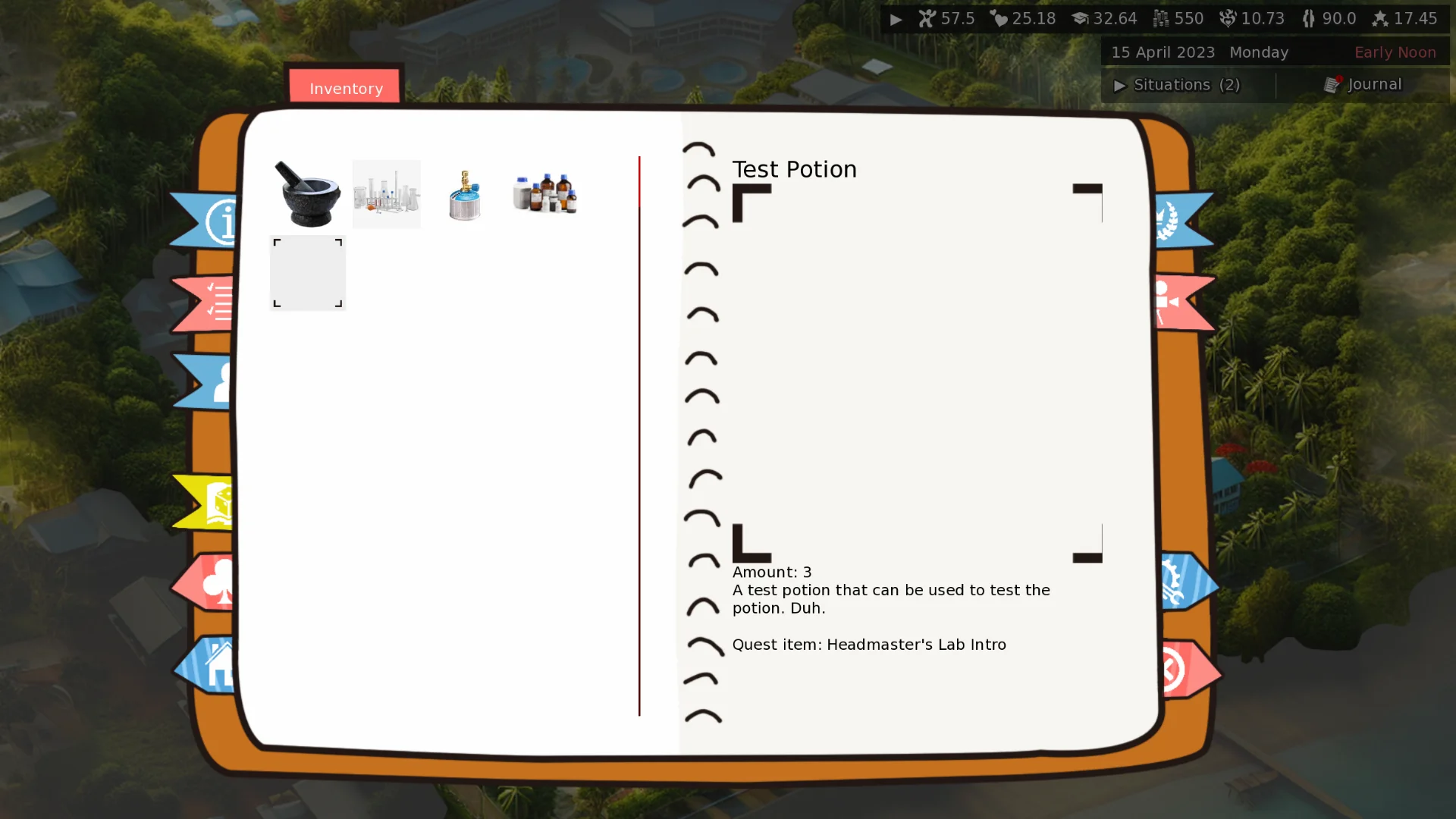
Owned stacks on the left, the selected item's name, image, amount and description on the right.
-
Left: a 4-column grid of every owned stack (
get_inventory()), 90×90 icons, in insertion order. Clicking one reopens the page withdisplay = item key. -
Right: the selected item's name, a 500×500 icon,
Amount: N, then each description line. - If
displaynames a key that has no definition, the page resets to empty.
Cheat side: Journal → Cheats → Items lists every registered definition
(get_cheat_item_list() in debug.rpy) with ADD (+1 / right-click +10) and Add all
items. See Cheat Menu.
-
inventory_manageris adefault, so the stacks persist. On every start and loadload_itemscallsinit(), which rebuilds the definitions from code. Editing an item's text or icon needs no migration. - After the mod loaders (
start_methods) have run,script.rpycallscheck_missing_items(), which deletes every stack whose key is no longer defined. Removing a definition, renaming a key, or disabling the mod that defined it erases those items from the save the next time it loads. Re-enabling the mod does not bring them back. -
Mods define items with
load_iteminside their loader, afterset_current_mod('mymod_key').load_itemis gated: a disabled mod's definitions are skipped (runtimeadd_itemis deliberately not gated). Use a mod-prefixed key (mymod_…) so you don't collide with base items. See Modding.
init python:
    register_start_method("load_mymod")

label load_mymod:
    $ set_current_mod('mymod_key')
    $ load_item(ItemData("mymod_flask", "Flask", "A dented hip flask.", "images/items/flask.webp"))
    $ load_item(ShopItemData("mymod_tea", "Herbal Tea", "Calms the nerves.", "images/items/tea.webp", 12, max_possession=5, max_purchase=99))
Note: the prune runs after
start_methods, so items defined by an active mod survive save/load. Only the items of a mod that is disabled (or removed) get pruned.
| Gap | Effect |
|---|---|
add_item doesn't validate the key |
giving an undefined key makes the notify toast call get_name() on a missing definition; the stack is pruned on the next load. Define first |
-----|--------|
| check_missing_items() runs inside base load_items, before start_methods | mod-defined item stacks are deleted on every load (fix: prune once after the start_methods loop in script.rpy) |
| ShopItemData.bought is never incremented at checkout | max_purchase only limits a single cart, not lifetime purchases |
| bought lives on the definition, which is rebuilt each load | even once incremented, it would reset on load; it needs a save-backed counter |
| Shipping ($5) is shown in the total but checkout charges only the product sum | the Checkout button gates on the total including shipping, the charge omits it |
| ItemCondition.to_desc_text reads get_item(key).amount | raises when the player owns none (the None stack). check_condition itself is safe |
| Item stacks with an undefined key | add_item accepts them and the notify toast calls get_name() on a missing definition |
Classes — Item(key, amount=1): data() · get_name() · get_description() ·
get_image(). ItemData(key, name, description, image): get_name() ·
get_description() (always a list) · get_image(). ShopItemData(…, price, max_possession=1, max_purchase=1): get_price() · get_max_possession() ·
get_max_purchase() · get_bought() (reads item_purchases).
inventory_manager — add_item(item|key) · remove_item(key, amount=-1) ·
has_item(key) · get_item(key) · get_item_count(key) · get_inventory() ·
has_item_data(key) · get_item_data(key) · get_all_shop_items(ignore_possession=False, ignore_purchase=False) · init() · check_missing_items().
Module functions — load_item(ItemData) · get_shopping_cart_totals() · has_delivery_today() ·
get_delivery_today() · remove_old_deliveries().
Conditions — ItemCondition(item_key, amount=1, *options) ·
DeliveryCondition(*options).
- Keys are snake_case and feature-prefixed (
lab_…,mymod_…). Never rename a shipped key; it silently deletes the item from every save. - One definition per key. Put base items in
load_items, mod items in the mod loader. - Icons go in
images/items/, kebab-case, square, WebP. - Quest items end their description with
""+Quest item: <chain>. - Give items inside events between
begin_event/end_event, and gate the event withItemCondition/NOT(ItemCondition(...))so it can't double-award. - Prefer a single
add_item(Item(key, n))over repeated calls (one toast).
-
game/scripts/inventory.rpy— classes,inventory_manager,load_item, shop screens, checkout, delivery event,label load_items -
game/scripts/conditions.rpy—ItemCondition,DeliveryCondition -
game/scripts/journal/journal.rpy—journal_inventoryscreen, cheat Items tab,add_item_cheat,give_every_item -
game/scripts/buildings/office_building.rpy—office_building_computer_shopping_event -
game/scripts/values.rpy—inventory_manager,shopping_cart,item_delivery,item_purchasesdefaults -
game/scripts/debug.rpy—get_cheat_item_list() -
game/script.rpy—call load_itemsin the start / after-load wave;check_missing_items()afterstart_methods