Pushing Changes to Git Repository - SmartBear/ready-git-plugin GitHub Wiki
After you made changes to your test project, you need to push them to a Git repository. To do this:
-
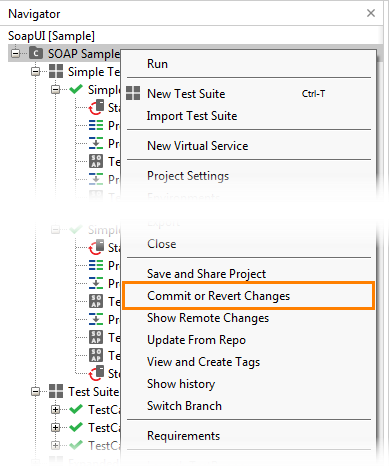
In ReadyAPI, right-click the project in the Navigator panel and select Commit or Revert Changes from the context menu:
-
The Share Changes dialog will appear. In the dialog:
- Select the changes you want to commit.
- Enter the commit message.
- Click Commit.
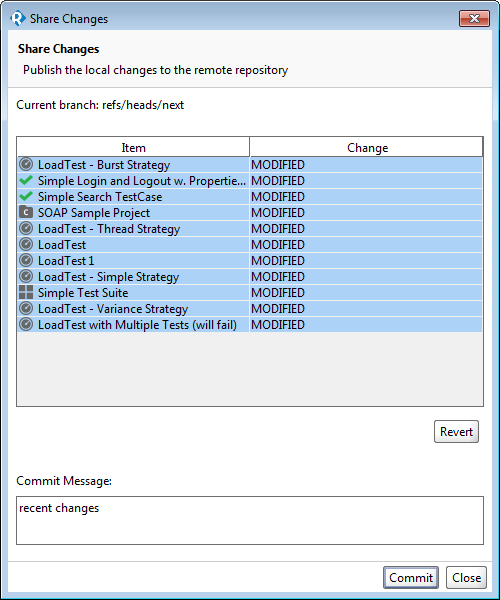
The changes will be committed to the repository.
If there are some merge issues, the Git plugin will ask whether you want to preserve local (ours) or remote (theirs) changes during the merge, or try a recursive merge strategy.
Note: If conflicts that cannot be resolved automatically happen during a recursive merge, the Git plugin will warn you about them. If you choose to continue automatic merging, the affected file will no longer be valid and ReadyAPI will ignore it. This may cause your project to become invalid. Use external merging tools to resolve the conflicts and commit your changes, or cancel the push and select a different merge strategy.
Tip: Before committing and pushing your changes, we would recommend that you enable the following ReadyAPI settings and save your project:
- Pretty print project files in the Preferences > WSDL dialog box, and
- Normalize line-break in the Preferences > UI dialog box.
These settings will make your project file more friendly to the "auto-merge" feature of Git.