Adding Project to Git Repository - SmartBear/ready-git-plugin GitHub Wiki
To add your project and changes to a Git repository, follow these steps:
- Make sure that your project is a ReadyAPI composite project. Composite projects store tests as separate files instead of a single XML file.
To make your project composite, set the Composite Project property to
true.
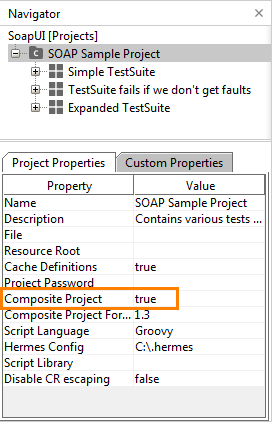
- (Optional) Before adding your project, we recommend that you enable the following ReadyAPI settings and save the project. This will make your project file more friendly to the "auto-merge" feature of Git:
- Pretty print project files in the Preferences > WSDL dialog box, and
- Normalize line-break in the Preferences > UI dialog box.
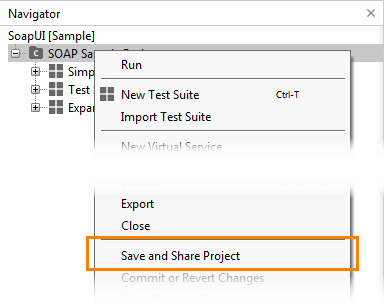
- To add your project to the remote repository, right-click the project in ReadyAPI's Navigator panel and select Save and Share Project from the context menu:
- The Share Project dialog will appear:
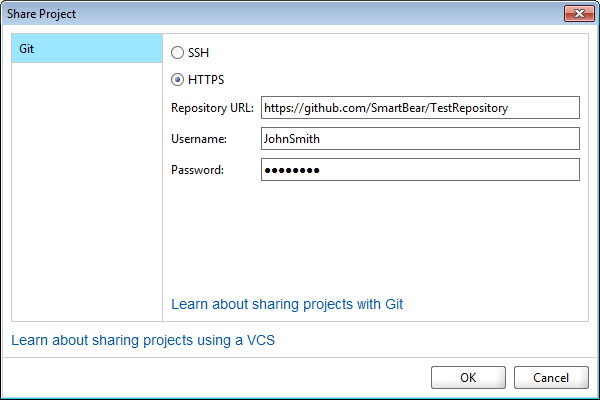
In the dialog:
- Specify the SSH or HTTPS URL of the repository, to which the project will be saved.
- If you use the HTTPS protocol, specify the username and password to access the repository.
- If you use the SSH protocol, specify the path to your private key and the passphrase you use when generating it.
- Click OK.
Note: We recommend to use a clear repository for the project.
-
The Git plugin will connect to the repository and ask if you want to share changes. Click Yes.
If you click No, you can share your changes later by using the Commit or Revert Changes command. -
The Share Changes dialog will appear. In the dialog:
- Select the changes to commit.
- Enter the commit message.
- Click Commit.
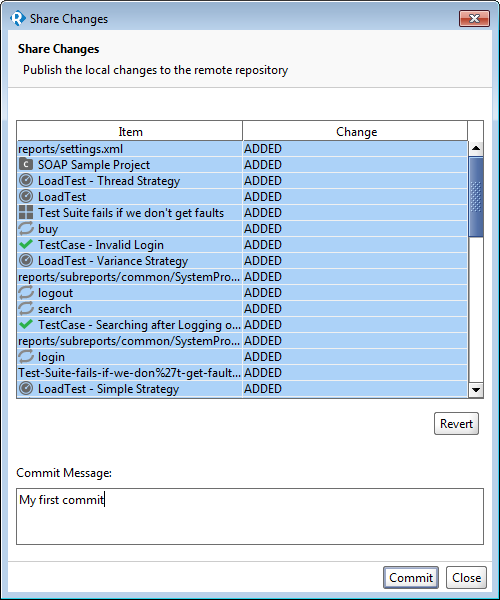
Note: if there are no changes in your project, the dialog will be empty.
- You will see the Authenticate dialog, where you need to verify the repository's URL and specify your username and password. The dialog will remember your credentials and will use them for later commits. Click Authenticate.
The Git plugin will create commit the changes and then will push them to the master branch of the repository.
If the repository was not empty, the plugin will suggest to merge the changes. Select ours to replace project files in the repository with your version.