Network Guard - SYasJ/StackRadar GitHub Wiki
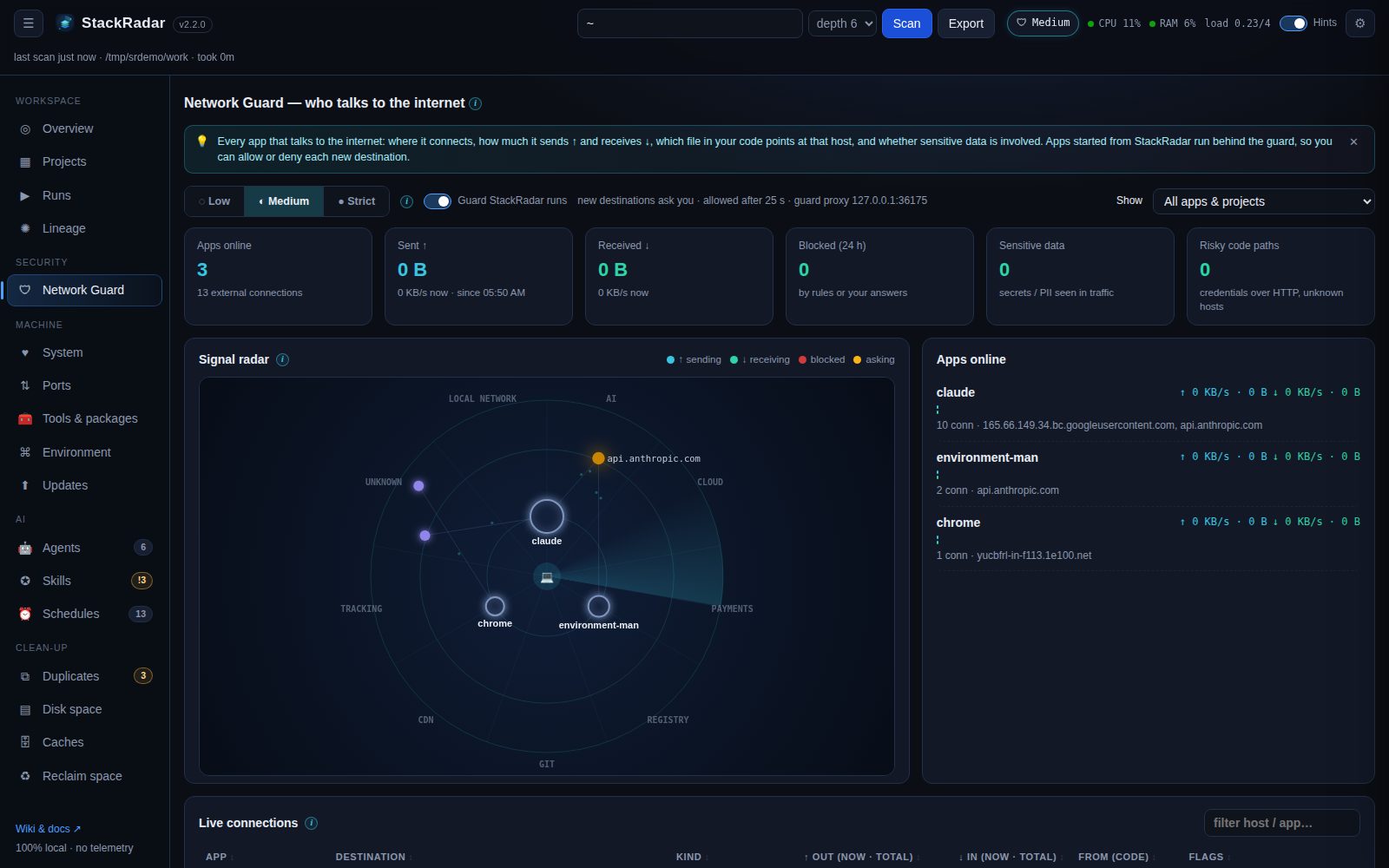
Which of my apps talk to the internet, what do they send, and from which line of code? The Network Guard answers that live and lets you allow or deny each destination.
| Panel | Shows |
|---|---|
| Signal radar | Inner ring = your apps, outer ring = the hosts they talk to, grouped by kind (AI, cloud, payments, tracking, registry, git, CDN, local network, unknown). Cyan dots flying out = data sent ↑, green dots flying in = data received ↓. More / faster dots mean more bytes per second. Red ✕ = blocked, amber pulse = waiting for your answer. Hover for details, click a host to filter the tables |
| Apps online | Every process with external connections, its live ↑ / ↓ rate, hosts, the script it runs, and flags (sends credentials, tracking, deny rule) |
| Live connections | App · destination (host + IP) · kind / service · ↑ out · ↓ in · from (code): the file and line that references this host · flags · actions (✓ always allow, ⛔ always deny, 🧱 block at the OS firewall) |
| Guarded traffic | Every request that went through the guard proxy, with bytes each way and anything sensitive it carried |
| Guard log | Every decision: allowed, blocked, asked, sensitive data, rule violations, possible data exfiltration |
| Code map | What your code is wired to talk to, found statically (see below) |
| Rules | Your allow / deny rules, per app or for all apps |
A 🛡 badge in the top bar shows the current level and pulses when an app is waiting for an answer, on any tab.
Sent / received totals: next to the live speed (KB/s, MB/s), every app and connection shows how much it has sent and received in total (since StackRadar started; per connection on Linux, per app on macOS).
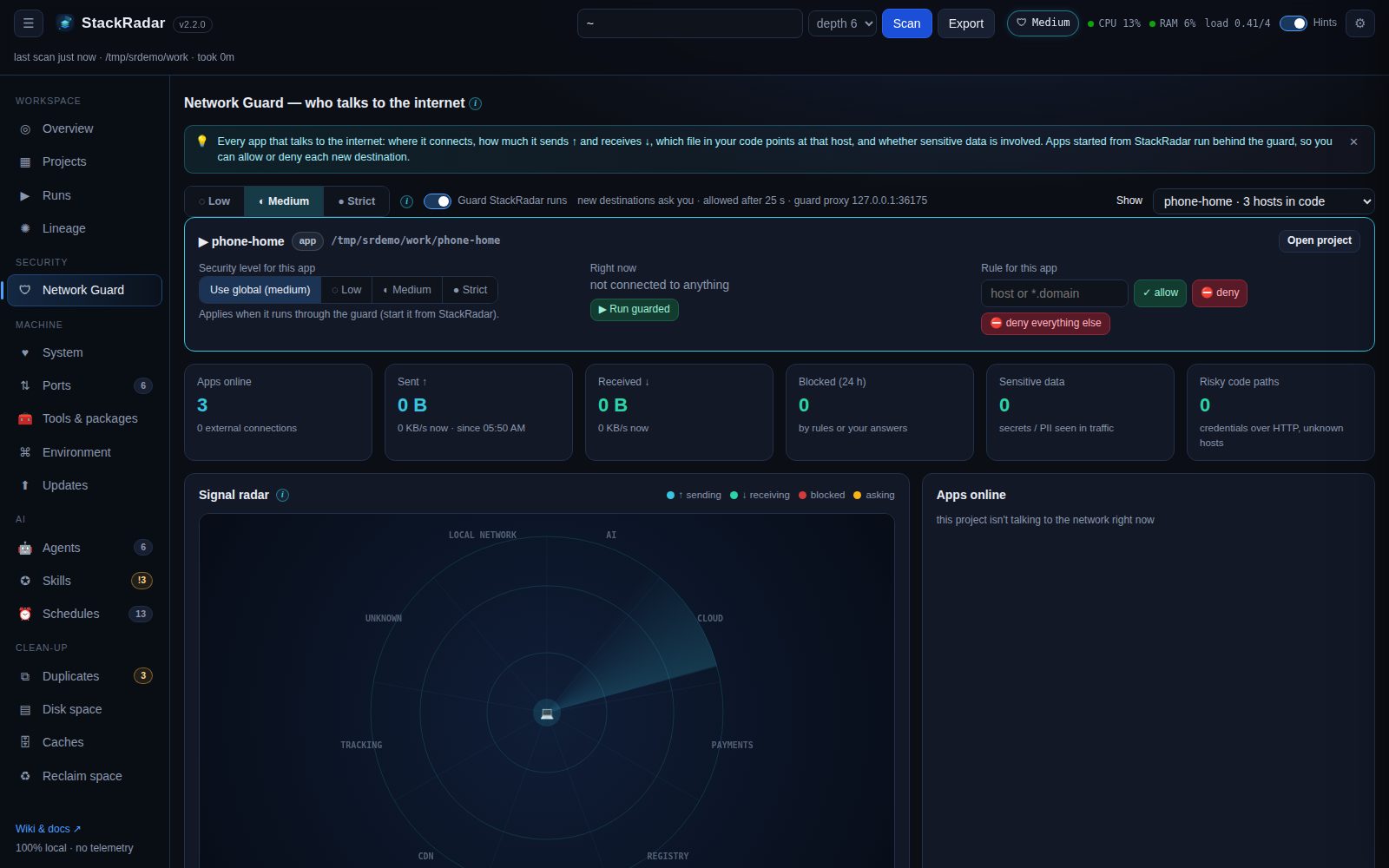
Pick a project, app or repo in Show (top right). Every panel filters to it, and a panel lets you:
- give it its own security level (Low / Medium / Strict, or use global),
- add allow / deny rules just for it, or deny everything else,
- ▶ Run guarded (start it behind the guard) or ■ Stop its processes.
Click any app or connection for a detail window: the destination, live and total traffic, the file and line behind it, its rule, and buttons to always allow / deny (for this app or for every app), block at the OS firewall, show only this host and stop the app. Rules can be flipped (⇄) or deleted (✕); the guard log can be cleared.
- The process behind each connection is mapped to its project (working directory) and the script it runs (
node server.js,python worker.py…). - During a scan StackRadar builds a code map of every project: URLs in the source (
https://api.stripe.com/v1/...) with file and line, plus hosts implied by SDKs in your dependencies (stripe→api.stripe.com,openai→api.openai.com,@sentry/*→*.sentry.io,posthog→*.posthog.com…). - Hosts in the code map are resolved to IPs, so a live connection is traced back to
lib/payments.ts:12even when the OS only knows the IP.
| Level | Apps started from StackRadar | Prompt timeout |
|---|---|---|
| Low | everything allowed, everything logged and flagged | none |
| Medium (default) | trusted developer hosts (npm, PyPI, GitHub, crates.io …) and hosts your own code references go straight through. Anything new asks you | allowed after 25 s |
| Strict | only hosts you allowed (or local ones). Everything else asks you. Plain-HTTP requests carrying secrets or personal data are always blocked | denied after 45 s |
Each prompt shows the app, the host and port, the service and kind, the file + line that references it (or a warning that nothing in the project does), and any sensitive data found. Answer with Allow once, Always allow, Deny or Always deny. "Once" answers are remembered for 10 minutes so an app isn't asked repeatedly.
-
Apps started from StackRadar (Runs tab / drawer ▶ Run) get
HTTP_PROXY/HTTPS_PROXYpointing at StackRadar's local guard proxy, with a per-run identity. Every new destination goes through your rules and level, and blocked requests get403 Blocked by StackRadar Network Guard. This works for anything that honours proxy variables: curl, Python (requests / urllib / httpx), Go, Ruby, npm / pip, and Node 24+ (NODE_USE_ENV_PROXY=1is set for you). Turn it off with Guard StackRadar runs. - The guard chains through your existing proxy (corporate
HTTPS_PROXY) and honoursNO_PROXY. - Other apps (not started from StackRadar) are monitored, not intercepted. A deny rule they violate shows up as an alert. To actually stop them, use 🧱 Block at OS firewall: StackRadar shows the exact command and runs it with your OS's admin prompt:
| OS | What it does |
|---|---|
| Windows |
New-NetFirewallRule -Direction Outbound -Action Block -RemoteAddress <IPs> (UAC prompt) |
| macOS | a pf anchor com.stackradar with block drop out quick to <IPs> (password prompt) |
| Linux | an nftables table inet stackradar dropping traffic to <IPs> (pkexec prompt) |
IP-based blocks affect every app, and CDN-hosted services can change IPs. Prefer guard rules where you can.
| Where | What StackRadar can see |
|---|---|
| Plain-HTTP requests through the guard | full request: headers, URL, body. Scanned for API keys (OpenAI, Anthropic, AWS, Stripe, GitHub …), JWTs, private keys, DB URLs with passwords, Authorization / Cookie headers, email addresses, card numbers, password= fields |
| HTTPS through the guard | host, port, bytes each way. Contents stay encrypted (StackRadar never installs a certificate or decrypts traffic) |
| Your code (static) | credentials used near a network call, credentials over plain HTTP, secrets sent to an unrecognised host, analytics / tracking SDKs |
| Any process | sustained large uploads (> 2 MB/s) to an unrecognised host raise a possible data exfiltration alert |
| OS | Connections | Bytes ↑ / ↓ |
|---|---|---|
| Linux |
ss -tunpi (per socket), falls back to /proc/net/tcp*
|
per socket via ss
|
| macOS | lsof -i |
per process via nettop
|
| Windows | netstat -ano |
guarded runs only |
Rules live in ~/.stackradar/network-rules.json. The level and the run-guard switch live in ~/.stackradar/settings.json.