Sprint 2: Use case diagrams - SD-Group-11/ml-frontend GitHub Wiki
| Use Case Name | Registration |
|---|---|
| Initiating Actor | User |
| Triggering Event | User desires to create an account on the platform |
| Preconditions | -The user must have access to an internet connection -The user must have access to the platform |
| Postconditions | -The user's details will be stores in the database -The user will be able to login with these credentials. |
Brief Description
The user is prompted to create an account on the platform. They enter their details, it gets validated and the registration is successful
Basic Flow
- User enters details into registration fields
- The system validates and verifies the details
- The system creates an account for the user
- The user is able to login with these credentials
Exceptions:
- The user enters invalid information
- The user already has an account
- The system is offline
Use Case Diagram:

| Use Case Name | Login |
|---|---|
| Initiating Actor | User |
| Triggering Event | User desires to log into platform |
| Preconditions | -The user must have access to an internet connection -The user must have access to the platform |
| Postconditions | -The user's will be redirected to the landing page -The user will be able to use the platforms services |
Brief Description
The user is prompted to enter their login credentials on the platform. They enter their details, it gets validated and the login is successful
Basic Flow
- User enters details into login fields
- The system validates and verifies the credentials
- The user is redirected to the landing page
Exceptions:
- The user enters invalid credentials
- The system is offline
Use Case Diagram:

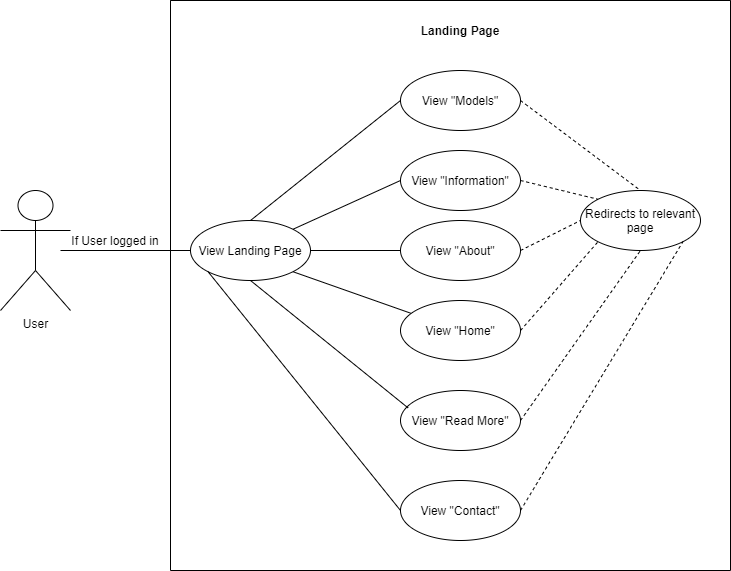
| Use Case Name | Landing Page |
| Initiating Actor | User |
| Triggering Event | User desires to use the services provided on the platform |
| Preconditions | -The user must have access to an internet connection
-The user must have access to the platform -The user must be logged in with their credentials |
| Postconditions | -The user will be able to interact with the landing page i.e select a model, find out information about the platform, etc. |
Brief Description
The user is redirected to the landing page after successfully logging in. The user is able to browse and interact with the options available, such as viewing the models they would like to use, finding out more information, reading more about the application and finding out about the team that's developing the platform, etc. The user can select the options available and the user will be redirected to the relevant page.
Basic Flow
- Browse options
- Select options
Exceptions:
- The user is not logged in
- The system is offline
Use-Case Diagram: