QA40x API - QuantAsylum/QA40x GitHub Wiki
The QA40x can be controlled by an application you write using a REST API. REST defines a method of connecting which relies in internet primitives to set and query the state of the QA402, initiate acquisitions, and perform maths (such as THD or SNR) on those acquisitions. Because REST is so pervasive, just about any computer language that can speak internet protocols can control the QA40x hardware.
In short, to communicate with the QA402, you will issue a series of HTTP protocol commands, such as GET and PUT along with a URL. If you need to capture raw data, you'd do it just as if you were asking a website for that data. The benefit of this approach is huge: It can be supported out-of-the-box by just about any language out there, and the methods for interacting with a web server and very refined on most all languages. You don't need DLLs or special libraries.
The full REST API is available when you load the URL http://localhost:9402 with the QA40x application running.
A Simple Example
For this simple example, we're going to use cURL, which is a command line program available on most platforms that allows you to quickly send and receive data using various internet protocols.
With the QA40x application running, let's first do a query to learn the version of the QA40x application:
curl -d "" -X GET http://localhost:9402/Status/Version
{ "SessionId":"577663019", "Value":"0.97" }
Notice what is returned: It's a short JSON document with two fields. The first is a session ID, and the second is a value. These are both strings that you may or may not wish to convert to ints or doubles. The HTTP GET that we're doing above is what happens every time you enter a URL into a browser. And thus http://localhost:9402/Status/Version could be entered into your browser and you'd see the raw JSON, as above, returned.
Above we tried an HTTP GET verb. How about an HTTP PUT verb. For that, let's change the relay setting so we can hear a click as the relay changes state:
curl -d "" -X PUT http://localhost:9402/Settings/Input/Max/6
If the QA402 input level was set to something other than 6 dBV, then you should have heard a click. You can change the max input level to 12 dBV using:
curl -d "" -X PUT http://localhost:9402/Settings/Input/Max/12
Now let's try sending a sequence of REST commands. What we'll do below is 1) set the analyzer to its default settings, set the max input to +18 dBV, enable Gen1 to generate a 1 kHz sine at 0 dBV, do an acquisition, and then make an RMS measurement from 20 to 20 kHz.
curl -d "" -X PUT http://localhost:9402/Settings/Default
{ "SessionId":"3385396359" }
curl -d "" -X PUT http://localhost:9402/Settings/Input/Max/18
{ "SessionId":"3385396359" }
curl -d "" -X PUT http://localhost:9402/Settings/AudioGen/Gen1/On/1000/0
{ "SessionId":"3385396359" }
curl -d "" -X POST http://localhost:9402/Acquisition
{ "SessionId":"3107986534" }
curl -d "" -X GET http://localhost:9402/RmsDbv/20/20000
{ "SessionId":"3107986534", "Left":"-0.0576729794600683", "Right":"0.0469983685396606" }
And from the returned JSON above, we can see the left channel measured -0.057 dBV in RMS (20 to 20 kHz).
Using REST in Your Favorite Language
The benefit of REST is that every language has to provide a means for speaking REST to enable developers to do basic tasks, and thus it's often part of the included API. That means you'll want to write simple wrappers for the API calls you want to use. These simple wrappers will convert from strongly-typed quantities to the more loosely typed quantities needed by REST.
In C#, a function to wrap the Generator 1 control might appear as follows:
static public async Task SetGen1(double freqHz, double ampDbv, bool enabled)
{
    await Put(string.Format($"/Settings/AudioGen/Gen1/{freqHz.ToString()}/{ampDbv.ToString()}/{0}", enabled ? "True" : "False"));
}
Note what is going on above: We take three values, which are the frequency, the amplitude and whether or not the generator is to be enabled. Those are converted to strings, and that calls a Put method, which appears as:
static private async Task Put(string url, string token = "", int value = 0)
{
    string json;

    if (token != "")
        json = string.Format("{{\"{0}\":{1}}}", token, value);
    else
        json = "{{}}";

    StringContent content = new StringContent(json, Encoding.UTF8, "application/json");

    HttpResponseMessage response = await Client.PutAsync(url, content);

    // Throw an exception if not successful
    response.EnsureSuccessStatusCode();
    response.Dispose();
}
And inside the above, the heavy lifting is done by the Client.PutAsync(), which is a standard library function.
Python can also do this out of the box, just include
import requests
and you can use something like
resp = requests.put('http://localhost:9402/Settings/Input/Max/6')
to set the attenuator to +6 dBV.
Retrieving Data Series
You can retrieve the raw time series data captured by the QA402 if you'd like to perform your own processing on that data. If we run the following:
curl -d "" -X PUT http://localhost:9402/Settings/Default
curl -d "" -X PUT http://localhost:9402/Settings/BufferSize/1024
curl -d "" -X POST http://localhost:9402/Acquisition
curl -d "" -X GET http://localhost:9402/Data/Time/Input
What is returned is
curl -d "" -X PUT http://localhost:9402/Settings/Default
{ "SessionId":"3107986534" }
curl -d "" -X PUT http://localhost:9402/Settings/BufferSize/1024
{ "SessionId":"3107986534" }
curl -d "" -X POST http://localhost:9402/Acquisition
{ "SessionId":"3987110919" }
curl -d "" -X GET http://localhost:9402/Data/Time/Input
{ "SessionId":"3987110919", "Length":"1024",  "Dx":"2.08333333333333E-05", "Left":"st0DT7RUZD+SHD0/m3diP1dMiq0TgGQ/khw9P5t3Yj+SHD0/m3diP4XBvaEO22U/OIvDnfqiYj+EaNBaufliPwoWkKn/R2E/odCpI331YT865LDkT4RlP3Nbdi+CmmA/c1t2L4KaYD8/73i5TyheP784g+xA8WA/ZgD3kfX9Yz/AkXAzltJjP5IcPT+bd2I/khw9P5t3Yj8Mb33wVClkPxnK/I3hxWA/P+94uU8oXj+KzIV2Dn9eP1dMiq0TgGQ/sIQWCF9zYT8ZyvyN4cVgPwoWkKn/R2E/wJFwM5bSYz+WzhfNRTpoP6HQqSN99WE/vzi[Truncated]
The last curl command--the /Data/Time/Input returns a large JSON document. We can see the session ID, the length (the number of samples for each channel), and the time spacing between each sample (1/2.083e-5 = 48kSps). The left channel comes back as a long string of Base64 encoded text. You can use your favorite method for converting a Base64 string into a byte array and then a double array. In C#, this code might appears as follows:
static double[] ConvertBase64ToDoubles(string base64DoubleArray)
{
    byte[] byteArray = Convert.FromBase64String(base64DoubleArray);
    double[] doubleArray = new double[byteArray.Length / sizeof(double)];
    Buffer.BlockCopy(byteArray, 0, doubleArray, 0, byteArray.Length);
    return doubleArray;
}
In summary, you can control the QA40x with any language that can speak basic internet, and you usually don't need any intermediate DLLs or libraries to make it work.
Debugging
When debugging, there are basically two things that can go wrong. The first is that you asked for a web page that doesn't exist. The second is that a parameter didn't make sense. In both cases, the HTTP status code should shed some light on the problem.
First, let's look at a well-formed URL. Below we set AudioGen 1 to 1000 Hz and -10 dBV:
curl -v -d "" -X PUT http://localhost:9402/Settings/AudioGen/Gen1/On/1000/-10
*   Trying ::1...
* TCP_NODELAY set
* Connected to localhost (::1) port 9402 (#0)
> PUT /Settings/AudioGen/Gen1/On/1000/-10 HTTP/1.1
> Host: localhost:9402
> User-Agent: curl/7.55.1
> Accept: */*
> Content-Length: 0
> Content-Type: application/x-www-form-urlencoded
>
< HTTP/1.1 200 OK
< Content-Length: 19
< Content-Type: application/json
< Server: Microsoft-HTTPAPI/2.0
< Access-Control-Allow-Origin: *
< Date: Fri, 28 May 2021 23:41:28 GMT
<
{ "SessionId":"0" }* Connection #0 to host localhost left intact
Note we're using the -v command in cURL which gives us verbose output. Note the HTTP response is 200 which says everything is OK.
Let's try again, and this time we will mis-spell 'settings' (there's an extra 't' in the middle:
curl -v -d "" -X PUT http://localhost:9402/Setttings/AudioGen/Gen1/On/1000/-10
*   Trying ::1...
* TCP_NODELAY set
* Connected to localhost (::1) port 9402 (#0)
> PUT /Setttings/AudioGen/Gen1/On/1000/-10 HTTP/1.1
> Host: localhost:9402
> User-Agent: curl/7.55.1
> Accept: */*
> Content-Length: 0
> Content-Type: application/x-www-form-urlencoded
>
< HTTP/1.1 400 Bad Request
< Transfer-Encoding: chunked
< Server: Microsoft-HTTPAPI/2.0
< Date: Fri, 28 May 2021 23:44:11 GMT
* HTTP error before end of send, stop sending
<
* Closing connection 0
Above, the HTTP response is a "bad request": The QA402 server couldn't find that web page that was requested.
Next, let's try again, this time specifying we want to change Generator 8 (which doesn't exist):
curl -v -d "" -X PUT http://localhost:9402/Settings/AudioGen/Gen8/On/1000/-10
*   Trying ::1...
* TCP_NODELAY set
* Connected to localhost (::1) port 9402 (#0)
> PUT /Settings/AudioGen/Gen8/On/1000/-10 HTTP/1.1
> Host: localhost:9402
> User-Agent: curl/7.55.1
> Accept: */*
> Content-Length: 0
> Content-Type: application/x-www-form-urlencoded
>
< HTTP/1.1 400 Generator specified must be 'Gen1' or 'Gen2'
< Content-Length: 19
< Content-Type: application/json
< Server: Microsoft-HTTPAPI/2.0
< Access-Control-Allow-Origin: *
< Date: Fri, 28 May 2021 23:45:32 GMT
* HTTP error before end of send, stop sending
<
{ "SessionId":"0" }* Closing connection 0
Now we see the HTTP return code is a 400, and this time we get some guidance that the generator must be Gen1 or Gen2.
In summary, look to the HTTP response code for a clue where things are going wrong. See the section on Timing below to see how to open a console windows in the QA40x application.
Sample Code
There is a sample application on Github (located here) that allows you to make measurements programmatically in C#. In the screen shot below, you can see the application screen.
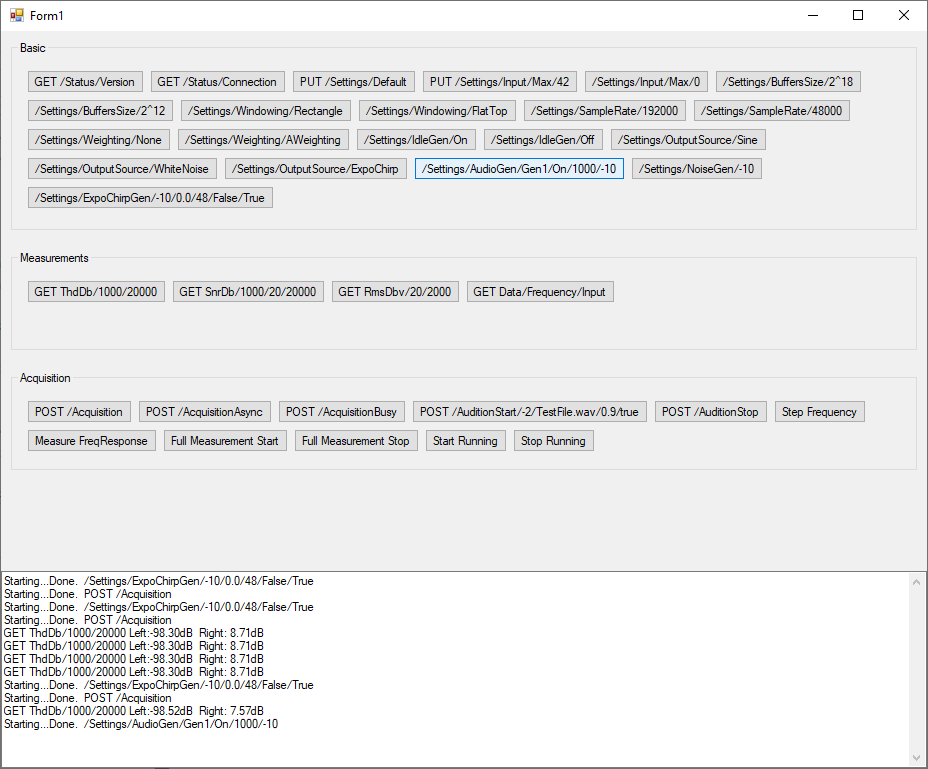
The button Full Measurement Start and Full Measurement Stop will start/stop a series of measurements over and over, and could be a good starting point for understanding how to automate a series of measurements for your product.
Timing
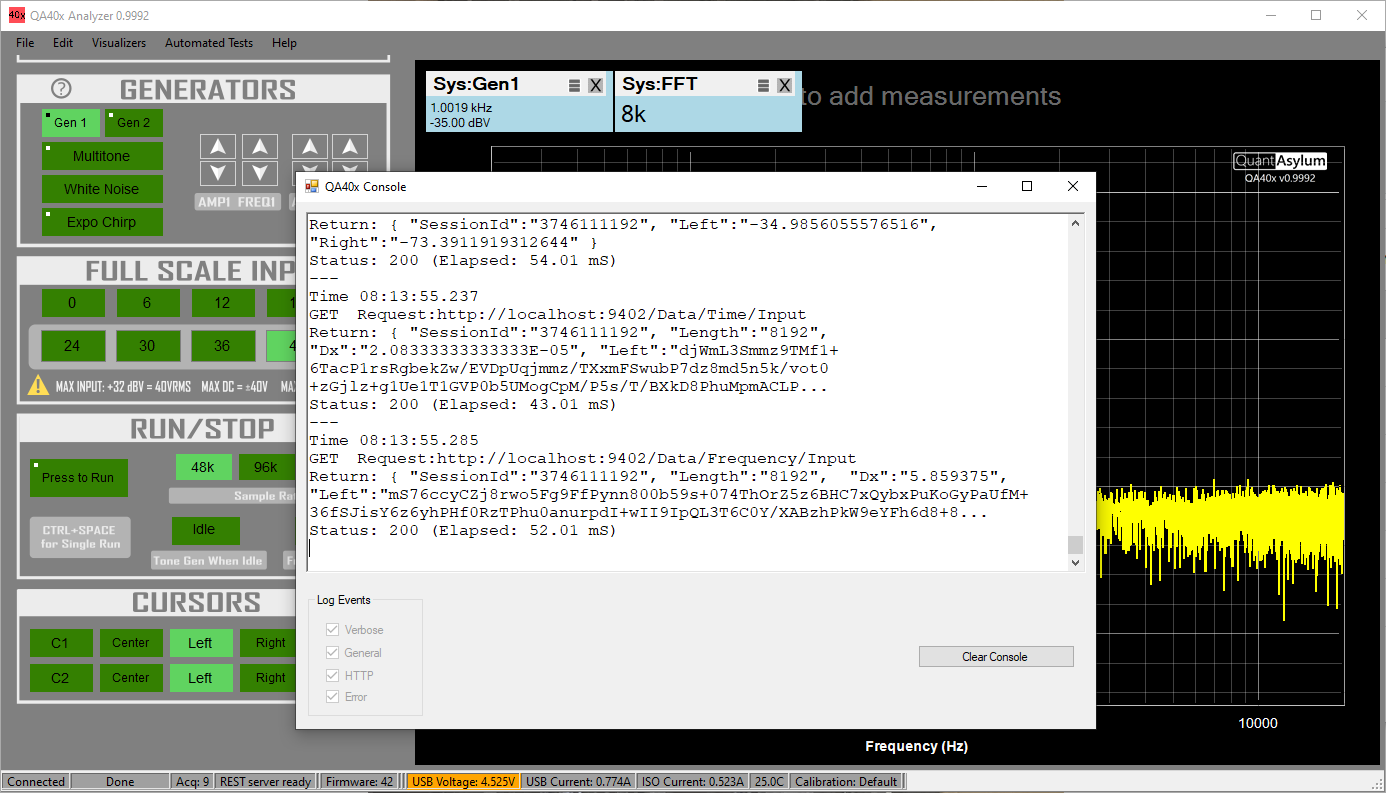
The QA40x application will open a console window with the -C command line option. This window will let you see the incoming HTTP requests as well as the response. The picture below shows the console window atop the main application.
As an example, we'll use the REST_TEST application to set the generator. The buttons used on the test app are shown below. With these 3 buttons, we specify the parameters for the generator 1 (if needed), we start an acquisition with the POST command, and we compute the THD.
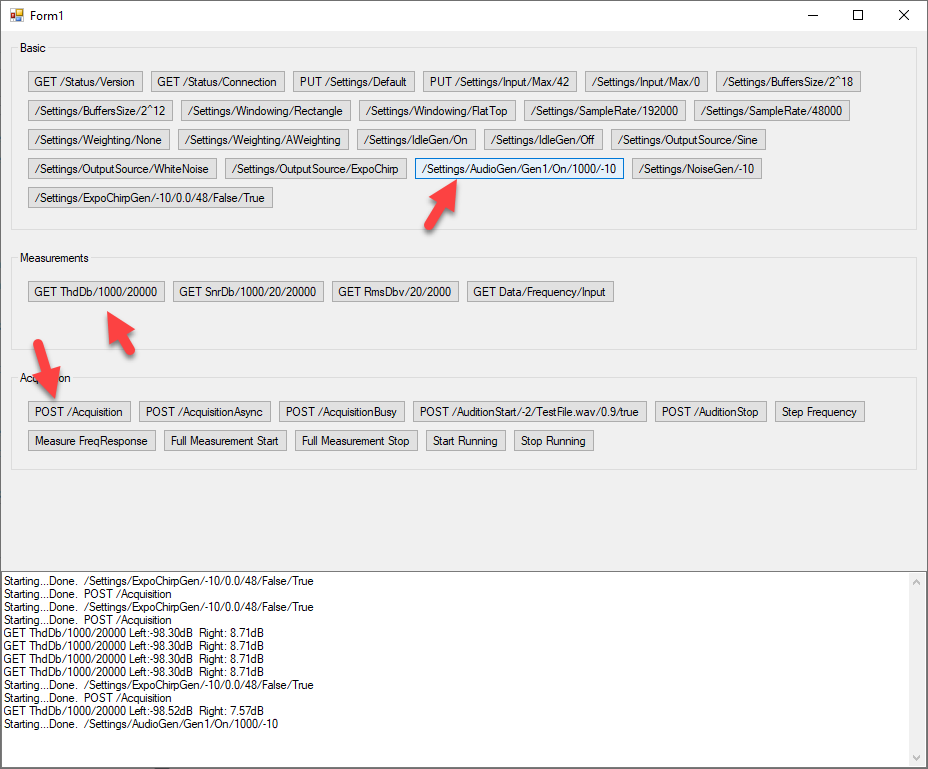
The console output appears as shown below. From the log, we can see the time required to set the audio generator parameters is about 8 mS and the time to do the 64K acquisition is 1.69 seconds. The acquisition should make sense because we're grabbing 64K samples at 48K sample rate, and 65536/48000=1.37 seconds. Finally, when we ask for the THD calculation, we can see that takes about 18 mS. What is important to note here is the data remains in the QA40x application. That is, you aren't pulling over large data sets to make a simple calculation such as THD. You can pull the data if you wish to do your own processing. The upshot is that measurements can be done very quickly over REST.
---
Time 07:58:14.319
PUT	Request:http://localhost:9402/Settings/AudioGen/Gen1/On/1000/-10
Return: { "SessionId":"4204223619" }
Status: 200 (Elapsed: 8.00 mS)
---
Time 07:58:19.151
POST	Request:http://localhost:9402/Acquisition
====================
Acquisition started. Fs: 48000 FFTSize: 65536 Window: Hann Rounding: True  Max Input: 42 dBV
Acquisition completed. Elapsed 1.50 seconds.
Return: { "SessionId":"2550853133" }
Status: 200 (Elapsed: 1694.38 mS)
---
Time 07:58:22.238
GET	Request:http://localhost:9402/ThdDb/1000/20000
Return: { "SessionId":"2550853133", "Left":"-98.5186384053783", "Right":"7.57282687163747" }
Status: 200 (Elapsed: 21.00 mS)
---
Time 08:02:50.380
PUT	Request:http://localhost:9402/Settings/AudioGen/Gen1/On/1000/-10
Return: { "SessionId":"2550853133" }
Status: 200 (Elapsed: 18.00 mS)
Conclusion
Your favorite programming language can already speak REST, and thus "talking" to the QA40x application should be quick to code. If you still aren't sure where to start, just ask your community how to load a web page in your favorite language (also known as an HTTP GET). And then, ask how to make a simple HTTP PUT call. With those two pieces--the basis of most all machine to machine communication on the internet, you have the pieces you need.
Using REST you can code some automated tests that are extremely fast and capable of making many measurements per second. And ask at the forum if you need more help!