How to enable the resource pack - PirateEra/pirate-era GitHub Wiki
Pirate-Era works with a resource pack, you need this pack to be enabled to properly see all the cool abilities. To enable this pack, all you have to do is press yes upon joining.
Enabling the pack
When you join you will see a screen like this one.
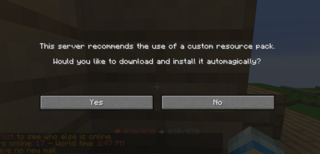
When you press yes on this screen, the resource pack will download and from there on your good to go!
Troubleshooting
Sometimes you do not get the screen shown above, to then make it appear you simply have to change the settings of Pirate-Era in your serverlist.
To do so you have to follow the following pictures.
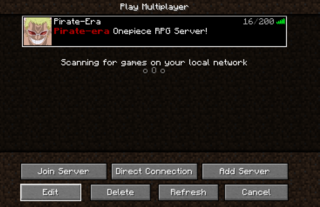
Select the server in your serverlist, and press the edit button
You will then be taken to a screen that looks like this.
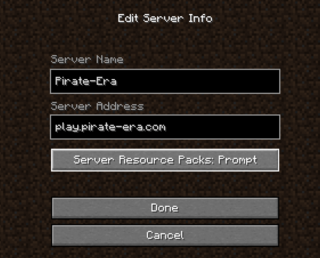
Then once there, you have to set your "Server Resource Packs" to Prompt. Once you have done that, you are good to go!
What if the resource pack stays loading on 100% but never finishes?
When this happens, delete your entire .minecraft folder. After doing so, it should fix the issue.