How to build repair and upgrade? - PirateEra/pirate-era GitHub Wiki
Building in Pirate-Era works a bit differently than in normal minecraft, Placing blocks is still the same. But you can not pick up your blocks as easily.
Tutorial video about this subject
To pick up your blocks you need a construction hammer, you can craft this item inside of the first level workbench. This construction hammer is the main tool to pickup blocks and upgrade/repair benches and blocks.
How to pickup blocks?
To pickup blocks you simply hold a construction hammer, and right click the block you want to pickup with it. Once you right click the block, you will get a little menu that looks like this,
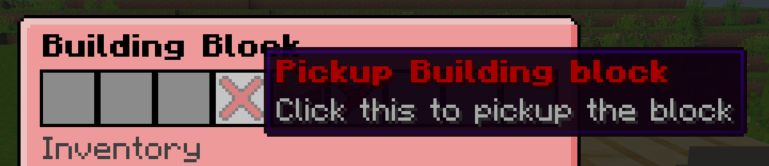
Simply press that button, to pickup the block.
Another option to fast pickup blocks is to shift-right-click the blocks whilst holding the construction hammer.
But please keep in mind that to pickup a block, is has to have full health.
How to repair blocks?
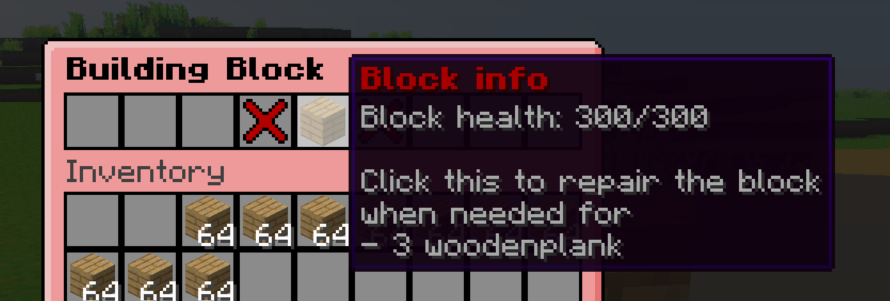
To repair blocks you have to also right-click them with the construction hammer. This time use the middle option in the menu, this option will allow you to repair your blocks when they are not at full health.
How to upgrade my crafting benches?
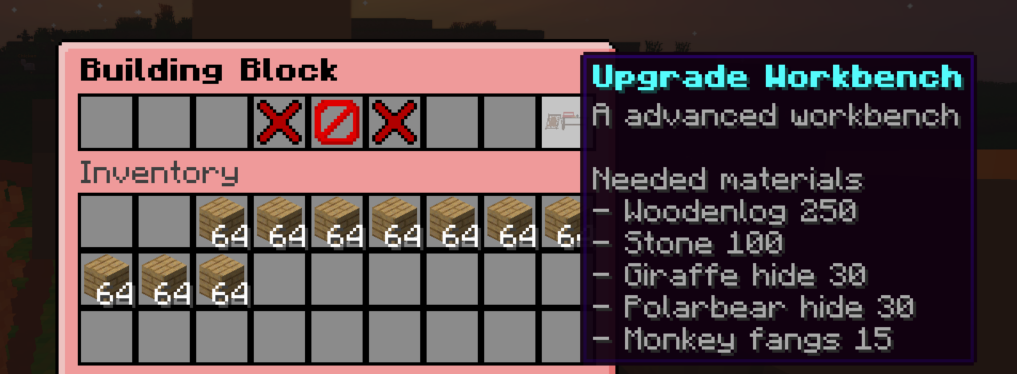
You sometimes need a better version of a workbench to progress in the game. To do this you have to place down the original workbench and right-click it with a construction hammer. If the workbench is upgradeable it will show in the block info menu.
Here is an example of how it will look. Simply press this button with the right amount of materials in your inventory to upgrade your crafting station.
These are all the bench upgrade you can do:
- campfire -> furnace
- workbench -> advanced workbench
- bellows -> advanced bellows