Terrain editor - Pfadfinder-Adam/RTW-M2TW-Campaign-Editor GitHub Wiki
Terrain editor
The Terrain and Coast & heights tabs of the Maps (beside its Map) paint the campaign map itself:
Terrain has Ground, Rivers / cliffs / volcanoes and Climates, Coast & heights everything of map_heights -
Land and sea (the coast) and Heights. They are one editor shown in two tabs: one Undo / Redo, one Apply. The Map
tab's own switches (Layers, Edit regions, Select, Merge regions, Signs and tools, Find) are not shown here.
Videos: editing rivers, fords, cliffs · editing a height map (both checked in the game on Rome and Medieval II).
- Ground: low / medium / high fertility, wilderness, sparse and dense forest, hills, mountains, high mountains, swamp, beach (land: both games lay it on the land tiles along the coast), and the three kinds of sea; impassable land and impassable sea (no army walks or sails there - Medieval II, whose map is full of them; Rome only with REX, which knows these ground types - not yet tried in the game on Rome); impassable land, always black (never walked and never seen - for the land of a wasteland you want hidden for good; Rome with REX and Medieval II with M2EX, whose ground type impassable_shrouded it is - not yet tried in the game). A sea ground painted on land turns the tile into sea, a land ground on the sea turns it into land - tile by tile, its region and heights with it, as Land and sea's Land / Sea brush does.
- Rivers, cliffs, volcanoes...: rivers, fords (the tiles where armies cross a river), river sources, cliffs, volcanoes, land bridges (Medieval II: armies walk across a narrow strait like the Bosporus - a straight strip of 3 tiles: land, sea, land; Preview names a bent or broken one), or nothing to rub one out. In this mode the rivers, fords, cliffs and volcanoes are always drawn (the Rivers tick is for the other modes).
- Climates: the mod's own climates (
descr_climates.txt, in its colours) - what grows on the campaign and battle maps, the snow in winter, the heat that tires men in battle. While this mode is on the map shows each land tile in its climate's colour. The sea keeps its climate. A new climate of your own is not in yet. - Heights (
map_heights.tga): a spray brush. Hold the left button: the land under the brush rises (Raise) or sinks (Lower) the more the longer you hold; the middle of the brush does the most, the edge fades out. Smooth evens out bumps, Level to height brings the land towards the height set beside it (a right click is an eyedropper: it picks the height of the point under the mouse). The strength slider sets how fast. The heights picture has 2 x 2 points a tile (it is 2 x the map + 1 wide) and the map shows them as they are; brush size n is n points across, round and snapped to the points like a pixel-art pencil (1 = one point, 2 = a square of 2 x 2, 3 = 3 x 3, 4 = a round 4 x 4...; up to 24); the outline shows exactly the points it takes. The line under the map gives the point under the mouse exactly: land - its grey (0 = the lowest land, still above the water) and about how many metres; water - its blue and the sea floor's depth (the water's surface is 0); and whatmap_heights.hgtholds there. While this mode is on the map shows the heights as the file has them: land grey - black low, white high (brightened a little so the low land is not all black) - and the sea blue. Only land is changed; the coast stays.
Find above the map finds a town, port or character by name. Left drag paints (brush 1-12), right click picks the ground of a tile, right drag moves the map, Rivers (rivers, fords and cliffs over the ground - also on the map drawn point by point) and Grid on or off.
The map in 3D
Maps > 3D shows the campaign map in 3D, drawn by the graphics card the way the games themselves draw it: one
point for every pixel of map_heights.tga, each point laid with the ground picture its climate (map_climates.tga)
and kind of ground (map_ground_types.tga) take in descr_aerial_map_ground_types.txt (Winter takes the second
column), each half-tile square blending the pictures of its four corners through the game's own painted masks
(terrain/aerial_map/template_weights), the pictures lying on the world as the game lays them (texture_density), the
light of descr_strategy_lighting.txt (with REX / M2EX their descr_strategy_lighting_ex.txt, added up in linear
light as the engines do), and the sea as one sheet at height 0 in water_surface.tga with the game's
waves and sky. Along the coast lie the game's beach strip (terrain/aerial_map/sea/beach_strip.tga) and its wet
sand and surf (surf2b.tga), traced where the ground crosses height 0 as the game traces them, the surf rolling in
every five seconds (none on river and cliff tiles, as in the game). Layers shows or leaves out the sea (left out,
the sea floor shows) and the beach and surf, and lets the surf stand still. It reads the same pictures the Terrain and Coast & heights brushes paint into, so what you painted and
did not write yet is there - the tab makes the map again when you open it after a change (Draw it again at any
time). The right button dragged moves over the map, the wheel held down and dragged turns and tilts the view, the
wheel turned goes nearer or farther, the arrow keys (or W A S D) move too; the left button carries anything the Map
moves - an army, agent or fleet, a town, a port (a new region's too), a resource, a fort or watchtower, a wonder, a
special place - to another tile: it goes with the mouse, standing on the ground of the tile under it, a white frame on
that tile. The mouse resting on anything that can be carried shows the same white frame round it (bigger round a town
or a port) and a hand; the Map's own check refuses a tile the
game would not take (it goes back, Esc too), and the move is the Map's (Undo, Preview, Apply); an army in a town stands
on its roofs, as in the game's own editor. Another mod or campaign loaded while the tab is open is drawn at once;
the relief stands as high as in the game;
Heights brush paints the relief right on the 3D map: a circle lies on the ground under the mouse, Ctrl + the
wheel or [ and ] change its size. Two ways (brush): Grab and drag, the game's own - press the left
button where the land should rise or sink and move the mouse up or down while holding it, the land under the circle
goes with it at once, most in the middle, as smooth as the mouse; or Spray - the left button raises (or lowers,
smooths, levels) the land while you hold it. Both work on the water too, as in the game, where the water is only a
sheet at height 0: press on the sea and lift its floor - out of the water it becomes land (its tile joins the region
picked in new land joins, else the nearest; its ground follows), and land pushed under becomes water; never under a
town, port or character (the bar says why). The heights are kept exactly (map_heights.hgt, no 29-metre steps). It
is the same editor as Coast & heights: its strokes, Undo and Apply are shared.
Whole map puts the view back. It needs a graphics card with OpenGL 3.3 (any from the last fifteen years); without
one the bar says why. The game's own mountains, hills and volcanoes stand on it too
(descr_aerial_map_tile_models.txt, the models in terrain/aerial_map/tile_models), placed as the game places them:
high mountains fitted with the game's pieces of four tiles, 2 x 2 hills and single ones, a volcano round a red pixel of
map_features.tga, the rivers routed from each white source along the blue (and cyan ford) pixels as the game
routes them - joins, splits, bends, fords, the long straight runs winding between three lanes - their water the sea's
look with the game's water.tga flowing over it, fading out at the sea. The game picks some pieces with its own dice,
so the same kinds stand on the same tiles but not always the same piece. The cliffs stand where
map_features.tga is yellow on land beside the sea - walls, corners, outcrops, pillars and bridges by the sea around
each tile, an end piece where a cliff line stops; none within 2 tiles of a river or a town, as in the game. Their
rock faces look at the sea, so from the land side you see their tops; a north-facing face lies in the shade, as the
game's sun shines from the south. The trees grow on the forest tiles of map_ground_types.tga: 3 trees on a
sparse forest tile, a dense one filled with trees and a canopy that joins its dense neighbours - the models of each
climate named on the strategy lines of descr_climates.txt (winter's where the climate has them), leaning with the
wind while The surf and the trees move is ticked. The game rolls its own dice for their spots, so the forests
match the game's but not tree for tree. What descr_strat.txt puts on the map stands there as the game's own
models: each town by its level and its owner's culture with the walls it has built, its port looking out to
the sea, forts and watchtowers, the resources, and every army, agent and fleet off the towns in its
faction's model and colours, standing on the ground, turned as the game draws them. What you add, move or take
away on the Map (or keep in another window) shows here before you write it. The roads run from town to town
between neighbouring regions, at the level of each town's road building (dirt, paved, highway - none without one),
crossing rivers only at fords, winding and forking as the game draws them; which tiles they take is our own
reckoning (the game's is not known), so a road may take another way than in the game. The region borders run
along every region's edge in its owner's colours - wide between two owners, thin within one owner's land, none
along the coast. Layers shows or leaves each out. On Windows the card shows the map straight in the window (nothing is copied back), so it moves without lag; a line under the buttons says how long a frame takes and where the time goes - send it with a report when the map lags.
Make the minimap from it draws the campaign's minimap again - radar_map1.tga / radar_map2.tga (and
map_radar2.tga where there is one), the small map in the game's bottom-left corner - from this map seen from
above: the ground's textures, the relief, the rivers and a sea with deep water and turquoise shallows along the
coast. Each picture keeps its own size (the original Rome program crashes on a too big radar_map1) and its
border lines (Medieval II's blue line along the top and the right). It waits for Apply like any change.
Own minimap... puts a picture of your own (.tga, .png, .jpg...) in its place, fitted the same way into each minimap picture - its size and border kept. Restore takes it back.
What it keeps safe
- How the game draws a coast (why a coast painted by tiles looks like stairs): a tile is one pixel of
map_regions.tga; the heights (map_heights.tga, andmap_heights.hgt, which the game reads) have a point at every tile's middle, side and corner. The game cuts every square of four points into two triangles and lays the water at height 0, so the shore runs where the height crosses 0 between a land and a water point - where exactly, the two numbers decide. The same numbers everywhere let the shore run only along the points' grid and its diagonals (steps at 90 and 45 degrees); the games' own coasts are smooth because their heights change smoothly near the water. - The shape brush (Land and sea, shape brush: land / water - the first pick): draw the coast where you want
it, round like a paint brush and not tied to the tiles - at every size, size 1 too, its circle is centred on
the mouse. The brush keeps the coast as a shape and sets the heights
near the water by their distance from its edge, on one slope on both sides - so the game's shore falls exactly
on the edge you drew. The exact heights go into
map_heights.hgt. The tiles follow by their middles (new land joins the region picked in new land joins - see below), the ground follows point by point (shallow water along the new shore), and a town, port, character, fort, resource or river keeps a little land round it. Smooth the coast rounds the coast under the brush the same way - the longer you hold, the smoother (a stepped coast becomes a curve; small capes and bays ease out). While these brushes are picked the map is shown by points (land grey, water blue, each point centred on its place), and close up a light Shore line shows the shore exactly as the game will draw it (in every mode of the tab; the tick is beside Find ground...). - Pull and Push (beside the shape brush): pull grabs the coast under the brush and drags it with the mouse, like a painter's liquify - the coast goes most in the brush's middle and softly less to its edge - so a cape or a bay is drawn in one move; push, pressed on the land beside the coast, grows the land into the water (pressed on the water: the water eats into the land), the longer you hold the further. The heights, the tiles and the ground follow as with the shape brush.
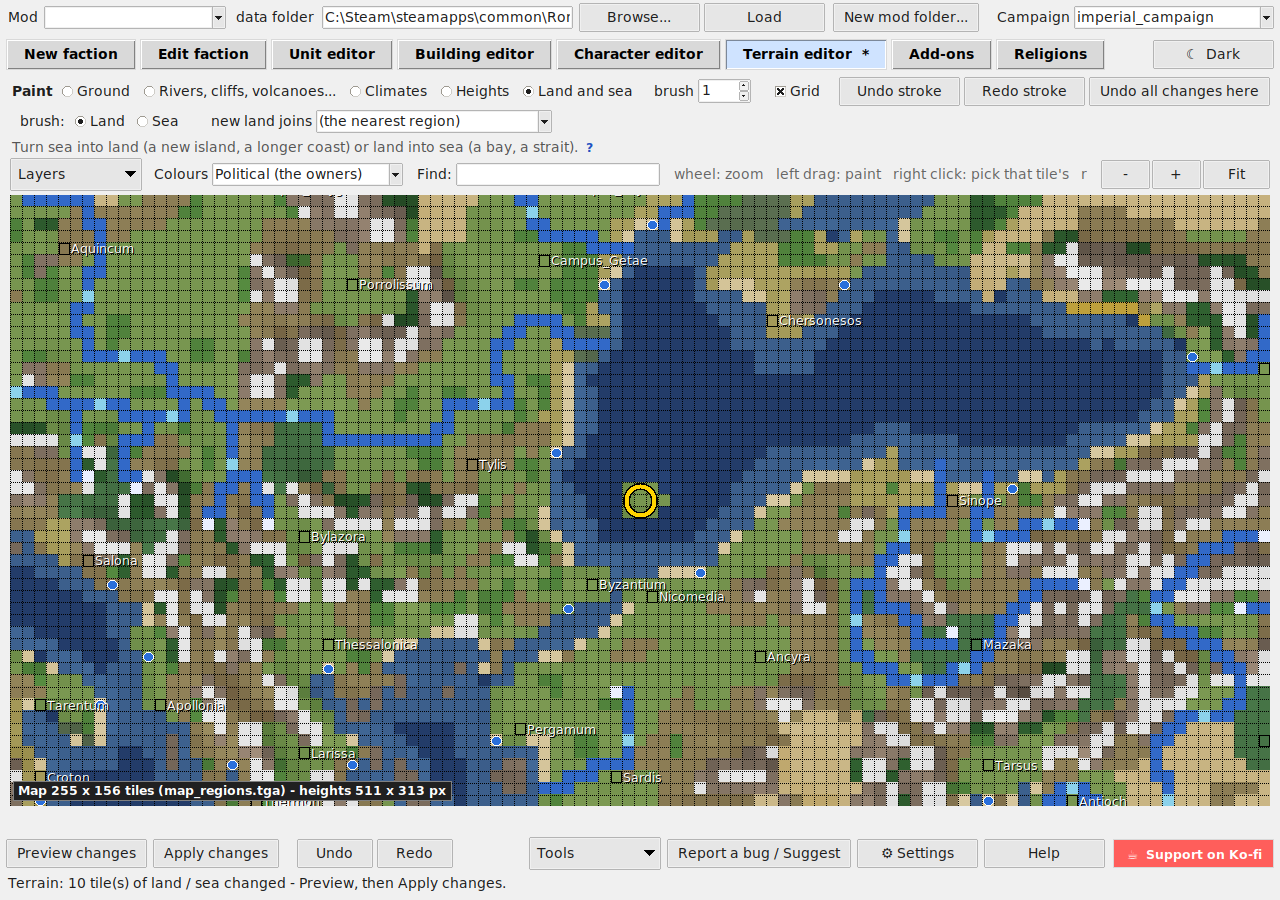
- Land and sea (Land / Sea, by tile): turn sea into land (a new island, a longer coast) or land into sea (a bay, a strait). Land and
sea are written in three places that must agree, so each tile changes all of them:
map_regions.tga(the region's colour or the sea's),map_ground_types.tga(a land ground like its neighbours', or shallow sea; new land gets a ring of shallow sea: the 8 sea tiles round it that are deeper turn shallow) andmap_heights.tgawithmap_heights.hgt(new land rises from a low shore inland as the games' own coasts do - 2, 8, 12, 14, then 16 grey steps from the sea - so an island never lies flat on the water; new sea: the sea's depth). The coast round the painted tiles is drawn the way the games' own maps are: on a smooth curve between the tiles (half a tile fine), not in tile-sized steps - a one-tile islet stays a small oval, a one-tile strait stays open, and every tile stays what you painted. The minimap (radar_map1 / radar_map2.tga) is drawn again on the changed tiles from the nearest tile of the same ground. The coast pen (land point / water point) draws the coast by hand on the heights' points - a tile is 3 x 3 of them, its middle its own, the sides and corners shared with its neighbours; the map is shown point by point while the pen is picked, and touching a tile's middle turns the whole tile. New land joins (beside the brushes): (nobody - the wasteland) - with REX (Rome) or M2EX (Medieval II), the default - keeps the land you paint nobody's: no town, no owner, no faction grows; all of it goes into ONE wasteland region,Wasteland, made on Apply when the map has none (three lines indescr_regions.txt: its name,wasteland, its colour; its name in the names text), and the next painting joins the same one (a map cut's leftover land too). (the nearest region): the region of the nearest land grows; or pick a region. The original games know no wasteland, so there the choice is not offered. Move borders later on the Map (Regions). Refused: drowning a town, port, character, fort or resource, a region's last land, a river (rub it out first) or a port's last land. The Ground brush keeps land as land and sea as sea, and on the coast it paints only the points on its own side of the waterline (a tile's 3 x 3 block reaches over the coast, which runs between the tiles) - no land texture on the water, no holes of sea in the land. - Find ground on the wrong side of the coast (under the Land and sea brushes): rings every point where the
ground (
map_ground_types.tga) and the heights (map_heights.tga) disagree - a land ground on the water or a sea ground in the land - and says how many of each; on a yes each point takes the ground round it on its own side. The heights lead and are not changed; kept until Apply, Undo (bottom, or Ctrl+Z) takes it back. The games' own maps have next to none (Rome 0, Medieval II 18 by lakes in the hills), so what it finds is most likely a mod's own painting or an older editor's. - Nothing the game refuses is put under a town, port or character.
- Rivers: the game follows a river side to side from where it joins the sea, a river source or another river, and stops where two river tiles touch only by a corner - everything past that point is not drawn. The 1-tile brush fills such steps itself; Preview names every river piece the game will not draw.
What it writes
Apply writes map_ground_types.tga, map_features.tga, map_climates.tga and map_heights.tga with a
backup and deletes map.rwm, so the game builds its map again on the next start. A heights change also
changes the same points in map_heights.hgt: it is the game's own copy of the heights, read instead of the
picture while it is there and never made again by the game (Medieval II needs it to load), so it is kept and
kept in step. Land never goes down to pure black - the game may take black for sea.
Painting mountains does not raise the land by itself: ground and heights are separate pictures - use the Heights brush there too.
Confirmed in the game on Rome (0.10.0): the campaign loads and the painted ground and rivers are drawn.
The bottom Undo / Redo (or Ctrl+Z / Ctrl+Y) step through your strokes.