Faction art - Pfadfinder-Adam/RTW-M2TW-Campaign-Editor GitHub Wiki
The Art tab lists every picture of the faction - buttons, symbols, the loading-screen logo, banners, the captain's card, the victory maps - each with where the game shows it and what it needs (size and format), sorted into tabs: Icons and buttons (logos, campaign-menu buttons, symbols, the loading-screen logo), Flags and banners (banners, standards, the flag symbol, the 3D symbol's texture, the flag on the towns), Maps (the victory-conditions maps) and Other (captain's cards and portraits...), each with how many it holds. The figures on the campaign map and their textures are on the Models tab (below).
The two pictures of the campaign-select screen - the map with the faction's land lit (map_<faction>.tga
in the campaign folder) and the leader's face (leader_pic_<faction>.tga, Rome) - sit on the Edit
faction / New faction tab under Victory; Replace... there works as below.
In Rome only a faction with a leader_pic_<faction>.tga shows a face on that screen (vanilla: the three Roman
families); vanilla Medieval II has no such picture.
Click any picture (here, in the Unit and Building editors, a town's buildings) to look at it closely: it opens big in a window of its own (the wheel zooms, drag to move, a checkerboard shows where it is see-through; its file, size and format under it).
Replace... takes a PNG, JPG, TGA or DDS. The tool makes it the size and format of the picture it replaces
(a 32-bit TGA stays a 32-bit TGA, a DXT5 .tga.dds banner stays DXT5 with its mipmaps) and writes it in the
same place under the same name, so every file that names it keeps working. Your file's own name does not
matter. Preview, then Apply writes it with a backup.
- A new faction's pictures are its own. The clone gives it copies under its own name, so replacing a picture of Epirus never changes Macedon's.
- Shared pictures: some pictures are used by several factions (the rebels' and the routing banner). The Art tab says who shares one; Replace... then makes a copy of the faction's own under its name and points only this faction's line at it. The others keep theirs. The same for a battle banner, a town flag or the 3D symbol's texture shared with others: Replace (its own copy)... (Edit faction) and Save a copy....
- Keep the current one drops a replacement not written yet.
- Back to the original puts back a picture the tool changed earlier: the version the first backup kept, or for a new faction the template's picture it was copied from.
There is no Remove: without its pictures the game shows errors and a placeholder instead.
The map on the faction-select screen (map_<faction>.tga) sits on the faction tab beside the description, with
the leader's face. Draw from the map under it makes a new one from the campaign map itself, seen from above in
the game's own ground textures (relief, rivers, a sea with deep water and turquoise shallows), no signs or names, and
the faction's land - its towns as given on the Map - filled with its primary colour at 50 % (the land shows
through), no borders inside it, and a crisp, smooth line round its outside (no tile steps, no town dots) - dark
round a bright colour, light round a dark one (as the map's signs). Where the campaign's other select maps have a frame round the
map (Medieval II), the drawing goes where the map lies in them and fills only the inside of the frame - the frame
stays the game's own. A faction with no select map of its own gets
Draw one from the map. It waits for Apply like any picture (Keep the current one takes it back); a new faction
otherwise keeps a copy of its template's, and every other faction's map stays the original.
Beside the map: the leader's face the screen shows - the faction's own leader_pic_<faction>.tga where it has
one (Rome's Roman families), else its faction leader's portrait (his own, or the one of his culture's portraits for
his age the game picks from); change it in Characters, or press Replace... under it: any picture becomes the
faction's own leader_pic_<faction>.tga in the campaign folder (both games read it first).
Three pictures of a Rome faction do not live in files of their own but on sheets shared by every faction:
-
Flag symbol on the campaign map - the symbol on the flags over its armies, fleets and towns. It is one
of four symbols on
banners/symbolsN.tga.dds, picked bystandard_indexindescr_sm_factions.txt. -
Faction logo (the faction button at the bottom right of the campaign map, diplomacy) and the small
faction logo - sprites named by
logo_index/small_logo_index.
A new faction gets its own: a free flag slot and logo sprites on a page of their own
(ui/<culture>/interface/faction_logo_<faction>.tga), the template's pictures copied in - so replacing them never
changes the template's. Replace... on an existing faction that shares its slot or sprite does the same
first; the factions that shared it get a page of their own with the old picture, so they keep it. This works with
or without REX: under REX with sprite_format xml the sprite goes into the .sd.xml text sheet; on the original
games (or an engine on sd) the editor writes the game's own binary sprite list (ui/strat3.rsd,
ui/shared2.rsd) in the mod - a page with its click mask and the sprite on it - and puts the page into every
culture's interface folder that held the old one. The Faction emblem button makes these logos the same way.
Medieval II (with M2EX) works the same way: the faction logo (68 x 76, ui/strategy.sd.xml) and the small
logo (32 x 32, ui/shared.sd.xml) - the shield in diplomacy, on the faction's scrolls and on its button. Both
cards are always on the Art tab, also when the sprite logo_index names is on no sheet (the game then shows
another faction's picture in its place - the card says so). A mod that reads the binary sheets (no
sprite_format xml in its own descr_caps_ex.txt, as many big mods, and the game without M2EX) gets its logos
in the game's binary sprite lists (ui/strategy.sd, ui/shared.sd), as in Rome. Only where the editor finds no
sprite list it can add to does the card offer Own logos for this mod... (M2EX): after a yes it writes that
line (a backup first; Undo this write puts it back), and every interface sprite comes from the .sd.xml
sheets then.
On the Models tab (beside Art): every character type of the faction (named character, general, admiral, spy, assassin,
diplomat - and on Medieval II princess, merchant, priest / bishop / cardinal ...) with the figure that shows it on
the campaign map - a strat model of descr_model_strat.txt, named per faction in descr_character.txt.
3D shows it with the faction's texture. Each type is ONE card: its name, the figure, 3D, and the figure's
texture - only its title and where the game shows it in sight, the file, the size it needs and where it is named
on the ? beside the title - with Replace..., Save a copy... and Recolour... (that one texture in the
faction's colours; for a faction already made) under it. A new faction gets copies of its own of the template's
(diplomat_macedon -> diplomat_epirus), so replacing them never changes the template's. Both games.
The faction's emblem is shown in many places, each in its own size: the campaign-menu buttons (small and big, each normal / mouse over / selected / greyed out), the loading screen, the faction screen (Medieval II), the in-game panels' symbol (Medieval II), the faction logo and small logo (Rome, on the game's sprite sheets). Faction emblem - one picture everywhere... on the Art tab takes one picture (best a square PNG with a clear background). First it is fitted by hand: drag it to move, the mouse wheel makes it bigger or smaller, a slider turns it; the shape cuts it like the old emblem (most are a disc - its outline is drawn as a yellow guide), as a circle, a square or not at all; the ground fills the shape behind it (clear, the faction's primary or secondary colour, any colour); the magic wand clears an area of like colour with one click (a white background), the paint bucket fills one; Undo, Fit again, Start over. Next makes all of them from it:
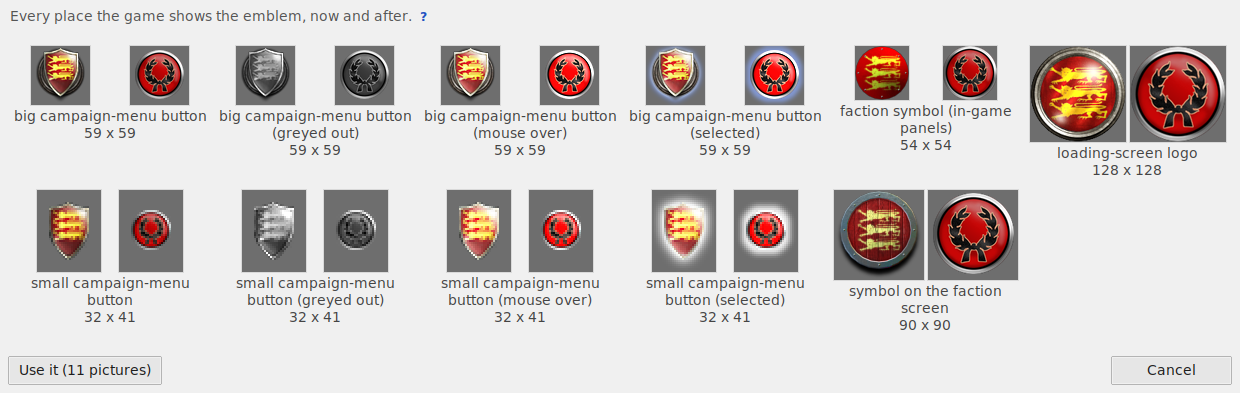
- each picture keeps its size and format, the emblem fitted where the old one sat (the margins stay clear);
- the button states are made the way the mod's own are: mouse over brighter, greyed out grey and darker (by as much as the faction's old pictures show), selected brighter with a glow round the new shape in the old glow's colour;
- a picture the faction shares with another (a loading logo) becomes a copy of its own, its line pointed at it;
- Medieval II's battle banners: the faction's banner sheet (every banner shape of its units on one picture) is made from a white template of the mod's own banner sheets, dyed in the faction's colours, with the symbol on each shape; Banner... under it changes the colours, the pattern and where the symbol sits. A sheet other factions share becomes the faction's own copy (for a new faction: after it is written); the rebels' banner stays as it is;
- from white templates (Rome): the flag on its towns in battle, the 3D symbol on the campaign map and the captains' cards and portraits are each made from a clean white template - the game's blank white banner (the routing one), its square flag, or the old card with its flag's cloth made that white cloth (the pole, fringe and frame kept) - dyed in the faction's colours with the symbol on it; the dead captain's card is that one in grey. The routing flag and the rebels' flag are never changed;
- the symbol on the flags and banners (Rome): the flag symbol on the campaign map gets the symbol alone (no disc, no ground), and the faction's battle banners (its own standard texture and its allies') are made new from the game's own blank white banner (the cloth a routing unit carries - Roman, barbarian or eastern, any of the three for any faction, whatever its culture - picked by its picture in Banner...; the game turns a fleeing unit's banner into it, and it is only read, never changed): its cloth dyed in the faction's colour, the folds kept, the symbol painted on it (faint on the allies' banner, as the game's own are); the trim, the experience stars and the pole stay as they are. Banner... under a banner picks another blank banner, a pattern of up to three colours (plain, two or three stripes upright - a tricolour - or across, halves or bands slanting, quarters, a cross, a slanting cross, a border, a stripe in the middle), the symbol on or off, and the symbol dragged with the left mouse button where it should be;
- a picture with a plain background (a white square round the symbol) has it cleared at once, so no square shows on the flags and banners (Start over brings it back);
- 'Use it' puts them on the Art tab; Preview and Apply write them with a backup, Restore gives them back.
The campaign map's flags over armies and towns take their colours from the faction's colours (the game paints them); the symbol on them is the flag symbol above.
Banner... (on the Art tab, beside Recolour) makes the faction's battle banners new, no emblem needed first:
- the cloth: a pattern of up to three colours on each banner on its own - plain, two or three stripes upright (a tricolour) or across, halves or bands slanting, quarters, a cross, a slanting cross, a border, a stripe in the middle; the cloth's folds and stitching are kept;
- a symbol if you like: Symbol picture... takes any picture (a white or plain square round it is cleared), shaded by the folds; drag it with the left mouse button where it should go (a click on another banner or pennant brings it there), the mouse wheel over it makes it bigger or smaller; Snap lays a grid on each banner - big cells (quarters), medium (eighths) or small (sixteenths) - and the symbol's middle lands on its lines, or no grid to move it freely; Symbol back in the middle puts it back;
- your own drawing: Save the template... saves the white banner as a PNG of the game's size with each banner outlined in red - paint inside the lines in any program, keep the size, then Put in my own drawing... takes it in its place (the symbol can still go on top); Back to the dyed cloth drops it;
- Undo steps back; Done puts the pictures on the Art tab; Preview and Apply write them with a backup in the game's own format, Restore gives them back.
Rome: made from the game's own blank white banner (the cloth a routing unit carries - Roman, barbarian or eastern, any of the three for any faction), the faction's own banner and the allies' (the symbol faint, as the game's own are); the trim, the experience stars and the pole stay as they are.
Medieval II has no white banner - every one of the game's banner pictures carries heraldry (even the rebels' a
cross, the multiplayer ones numbers). But every faction's picture (banners/textures/faction_banner_<faction>.texture,
1024 x 512) holds the same banners in the same places, so the white template is taken from the mod's own pictures:
per pixel, the light of each against its surroundings, and the middle value of them all - each faction's heraldry
sits somewhere else, so it goes; the folds, the tooth edges and the holes they share stay; what is alike in nearly
all of them (the poles, the fittings) keeps its colour. The banners' 3D models (data/banners/main_*.mesh, named in
descr_banners_new.xml) say where each banner and pennant lies on the picture: each is dyed on its own, and the
window shows the banner in 3D (pick infantry, spear, cavalry, missile or general). Each small pennant has four looks
on the picture (the game shows the others on other units): all four get the design - the saved template outlines the
other three in grey, and your own drawing's first pennant is copied into them. The cavalry banner's slit is dyed with
the cloth round it (no dark seam through the symbol). The translucency picture beside it
(_trans) is left as it is. A banner picture shared with other factions becomes the faction's own copy (its line
in descr_banners_new.xml pointed at it; when the file carries the faction's name, the others get copies of the old
one instead). Making the template takes a few seconds the first time (kept while the files are unchanged). Royal
banners (royal_banner_<faction>) and crusade / order banners are not made here.
Recolour all its pictures... (on the Art tab, also Recolour... in the top row - a list at the window's top picks the faction) moves every picture of the faction that carries its colours to new ones: unit cards and info pictures, the units' battle textures, weapons and shields and the faction's own siege engine (Medieval II's carroccio) and far-away sprites, the campaign-map figures (generals, agents, admirals), the faction symbol's texture, the menu buttons and symbols, banners (Rome's standards, Medieval II's battle banners), the flag on its towns in battle (Rome), captain cards and the loading-screen symbol. Both games. The campaign map's flags over armies and towns are painted by the game itself from the faction's colours. While a new faction is being made (not created yet), Recolour shows its template's pictures - the ones it will get as copies - with the new faction's colours as the target; kept, they are recoloured on its own copies by the same Apply changes that creates it (brush touch-ups come after it is created).
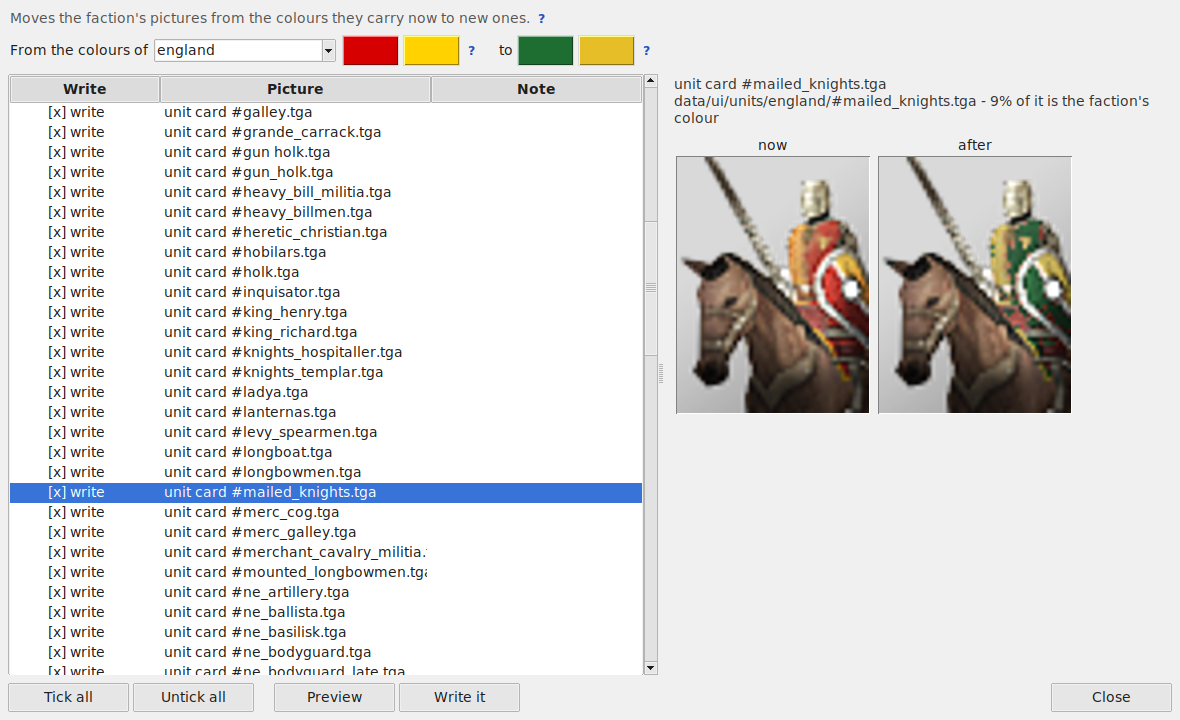
- From the colours of: the colours the pictures carry now. For a faction cloned from a template it finds the template by itself (its cards are copies of the template's); otherwise the faction's own. Click a colour to pick another.
-
to: the faction's own primary and secondary colour from
descr_sm_factions.txt(the Edit / New faction tab sets them), or any picked here. - A part counts as the faction's colour when it is coloured and its hue is near the old colour. Where the same picture exists for other factions (a unit card, a battle texture), only what differs between them changes - faces, horses, metal and leather stay. Light and shade are kept. A cloak painted duller or darker than the faction's colour is taken whole (its shaded half too). White, grey or black 'from' colours (the Holy Roman Empire's black, France's white) have no hue: they change only on unit cards and battle textures, where the other factions' copies show which parts are the faction's; on symbols (each faction's is another drawing) they stay. Faces and hands are never taken for a red or yellow coat.
-
Into black / white: a colour has no hue to move into black or white, so a battle texture made black / white
starts from the same model's texture of the faction whose colours are nearest (Medieval II: Sicily's grey and
white, the rebels' grey, Scotland's white...) - the game's artist's own black and white cloth, folds and faces kept
- and only what still differs is recoloured; the faction's own copy is made from it (that faction's heraldry comes along - paint over it with the touch-ups if it should go). The window says 'made from ...'s texture' under such a picture. Where no such texture exists the colours are made black / white as the artists do it: black at their darkness with every fold kept, white at their lightness.
- Touch up by hand: paint on the 'after' picture what the test missed (a red line, a rim) with new primary colour / new secondary colour, or give pixels back with keep as it was; brush size in the picture's pixels, wheel to zoom, right drag to move. Area of like colour (beside the brush): a click takes the whole patch of the picture's own colour joined to that point - a hood, a shield's field - and paints it at once; alike says how far a colour may differ and still belong; keep as it was + a click gives an area back. The touch-ups go with Keep for Apply.
- Every picture with before / after; untick the ones to keep. A picture other factions use too: when a line of
the game's files names it (a campaign-map figure, a loading logo), the faction gets a copy of its own, recoloured,
and its line points at it. A unit's battle texture (and Medieval II's weapons and shields) is NEVER recoloured
over the original: the original is copied, the copy recoloured and put in the mod beside it, and the model's line
for the faction points at it (
descr_model_battle.txtand the modeldb) - whether the faction wears it with others (a new faction wears its template's), only the game's data holds it (a mod inmods/), or it is the game's own file of that faction (named..._ownthen); the others and the game's files stay as they are. Only a copy made for the faction before is recoloured where it is. A faction that has a unit's texture but no weapons texture gets that line too (without it Medieval II shows its men like bare skeletons in battle). A battle banner, the 3D symbol's texture or a town flag several factions name: the faction it is named after keeps the file and the others get copies of their own first (Medieval II's Normans keep England's old banners); crusade and military order banners stay as they are. - What most factions that do not wear the colour have the same (a bronze star, a wooden pole, a face) is never recoloured.
- They wait in the session's list by itself; Apply changes in the main window writes each file in its own format (TGA of the same depth, DDS with its compression and mipmaps,
Medieval II's
.texture) with one backup; Restore gives every file back.
The strat-map symbol model; a new strat model from files of your own.