react - Offirmo-team/wiki GitHub Wiki
Voir aussi flux, Jest, enzyme, redux, reactive programming, appli web, javascript, AngularJS...
officiel
Quick ref:
- official explanations about lifecycle methods https://reactjs.org/blog/2018/03/27/update-on-async-rendering.html ! + ce schéma:
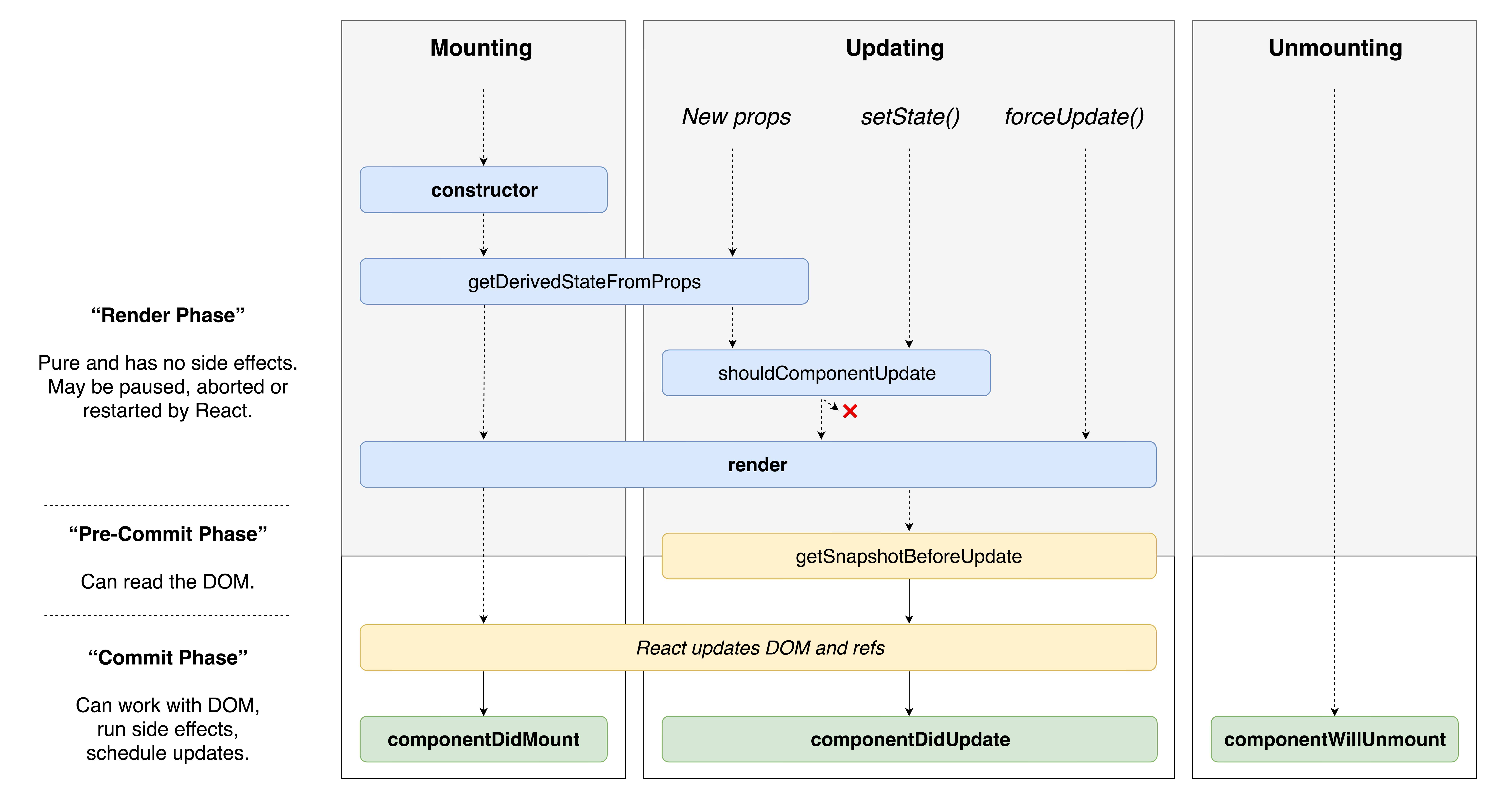 version interactive
- TypeScript https://react-typescript-cheatsheet.netlify.app/docs/basic/setup
- proptypes https://github.com/facebook/prop-types#usage
- https://github.com/deepsweet/hocs
- hooks https://twitter.com/threepointone/status/1056594421079261185?s=21
Tutoriels
- before: https://www.robinwieruch.de/javascript-fundamentals-react-requirements/
- Plan: https://github.com/adam-golab/react-developer-roadmap
- +++ react/redux slides https://react-redux-bootcamp.herokuapp.com/
- ++ quick https://medium.freecodecamp.org/all-the-fundamental-react-js-concepts-jammed-into-this-single-medium-article-c83f9b53eac2
- ++ https://camjackson.net/post/9-things-every-reactjs-beginner-should-know
- ++ https://www.robinwieruch.de/learn-react-before-using-redux/
- http://facebook.github.io/react/docs/getting-started.html
- http://blog.risingstack.com/the-react-way-getting-started-tutorial/
courses
- (free) https://egghead.io/series/react-fundamentals
- (pay) ++ https://learn.tylermcginnis.com/
- (pay) +++ advanced patterns https://courses.reacttraining.com/p/advanced-react (Free videos https://reacttraining.com/patterns/)
Advocacy
- 2022 -- https://typeofnan.dev/solid-js-feels-like-what-i-always-wanted-react-to-be/
- 2022 -- https://www.jackfranklin.co.uk/blog/working-with-react-and-the-web-platform/
- https://medium.freecodecamp.org/yes-react-is-taking-over-front-end-development-the-question-is-why-40837af8ab76
- competitor https://eng.uber.com/fusionjs/
Voir aussi appli web#Sécurité
-
npm install -D react react-domor through create-react-app - dev-tool
- jsx
- flux
- reconciliation
- Autobinding
- backing instances
- components https://facebook.github.io/react/docs/component-specs.html
- props
this.props.xyz.propTypes+ext.defaultProps - state
- context (as a prop or whatever through a Consumer)
- lifecycle https://medium.com/react-ecosystem/react-components-lifecycle-ce09239010df
- patterns container components = behaviour vs presentational components = display (or hybrid) http://redux.js.org/docs/basics/UsageWithReact.html
- props
- components vs elements https://tylermcginnis.com/react-elements-vs-react-components/
- stateless functions https://facebook.github.io/react/docs/reusable-components.html#stateless-functions
- events https://levelup.gitconnected.com/how-exactly-does-react-handles-events-71e8b5e359f2
- HOC Higher Order Components https://www.sitepoint.com/react-higher-order-components/
- hooks
good practices
+++ petits exemples http://ricostacruz.com/cheatsheets/react.html
+++ https://github.com/planningcenter/react-patterns
Composant "stateles" : https://medium.com/@joshblack/stateless-components-in-react-0-14-f9798f8b992d#.g1n3ka57q
import React, { Component, Fragment } from 'react'
import PropTypes from 'prop-types'

const SomeViewM = React.memo(
   function SomeView({children, title, onClick}) {
      return (
         <div id="fab">
            <h1>{title}</h1>
            <FloatingActionButton onClick={onClick}>
               {children}
            </FloatingActionButton>
         </div>
      )
   }
)
SomeView.propTypes = {
   onClick: PropTypes.func,
}
SomeView.defaultProps = {
   onClick: () => {},
}
import ReactDOM from 'react-dom'
var foo = React.createElement('li', null, 'First Text Content');
ReactDOM.render(foo, document.getElementById('example'));import React, { Component, Fragment } from 'react'
import PropTypes from 'prop-types'
import ReactDOM from 'react-dom'
// https://facebook.github.io/react/docs/reusable-components.html
class CoolComponent extends React.Component {
static propTypes = {
...
}
static defaultProps = {
initialCount: 0
}
state = {
...
}
constructor (props) {
console.info('~~ constructor', arguments)
super(props)
}
// inheriting :
// .state => NEVER mutate this.state directly, treat this.state as if it were immutable.
// this.setState(state => ({bubbles: state.bubbles.slice(0, -1)})) XXX asynchronous, don't expect this.state to mutate immediately
// .replaceState(nextState, [callback]) XXX do not use, pending removal
// .forceUpdate([callback])
// setProps
// NO "This is only supported for classes created using React.createClass.
// Did you mean to define a state property instead?"
/*getInitialState () {
console.info('~~ getInitialState', arguments)
return {
foo: 42
}
}*/
// NO "This is only supported for classes created using React.createClass.
// Use a static property to define defaultProps instead."
/*getDefaultProps () {
console.info('~~ getDefaultProps', arguments)
return {
value: 'default value'
}
}*/
// invoked once
componentWillMount () {
console.info('~~ componentWillMount', arguments)
}
render () {
console.count('~~ render')
console.info('~~ render', arguments)
return (
<p>
Hello, <input type="text" placeholder="Your name here" /> !<br />
{this.props.children}
</p>
)
}
// invoked once, client only
componentDidMount () {
console.info('~~ componentDidMount', arguments)
}
// https://facebook.github.io/react/docs/component-specs.html#updating-componentwillreceiveprops
// REM : props may NOT have changed
// cf. https://facebook.github.io/react/blog/2016/01/08/A-implies-B-does-not-imply-B-implies-A.html
componentWillReceiveProps (nextProps) {
console.info('~~ componentWillReceiveProps', arguments)
}
// https://facebook.github.io/react/docs/component-specs.html#updating-shouldcomponentupdate
shouldComponentUpdate (nextProps, nextState) {
console.info('~~ shouldComponentUpdate', arguments)
return true // optimisation possible
}
// https://facebook.github.io/react/docs/component-specs.html#updating-componentwillupdate
// REM : NOT called in the initial rendering
componentWillUpdate (nextProps, nextState) {
console.info('~~ componentWillUpdate', arguments)
return true // optimisation possible
}
// https://facebook.github.io/react/docs/component-specs.html#updating-componentdidupdate
componentDidUpdate (prevProps, prevState) {
console.info('~~ componentDidUpdate', arguments)
}
// https://facebook.github.io/react/docs/component-specs.html#unmounting-componentwillunmount
componentWillUnmount () {
console.info('~~ componentWillUnmount', arguments)
}
}
// CoolComponent.mixins
// CoolComponent.statics
ReactDOM.render(
<CoolComponent />,
document.getElementById('example')
)import React from 'react'
import PropTypes from 'prop-types'
export interface State {
}
export interface Props {
children?: React.ReactNode[]
}
export class CoolComponent extends React.Component<Props, State> {
public constructor(props: Props) {
super(props)
this.state = { ... }
}
public componentWillMount () {}
public render () {}
public componentDidMount () {}
public componentWillReceiveProps (nextProps: Props) {}
public shouldComponentUpdate (nextProps: Props, nextState: State) {}
public componentWillUpdate (nextProps: Props, nextState) {}
public componentDidUpdate (prevProps: Props, prevState) {}
public componentWillUnmount () {}
}- http://facebook.github.io/react/docs/jsx-in-depth.html
- http://facebook.github.io/react/docs/jsx-gotchas.html
// To render an HTML tag, just use lower-case tag names in JSX:

var myDivElement = <div className="foo" />;
ReactDOM.render(myDivElement, document.getElementById('example'));

// To render a React Component, just create a local variable that starts with an upper-case letter:

var MyComponent = React.createClass({/*...*/});
var myElement = <MyComponent someProperty={true} />;
ReactDOM.render(myElement, document.getElementById('example'));

// React's JSX uses the upper vs. lower case convention to distinguish between local component classes and HTML tags.
Attribute Expressions, Boolean Attributes, Child Expressions, Comments :
<Person name={window.isLoggedIn ? window.name : ''} />
<input type="button" disabled={true} />
<Container>{window.isLoggedIn ? <Nav /> : <Login />}</Container>
  <Nav>
    {/* child comment, put {} around */}
    <Person
      /* multi
         line
         comment */
      name={window.isLoggedIn ? window.name : ''} // end of line comment
    />
  </Nav>
HTML Entities, Custom HTML Attributes
<div dangerouslySetInnerHTML={{__html: 'First · Second'}} />
<div data-custom-attribute="foo" />- une par une
return <tileSimple image={x.jpg} legend='foo' /> - toutes d'un coup
return <tileSimple {...tile} />http://stackoverflow.com/a/26860030/587407 - plus complexe : héritage de props : https://facebook.github.io/react/docs/transferring-props.html
this.props
- https://reactjs.org/docs/typechecking-with-proptypes.html
- https://facebook.github.io/react/docs/reusable-components.html#prop-validation
import PropTypes from 'prop-types'

PropTypes.bool,
PropTypes.func,
PropTypes.number,
PropTypes.object,
PropTypes.string,
PropTypes.element, // A React element.
PropTypes.node, // Anything that can be rendered: numbers, strings, elements or an array (or fragment) containing these types

PropTypes.array,
PropTypes.arrayOf(PropTypes.number),


// You can also declare that a prop is an instance of a class. This uses JS's instanceof operator.
PropTypes.instanceOf(Message),

// You can ensure that your prop is limited to specific values by treating it as an enum.
PropTypes.oneOf(['News', 'Photos']),

// An object that could be one of many types
PropTypes.oneOfType([
      PropTypes.string,
      PropTypes.number,
      PropTypes.instanceOf(Message)
]),

// An object with property values of a certain type
PropTypes.objectOf(PropTypes.number),

// An object taking on a particular shape
PropTypes.shape({
      color: PropTypes.string,
      fontSize: PropTypes.number
}),

// You can chain any of the above with `isRequired` to make sure a warning is shown if the prop isn't provided.
PropTypes.func.isRequired,

// A value of any data type
requiredAny: PropTypes.any.isRequired,
custom possible.
https://facebook.github.io/react/docs/more-about-refs.html
- boucles http://stackoverflow.com/questions/22876978/loop-inside-react-jsx
- if
{ foo && <Foo ...> }
https://reactjs.org/docs/context.html
let children = state.children.map(c => c.element)
	children = React.Children.map(children, (child, index) => {
		return (typeof child === 'string')
			? child
			: React.cloneElement(child, {key: `${index}`})
	})

const children = React.Children.map(this.props.children, child => {
        const { value } = child.props
          return React.cloneElement(child, {
              isActive: value === this.state.value,
              onClick: () => {console.log(value); this.setState({value})},
          })
})Voir enzyme
Available types:
-
ElementType<P = any> = (some complex intrinsic stuff) | ComponentType<P>- deprecated
type ReactType<P = any> = ElementType<P> - deprecated
type ComponentType<P = {}> = ComponentClass<P> | FunctionComponent<P>
- deprecated
ReactElement<P = any, T extends string | JSXElementConstructor<any> = string | JSXElementConstructor<any>> {interface Component<P = {}, S = {}, SS = any>Ref<T>interface FunctionComponentElement<P> extends ReactElement<P, FunctionComponent<P>> { …interface ReactComponentElement<…> extends ReactElement<P, T> { }
https://medium.com/curated-by-versett/dont-eject-your-create-react-app-b123c5247741
https://facebook.github.io/react/docs/advanced-performance.html
- Wireframe rendering "In some cases rendering or re-rendering a lot of heavy components is necessary. Our solution to this is to use what we call Wireframes. Wireframes are non-interactive versions of heavy interactive components. For example, for a heavy Input component we might have a wireframe that is just a simple div with text in it. We can render wireframes until the Component is interacted with, or while scrolling through a large list of items."
- "Use indexed maps instead of naive denormalization" = instead of an array, store by map id => item to avoid searches
- 2017 https://calibreapp.com/blog/react-performance-profiling-optimization/
- 2019 https://www.npmjs.com/package/why-did-you-update
- https://cdb.reacttraining.com/react-inline-functions-and-performance-bdff784f5578
- React beautiful DnD ** https://medium.com/@alexandereardon/performance-optimisations-for-react-applications-b453c597b191 ** https://medium.com/@alexandereardon/performance-optimisations-for-react-applications-round-2-2042e5c9af97 ** https://medium.com/@alexandereardon/dragging-react-performance-forward-688b30d40a33
- +++ https://medium.com/doctolib-engineering/improve-react-performance-with-babel-16f1becfaa25
- 2016 https://benchling.engineering/performance-engineering-with-react-e03013e53285
- https://github.com/jamiebuilds/babel-react-optimize
- +++ https://github.com/jamiebuilds/react-loadable
PureRenderMixin
- Utile si utilisation d'immutable.js
- https://facebook.github.io/react/docs/pure-render-mixin.html
react n'est qu'un composant, il faut bâtir sa stack. Recommendations ?
Bons:
- common hooks https://usehooks-ts.com/introduction
- https://addyosmani.com/blog/react-window/
- https://github.com/klarna/higher-order-components
- https://github.com/acdlite/recompose/blob/master/docs/API.md
- util https://github.com/theKashey/react-focus-lock
- util https://github.com/jossmac/react-scrolllock
- animation https://github.com/drcmda/react-spring
- https://github.com/arturbien/React95
À voir:
- redux <- pas forcément
- react addons https://facebook.github.io/react/docs/addons.html
react-addons-pure-render-mixin
- react-router
- react-tap-event-plugin
- https://github.com/JedWatson/classnames
- https://github.com/BananaBobby/react-awesome-scroll
https://github.com/reactjs/react-router
- tutorial (p. 3) https://github.com/reactjs/react-router/tree/master/docs
Cascading routes:
- Top
import { Router, hashHistory } from 'react-router'
import { routes } from './routes'

<Router history={hashHistory}>
  { routes() }
</Router>- routes
import SubAppRoutes from '../subapp/routes'

export function routes() {
  return (
    <Route>
      <Route path='dependencies'
        component={Dependencies} />
      <Route path='download'
        component={Download} reducer={downloadReducer} />

      {WebAppRoutes() }

    </Route>
  )
}- https://kentcdodds.com/blog/common-mistakes-with-react-testing-library
- https://betterprogramming.pub/why-you-should-avoid-testing-react-components-with-test-ids-ee50d20d37d2
- https://arielelkin.github.io/articles/why-im-not-a-react-native-developer
- http://daily-javascript.com/articles/deco/
Common https://dev.to/samerbuna/reactjs-frequently-facedproblems--l5g
Utiliser className http://stackoverflow.com/questions/30968113/warning-unknown-dom-property-class-did-you-mean-classname
- https://github.com/donavon/render-props
- http://americanexpress.io/faccs-are-an-antipattern/
- https://github.com/perrin4869/react-stay-scrolled
- modèle complet https://github.com/pheuter/essential-react
- compilation d'articles
- prez Omnilog https://github.com/eferte/pres-reactjs
- https://github.com/burakcan/react-snowstorm
- http://blog.nparashuram.com/2015/12/react-web-worker-renderer.html
- https://github.com/pheuter/essential-react
- https://github.com/eferte/pres-reactjs
- https://blog.risingstack.com/the-react-way-getting-started-tutorial/
- https://daveceddia.com/create-react-app-express-production/
- https://medium.com/merrickchristensen/function-as-child-components-5f3920a9ace9