css - Offirmo-team/wiki GitHub Wiki
Cascading Style Sheets : feuilles de style en cascade. Voir aussi design, html, javascript, svg, bootstrap css, tachyons, famo.us, blueprint css, compile to css...
Concepts
- rule = selector + property+value+unit
- layers
- nesting
- atomic CSS https://css-tricks.com/lets-define-exactly-atomic-css/
- BEM
:root {
   --safe-area-inset-top:    env(safe-area-inset-top,    0px);
}

[data-o-theme="dark--colorhunt212"] {
   --o⋄dtoken⁚fg--h: 42;
}

.block {}
.block__element {}
.block--modifier {}

.person {}
.person__hand {}
.person--female {}
.person--female__hand {}
.person__hand--left {}<body class="o⋄top-container" data-o-theme="dark--default">Liens rapides
- https://web.dev/learn/css/
- +++ https://web.dev/patterns/layout/
- +++ flexbox http://jonibologna.com/flexbox-cheatsheet/ https://css-tricks.com/snippets/css/a-guide-to-flexbox/
- ++ grid https://codepen.io/collection/DQvYpQ/ https://css-tricks.com/snippets/css/complete-guide-grid/
- +++ https://csswizardry.com/2013/01/mindbemding-getting-your-head-round-bem-syntax/
- +++ http://www.barelyfitz.com/screencast/html-training/css/positioning/
- Methodologies:
- https://30-seconds.github.io/30-seconds-of-css/
Tools
- gradient shape editor https://shapy.app/
- animations https://greensock.com/
- shadow https://shadows.brumm.af/
Nouveautés:
- $$$ https://css-for-js.dev/
- ++ https://x-team.com/blog/forc-fear-of-removing-css/
- Réflexion http://motherfuckingwebsite.com/
- 2023 https://stylex-docusaurus.vercel.app/docs/design/principles/#style-encapsulation-and-debuggability-over-power
- the Chrome status report publishes the CSS property usage, JS/HTML usage of pages loaded via Google Chrome daily.
Références :
- +++ http://cssreference.io/
- vendor prefixing https://css-tricks.com/is-vendor-prefixing-dead/
- http://tympanus.net/codrops/css_reference/
- http://www.cssdebutant.com/les-marges-margins-css.html
- http://cdn.dzone.com/sites/all/files/refcardz/rc019-corecss1_online.pdf http://cdn.dzone.com/sites/all/files/refcardz/rc025-corecss2_online.pdf http://cdn.dzone.com/sites/all/files/refcardz/rc034-010d-css3.pdf
- specificity: https://stuffandnonsense.co.uk/archives/css_specificity_wars.html
Misc
- +++ abus ;) https://dev.to/abdelrahman3d/css-abuse-31gp
- https://csshell.dev/
- ;-) http://saijogeorge.com/css-puns/
- https://css-tricks.com/snippets/css/
- +++ Francine http://diana-adrianne.com/purecss-francine/
Apprendre
- https://smolcss.dev/
- https://moderncss.dev/
- https://medium.com/@devdevcharlie/things-nobody-ever-taught-me-about-css-5d16be8d5d0e
- 2019 https://frontend30.com/css-selectors-cheatsheet/
https://frontarm.com/james-k-nelson/how-can-i-use-css-in-js-securely/
- 2023 nesting https://cloudfour.com/thinks/when-to-nest-css/
- 2019 https://www.madebymike.com.au/writing/css-architecture-for-modern-web-applications/
- 2020 https://mxstbr.com/thoughts/margin "margins considered harmful"
(cf le mien)
- BEM methodology
- +++ https://csswizardry.com/2013/01/mindbemding-getting-your-head-round-bem-syntax/
- practical http://simurai.com/blog/2013/10/24/BEM-syntax-with-ux-in-mind
- extension ? https://assortment.io/posts/grandchild-elements-bem-css
- https://csswizardry.com/2015/08/bemit-taking-the-bem-naming-convention-a-step-further/
- http://bem.info/
- ++ http://bradfrost.com/blog/post/atomic-web-design/
- ITCSS http://www.creativebloq.com/web-design/manage-large-scale-web-projects-new-css-architecture-itcss-41514731
- http://learnsemantic.com/
- http://maintainablecss.com/chapters/reuse/
- https://medium.com/maintainable-react-apps/journey-to-enjoyable-maintainable-styling-with-react-itcss-and-css-in-js-632cfa9c70d6
- W3.css https://dev.to/imalittletester/style-beautiful-web-pages-without-writing-any-css-using-w3css-45ee
Plusieurs moyens, cf. http://www.w3schools.com/css/css_howto.asp :
- utiliser une feuille de style '*.css' et la référencer dans le document HTML par :
<link rel="stylesheet" type="text/css" href="style.css" />- Déclarer les styles directement dans la page html :
<style type="text/css">
...
</style>- Déclarer le style à l'intérieur de l'élément à styler :
<p style="color:sienna;margin-left:20px">This is a paragraph.</p>- modifier le style en JS XXX https://developers.google.com/web/updates/2018/03/cssom
element.style.opacity = 1- déclarer le style en JS: https://css-tricks.com/snippets/javascript/inject-new-css-rules/
// https://stackoverflow.com/a/13883978/587407

// if you want to add css text
var style = document.createElement('style');
style.type = 'text/css';
style.innerHTML = 'content';
document.getElementsByTagName('head')[0].appendChild(style);

// if you want to add css file
var link = document.createElement('link');
link.setAttribute('rel', 'stylesheet');
link.setAttribute('type', 'text/css');
link.setAttribute('href', 'css/my.css');
document.getElementsByTagName('head')[0].appendChild(link);- https://css-tricks.com/theming-with-variables-globals-and-locals/
- test support https://twitter.com/ireaderinokun/status/976817789481734144
		:root {
			--bg: white;
			--fg: black;
			--font: -apple-system, BlinkMacSystemFont, "lucida grande", roboto, noto, ubuntu, sans-serif;
			--scale: 1.5;
		}

		* {
			background-color: var(--bg);
			color: var(--fg);
			font-family: var(--font);
		}

		main {
			transform: scale(var(--scale));
			transform-origin: 0px 0px;
		}
// change a CSS variable
document.documentElement.style.setProperty(
'--omr⋄ui__bottom-menu--selected-reverse-index',
css_selected_bottom_menu_value,
)
// read a CSS variable
getComputedStyle(document.documentElement).getPropertyValue('--my-variable-name')
// env = not possible, use a var https://benfrain.com/how-to-get-the-value-of-phone-notches-environment-variables-env-in-javascript-from-css/https://developer.mozilla.org/en-US/docs/Learn/CSS/Building_blocks/Values_and_units
- absolutes
⚠️ au scaling via font, utiliser rem?px- autres:
cm, mm, Q, in, pc, pt⚠️ non recommandé à part print
- relatives
-
%⚠️ dangereux car relatif au parent et souvent besoin d'un parent avec une taille explicite -
em⚠️ dangereux du au "compounding cascade conundrum", préferer rem -
rembien⚠️ se rappeler que certains utilisateurs changent la root font size pour zoomer -
vw, vh, vmin, vmax⚠️ attention mobile browsers https://nicolas-hoizey.com/articles/2015/02/18/viewport-height-is-taller-than-the-visible-part-of-the-document-in-some-mobile-browsers/- il faut plutôt utiliser: dynamic(dvw, dvh), small(svw, svh), large(lvw, lvh)=(dvw, dvh)
- semantic = inline, block: (vi, vb), large(lvi, lvb), small(svi, svb) max: dvmin, dvmax etc.
- 1vw is 1% of the viewport width
- 1vh is 1% of the viewport height
- il faut plutôt utiliser: dynamic(dvw, dvh), small(svw, svh), large(lvw, lvh)=(dvw, dvh)
-
exx-height of the element's font -
chThe advance measure (width) of the glyph "0" of the element's font -
lh, rlhLine height of the element⚠️ not supported
-
Classes et IDs :
<div class="hentry" id="post-777">On peut aussi donner plusieurs classes :
<span class="meta-prep meta-prep-author">Publié le</span>- 2023 visual? https://fffuel.co/css-selectors/
- http://www.sitepoint.com/getting-to-know-css3-selectors-other-pseudo-classes/
- Les sélecteurs doc complète ou tableau récapitulatif
- Le sélecteur universel : *
- Le sélecteur id : P#id
- Le sélecteur de type : P
- Le sélecteur de classe : P.toto (raccourci, HTML uniquement)
- Le sélecteur d'enfants directs : chevron >
- Le sélecteur d'enfants quelconques : espace " "
- Le sélecteur CSS3 général d'adjacence : ~
- Le sélecteur CSS3 : +
- les sélecteurs d'attributs https://developer.mozilla.org/en-US/docs/Web/CSS/Attribute_selectors
-
[attr]Represents an element with an attribute name of attr. -
[attr=value]Represents an element with an attribute name of attr and whose value is exactly "value". -
[attr~=value]Represents an element with an attribute name of attr whose value is a whitespace-separated list of words, one of which is exactly "value". -
[attr|=value]Represents an element with an attribute name of attr. Its value can be exactly “value” or can begin with “value” immediately followed by “-” (U+002D). It can be used for language subcode matches. -
[attr^=value]Represents an element with an attribute name of attr and whose value is prefixed by "value". -
[attr$=value]Represents an element with an attribute name of attr and whose value is suffixed by "value". -
[attr*=value]Represents an element with an attribute name of attr and whose value contains at least one occurrence of string "value" as substring. -
[attr operator value i]Adding an i (or I) before the closing bracket causes the value to be compared case-insensitively (for characters within the ASCII range).
-
- le sélecteur quantième http://www.marevueweb.com/css-html/liste-nth-child-propriete/
-
:first-childhttps://developer.mozilla.org/en-US/docs/Web/CSS/:first-child -
:last-childhttps://developer.mozilla.org/en-US/docs/Web/CSS/:last-child li:nth-child(<1..n>)- seulement le 5e élément
li:nth-child(5) - 1er élément de la liste
li:first-childou tout simplementli:nth-child(1) - Tout sélectionner sauf les cinq premiers
li:nth-child(n+6) - seulement les cinq premiers
li:nth-child(-n+5) - Selectionner à chaque quatre éléments, en comment par le premier
li:nth-child(4n-7)/* or 4n+1 */ - seulement les positions paires ou les impaires
li:nth-child(odd)li:nth-child(even) - le dernier élément de la liste
li:last-child- tout sauf le dernier
:not(:last-child)
- tout sauf le dernier
- l’avant-dernier élément de la liste
li:nth-last-child(2) :only-child
-
- Alt quantième
-
:first-of-type:not(:first-of-type) :last-of-type:nth-of-type(<1..n>):nth-last-of-type(<1..n>):only-of-type
-
- ~parent
:has()https://developer.mozilla.org/en-US/docs/Web/CSS/:has - pseudo-selectors (aggregators) https://css-irl.info/simpler-block-styling-in-wordpress-with-is-and-where/
http://davidwalsh.name/css-animation-callback
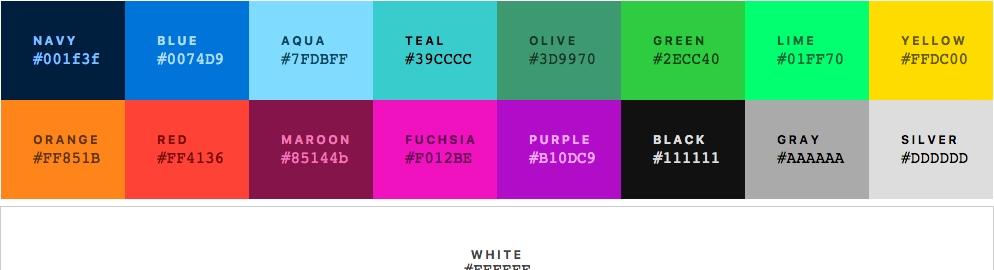
- +++ http://clrs.cc/
Navy #001f3f
Blue #0074D9
Aqua #7FDBFF
TEAL #39CCCC
OLIVE #3D9970
GREEN #2ECC40
LIME #01FF70
YELLOW #FFDC00
ORANGE #FF851B
RED #FF4136
MAROON #85144b
FUCHSIA #F012BE
PURPLE #B10DC9
BLACK #111111
GRAY #AAAAAA
SILVER #DDDDDD
- CSS layout cookbook https://developer.mozilla.org/en-US/docs/Web/CSS/Layout_cookbook
- https://every-layout.dev/blog/multi-column-manipulation/

Def
padding: tous;
padding: haut/bas gauche/droite;
padding: haut     gauche/droite   bas;
padding: haut droite bas gauche; (sens des aiguilles d'une montre)border: width style colo
border: solid 1px gray;ou
border-style: solid;
border-color: gray;
border-width: 1px 0px 0px 1px;- http://chrisbewick.com/blog/css/generating-double-borders-with-css/
- https://blogs.igalia.com/mrego/2019/01/11/an-introduction-to-css-containment/
https://jonathan-harrell.com/advanced-css-form-styling/
- +++ http://www.barelyfitz.com/screencast/html-training/css/positioning/
- z-index http://philipwalton.com/articles/what-no-one-told-you-about-z-index/
- récent https://css-tricks.com/centering-the-newest-coolest-way-vs-the-oldest-coolest-way/
- centrer un objet http://www.w3.org/Style/Examples/007/center
- http://www.alsacreations.com/article/lire/539-Centrer-les-elements-ou-un-site-web-en-CSS.html
- http://stackoverflow.com/questions/1062783/css-left-and-right-alignment-on-the-same-line
- http://zerosixthree.se/vertical-align-anything-with-just-3-lines-of-css/
text-align: center ok avec display: block
flex !
http://stackoverflow.com/questions/1062783/css-left-and-right-alignment-on-the-same-line/5329340
http://www.alsacreations.com/astuce/lire/43-comment-dfinir-lapparence-de-ses-liens.html
- enlever le soulignement
a:hover {
  text-decoration: none;
}- couleurs
a:link,
a:visited {color: var(--o⋄color__co212__blue);}
a:hover,
a:active {color: red;}ul {
list-style-type: none;
display: inline;
}
li {
width: 50px;
display: inline-block;
text-align: center;
}Tous: https://www.brunildo.org/test/Overflowxy2.html
Texte monoligne avec ellipse si dépassement
.title {
  display: inline-block;
  overflow: hidden;
  text-overflow: ellipsis;
  white-space: nowrap;
  width: 100%;
}Voir aussi typographie
"typography is impossible" +++ https://medium.engineering/typography-is-impossible-5872b0c7f891
- INSTALL LOCALE FORTEMENT RECOMMENDEE (même si Google fonts)
- utiliser npm ex. https://fontsource.org/fonts/noto-sans/install
- ou aussi https://gwfh.mranftl.com/fonts/noto-sans?subsets=latin
- 2018 https://equinusocio.dev/blog/web-fonts-in-2018
- https://developer.mozilla.org/fr/docs/Web/CSS/font-family
serif, sans-serif, cursive, fantasy, monospace- https://developer.mozilla.org/fr/docs/Web/CSS/font
- http://craigmod.com/journal/font-face/
Bonnes combos :
- Utiliser https://www.cssfontstack.com/ et/ou https://systemfontstack.com/
- monospaced
font-family: "Consolas", "Lucida console", monospace;- Sans serif :
font-family: "Lucida Sans Unicode", "Lucida Grande", sans-serif- Microsoft :
font-family: "Segoe UI", "Segoe UI Web Regular", "Segoe UI Symbol", "Helvetica Neue", "BBAlpha Sans", "S60 Sans", "Arial", sans-serif;font-size: medium;
color: red;gras et italique, malgré leur apparente proximité, sont gérés par des balises CSS totalement différentes : http://archivist.incutio.com/viewlist/css-discuss/6136
font-style: italic;
font-weight: bold;http://stackoverflow.com/questions/2438122/font-variantsmall-caps-vs-text-transformcapitalize
font-variant:small-caps;
text-transform:capitalize;http://reference.sitepoint.com/css/text-transform
text-transform:capitalize
   transforms the first character in each word to uppercase; all other characters remain unaffected—they’re not transformed to lowercase, but will appear as written in the document
text-transform:lowercase
   transforms all characters to lowercase
text-transform:none
   produces no capitalization effect at all
text-transform:uppercase
transforms all characters to uppercase- le meilleur format est "woff2" (ref. https://courses.joshwcomeau.com/css-for-js/06-typography-and-media/08-web-fonts)
- convertisseur de fontes http://www.fontsquirrel.com/tools/webfont-generator
- custom http://www.fontsquirrel.com/fontface/generator
- retina-pixel underlining http://codepen.io/ghepting/pen/tLnHK/
- http://typecast.com/blog/readable-fluid-type-with-basic-css-smarts
- https://medium.com/@fat/mediums-css-is-actually-pretty-fucking-good-b8e2a6c78b06
- http://www.smashingmagazine.com/blog/2014/09/29/balancing-line-length-font-size-responsive-web-design/
- mode qualité : http://www.webdesignerdepot.com/2013/05/how-to-optimize-for-legibility-using-text-rendering/
text-rendering: optimizeLegibility;font-stretch: normal
line-height: normalhttp://css-tricks.com/almanac/properties/o/overflow/
bien utilisé en conjonction avec display flex
http://www.commentcamarche.net/faq/9119-changer-l-aspect-du-curseur-en-css
.clickable {
  cursor:  pointer;
}- auto : Aspect identique à celui du curseur par défaut sur la balise qui possède l'attribut, ne change rien.
- default : Curseur par défaut du navigateur.
- pointer : Curseur en forme de main avec le doigt déplié.
- text : Curseur d'édition de texte.
- help : Curseur d'aide.
- wait : Curseur d'attente
- progress : Curseur de progression.
- move : Curseur de déplacement.
- crosshair : Curseur en forme de croix.
	<table>
		<thead>
			<tr><th></th><th>XX</th><th>YY</th></tr>
		</thead>
		<tbody>
			<tr><th>AA</th><td><div>Foo</div></td><td><div>bar</div></td></tr>
			<tr><th>BB</th><td><div>baz</div></td><td><div>42</div></td></tr>
		</tbody>
</table>- 2020 https://joshwcomeau.com/performance/embracing-modern-image-formats/
- 2020 https://www.smashingmagazine.com/2020/03/setting-height-width-images-important-again/
- http://dev.opera.com/articles/responsive-images/
- http://www.alsacreations.com/astuce/lire/1662-conserver-ratio-16-9-images-videos.html
- http://www.pompage.net/traduction/les-bases-du-background
- http://css-tricks.com/perfect-full-page-background-image/
- on demand http://animista.net/
- 10 principles for smooth web animations https://blog.gyrosco.pe/smooth-css-animations-7d8ffc2c1d29
https://css-tricks.com/next-gen-css-container/
https://dev.to/tongrhj/the-mistake-developers-make-when-coding-a-hamburger-menu-1deg
https://heydonworks.com/article/the-flexbox-holy-albatross/
https://css-tricks.com/snippets/css/css-diagnostics/
.button-like {
  cursor: pointer;
  user-select: none;
}

.foo button {
  /* button used for semantic reasons, remove its styling */
  width: 100%;
  border: none;
  color: inherit;
  background: inherit;
  font-size: inherit;
  line-height: inherit;
  text-align: left;
  padding: 0;
  margin: 0;
  text-decoration: none;
}- http://www.sitepoint.com/csscomb-css-property-sorting/
- http://www.sitepoint.com/cssrefresh-instant-css-testing/
- techniques avancées sans JS https://github.com/NamPNQ/You-Dont-Need-Javascript
- http://alistapart.com/blog/post/ten-css-one-liners-to-replace-native-apps
- http://alistapart.com/blog/post/css-regions-considered-harmful
- http://www.quirksmode.org/css/display.html
- http://www.brunildo.org/test/inline-block.html
- http://www.w3schools.com/css/pr_class_display.asp
- http://www.alsacreations.com/actu/lire/111-display-vous-connaissez.html
- ...
- layout patterns https://csslayout.io/
- grid
- 2019 https://css-irl.info/to-grid-or-to-flex/
-
https://flexbox.ninja/
- "holy grail" pattern
- http://www.heydonworks.com/article/the-flexbox-holy-albatross
- +++ http://jonibologna.com/flexbox-cheatsheet/
- http://www.flexboxpatterns.com/home
- Quick Tip: How z-index and Auto Margins Work in Flexbox https://www.sitepoint.com/quick-tip-how-z-index-and-auto-margins-work-in-flexbox/
- http://www.alsacreations.com/tuto/lire/1493-css3-flexbox-layout-module.html
- http://css-tricks.com/snippets/css/a-guide-to-flexbox/
- ? http://flexboxfroggy.com/
- ? https://www.smashingmagazine.com/2016/02/the-flexbox-reading-list/
Header / content / footer
.container {
  position: absolute;
  top: 0;
  right: 0;

  height: 100vh;

  display: flex;
  flex-direction: column;
}

.header { height: 132px; }
.content {
  flex-grow: 1;
  overflow-x: hidden;
  overflow-y: scroll;
}
.footer { height: 64px; }Difficile d'occuper toute la page par défaut. Pose particulièrement problème avec chrome. Solution : http://www.geekicon.net/thinktank/index.shtml/article/643
- noms des couleurs : http://www.w3schools.com/cssref/css_colornames.asp
- Une page permettant de générer facilement n'importe quelle couleur : http://html-color-codes.info/
- et pareil pour les gradients : http://www.colorzilla.com/gradient-editor/ ou http://gradients.glrzad.com/
- bonnes pratiques pour les gradients : http://babylon-design.com/bonnes-pratiques-degrades-css3/
- Bulles en javascript : http://blogs.sitepoint.com/pure-css3-speech-bubbles/
- containment (optimisation) https://blogs.igalia.com/mrego/2019/01/11/an-introduction-to-css-containment/
- https://codepen.io/tomhodgins/post/expressing-element-queries-in-valid-css-syntax
- click through
pointer-events: none;https://stackoverflow.com/a/4839672/587407 - https://lea.verou.me/2012/04/background-attachment-local/ Pure CSS scrolling shadows with background-attachment: local
http://babylon-design.com/le-hack-css-important/
...