Getting Started, Help and FAQ - Nathan-Dane/Clickett GitHub Wiki
(Note to self: Write something here)
(Note to self: what that other note said)
Some people may be confused with closing Clickett, This should clear It up!
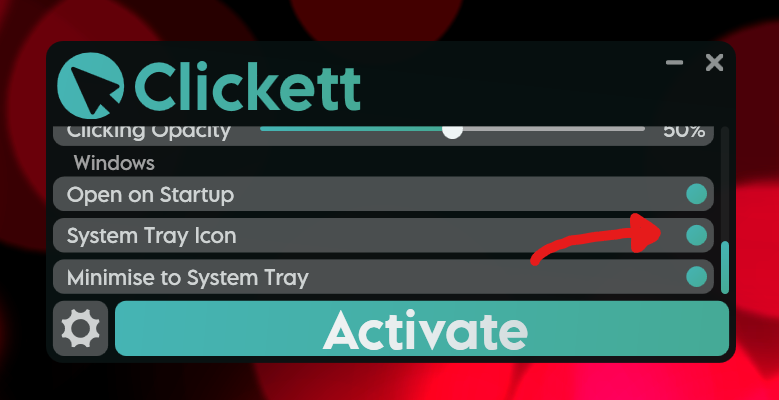
If the 'System Tray Icon' option (here)
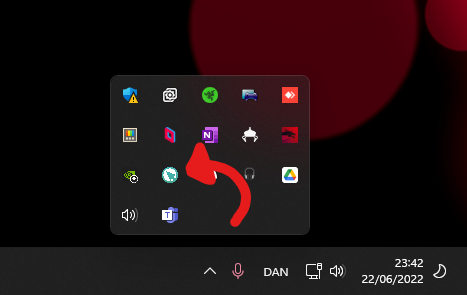
and the 'Minimise to System Tray' option (just beneath it) are enabled, Minimising the app (using the - icon at the top-right) will not fully close the app. You will not be able to see the app on the taskbar, but it will still be open in the system tray (as shown here)
This could cause you to have your hotkey not working when you're normally typing or possibly randomly start clicking it when you don't want it to (if you press the hotkey)
To fully close Clickett you can either use the x button in the top-right corner or right-click on the system tray icon and choose 'Exit'.
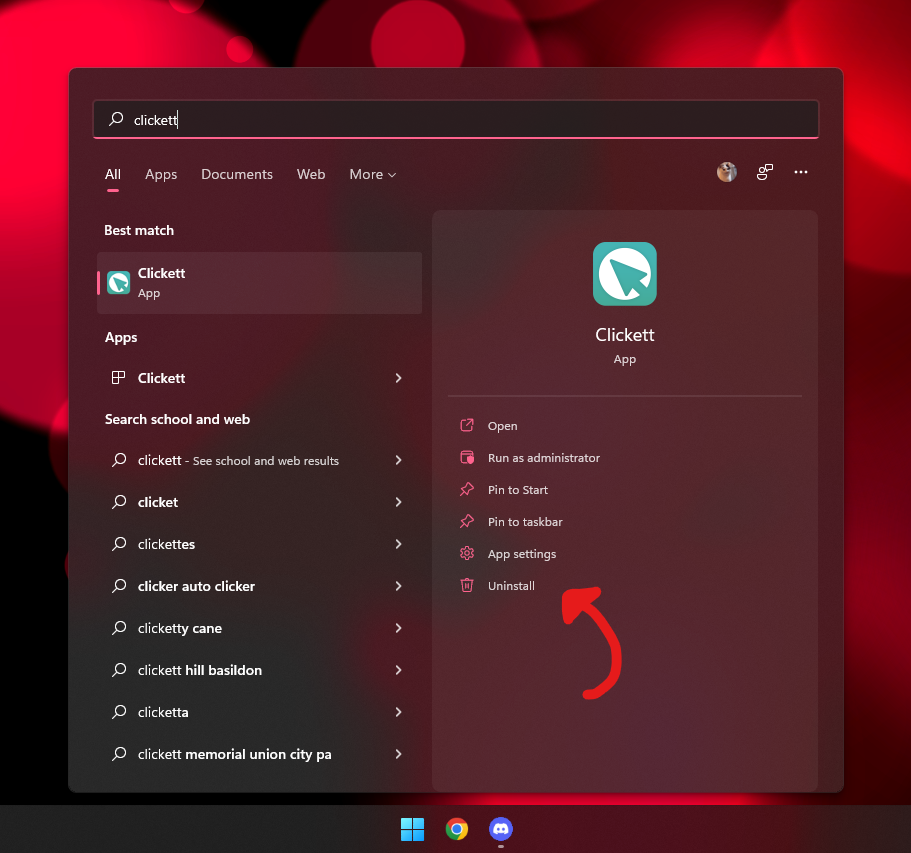
On Windows 10 and 11 the process is the same.
For any app from the Microsoft store (Including Clickett) you simply search for the app in start or search. Once the app shows up Click the 'Uninstall' button beneath it. Et voila! (sorry to see you go)
This might happen if you have set the hotkey to a single key and have left Clickett running in the background.
To fix this either deactivate / close Clickett to free up the hotkey, or change the hotkey to a different key / a hotkey with multiple buttons.
Clickett simulates clicks as if they were coming from the mouse. This means it will work in any game a mouse does. If it isn't working in a specific game you may need to lower the clicking speed, if this doesn't work and you are certain it is working in other games, there may be an anti-auto clicker feature in the game.
At higher clicking speeds some games may struggle to keep up. In some cases, a game may start to lag when processing too many clicks. Other games might just limit how many clicks per second it accepts. For example, on cookie clicker you may only get 30-40 clicks per second, even if Clickett is clicking at 69 clicks per second. This is just because cookie clicker cannot handle that many clicks and skips some clicks.
Clickett has a simple interface and system which requires very little to run and the clicking function uses only a single thread. If the clicker laggs the computer, it is very likely that the clicking speed is set too high and the game is struggling to process all of the clicks. To fix this try lowering the clicking speed.
You can contact me at [email protected] if you have any issues or suggestions. I'd be more than happy to give it a look!