CreatingOutfits - NRK4/endless-sky GitHub Wiki
The thumbnail graphics for all the outfits in the game are created using two free, open source programs: Blender for creating the 3D models, and GIMP for post-processing the rendered images to look more grungy and less artificial. (Another open source program, Inkscape, is used for the vector graphics in the user interface.) You can download the original Blender and GIMP files for any of the graphics here.
Any outfit model you create in Blender should use the camera and lighting settings from this template. That will ensure that your new thumbnails do not look out of place next to the existing ones. The template is set up with sunlight coming from a certain angle and with the image rendered in an orthographic projection along the XYZ diagonal, so that a cube in your model will line up exactly with the cubical grid used as a backdrop for the outfits.
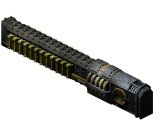
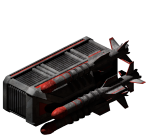
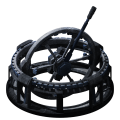
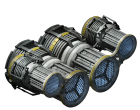
The outfitter view divides outfits into difference categories: "Guns," "Turrets," etc. As another way of ensuring a consistent look, most outfits in a given section point in a certain direction:
- Guns: top left.
- Turrets: top left, and angled slightly up in the Z axis.
- Missiles: bottom left.
- Anti-missiles: top right.
- Engines: bottom right.
In a few cases, it's ambiguous which direction something should point in. For example, the Flamethrower is aligned with the guns even though it is shown in the "Secondary Weapons" section with all the missiles.
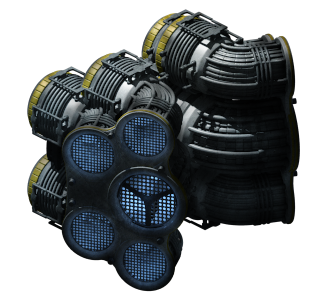
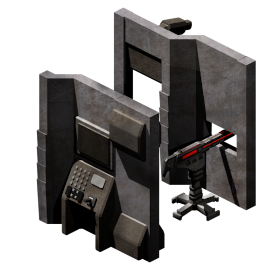
As with ships, it is often easier to add texture and color variation to the outfit images in GIMP rather than trying to texture map all the surfaces in Blender. And, also as with the ship graphics, be sure that your GIMP file is at least high enough resolution to create an "@2x" high resolution version.
Outfits work by modifying the attributes of your ship. Many of the attributes are in units of heat or energy per frame; a frame is 1/60th of a second. All attributes stack. For example, if you install two shield generators, your shield regeneration doubles.
Most attributes are given as a single number, but there are a few "special" attributes:
-
category: which outfitter category to show this outfit in. The category must be one of the following if it is to be purchasable:- "Guns"
- "Turrets"
- "Secondary Weapons"
- "Ammunition"
- "Systems"
- "Power"
- "Engines"
- "Hand to Hand"
- "Special"
-
"flotsam sprite": the image that is drawn when this outfit is dropped in space, either because it was jettisoned by a ship or because it was the payload of a minable asteroid. If no flotsam sprite is given, then the default flotsam box is used. -
"flare sprite": for thrusters, the image that is drawn at each of the engine hardpoints when the thruster is firing.- Beginning with v. 0.9.13,
"reverse flare sprite"and"steering flare sprite"can also be used to define the image that is drawn for"reverse engine"and"steering engine"hardpoints on a ship.
- Beginning with v. 0.9.13,
-
"flare sound": for thrusters, the sound that is played when the thruster is firing.- Beginning with v. 0.9.13,
"reverse flare sound"and"steering flare sound"can also be used to define the sound that is played when reversing or steering. Sounds are only played if the ship has an associated"reverse engine"or"steering engine"hardpoint for a flare to be emitted from.
- Beginning with v. 0.9.13,
-
"afterburner effect": the effect that is created for every frame that the afterburner is firing. Afterburner effects can last for multiple frames, leaving a trail behind the ship. -
thumbnail: the thumbnail image to use for the outfit in the outfitter. Outfit thumbnails should be no larger than 360x360 for the @2x sprite and 180x180 for the normal-resolution sprite. -
licenses: a list of names of licenses you need to buy this outfit. For each<name>specified, thelicense: <name>condition must be set for the player to buy this ship. (v. 0.9.7) (If you make an outfit named"<name> License", that condition variable will automatically be set when you buy that outfit.) -
Beginning with v. 0.9.13, the sound and effects of a drive can be customized. If multiple drives are installed that each have their own sounds and effects, then all sounds and effects are played at once.
-
"jump effect": the effect that is created on a ship when using a jump drive. -
"jump sound": The sound that the flagship's jump drive makes when jumping. For other ships, use"jump in sound"and"jump out sound"for the sound that is played when other ships jump into or out of the player's current system. -
"hyperdrive sound": The same as"jump sound", but for hyperdrives. Also has a"hyperdrive in sound"and"hyperdrive out sound"for other ships jumping into or out of the current system.
-
-
description: a paragraph of text to show in the outfitter. To define multiple paragraphs, you can add more than one "description" line.
Unless otherwise states, other outfit attributes will stack additively between multiple outfits and can only have values greater than 0. The other attributes include the following:
-
These attributes are basic attributes that practically every outfit will have.
-
cost: cost of this outfit, in credits. -
mass: how much your ship's mass should change by when this outfit is installed.
-
-
These attributes are used to alter various capacities of the ship they are installed on, limiting the number of outfits that can be installed at once.
-
"outfit space": if negative, how much generic outfit space (as opposed to weapon or engine space) this outfit takes up. -
"engine capacity": if negative, how much engine space an outfit uses. Engine space and weapon space are an important part of giving different ship models different strengths and weaknesses, so I recommend against creating outfits that give you extra engine capacity, or engines that do not use up engine space. -
"weapon capacity": set this to a negative value (generally, the same value as"outfit space") for any outfit that is a weapon. Limited weapon space is one of the ways that ship models are differentiated from each other. -
"cargo space": amount of cargo space that this outfit adds (if positive) or removes (if negative) from your ship.
-
-
These attributes alter the legality of an outfit.
-
atrocity: if you are caught carrying this outfit, the government that scanned you turns hostile. If the scan happens when you are landed on planet, you are immediately captured and imprisoned for life. -
illegal: the fine, in credits, for being caught using this outfit.
-
-
These attributes are used to alter and repair the shields and hull of a ship.
-
shields: I recommend against providing outfits that give ships additional shield strength, because that could create balancing issues. But if you want to do it, this is the attribute to modify. -
"shield generation": the number of shield points regenerated per frame. It takes 1 energy to regenerate 1 unit of shields, so if your shields are recharging your ship has less energy available for other things. -
"shield energy": the amount of energy your shield generator draws when recharging at the full rate. (Prior to v. 0.9.0, shield recharge also draws an additional amount of energy equal to"shield generation".) Beginning in v. 0.9.13, this value is capable of being negative, causing shield generation to grant energy. -
"shield heat": the amount of heat that shield generation creates when recharging at the full rate. (v. 0.9.1) Beginning in v. 0.9.13, this value is capable of being negative, causing shield generation to reduce heat. -
"shield fuel": the amount of fuel that shield regeneration consumes when recharging at the full rate. (v. 0.9.9) Beginning in v. 0.9.13, this value is capable of being negative, causing shield generation to grant fuel. -
"shield delay": the number of frames that must pass without taking shield damage in order for shield generation to begin. (v. 0.9.13) -
"depleted shield delay": the number of frames that must pass after the shields have been depleted (i.e. reached 0) in order for shield generation to begin. (v. 0.9.13) -
hull: I recommend against providing outfits that give ships additional hull strength, because that could create balancing issues. But if you want to do it, this is the attribute to modify. -
"hull repair rate": the number of hull points regenerated per frame. It takes 1 energy to repair 1 unit of hull. -
"hull energy": the amount of energy that hull repair draws when recharging at the full rate. (Prior to v. 0.9.0, hull repair also draws an additional amount of energy equal to"hull repair rate".) Beginning in v. 0.9.13, this value is capable of being negative, causing hull repairs to grant energy. -
"hull heat": the amount of heat that hull repair creates when recharging at the full rate. (v. 0.9.1) Beginning in v. 0.9.13, this value is capable of being negative, causing hull repairs to reduce heat. -
"hull fuel": the amount of fuel that hull repair consumes when recharging at the full rate. (v. 0.9.9) Beginning in v. 0.9.13, this value is capable of being negative, causing hull repairs to grant fuel. -
"repair delay": the number of frames that must pass without taking hull damage in order for hull repairs to begin. (v. 0.9.13) -
"disabled repair delay": the number of frames that must pass without taking hull damage after the ship has been disabled in order for hull repairs to begin. Note that the delay timers for both hull and shields do not decrease while the ship is unable to repair itself (i.e. it is disabled), so this attribute is the time after the ship has been assisted for repairs to start. (v. 0.9.13)
-
-
These attributes change the point at which a ship becomes disabled. The default point at which a ship becomes disabled is dictated by the equation
hull * max(.15, min(.45, 10. / sqrt(hull))). (v. 0.9.13)-
"absolute threshold": the exact hull value at which a ship becomes disabled. Having this attribute overrides the effects of any other attributes that change when a ship becomes disabled. Suggested that this not be changed by outfits, instead being an attribute applied directly to a ship. -
"threshold percentage": a value between 0 and 1 that represents the percentage of the hull remaining for the ship to become disabled, causing the equation for when a ship becomes disabled to behull * "threshold percentage". -
"hull threshold": a hull value that gets added or subtracted from the result of either the default equation or the threshold percentage equation, whichever is used.
-
-
Most of the above shield and hull attributes also have "multiplier" attributes that will alter what value they have on a ship according to the equation
stat * (1 + multiplier), which means that the default value of 0 means no change, while a value of 1 would be a +100% increase in the stat. These attributes are capable of having negative values down to -1 (meaning -100%), where negative values result in reducing the value of the associated stat. (v. 0.9.13)-
"shield generation multiplier": multiplies the shield generation value of other outfits. -
"shield energy multiplier": multiplies the shield energy value of other outfits. -
"shield heat multiplier": multiplies the shield heat value of other outfits. -
"shield fuel multiplier": multiplies the shield fuel value of other outfits. -
"hull repair multiplier": multiplies the hull repair rate value of other outfits. -
"hull energy multiplier": multiplies the hull energy value of other outfits. -
"hull heat multiplier": multiplies the hull heat value of other outfits. -
"hull fuel multiplier": multiplies the hull fuel value of other outfits.
-
-
These attributes are generally related to power generators and batteries.
-
"energy capacity": how much energy your ship can store. -
"energy generation": energy generated each frame. If you do not have any energy capacity, this energy does not carry over from frame to frame. -
"energy consumption": energy consumed each frame. (v. 0.9.7) -
"heat generation": how much heat this outfit generates every turn, regardless of whether it is working at full capacity or not. For example, a power generator will create its full amount of heat even if your batteries are fully charged and the energy it creates is just being thrown away.
-
-
These attributes will change in effectiveness given how close a ship is to the system center and what type of stars are in the system.
-
ramscoop: fuel regeneration. Each frame, your ship gains fuel proportional to .03 * √("ramscoop"). The square root is so that each additional ramscoop will have less effect than the previous one; otherwise, ramscoops would make weapons and afterburners that run on fuel way too powerful. As of v. 0.9.0, ramscoops are more effective near the system center: the fuel gain is multiplied by.2 + 1.8 / (distance to center / 1000 + 1). Beginning in v. 0.9.0, when very close to the star, even ships with no ramscoop recharge a tiny amount of fuel. Beginning in v. 0.9.9, the amount of fuel gained varies based on the solar wind of star(s) in the system. -
"solar collection": the amount of energy that this outfit provides when your ship is 1250 pixels from the system center. As you come closer, you will harvest up to twice as much power; farther away, and the energy generation slowly tapers off to 1/5 of this value. (v. 0.9.0) Beginning in v. 0.9.9, the amount of solar energy collected varies based on the solar power of the star(s) in the current system. -
"solar heat": the amount of heat that this outfit produces when your ship is 1250 pixels from the system center. As with solar collection, heat increases up to two times this value the closer you are to the system center and decreases down to 1/5 of this value the farther away you are. This value will also vary based on the solar power of the star(s) in the current system. (v. 0.9.12)
-
-
These attributes alter the fuel capacity and usage of a ship.
-
"fuel capacity": the amount of fuel storage provided by this outfit. -
"fuel consumption": the amount of fuel consumed per frame. (v. 0.9.9) On any frame in which the ship can supply its total"fuel consumption", it will also evaluate the following attributes:-
"fuel energy": energy produced per frame from consumed fuel. (v. 0.9.9) -
"fuel heat": heat produced per frame from consumed fuel. (v. 0.9.9)
-
-
"fuel generation": fuel produced per frame. (v. 0.9.9)
-
-
These attributes are used to turn an outfit into an engine for ship movement.
-
thrust: your ship's acceleration per frame equals thrust / mass, and your ship's max speed is thrust / drag. -
"thrusting energy": energy cost per frame of thrusting. -
"thrusting heat": heat generated each frame when thrusting. -
"thrusting shields": shields consumed each frame when thrusting. (v. 0.9.15) -
"thrusting hull": hull consumed each frame when thrusting. (v. 0.9.15) -
"thrusting fuel ": fuel consumed each frame when thrusting. (v. 0.9.15) -
"thrusting discharge": discharge accumulated each frame when thrusting. (v. 0.9.15) -
"thrusting corrosion": corrosion accumulated each frame when thrusting. (v. 0.9.15) -
"thrusting ion": ionization accumulated each frame when thrusting. (v. 0.9.15) -
"thrusting leakage": leakage accumulated each frame when thrusting. (v. 0.9.15) -
"thrusting burn": burn accumulated each frame when thrusting. (v. 0.9.15) -
"thrusting slowing": slowing accumulated each frame when thrusting. (v. 0.9.15) -
"thrusting disruption": disruption accumulated each frame when thrusting. (v. 0.9.15) -
turn: your ship's turn rate is (turn / mass) degrees per frame. -
"turning energy": energy cost per frame of turning. -
"turning heat": heat generated each frame when turning. -
"turning shields": shields consumed each frame when turning. (v. 0.9.15) -
"turning hull": hull consumed each frame when turning. (v. 0.9.15) -
"turning fuel ": fuel consumed each frame when turning. (v. 0.9.15) -
"turning discharge": discharge accumulated each frame when turning. (v. 0.9.15) -
"turning corrosion": corrosion accumulated each frame when turning. (v. 0.9.15) -
"turning ion": ionization accumulated each frame when turning. (v. 0.9.15) -
"turning leakage": leakage accumulated each frame when turning. (v. 0.9.15) -
"turning burn": burn accumulated each frame when turning. (v. 0.9.15) -
"turning slowing": slowing accumulated each frame when turning. (v. 0.9.15) -
"turning disruption": disruption accumulated each frame when turning. (v. 0.9.15) -
"reverse thrust": if your ship has reverse thrusters installed, the "back" button will apply reverse thrust instead of turning your ship around. -
"reverse thrusting energy": energy cost per frame of reverse thrusting. -
"reverse thrusting heat": heat produced per frame of reverse thrusting. -
"reverse thrusting shields": shields consumed each frame when reverse thrusting. (v. 0.9.15) -
"reverse thrusting hull": hull consumed each frame when reverse thrusting. (v. 0.9.15) -
"reverse thrusting fuel ": fuel consumed each frame when reverse thrusting. (v. 0.9.15) -
"reverse thrusting discharge": discharge accumulated each frame when reverse thrusting. (v. 0.9.15) -
"reverse thrusting corrosion": corrosion accumulated each frame when reverse thrusting. (v. 0.9.15) -
"reverse thrusting ion": ionization accumulated each frame when reverse thrusting. (v. 0.9.15) -
"reverse thrusting leakage": leakage accumulated each frame when reverse thrusting. (v. 0.9.15) -
"reverse thrusting burn": burn accumulated each frame when reverse thrusting. (v. 0.9.15) -
"reverse thrusting slowing": slowing accumulated each frame when reverse thrusting. (v. 0.9.15) -
"reverse thrusting disruption": disruption accumulated each frame when reverse thrusting. (v. 0.9.15) -
"afterburner thrust": thrust produced each frame when using an afterburner. -
"afterburner energy": energy consumed each frame when using an afterburner. -
"afterburner heat": heat produced each frame when using an afterburner. -
"afterburner fuel": fuel consumed each frame when using an afterburner. -
"afterburner shields": shields consumed each frame when using an afterburner. (v. 0.9.15) -
"afterburner hull": hull consumed each frame when using an afterburner. (v. 0.9.15) -
"afterburner discharge": discharge accumulated each frame when using an afterburner. (v. 0.9.15) -
"afterburner corrosion": corrosion accumulated each frame when using an afterburner. (v. 0.9.15) -
"afterburner ion": ionization accumulated each frame when using an afterburner. (v. 0.9.15) -
"afterburner leakage": leakage accumulated each frame when using an afterburner. (v. 0.9.15) -
"afterburner burn": burn accumulated each frame when using an afterburner. (v. 0.9.15) -
"afterburner slowing": slowing accumulated each frame when using an afterburner. (v. 0.9.15) -
"afterburner disruption": disruption accumulated each frame when using an afterburner. (v. 0.9.15)
-
-
These attributes relate to the cooling of a ship.
-
cooling: heat subtracted from your ship by this outfit, per frame. -
"active cooling": amount of cooling this outfit provides when heat is at 100%, at which level it will consume its entire"cooling energy". When heat is at 0%, no energy is consumed and no active cooling is provided. -
"cooling energy": energy consumed by"active cooling"when heat is at 100%. Beginning with v. 0.9.13 cooling energy can be net negative to allow for outfits that produce energy as heat increases. -
"heat dissipation": outfits should generally not modify this. If you want an outfit to help cool off a ship, use the "cooling" attribute instead. -
"heat capacity": adds to the ship's total mass where the ship's maximum heat capacity is concerned, but does not influence movement as mass does. A value of one is like adding one ton of mass to the ship for holding heat. (v. 0.9.15) -
"overheat damage rate": the amount of hull damage dealt to this ship every frame in which it is overheated beyond its overheat threshold (100% on most ships, greater for ships with the attribute below). The damage increases in scale the further beyond the overheat threshold that the ship is (e.g. 2x beyond the threshold = 2x overheat damage). (v. 0.9.15) -
"overheat damage threshold": adds to the threshold at which point overheat damage kicks in. For example, a value of 0.2 would mean that the ship doesn't start taking overheat damage until it has reached 120% heat. (v. 0.9.15) -
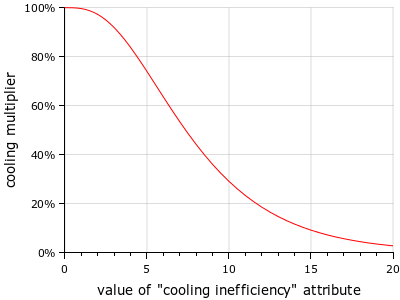
"cooling inefficiency": the higher this attribute is, the less effective your cooling systems are. Both active cooling and regular cooling will be multiplied by2 + 2 / (1 + exp(i / -2)) - 4 / (1 + exp(i / -4)), which forms the S-curve shown below. (v. 0.9.7)
-
-
These attributes relate to granting various types of scanning abilities, as well as combating them.
-
"atmosphere scan": not usable by the player, but indicates that the AI will treat this ship as if it wants to fly past planets to "scan" them. -
"cargo scan": sets the distance from which this outfit can be used to scan a ship's cargo. -
"cargo scan power": the cargo scanning range is 100 times the square root of this number. This means you need four scanners to get twice the range of one scanner. (v. 0.9.5) -
"cargo scan speed": The time it takes to complete a cargo scan is one second divided by the square root of this number. This means you need four scanners to get twice the speed of one scanner. (v. 0.9.5) -
"outfit scan": sets the distance from which this outfit can be used to scan a ship's outfits. -
"outfit scan power": the outfit scanning range is 100 times the square root of this number. This means you need four scanners to get twice the range of one scanner. (v. 0.9.5) -
"outfit scan speed": The time it takes to complete an outfit scan is one second divided by the square root of this number. This means you need four scanners to get twice the speed of one scanner. (v. 0.9.5) -
"scan interference": your odds of a scan of your ship discovering anything illegal you have are equal to1 / (1 + scan interference). For example, if "scan interference" is 3 you evade 75% of scans. -
inscrutable: if a ship has a nonzero value for this attribute, you cannot scan its outfits. (v. 0.9.7) -
"asteroid scan power": the asteroid scanning range is 100 times the square root of this number. This allows you to identify and target minable asteroids. (v. 0.9.9) -
"tactical scan power": the tactical scanning range is 100 times the square root of this number. This gives you information on the distance to your target, as well as the fuel, energy, heat, and crew levels of the targeted ship if it is within the tactical scanning range. (v. 0.9.9)
-
-
These attributes apply when partaking in boarding combat.
-
"capture attack": this outfit can be wielded by a crew member and adds this amount to their base strength of 1 when attacking another ship's crew. Each crew member can only wield one such outfit, and they will make use of the best outfits available in each combat round. -
"capture defense": this outfit can be wielded by a crew member and adds this amount to their base strength of 2 when defending against boarders. -
unplunderable: if set to 1, this outfit cannot be plundered (for example, for hand to hand weapons and outfit expansions). (v. 0.9.0)
-
-
The following attributes are used to allow an outfit to grant the ability to jump between systems, and alter the behavior of jumping.
-
hyperdrive: set this to 1 if an outfit is a hyperdrive. -
"scram drive": a scram drive can engage as long as your ship is moving in the direction of the target system. This value is how much your ship can be drifting relative to that vector and still be allowed to jump. -
"jump drive": set this to 1 if this outfit is a jump drive. -
"jump speed": how slow your ship must be moving in order to jump. -
"jump fuel": how much fuel the ship consumes when using this outfit to jump. The default is 100 for hyperdrives, 150 for scram drives, and 200 for jump drives. Unlike other attributes, the jump fuel of multiple outfits will not stack. Instead, the lowest jump fuel among all installed outfits will be used. (v. 0.9.7) -
"jump range": how far a ship can jump when using this outfit. The default jump range is 100. As with jump fuel, jump range does not stack between outfits. The outfit with the highest jump range will dictate the farthest a ship can jump. If a ship has multiple outfits with varying jump ranges, the one with the lowest jump fuel that is capable of making the given jump will be used. (v. 0.9.13)
-
-
These attributes can be used to alter the crew stats of a ship.
-
bunks: additional crew / passenger space. -
"required crew": turrets (and maybe other high-end outfits) can increase your crew requirements. It might also make sense to provide outfits, such as an android crew replacement, that reduce crew requirements (in exchange for energy consumption or some other penalty). -
"crew equivalent": adds to the crew value of the ship when government reputation changes are applied for interacting with their ships. For example, a ship with a crew of 10 and a crew equivalent of 5 would be treated as if it had a crew of 15 for reputation hits, or a drone with a crew of 0 that normally doesn't incur a reputation hit for being destroyed can be given a crew equivalent of 1 so that a government cares about the destruction of its drones. This attribute is able to be negative, reducing the impact of interacting with a ship. (v. 0.9.15)
-
-
These attributes define an outfit as occupying either a gun port or a turret mount on a ship, typically used for weapons.
-
"gun ports": any weapon that fires forward (i.e. is not a turret) must have a value of -1 for this attribute. That is how the game recognizes that it is a gun. Outfits cannot provide more gun ports, because each gun must be tied to a specific hardpoint in the ship model. The only way to get more hardpoints is to upgrade to a bigger ship. -
"turret mounts": as with"gun ports", any outfit that fits in a turret hardpoint must have a value of -1 for this.
-
-
These attributes grant cloaking and alter its aspects.
-
cloak: how quickly a cloaking device cloaks or uncloaks. When cloaking, this amount is added to your cloaking each frame until you reach 1, at which point your ship is fully cloaked. The opposite happens when uncloaking. -
"cloaking energy": how much energy it takes each frame to maintain cloaking. -
"cloaking fuel": how much fuel it takes each frame to maintain cloaking. -
"cloaking heat": how much heat is generated per frame to maintain cloaking.
-
-
These attributes grant resistance against special status effects.
-
"disruption resistance": an extra amount of shield disruption that this ship "bleeds off" every frame. (v. 0.9.9) -
"disruption resistance (energy | heat | fuel)": the amount of energy, heat, or fuel that disruption resistance draws, creates, or consumes when active. (v. 0.9.13) -
"ion resistance": an extra amount of ionization that this ship "bleeds off" every frame. (v. 0.9.9) -
"ion resistance (energy | heat | fuel)": the amount of energy, heat, or fuel that ion resistance draws, creates, or consumes when active. (v. 0.9.13) -
"slowing resistance": an extra amount of slowing damage that this ship "bleeds off" every frame. (v. 0.9.9) -
"slowing resistance (energy | heat | fuel)": the amount of energy, heat, or fuel that slowing resistance draws, creates, or consumes when active. (v. 0.9.13) -
"discharge resistance": an extra amount of discharge damage that this ship "bleeds off" every frame. (v. 0.9.15) -
"discharge resistance (energy | heat | fuel)": the amount of energy, heat, or fuel that discharge resistance draws, creates, or consumes when active. (v. 0.9.15) -
"corrosion resistance": an extra amount of corrosion damage that this ship "bleeds off" every frame. (v. 0.9.15) -
"corrosion resistance (energy | heat | fuel)": the amount of energy, heat, or fuel that corrosion resistance draws, creates, or consumes when active. (v. 0.9.15) -
"leak resistance": an extra amount of leak damage that this ship "bleeds off" every frame. (v. 0.9.15) -
"leak resistance (energy | heat | fuel)": the amount of energy, heat, or fuel that leak resistance draws, creates, or consumes when active. (v. 0.9.15) -
"burn resistance": an extra amount of burn damage that this ship "bleeds off" every frame. (v. 0.9.15) -
"burn resistance (energy | heat | fuel)": the amount of energy, heat, or fuel that burn resistance draws, creates, or consumes when active. (v. 0.9.15) -
"piercing resistance": this value subtracts from the piercing value of any incoming projectiles. For example, if an incoming projectile has a piercing value of 50% (.5) and you have a piercing resistance of 20% (.2), then the projectile will only pierce by 50% - 20% = 30%. (v. 0.9.13)
-
-
These attributes reduce the impact of incoming damage according to the equation
1 / (1 + protection). That is, a total value of 1 will cut incoming damage in half, while a total value of 2 will cut incoming damage to a third of its original value. These values are capable of going down to -0.99. (v. 0.9.13)-
"disruption protection": protects against incoming disruption damage. -
"energy protection": protects against incoming energy damage. -
"force protection": protects against incoming hit force. -
"fuel protection": protects against incoming fuel damage. -
"heat protection": protects against incoming heat damage. -
"hull protection": protects against incoming hull damage. -
"ion protection": protects against incoming ion damage. -
"piercing protection": protects against incoming piercing projectiles by reducing the amount of piercing by the above equation. -
"shield protection": protects against incoming shield damage. -
"slowing protection": protects against incoming slowing damage. -
"discharge protection": protects against incoming discharge damage. (v. 0.9.15) -
"corrosion protection": protects against incoming corrosion damage. (v. 0.9.15) -
"leak protection": protects against incoming leak damage. (v. 0.9.15) -
"burn protection": protects against incoming burn damage. (v. 0.9.15)
-
-
These attributes can be used to cause outfits to incur a daily cost on or income for the player.
-
"maintenance costs": how many credits per day are spent to "maintain" this outfit. Maintenance is paid for any owned ships or outfits. Overdue maintenance costs will not impact the efficiency of an outfit or ship. (v. 0.9.11) -
"operating costs": how many credits per day are spent to "maintain" this outfit. Differs from"maintenance costs"in that operating costs are only applied to actively in use outfits and ships, meaning parked ships or outfits in cargo won't charge the player. (v. 0.9.11) -
"income": how many credits per day are gained from this outfit. Income is gained for any owned ships or outfits. (v. 0.9.15) -
"operating income": how many credits per day are gained from from this outfit. Differs from"income"in that operating income is only gained from actively in use outfits and ships, meaning parked ships or outfits in cargo won't provide income for the player. (v. 0.9.15)
-
-
These are miscellaneous attributes capable of being added to outfits.
-
"ammo": if an outfit is not a weapon but is able to carry ammunition, that outfit should specify the ammo that it holds. This makes it so that if you sell the outfit carrying the ammunition, it will automatically sell any ammunition that would go over capacity instead of preventing the sale of the outfit. (v. 0.9.5) -
drag: please do not create outfits that reduce a ship's drag, because if the drag becomes zero or negative it can cause problems. -
installable: if set to a value below zero, this outfit cannot be installed. From v. 0.9.0 to v. 0.9.15, the trading panel displayed these outfits as "harvested materials." Starting in v. 0.9.15 this behavior is handled by theminableattribute. -
minable: if positive, the text "This item is mined from asteroids," will appear on the outfit in the outfitter. The trading panel will also display these outfits as "harvested materials." (v. 0.9.15) -
map: number of hyperlinked star systems that are mapped by this outfit. -
"radar jamming": how much resistance this ship has to radar tracking. The missile's chance of maintaining its lock is proportional to is"radar tracking"value divided by (1 + the ship's"radar jamming"). (v. 0.9.1) -
"self destruct": a value between 0 and 1, representing the probability that a ship will self destruct when you try to plunder it or, after succeeding in boarding it without it self destructing, try to capture it. That is, the probability of successfully boarding a ship with self destruct is(1 - "self destruct"), and the probability of both boarding and capturing it is(1 - "self destruct")^2. (v. 0.9.0)
-
An outfit that provides a weapon contains an extra set of attributes inside a weapon tag. These attributes must be placed in the weapon block to have any effect. If you have multiple weapon blocks in one outfit, they are just merged together; that doesn't make an outfit provide two different weapons. Some weapon attributes have special formats:
-
sprite: the path to the sprite, relative to the "images" folder, and not including the frame number or extension (e.g. "projectile/flamethrower", not "images/projectile/flamethrower+0.png"). The sprite field can also have "child" elements, which include:-
"frame rate" <fps#>: animation frames per second. -
"frame time": game ticks per animation frame. A game tick is 1/60th of a second. This is an alternative way of specifying frame rate; if you specify both the last specification will be used. -
delay: number of animation frames to delay in between loops of the animation. For example, a four-frame animation with a delay of 4 and a frame rate of 8 FPS will play the animation for half a second, then pause for half a second, then repeat. -
"start frame" <frame#>: which frame to start the animation at. -
"random start frame": start the animation at a random frame (e.g. so if you fire a bunch of projectiles, they won't all be pulsing through the animation in unison with each other). -
"no repeat": the animation stops after it has played through once. (If "rewind" is also specified, it will play forward, then play backward, then stop.) -
rewind: the animation plays forward, then reverses, rather than looping back to the beginning when it reaches the end.
-
-
"hardpoint sprite": the sprite (which ought to be very tiny) to draw on top of the hardpoint where this weapon is installed, to show what direction the weapon is pointing in. Generally, this should only be used for turrets, because the gun hardpoints on many ships are already designed to look like guns. This sprite definition can use any of the same animation values as the ship sprite. (v. 0.9.7) -
"hardpoint offset": The distance, in screen pixels, between the center of the hardpoint sprite and the point that projectiles should emerge from. Assuming the gun barrel is at the very top of the sprite, this will be 25% of the sprite's height in pixels. The weapon's range is effectively increased by this amount. (v. 0.9.7)- For versions v. 0.9.9 and later, can be an x, y coordinate relative to the center of the hardpoint sprite, e.g.
"hardpoint offset" -1.2 8.7, in order to accommodate asymmetric hardpoint sprites. Axes orientation is the standard Cartesian, where+xis "rightward" and+yis "upward."
- For versions v. 0.9.9 and later, can be an x, y coordinate relative to the center of the hardpoint sprite, e.g.
-
sound: a path to a sound, relative to the "sounds" folder, and not including the extension or the loop specifier (e.g. "laser", not "sounds/laser~.wav"). The sound file must be a mono (not stereo) WAV file with 16-bit, 44100 Hz encoding. -
ammo: if specified, an outfit which provides ammunition for this weapon. Each time it is fired, one outfit of that type is removed from your ship.- For versions v. 0.9.11 and later, a number following the ammo name will change how many units of that ammo are consumed upon firing the weapon. An ammo usage of 0 is possible, which results in the ammo outfit needing to be installed to fire, but never being consumed.
-
icon: for secondary weapons, the icon that will be shown along with this weapon's ammunition count. -
Effect objects are created for various stages of a projectile's existence:
-
"fire effect": created when this weapon fires (such as a smoke cloud from a missile launch). You can specify a number to create more than one instance of the effect. -
"live effect": created while the projectile is in flight. You can specify the number of times this effect will be created, on average, during the projectile's lifetime. (v. 0.9.0) -
"hit effect": created when this projectile hits something. You can specify a number to create more than one instance of the effect. You can also specify multiple different hit effects. -
"target effect": created on any impacted ships. As with"hit effect", a number can be specified to create more effects and multiple target effects can be used. If a ship was impacted through an explosion, the number of effects created is scaled with the damage. (v. 0.9.15) -
"die effect": created if this projectile reaches the end of its lifetime without hitting anything.
-
-
"submunition" "<weapon>" <count#>: if the projectile reaches its end of life, create a new set of projectiles based on the given weapon outfit. The damage and hit force associated with a parent projectile is the sum of both its own damage and hit force attributes, and those of its submunitions, except in the case of self-referential submunitions where only the damage of the parent projectile is used. A count can also be provided to increase the number of new projectiles created. The following lines can optionally be added as a "child" of the submunition:-
"facing" <angle#>: an angle in degrees that is added to the parent projectile's angle to determine the submunition projectile's angle. Excluding this line means that the submunition always generates with the same angle as the parent projectile. (v. 0.9.15) -
"offset" <x#> <y#>: an x,y coordinate pair that cause the submunition projectile's generated location to be shifted from the parent projectile's death location by the given number of units in the x and y directions. Axes orientation is the standard Cartesian, where+xis "rightward" and+yis "upward." (v. 0.9.15)
-
-
stream: this tag (just the word by itself, no value following it) makes a weapon fire in "stream" mode (multiple copies of this weapon take turns firing) even if it is susceptible to anti-missile. (v. 0.9.0) -
cluster: this tag (just the word by itself, no value following it) makes a weapon fire in "cluster" mode (all copies of the weapon fire at the same time, rather than alternating). (v. 0.9.0) -
safe: this tag (just the word by itself, no value following it) will prevent this projectile from accidentally damaging any allied ships, even via explosions. If a ship is explicitly targeted, or an enemy, it will still be damaged. (v. 0.9.9) -
phasing: this tag (just the word by itself, no value following it) enables the projectile to only hit the intended target (instead of perhaps colliding with a closer ship in the line of fire). If a ship has no target, then a phasing projectile will hit any hostile ship in the line of fire. Asteroids - even if targeted - are not hit by phasing weaponry. (v. 0.9.9) -
"no damage scaling": this tag (just by itself, no value following it) prevents any damage scaling associated with blast damage from being applied: the nominal damage and hit force values are dealt at the center of the blast and at the very edges. (v. 0.9.9) -
"gravitational": this tag (just by itself, no value following it) causes all ships impacted by this weapon to receive the same amount of hit force, as opposed to hit force decreasing in its effectiveness against heavier ships. (v. 0.9.13) -
"parallel": this tag (just by itself, no value following it) causes this gun to fire in parallel when installed on a ship. This tag has no effect on turrets. See the gun port definition for more information on parallel firing behavior. (v. 0.9.13)
Ordinary weapon attributes (those that take a number as an argument) include:
-
lifetime: how long the projectile lasts before it "dies." -
"random lifetime": a random number of frames up to this amount will be added to each projectile's lifetime. (v. 0.9.2) -
velocity: initial velocity of the projectile, relative to whatever fired it (which may be a ship or a "parent" projectile of which this is a submunition). -
"random velocity": a random amount up to this number will be added to the projectile's initial velocity. (v. 0.9.0) -
acceleration: projectile's acceleration, per frame. If this is nonzero, it should be coupled with a nonzerodragto limit the projectile's total speed. -
drag: percent loss of speed per frame. For example, a projectile with an acceleration of 1 and a drag of .1 will have a maximum speed (acceleration / drag) of 10. -
turn: If the projectile is homing, how much it is allowed to turn each frame to seek its target. Otherwise, it will always turn by this amount, which can be used to create spinning projectiles or other effects. -
inaccuracy: the maximum error, in degrees, in a projectile's firing angle. Inaccuracy limits a weapon's effectiveness at long range but can also make it look a bit more "natural" and unpredictable. -
"turret turn": the number of degrees that this turret rotates per frame. (v. 0.9.7) -
The calculation for the range of a weapon involves multiplying its base lifetime by its base velocity. This value is what is used by the AI to determine when to fire the weapon given the distance to the target. The AI will also take any random velocity into account when aiming the weapon in order to properly lead the target. These base values may not always be entirely accurate as to how the AI should use a weapon though. Such situations may include weapons with acceleration and drag values that cause a projectile to travel much faster or slower than the base velocity, or weapons with very high inaccuracies that make using them at range impractical. In such situations, the following two attributes can be used in order to get more favorable results in how the AI uses the weapon (v. 0.9.13):
-
"range override": If provided, this value will be used to determine when the weapon should be fired instead of the normal range calculation. This will also be what is shown for the range of the weapon in the outfitter. -
"velocity override": If provided, this value will be used to determine how far to lead the target when firing. The higher this value, the less the AI will lead its target.
-
-
"firing energy": the energy cost to fire this weapon. -
"firing force": the thrust generated by firing this weapon. -
"firing fuel": fuel consumed when this weapon fires. -
"firing heat": heat produced when this weapon fires. -
"firing hull": hull destroyed when this weapon fires. (v. 0.9.13) -
"firing shields": shield depleted when this weapon fires. (v. 0.9.13) -
"firing ion": ionization added when this weapon fires. (v. 0.9.13) -
"firing slowing": slowing added when this weapon fires. (v. 0.9.13) -
"firing disruption": disruption added when this weapon fires. (v. 0.9.13) -
"firing discharge": discharge added when this weapon fires. (v. 0.9.15) -
"firing corrosion": corrosion added when this weapon fires. (v. 0.9.15) -
"firing leak": leak added when this weapon fires. (v. 0.9.15) -
"firing burn": burn added when this weapon fires. (v. 0.9.15) -
"relative firing energy": the energy cost to fire this weapon fires as a percentage of the ship's energy capacity. (v. 0.9.13) -
"relative firing fuel": fuel consumed when this weapon fires as a percentage of the ship's fuel capacity. (v. 0.9.13) -
"relative firing heat": heat produced when this weapon fires as a percentage of the ship's heat capacity. (v. 0.9.13) -
"relative firing hull": hull destroyed when this weapon fires as a percentage of the ship's total hull. (v. 0.9.13) -
"relative firing shields": shields depleted when this weapon fires as a percentage of the ship's total shields. (v. 0.9.13) -
reload: how many frames this weapon takes to reload: 1 means it fires every turn (e.g. most beam weapons), and 60 means it fires once per second. -
"burst count": how many projectiles this weapon can fire in a row at a higher reload rate ("burst reload"). The burst will reload fully afterreload * # of shots firedframes from the first shot of the burst, making the reload time for a full burstreload * "burst count"frames. (This is technically the same as a non-burst weapon, as it effectively has a burst count of 1.) The number of frames between the end of a full burst and the start of the next burst is"burst count" * (reload - "burst reload"). (v. 0.9.0) -
"burst reload": how many frames this weapon takes to reload between projectiles in a burst. This value must be less than the fullreloadvalue. For example, a weapon with areloadof100,"burst count"of2and"burst reload"of5will fire on the 1st and 6th frames, then on the 201st and 206th frames, and so on. The fraction of time that a burst weapon spends firing is("burst reload" - 1) / reload, where the weapon is considered firing on each frame where it has fired a projectile or is reloading the next projectile in the burst, with the final projectile in a burst being the end of the firing period. (v. 0.9.0) -
homing: How good this weapon is at seeking its target:-
0: no homing.
-
1: projectile loses its homing ability if no longer facing toward the target.
-
2: dumb homing (always try to turn to point toward the target).
-
3: stop thrusting if you miss the target, in order to turn back towards it in a tighter loop.
-
4: rather than moving directly towards the target, calculate an interception point based on the projectile's speed and the target's current speed.
-
-
Tracking attributes (as of v. 0.9.1) control how well a projectile seeks targets, and accept values from 0 to 1:
-
"infrared tracking": how well this projectile tracks targets based on their heat. That is, hot targets will be easier to track. -
"optical tracking": how well this projectile tracks objects based on their size. That is, large targets will be easier to track. -
"radar tracking": how well this projectile tracks targets using radar (which ships can resist if they have"radar jamming"). -
tracking: a form of tracking that is constant, regardless of the ship's size, heat, or radar jamming ability.
-
-
"missile strength": how hard a projectile is for an anti-missile to destroy. If this is 0, the projectile cannot be destroyed by anti-missile. -
anti-missile: weapon's ability to shoot down missiles. The anti-missile succeeds if a random integer less than this value is greater than a random integer less than the missile's strength. -
"split range": when the projectile is within this range of its target, it will split into its submunitions. (If no target was selected when the weapon was fired, this does nothing.) -
"trigger radius": how close a projectile must be to a hostile target to trigger its explosion. This only makes sense to use with weapons with a"blast radius"at least as big as their"trigger radius". -
"blast radius": all ships (friendly and hostile) within this radius are damaged if this projectile explodes. Note: anything with a blast radius will show up on radar, like missiles do. Beginning in v. 0.9.9, any weapon with a blast radius is subject to damage scaling - objects closer to the center of the blast take more damage. Weapons with a trigger radius have their nominal damage boosted a small amount to compensate.

-
"hit force": how much thrust is applied to a ship when this projectile strikes it. If this is negative, the ship is pulled towards the projectile. Hit force associated with blast damage is also scaled. Ships with a greater mass are pushed around less by the same hit force value than a ship with a lower mass, unless the"gravitational"tag is present. -
piercing: a value between 0 and 1, controlling what fraction of the weapon's damage "pierces" through shields and does direct damage to the hull instead. When the target's shields are still up, shield damage will be(1 - piercing) * "shield damage"and hull damage will bepiercing * "hull damage". Beginning in v. 0.9.13, piercing is capable of having values greater than 1, but any value over 1 will be treated as 1. (When combined with piercing resistance, this can allow for a ship that can resist against all normal forms of piercing by having a resistance of 1, but a projectile with a piercing value greater than 1 could still hurt that ship.) -
"damage dropoff": an attribute that can take one or two values denoting ranges at which this weapon's damage begins to change. The first value provided is the minimum dropoff range and the second value provided is the maximum dropoff range. Before the minimum range the weapon deals normal damage, while after the maximum range the weapon deals damage according to the dropoff modifier. Between these two ranges damage output changes linearly. If no second value is given then the maximum dropoff range becomes the range of the weapon. (v. 0.9.13) -
"dropoff modifier": a value that dictates how a weapon's damage changes over range if the"damage dropoff"attribute is present. Values between 0 and 1 will result in reduced damage over range, while values greater than 1 are allowed and result in increased damage over range. (v. 0.9.13) -
There are several damage types, and a weapon may have more than one type. Generally, most weapons include shield and hull damage, as a ship's shields mitigate incoming damage, and without hull damage, the target cannot be eliminated. The normal damage types consist of the following:
-
"shield damage": how much damage a projectile does to shields. -
"hull damage": how much damage a projectile does to the hull of ships or minables. -
"disabled damage": how much damage a projectile does to hull while the target is disabled. If omitted, the damage dealt while the target is disabled is the same as the normal hull damage. If included, this damage amount overrides the normal hull damage. (v. 0.9.15) -
"minable damage": how much damage a projectile does to minable objects. If present, this value is used in lieu of hull damage. (v. 0.9.15) -
"heat damage": how much heat is added to a target when struck by this projectile. If the target's shields are up, heat damage is cut in half. -
"fuel damage": how much fuel is removed from a target when struck by this projectile. If the target's shields are up, fuel damage is cut in half. (v. 0.9.9) -
"energy damage": how much energy is removed from a target when struck by this projectile. If the target's shields are up, energy damage is cut in half. (v. 0.9.13)
-
-
All of the above damage types also come in "relative" forms that scale the exact amount of damage dealt depending on the stats of the ship impacted. (v. 0.9.13)
-
"relative shield damage": shield damage that gets scaled according to the max shields of a target. A value of 0.5 means that one shot should take out 50% of the target's shields, regardless of how strong the target's shields are. Suggested that relative damage types be used on system hazards as a way to make hazards that affect all ships to a reasonable degree without crippling smaller/weaker ships (unless of course that is the intended effect). -
"relative hull damage": hull damage that gets scaled according to the max hull of a target ship or minable. -
"relative disabled damage": disabled hull damage that gets scaled according to the max hull of a target. (v. 0.9.15) -
"relative minable damage": minable damage that gets scaled according to the max hull of a target minable. (v. 0.9.15) -
"relative heat damage": heat damage that gets scaled according to the max heat capacity of a target (the point at which it becomes overheated). If the target's shields are up, heat damage is cut in half. -
"relative fuel damage": fuel damage that gets scaled according to the fuel capacity of a target. If the target's shields are up, fuel damage is cut in half. -
"relative energy damage": energy damage that gets scaled according to the energy capacity of a target. If the target's shields are up, energy damage is cut in half.
-
-
There also exist various damage over time damage types. Each of these damage types dissipate at a rate of 1% per frame. For example, a ship that takes 10 ion damage will lose 10 energy that frame, 9.9 energy the next frame, 9.801 energy the next, and so on until ionization tapers off to 0. That means the total energy loss from that one ion impact will be 10 + 99% * 10 + 99% * 99% * 10 + ... = 10 / 1% = 1000 energy.
-
"ion damage": how much ionization is added to a target when struck by this projectile, draining the target's energy over time. If the target's shields are up, incoming ion damage is cut in half. Beginning in v. 0.9.15, ionization also causes the weapons of a ship to have a chance to jam when firing. The jamming chance is equivalent toionization / (energy % * 220), whereenergy %is the percentage of energy that the ship has left relative to its energy capacity. The jamming chance caps out at 50%. Jammed weapons must go through another reload cycle before being able to attempt to fire again. -
"disruption damage": how much "shield disruption" is added to a target when struck by this projectile. Shield disruption causes a ship's shields to only block1 / (1 + .01 * disruption)of incoming weapon damage, while the rest pierces through the shields and damages the hull. For example, if a ship has accumulated 10 disruption, about 9% of damage will leak through to the hull. If the target's shields are up, incoming disruption damage is cut in half. (v. 0.9.0) -
"slowing damage": how much slowness is added to a target when struck by this projectile. Slowness multiplies the ship's turn rate and acceleration by1 / (1 + .05 * slowness). If the target's shields are up, incoming slowing damage is cut in half. (v. 0.9.0) -
"discharge damage": how much discharge is added to a target when struck by this projectile, draining the target's shields over time. Incoming discharge damage always has maximum effect regardless of the state of the target's shields. (v. 0.9.15) -
"corrosion damage": how much corrosion is added to a target when struck by this projectile, draining the target's hull over time. If the target's shields are up, all incoming corrosion damage is ignored. (v. 0.9.15) -
"leak damage": how much leak is added to a target when struck by this projectile, draining the target's fuel over time. If the target's shields are up, all incoming leak damage is ignored. (v. 0.9.15) -
"burn damage": how much burn is added to a target when struck by this projectile, increasing the target's heat over time. If the target's shields are up, incoming burn damage is cut in half. (v. 0.9.15)
-
In order for anyone to buy your new outfit, it must be added to one of the "outfitter" objects. For example, if you are writing a plugin you could include this in one of your data files:
outfitter "Syndicate Advanced"
    "My Fancy New Outfit"
    "My Other Fine Outfit"
Any outfits you list will be appended to the outfits currently in the list you named. So, the above example would make two new outfits available on all planets that have the "Syndicate Advanced" outfits.
In Escape Velocity, the classic series of games that Endless Sky is patterned after, there were some outfits that were so powerful compared to their size that there was no reason not to install them if you could afford it: for example, outfits that took no space and improved your acceleration and turn rate, or very small outfits that boosted your shields considerably. As a result, those games needed to put a limit on how many of each outfit could be installed.
In Endless Sky, I'm attempting to have the balancing happen naturally, without putting fixed limits on how many copies of an outfit you can install. For example, that means that more powerful outfits tend to be larger or much more expensive (or both), and may have other side effects like generating a lot of heat or requiring more energy than other alternatives.
However, it is still quite possible to do things like buying a bulk freighter and installing 30 outfits expansions, which then lets you pack in an absurd number of shield generators. If outfits were provided that could increase your shield or hull strength, or your weapon or engine capacity, it would be very hard to keep the game balanced - a Bactrian freighter would have the capacity to be far more powerful than any warship, just because of its large cargo space.
So, when creating new outfits, it's important to keep in mind not just what you think would be cool, but whether your new outfits will be unbalanced. If you're creating a weapon that is so good that no ship will want to install anything else, that's a balance problem.