Connection Troubleshooting - MyShiLingStar/ACNHPokerCore GitHub Wiki
You are here because you receive an error message. Life is not daijoubu for you today.
Before you start troubleshooting, understanding what is needed will help you diagnose your problem faster.
Here are a few things needed in order for ACNHPokerCore to work.
If you are using sys-botbase:
A) A stable Wifi connection for both your computer and Nintendo Switch that is on the same Network.
Decent enough signal strength without any random disconnecting for both your computer and Nintendo Switch.Unique IP addresses for both your computer and Nintendo Switch that is inside the same Network.An open TCP/IP port 6000 for the connection.
B) Sys-botbase running properly on your Nintendo Switch that is running Atmosphère customized firmware.
You need to boot up your Nintendo Switch in custom firmware mode for sys-botbase to work.Having the "Home" button of your connected Joy-Con light up during boot. Indicating that sys-botbase is running.

If you are using USB-botbase:
C) A proper USB cable that allows data transfer
Do not use some shitty cables that only provide charging.If you are unsure, use the one that comes with the "Nintendo Switch Pro Controller".
D) USB-botbase running properly on your Nintendo Switch that is running Atmosphère customized firmware.
Boot up your Nintendo Switch with custom firmware.Having the "Home" button of your connected Joy-Con light up during boot. Indicating that USB-botbase is running.
E) A correct libusbK driver is installed on your computer.
Your Nintendo Switch needs to appear in Windows' [Device Manager] when power on and connected.
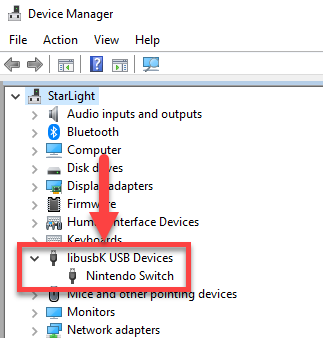
Here are the most common connection errors that you could get :
Unable to establish connection!
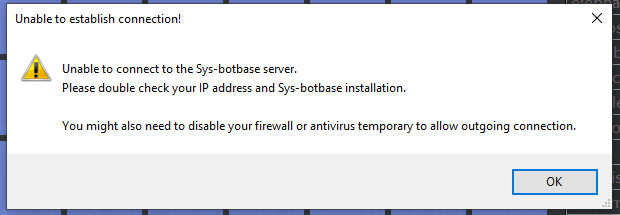
This is a general connection error. It means the connection is unsuccessful.
It means part A) is not working.
Here are the things that you should check first:
- The IP address of your Nintendo Switch might be wrong.
You might have typed it wrong. Or the IP address has changed and you are unaware of it.
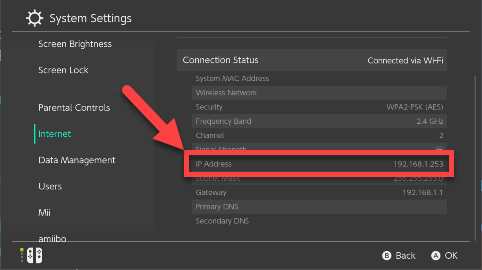
-
Your Nintendo Switch and computer are NOT on the same network.
This might happen if your location has multiple access points.
Try to redo all the wireless connection settings on both your Switch and computer. Make sure they are connecting to the same access point. -
If you are on a vacation and using your Hotel's wifi network, they might have blocked the connection.
You could set up your own wifi hotspot using your phone and connect both your Nintendo Switch and computer to it. -
Your firewall or antivirus software might have blocked the connection.
Please try disabling them. Or look for a white-list or exclusion setting and add ACNHPokerCore to it.
Where are you, my socket 6000?
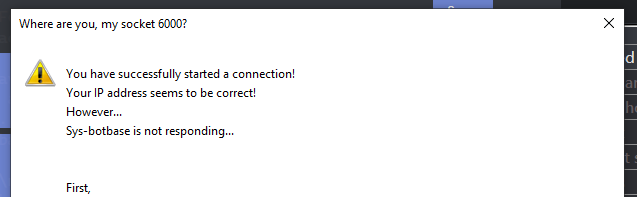
This is an error for sys-botbase not functioning.
It means the connection seems to be successful. But sys-botbase is not responding.
It means part B) is not working.
Here are the things that you should check first:
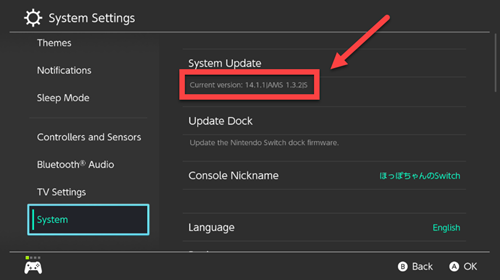
- Your Nintendo Switch is not in CFW mode.
Sys-botbase only runs in CFW. Please check your "Current version:" and make sure you are in CFW mode.
- The IP address of your Nintendo Switch might be wrong.
You might have typed it wrong. Or the IP address has changed and you are unaware of it.
-
Sys-botbase might have crashed and stopped working.
Please try rebooting your Nintendo Switch. Then retry the connection. -
If you are on a vacation and using your Hotel's wifi network, they might have blocked the connection.
You could set up your own wifi hotspot using your phone and connect both your Nintendo Switch and computer to it. -
Your firewall or antivirus software might have blocked the connection.
Please try disabling them. Or look for a white-list or exclusion setting and add ACNHPokerCore to it.
Sys-botbase validation
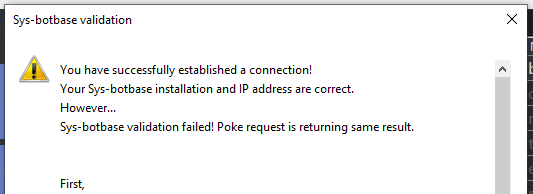
This means the connection is successful. And Sys-botbase is responding.
However, the data received seems to be incorrect.
Here are the things that you should check first:
-
You have not booted the game up.
Please try to connect once your game has started. -
You are running an old version of the game.
ACNHPokerCore is usually updated to support the latest version of the game.
Please try to update the game version. -
You have another cheat or mod installed that interferes with Sys-botbase.
Please try holding down the "L" button on your Joy-con while booting up the game. -
Sys-botbase might have crashed and stopped working.
Please try rebooting your Nintendo Switch. Then retry the connection. -
The game just received a new update. (Extremely unlikely)
Please be patient while I will try to update the application to support the new game version.
Receive some other error? Please open an issue with the error message attached.
Preferably with a screenshot and a detailed description of what you are doing.
I will try my best to respond to you when I am free.