Docker compose - Monadical-SAS/oddslingers.poker GitHub Wiki
Running Oddslingers with docker-compose
Install Docker Compose
apt install docker docker-compose
# OR on mac:
brew install docker docker-compose
Documentation
Docker-Compose
Docker-compose is a tool that allows to declaratively define a collection of Docker images that run together on a simulated network.
Docker-compose uses docker-compose.yml files to define a group of services and their interactions.
Oddslingers is a project that was initially developed with separate code, data and configuration in the /opt directory. It is important to understand this work philosophy to realize the docker-compose file design.
In the project directory you will find other folders like:
- bin: for management commands executables.
- data: to store the variable data like redis and logs data.
- database: to store data like postgres database.
- etc: it contains the configuration files for the different services.
- core: it is the main python application folder.
For more information read Folder Locations page.
The nginx service defined in the compose file is as follows:
  nginx:
    image: nginx:alpine
    ports:
      - 80:80
      - 443:443
    links:
      - "django"
    volumes:
      - ./etc/nginx:/etc/nginx
      - ./data/certs:/opt/oddslingers.poker/data/certs
      - ./core:/opt/oddslingers.poker/core
In the nginx service definition we can notice the volume mappings are linked to a directory in the project root.
For example,
- /etc/nginx is mapped to /opt/oddslingers.poker/etc/nginx.
- /opt/oddslingers.poker/data/certs is mapped to the same directory in the host system.
- The same applies to /opt/oddslingers.poker/core
Th django service depends on postgres and redis services.
  django:
    build:
      context: .
      dockerfile: ./Dockerfile
    image: oddslingers:django_base
    working_dir: /opt/oddslingers.poker/core/
    command: ./manage.py runserver 0.0.0.0:8000
    stdin_open: true
    tty: true
    depends_on:
      - postgres
      - redis
    environment:
      ODDSLINGERS_ENV: DEV
      POSTGRES_HOST: postgres
      REDIS_HOST: redis
    env_file:
      - .env
      - .secrets.env
    expose:
      - 8000
    volumes:
      - ./data:/opt/oddslingers.poker/data
      - ./core:/opt/oddslingers.poker/core
Django service uses a custom image based on a python3.7. The docker-compose building process basically replicates the two first steps of the Manual setup and it tags the image as oddslingers:django_base. This image installs the different Django and python requirements for running oddslingers.
You can rebuild this image by running this command:
docker-compose build
Note: Dramatiq and yacron services are supported on this image too.
Commands
Run all Oddslingers stack with docker-compose
git clone https://github.com/Monadical-SAS/oddslingers.poker.git
cd oddslingers.poker

# Add to /etc/hosts  ->   127.0.0.1    oddslingers.l

docker-compose run django ./manage.py migrate
docker-compose run django ./manage.py createsuperuser
docker-compose up

# Open http://oddslingers.l
These commands will run oddslingers automatically. Every service defined in docker-compose.yml will be created and you will be able to manage them globally or individually.
The next picture shows the containers and their dependencies.
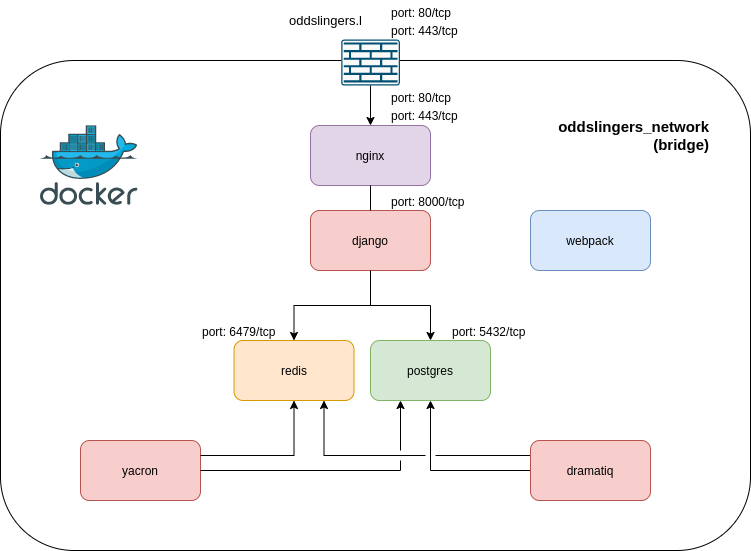
Run specific services using docker-compose
You can manage each service individually starting, stopping or restarting.
For example:
docker-compose stop postgres
docker-compose start django
For oddslingers these services are created:
- django
- dramatiq
- yacron
- redis
- postgres
- webpack
Setting an init system
Supervisor
For automatically starting oddslingers you can configure docker-compose as a supervisor task.
- First install supervisor and enable it for automatic start by using systemctl. For more information read Supervisord page.
# In Ubuntu
apt install supervisor
systemctl enable supervisor
- Oddslingers includes an example config file in etc/supervisor/docker-compose-dev.conf. You can replace /etc/supervisor/supervisord.conf with this file. Remember to rename it.
- Reload supervisor config.
supervisorctl reload
This config file basically use the command "docker-compose up" to start the stack when the server up.
[program:oddslingers]
priority=1
command=docker-compose up
directory=/opt/oddslingers.poker/
autorestart=true
startretries=3
stopwaitsecs=10
stopasgroup=true
stderr_logfile=/opt/oddslingers.poker/data/logs/docker-compose.err.log
stdout_logfile=/opt/oddslingers.poker/data/logs/docker-compose.out.log
Later, you will be able to manage this like you manage other supervisor services:
supervisorctl stop oddslingers
supervisorctl start oddslingers
docker-compose restart option
If you don't want to manage the stack as a supervisor task but you require that the oddslingers stack restarts automatically it is possible add an option to docker-compose services definition. You only need to add "restart" option setted as "always" in each service in the docker-compose file. For example, for postgres and nginx services:
  nginx:
    image: nginx:alpine
    restart: always
    ports:
      - 80:80
      - 443:443
    links:
      - "django"
    volumes:
      - ./etc/nginx:/etc/nginx
      - ./data/certs:/opt/oddslingers.poker/data/certs
      - ./core:/opt/oddslingers.poker/core

  postgres:
    image: postgres:12-alpine
    restart: always
    env_file:
      - .env
      - .secrets.env
    expose:
      - 5432
    volumes:
      - ./database/postgres:/var/lib/postgresql/data