Employee Details - MikeBlyth/mission_database GitHub Wiki
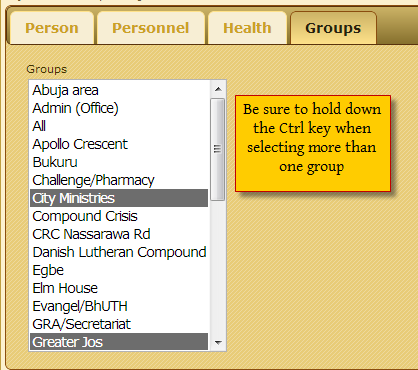
While the most basic and common employee data can be entered on the family form, there are some things that are only shown on the individual's own form. These include health data, group membership, and more personnel data. In part, this helps separate the more public from the more confidential information. To access the individual member/employee form, select the person from the members list, then click on the edit link.

That will open the employee/member form. The first tab of this form, Person, is the same as the one in the family form. The second, Personnel, is only available to those users whose roles include "personnel." It adds the personnel comments field for any notes.

The third tab, Health, is visible only to those with the "health" role (e.g., the organization's nurse). Others can neither see the form nor access the information on it in other ways.

The last tab, Groups, controls which groups a member belongs to. [Limitation: Until the selection control is updated, you need to hold down the Ctrl key while clicking on the group names to add or remove them. Clicking without holding that key will unselect any already-selected groups.]