Campaign map - MasterOogwayHomebrew/RTW-M2TW-Campaign-Editor GitHub Wiki
The Map tab draws the campaign map tile by tile from the game's own map files: one square = one tile. Big maps load too - a tester's mod with a map of 5456 x 2464 tiles (map_regions.tga pixels; vanilla Rome is 255 x 156) opened fine.
-
Wonders (Rome): a double click on one opens its window as the game shows it (picture, title, what it does,
descriptions) with View it in 3D; Put a wonder here (right click on land) places one of the game's seven
- Rome's exe and REX know no other types ("dont recognise this wonder type"), so a new wonder is one of them, its model, picture and texts changed if you like.
-
Special places (both games, with REX / M2EX): a right click on land > Special place here... - a model of
the campaign map (a tower, fort, keep, wonder, mine... any
.casundermodels_strat, or your own) drawn on that tile by the engine, and a window of its own like a wonder's: its name on a hover, a double click opens it at the screen's left on the game's own scroll (Medieval II's painted frame, Rome's rolled scroll) - its picture across the whole width, its name, what it gives (one or two lines), its text, and at the foot who holds it now. A name and a text are a must; the picture, what it gives and money a turn for its holder are yours to add. The window shows the game's window as it will look. Its gold diamond on the map: a double click or a right click edits or deletes it; drag it with the left button to move it to another tile. Keep for Apply, then Apply writes it (one backup): the windows' pictures indata/ui/ce_places, the model into the mod, and one script in the game'sscript/modules(ce_places_<mod>.nut) that runs only for this mod. - Delete from the map (right click): a resource, a fort, a watchtower or a wonder goes with its line; a character of any faction goes with everything under him (his army or fleet); one placed but not written yet is simply taken out. A man on the family tree stays on it as one who died before the start, so his wife and children keep their place. Refused, in plain words: a faction's leader or heir (make another one first). A town is not deleted alone - every region of the map needs its town; give it to another faction instead (Give this town to).
- A town or character sign grows as the mouse comes near it - softly, the nearer the bigger, and from further away when the map is zoomed far out (the signs are small then), so the mouse need not hit the sign itself.
- Wheel zooms (to the point under the mouse), right drag moves the map (everywhere; a right click without moving opens the menu) - past its edges too: the map is a free canvas with an empty field around it, and zooms out smaller than the window; Fit puts it back in the middle.
- Find: type part of a name - a town or region by its file name or the name players read in the game (also the name shown for its owner), a port, a general, agent or fleet, a unit in an army (e.g. "hastati"), a fort, a resource. Pick a hit (click, or Down then Enter) and the map zooms in close on it and a ring blinks round it for a few seconds (video).
- The legend is a palette: the signs on a button (+) are tools - click one (it turns yellow), then click the map to make one there: a town (first its region's names; then the click puts the town and the land around it becomes the new region's - paint more with a left drag), a port (click a coastal land tile: the port of the region there moves to it, a region without a port gets one), a fort or watchtower, any resource, an army, fleet or agent for any faction: click the tile and a window asks for the name - the faction is the one holding that land (a fleet: the owner of the nearest land), and another can be picked there. No faction has to be picked first. The faction you make or edit gets it in its list on Units & armies (give it its units there); any other faction's army or fleet starts with the first unit of its nearest army or fleet (its general's bodyguard) and is written with the next Apply. While a sign is picked it rides under the mouse (framed green where it may go, red where not - the reason beside it). Click the button again to stop; hiding the legend puts the picked sign down too. The legend is open on the first start (Signs and tools on the bar hides it; it scrolls by the wheel or a drag). Every named character shows as a general's flag, as in the game (family members too); an army in a town stands as a flag on the town's roof (no army, no flag). Towns, ports and characters grow under the mouse.
- An army in a town is one flag on the town's roof - part of the town's sign (a square cloth with a triangle cut into its right edge, at the sign's upper right corner); it is not dragged: right click the town > Take the army out or Take an agent out (each agent there by name and what he is), then click a free tile (Esc or a right click stops).
- A double click on an army or a fleet opens its units (any faction's in a window of its own; in Edit faction your own opens in Units & armies) - Suggest there draws an army at random from the units the faction trains (a fleet: its ships) by the numbers beside it: how many units, their upkeep together at most (0: no limit; kept for next time); on a fort, the army that holds it (a fort has no buildings - an empty one says how to man it: drag an army onto it).
-
A double click on a town (or the right click's This town...) opens the town's own window, both games, any
owner (Maps too). A region with no town in descr_strat.txt (the rebel village the game makes by itself)
shows a short note instead, with an owner to pick and Write its town (the rebels too) - after the next Apply it
opens like any town. Otherwise the window holds: its owner (hand it to another faction), city or castle (Medieval II), level,
population, and two tabs that switch the same window: Buildings - the Buildings tab's own editor (the
game's pictures, a level picked per chain, checked the way the game checks it: too small a town, a castle-only
building in a city, one temple per town) - and Garrison - the Units & armies tab's card picker (click a card to
add it, a garrison card to take it out; Suggest picks units the owner trains there - how many and the upkeep limit beside it; a named character keeps
his bodyguard; a town nobody holds gets a captain; a town whose garrison is written in its own block -
garrisoned_army, no captain, as some mods do for every town - shows that garrison and keeps it there; a town with nobody on its tile says who stands next to it, outside the walls). Preview, then Keep for Apply: the changes go into the session's list and Apply changes in the main window writes them with everything else waiting, in one go (one backup set, one Undo this write). Another town opens in the same window. The right click's Edit this town in Edit faction still opens its owner in Edit faction. - Right click on the map: on a town - Give this town to any faction (written with the next Apply; its characters go to the old owner's other towns, a captain's garrison goes with it; a town left empty - the rebels' garrison leaves with them - gets 3 to 6 of its new owner's units drawn at random, their upkeep together at most 750, so you need not fill it by hand); on a free tile - New army / agent / fleet here with the land's owner already picked (a new army's Make him a general gives him the faction's general's bodyguard as his first unit and writes him as a named character outside the family tree - a general with his own name and a star on the map, not a captain; Rome's rebels keep a captain); on a new character not written yet - Take it out.
- Layers (a panel under its button - it stays open while you tick, a second press or a click aside closes it): Colours, one mode at a time - Political (the owners), Diplomacy (how the faction stands towards each owner), Religion (Medieval II: each region in its main religion's colour, paler where the majority is small; the legend counts the regions), None (the ground only); Shown: borders, towns and ports (their squares and anchors - off for a clean look at the land), town names, the rebels' land coloured (it is barely tinted otherwise, so the factions stand out), characters, resources, relief, rivers, a tile grid when zoomed in. The mouse over a man shows his name beside it, over a resource its name as players see it.
- The line under the map describes the tile under the mouse: region, owner, ground, and whether an army may stand there.
Maps (the first button of the top row) shows the map alone - no faction to pick, every faction alike: drag any faction's towns, ports, armies, agents and fleets with the left button; right click a town to give it to any faction, an army or a fleet for Its units... (the card picker in a window of its own - a general keeps his bodyguard), a character to delete him, an empty tile for a new army, agent or fleet of any faction. Resources, forts, wonders and regions work as on the Map tab. Preview, then Apply changes (a backup first; Restore puts every byte back). New faction / Edit faction show all the tabs again; the map's changes stay until written.
Delete a town with its region: right click the town > Delete this town with its region.... The window asks where its land goes:
-
stays as a wasteland (Rome with REX, Medieval II with M2EX - the default there): the region and its land stay,
nobody's - no town, no owner, no rebels, no economy; the AI never goes for it, no victory counts it, no neighbour
grows, armies can still walk over it. Its line in
descr_regions.txtsayswastelandwhere the town's name stood (the engines' own way), its town pixel takes the region's colour. Medieval II takes no resource in a region without a town (its log says the tile is invalid): when resources lie on that land, one question asks whether to delete them or keep them (Check mod files names the ones kept). An island can go too. The map shows it grey while the window is open. The way back: right click its land > Give it its town here... - its name, the name players see and its owner; a village is written on that tile as the game makes it. - goes to a neighbour (the only way of the original exes): its land (and its port) becomes the neighbour's it shares the longest border with - or pick another neighbour, in the window or on the map (while the window is open the map shows the town's region red, the one taking its land yellow and the other neighbours green; click a green one).
Either way every file that ties them follows: its block of descr_regions.txt, its settlement in descr_strat.txt (the owner's next
town becomes its capital; the rebels in the town go with it, a faction's characters there stay in the field), the
mercenary pools, the win conditions and Medieval II's music lists, in every campaign that uses the same map;
its block of the regions section at the end of descr_strat.txt (roads, forts, watchtowers: handed to the
neighbour's block, or gone with a wasteland - the game takes forts only in a region with a town); map.rwm is
removed. Written at once after Preview, with a backup. Refused in plain words: a faction's last
town (it would die as the campaign loads), a region a faction rises in by an event, an island with no land
neighbour. A campaign script that names the town or region is no reason to refuse: its lines that only list the
place (an invasion's region list) or flash it (settlement_flash_start / stop, console_command) are commented
out with ; in the same write - as the game's own authors took Tbilisi out of the Mongols' list - and a condition
naming it (if I_SettlementOwner ...) is named in a warning to change by hand; an invasion left with no region is
named too. The names lookup and the names texts keep the old names (an unused name harms nothing).
Many towns at once: switch Select on, select the towns (a box, or clicks), right click > Delete the N selected town(s) with their regions.... The same choice: their regions stay as wastelands (with an engine), or the window lists each town with the region its land goes to - the neighbour that stays it shares the longest border with; a region surrounded only by regions deleted with it follows them. On the map: red = goes, yellow = takes land; pick a row (or click a red region) and it turns orange, its neighbours that could take its land green - click one to give it the land. The same refusals as above (a faction's last towns counted together). One write, one backup: Undo this write puts all of them back.
Merge regions (the switch on the map's bar - for a map with more regions than you want): only the regions' borders and the town names are drawn meanwhile. Click the region that stays (yellow), then its neighbour that goes (red) - a click on a third region makes that one the red, a click on a picked one drops it, Clear starts again - and Merge them under the map: the red region's town and region go from every file as above and all its land (and port) becomes the yellow one's; the yellow region stays as it is. Written at once with a backup (Undo this write, Tools > Restore); the switch stays on for the next pair, and off again everything shows as before. The same refusals as deleting a town (the two must touch; a faction's last town, an event region); script lines naming B are commented out as when deleting a town.
- Picking a faction's towns (Towns on the map... in Factions): a click on a town adds it or takes it out, Done goes back.
- A left drag moves characters, towns and ports. The target turns green or red: an army needs land it may stand on (no sea, mountains, dense forest, river, ford or cliff) or a town no other army holds; a fleet needs sea; an agent any land.
-
Moving a town or port repaints its pixel in
map_regions.tga, moves the characters in it, and deletesmap.rwm- the game builds it again on the next start (the first start takes a little longer).
Tick Select on the Map's bar and choose in what... the kinds it takes: towns, armies, agents, fleets (ticked at first), resources, forts. Then, as in a strategy game, drag a box with the left button: everything of those kinds inside it is added to what is selected (hold Shift to take it away instead). A click adds one thing (Shift + click takes it away); a click on nothing clears the selection. The political colours and borders go meanwhile; selected towns and their regions turn yellow, selected characters, resources and forts get a yellow frame; the right button drags the map. A right click offers:
- Give the N selected town(s) to any faction (written with the next Apply);
- Delete the N selected character(s) from the map (their armies too) - a faction's leader, heir or a man on its family tree stays (the line under the map names them); Delete the N selected resource(s) / fort(s);
- Add a building to the N picked town(s)..., Garrisons for the N picked town(s)... and City / castle and level for the N picked town(s)... - all open the window Buildings and garrisons for many towns with the picked towns already chosen (the third tab makes them city or castle - Medieval II - and / or of another level: the buildings converted the game's way, the governor's building and the population follow);
- Pick every town of (on a town), Unselect all. One Undo takes a whole job back.
Untick Select and nothing stays selected (the same everywhere: switching Layers > Resources or Edit regions off drops what was picked or waiting for a click, hiding the legend puts its picked tool down).
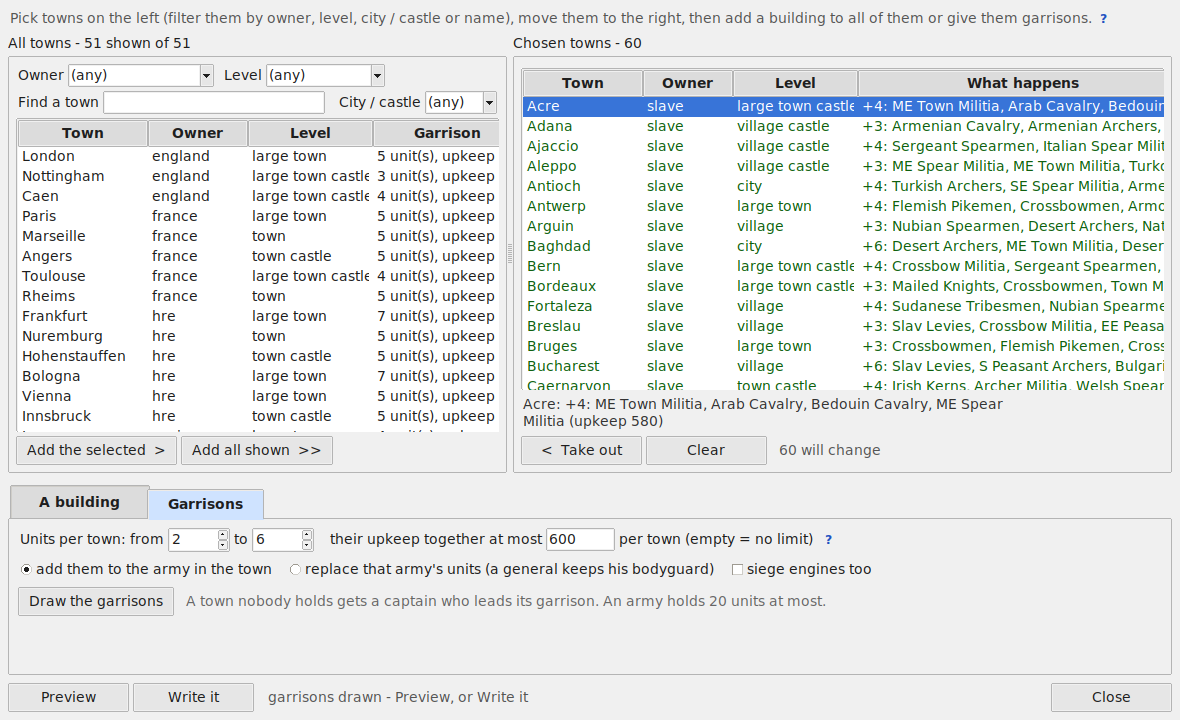
The same window is in Tools and on the Buildings tab (Many towns at once...). All towns of the campaign on the left - filter them by owner, level, city / castle (Medieval II) or name, Add all shown - the chosen ones on the right, with What happens in each:
-
A building: pick the chain and level. A town that has the chain gets it raised (never lowered, unless you pick
set it to this level). Left out, with the reason: a town too small for the level (
settlement_min), a castle's building in a city or a city's in a castle (Medieval II), a level the owner'srequires factions { }does not allow (tick the box to put it in anyway - the game loads such a building, the owner just cannot build it again), a port building where the town has no port on the map. Take a building out removes a chain. The governor's building (walls / castle) follows the town's level and is not offered. -
Garrisons: units per town from 3 to 6 (any range up to 20) and the upkeep they may cost together per town
(750 at first; 1000... - empty for no limit). Draw the garrisons picks them at random from the units each owner may
recruit (its
ownershipand a recruit line of some building; generals' bodyguards and - unless ticked - siege engines left out); a rebel town draws from its region's rebel type (descr_rebel_factions.txt- the units the game itself raises there in a revolt; without one, from the rebel armies nearest to it), so a Gallic town gets Gallic rebels. As many units as the game gives such a town sets the number by the town's level, the way the mod's own towns of that owner have them at the start (vanilla's rebel towns: Medieval II village 5, town 4, large town 7, city 6; Rome 3, 3, 4, 4). With only units the town's own buildings recruit (on by default) a town gets only what its own buildings recruit for its owner - no catapult in a village without a siege workshop, no heavy infantry without barracks; a town that recruits none of them gets the two cheapest unit types (peasants, levy spearmen). Draw again for others. They join the army that holds the town, or replace its units (a general keeps his bodyguard); a town nobody holds gets a captain.
Preview shows every line, Keep for Apply puts it in the session's list; Apply changes in the main window
writes descr_strat.txt with everything else waiting, with a backup - Undo this write / Restore gives it back.
Forts and watchtowers of descr_strat.txt (Medieval II, REX: fort x y ... permanent name ...) are drawn as small
towers, the top in the owner's colour; the mouse over one shows its name and whether it is permanent. No army or
agent is placed on a fort's tile. Barbarian Invasion's watchtowers (listed after the diplomacy) are drawn too.
Forts, watchtowers and wonders need no mode of their own - everything is in the legend and on the right click. New: click a fort or a watchtower in the legend, then a land tile on the map. Move: drag one to another tile (land, no town, port or other fort there). Remove: right click it - Delete from the map. A new one copies the line of the nearest one the campaign already has (only the tile changes); a campaign with none (vanilla Rome and Medieval II) gets it written in the regions section. In that section (Barbarian Invasion's watchtowers) a new or moved one always goes under the block of the region its tile lies in - the game skips one written under another region. Written with Preview / Apply, backed up like every change.
Tick Regions: every region in its own colour.
- New region...: names, builder, rebels, region tags (hidden resources - picked from the mod's own under the arrow beside the box, a click adds or takes one out, or typed), triumph, farming, owner, settlement level. The tool picks an unused colour.
- Paint its land with a left drag (brush 1-6 tiles). Right click a region to paint with that one - the same brush moves the border between two existing regions. (sea) at the end of Paint with paints the region map's sea (a border cut into a sailable river); land that belongs to no region can be painted to a region.
- Place its town (and Place its port on the coast). For a region of the map picked in Paint with the same buttons move its town or port to the tile clicked; a wasteland gets its town there (then its port).
-
Preview lists everything written:
map_regions.tga,descr_regions.txt, the name lookup, the region labels, the settlement,map.rwmremoved.
A new region is in the towns list at once: a new faction can start there, and an edited one can take it, all
in one Apply. Edit region... opens a region's data again. For a region of the map it holds its Owner at the start (who holds the town in descr_strat.txt - a change is written with the next Apply, as Give this town to; a region with no town in descr_strat.txt, the rebel village the game makes by itself, gets its town written for the owner picked, the rebels too) and both names of the region and its town: the names players see (written to the campaign's <campaign>_regions_and_settlement_names.txt with the next Apply) and the names in the files (changed at once in every file that names them, with a backup - asked first). Rename... beside the towns list on the Edit / New faction tab (or a right click on a town there) opens the same window.
Settlements tab: every region and its town, both names. Rename in the files... (also on the Map: Edit regions, right click the region, then Edit region...) changes the system names (Latium, Rome) everywhere the mod uses them - descr_regions, descr_strat, the names lookup and texts of every language, mercenaries, win conditions, campaign scripts, trait and ancillary conditions - as whole words; comments, descriptions, lines naming a faction of the same name and people's names (descr_names, names.txt, a character named like the town) stay. Preview first, a backup, map.rwm removed. Tip: keep the name players see and the name in the files alike.
Events... (top row) (both games): the campaign's descr_events.txt - historic messages, and
plagues, volcanoes, earthquakes at a place. Each event's date (Rome: years from the start and optionally summer or
winter, 14 winter; Medieval II: years from the start, or two the game picks one between, 210 220 - a date
the game would not read is refused; beside it the turn and the year it means, from the campaign's start_date and
timescale; a new event goes in date order - the games read the events as a queue, one put after a later event
never fires), its place (x, y; empty = a message only; Show on the map), the title and text
players see (historic_events.txt), the picture players see on the scroll (a historic event its own
ui/<culture>/eventpics/<event>.tga - Picture... puts yours in for every culture, sized like the game's; a
plague, volcano... shows its kind's disaster_<kind>.tga - Picture... replaces it for every event of that kind) and what it does in the game in plain words.
New event..., a right click on an event removes it (Ctrl / Shift + click picks many; Remove all... takes every one out), Preview, Keep for Apply (written by Apply changes with the rest, a backup first). Below the
list: the factions that appear later - they start dead (dead_until_resurrected in descr_strat.txt, no towns,
no characters) and come in by an event (emergent_faction with a date and a region the rebels hold, as Barbarian Invasion's
slavs - only those are offered), as the shadow of a faction
(the side that splits off it in a civil war, Barbarian Invasion's rebels of the empires) or splitting off a faction
in a revolt (Barbarian Invasion's Ostrogoths) - all of them only in Barbarian Invasion and Medieval II (plain Rome,
also with REX, stops reading descr_strat.txt at a faction that starts dead and crashes with a shadow and a split-off
one on a faction; Load offers to take such a line out of a plain Rome mod); the campaign script lines that wake one are shown too (Medieval II:
the Mongols and Timurids). Change... (or a double click) changes how a faction comes in - its date and region,
its partner, may come back after it dies (re_emergent), lives without towns (REX / M2EX's can_homeless: it stays in the game with no town instead of dying or becoming a horde); Another faction... makes a faction without towns
and characters appear later. Written with Keep for Apply and Apply changes, every file in step (descr_sm_factions, descr_strat,
descr_events).
Campaign script... (the Events window's bottom bar, both games): the campaign's own campaign_script.txt piece
by piece - each monitor (monitor_event / monitor_conditions ... end_monitor), loop, counter or command with the
comment right above it, its code beside the list. Take any out: a right click (the picked ones), Remove all...
for a mod made bare (an M2EX / REX mod that keeps only the map, factions and units). script / end_script stay, so
the game still finds the file. Preview, Keep for Apply, Apply changes - a backup first.
Trade goods on the map can be placed, moved and removed; one per tile. Show them with Layers > Resources: a bar opens under the map's buttons. New: click the resource in the legend on the right (or pick it in the bar and press Place new), then click a land tile on the map - a right click or Esc puts it back. Move: drag one. Remove: right click it > Delete, or click it (it gets a yellow frame), then Delete picked. A region's resources are the ones on its land; Region tags (hidden resources)... edits the region's tag line.
Religions per region (a town's right click on the Map: Religions of ...; with Select, the same shares for every selected region at once: Religions of the N selected regions...; or the Religions work, several lines picked); castles; agents such as merchants, priests and princesses.
A faction's religion (the Religion field of the Faction form) pulls what hangs on it along: the faction leaves
the old faith's buildings (temples and that faith's guilds - the religion X chains of export_descr_buildings.txt,
their levels and the priest lines in them) and gets the new faith's wherever a faction of that faith has them (one
of its own culture first, as a model), and its priest, bishop and cardinal on the campaign map take that
faction's figures. Preview lists every line; units and traits of the old faith (crusaders, jihad, the Pope's
favour) stay as they are - Preview says so.
New religion... (a town's right click on the Map, or the Religions work) adds a religion of your own - e.g. Judaism - everywhere the game needs
it: descr_religions.txt (its name and symbol), descr_religions_lookup.txt, text/religions.txt (without its
text the game crashes silently), its symbol in ui/pips, and every region's religions line at 0 %. It needs no
other religion: its symbol is drawn by the editor (its first letter on a disc of the colour you pick, in the
size of the game's own symbols) unless you take a copy of another religion's or a picture of yours. Temples of
its own (levels, 0 = none) makes a temple chain for it from nothing - temple_<name>, its religion line naming
the new faith, each level with the usual numbers of the mod's temples (another religion's own lines such as the
Pope's favour left out), built by the factions you pick, plain pictures drawn. Then give it its share per region
with Religions of... (each region adds up to 100) and, if you like, the factions that follow it. The game takes
at most 9 religions (vanilla has 5; REX / M2EX: no limit). Priests and traits of its own are not made - Preview
says which files still name only the old religions.
Barbarian Invasion (Rome's official expansion, and every mod made from it) has religions too - its beliefs
(Christianity, Paganism, Zoroastrianism). New religion... there writes a new belief into descr_beliefs.txt (its
tag, its three pips - drawn by the editor as the game draws its own: the symbol, and the same full-size symbol with the
game's own green arrow up (order) or red arrow down (unrest) laid on it at the bottom right; or the order and unrest pips copied from the belief picked and the level pip
your picture - and its name, order and unrest texts in text/expanded_bi.txt). Each region starts with its
shares of the beliefs - the last line of its block in descr_regions.txt (pagan 90 christianity 10, 100 in all) -
set the same way as Medieval II's (Religions of..., one region or many); during the game the buildings that carry
a belief (religious_belief <tag> <n>) and the characters' traits move them. Barbarian Invasion has no faction
religion line. Temples of its own makes a temple chain for the new belief from nothing, each level carrying it at
the strength the mod's temples give. Plain Rome has no religions.
Names by culture... (next to Edit region... on the Edit / New faction tab, and a town's right click on the Map: Names of by culture...) gives a town a
name for each culture of its owner, plus a name for every other culture. The engine (REX on Rome, M2EX on
Medieval II) renames the town when it changes
hands - as soon as a general takes it, and at each of its owner's turns. The tool writes it into the campaign's
campaign_script.txt (it makes one when the campaign has none; a script of the mod's own stays as it is around the
tool's block), with a backup like every write. Needs REX (Rome) or M2EX (Medieval II). Checked in the game on Medieval II with M2EX
(video).
The window shows it at once: take a town for a faction (on the Edit / New faction tab or by clicking it on the Map) and its label on the map changes to the name for that faction's culture; the towns list shows the name a town has now.
All towns' names... (on the Edit / New faction tab, in the per-town dialog and under Tools) shows every town in one table: one column per culture plus every other, the owner, its culture and the name shown now. Sort by any column, filter by a culture (towns with or without a name for it), by the owner's culture, by what waits for Apply, or search. Double click a culture's cell to type a name in place (Enter keeps it, Esc drops it, an empty cell removes it). Towns the mod's own campaign script renames are shown grey and are not edited here.
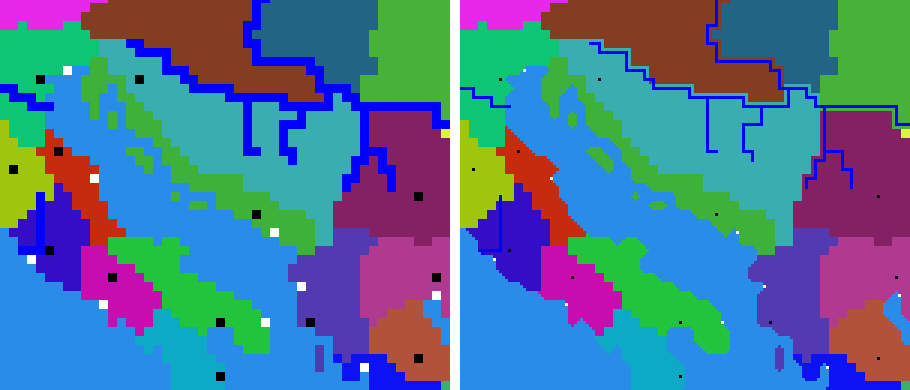
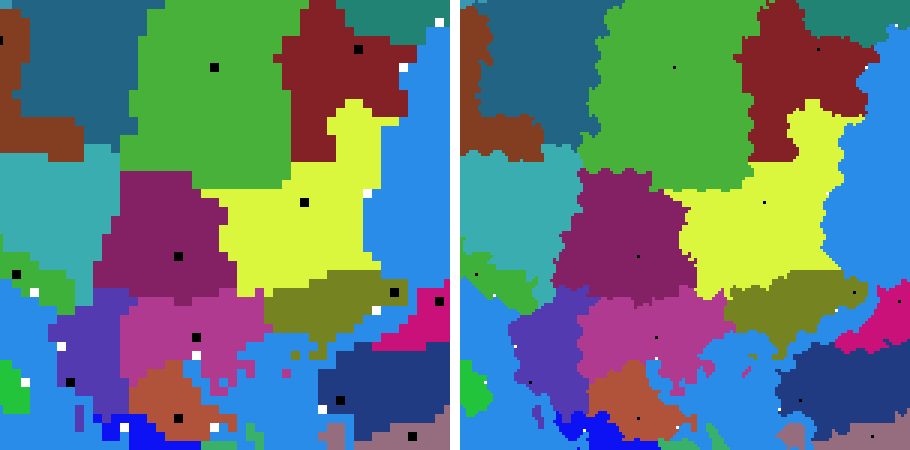
Bigger map (x3)... (on the map's bar, beside the zoom) turns every tile into a 3 x 3 block (both games). Its window says the map's
size now and after, asks for its values - fields for the hills and mountains (times higher), the smoothing of the lines (coast, rivers drawn as sea, borders, ground, climates: 1 smooth as water finds its level - the default, 0.67 lighter, 0 winding with every old tile's corner kept), narrow rivers kept open, crags on mountains, river valleys and volcano cones; each shows its default and range, a ? says what was tried in the game, Back to the defaults resets them; the shore by the water is the games' own and is not among them - and leads through five steps, one press each (Do step N): 1 the grid (every tile a 3 x 3 block, everything on
the map moved to its block's middle), 2 smoothing (coast, region borders - a border along a river stays on it -,
ground, climates), 3 heights (every sea point under the water and no land point under it: no saw teeth, no holes;
the ground's sea follows), 4 rivers (one pixel wide, on land only, ending on the last land tile at the water),
5 objects (towns, ports, armies, agents, fleets, resources on tiles they may stand on). Each step is written with
a backup and checked; between the steps the map is in Maps - look at it and fix what you want by hand
(borders after step 2, the coast before step 3, the ground after step 3), then the next step. Steps 2 and 3 take a
minute or two. The window may be closed between the steps: opened again it goes on where it stopped. Show every
change... lists the next step's files first; Put the old map back undoes every step at once (later: Tools >
Restore a backup...). Towns, ports, armies,
agents, fleets, resources, forts, watchtowers, wonders and event positions keep their places; every town keeps its
own region all round it, every port stands on the shore touching the sea and its region; the coast winds with bays
and capes, not in squares, and the heights follow the same coast; the borders between regions wind too, and every
region stays in as many pieces as before; a border that ran along a river stays on the new river (each bank
its own region's), and no lone pixel sticks out of a border; every tile keeps the ground type and climate of the old tile it lies in (a
forest stays a forest), the edges between them not in 3 x 3 steps; mountains only where the new heights stand high (a range's low edge becomes hills, or the ground beside it); land bridges stay unbroken; the relief is made the natural way - bent with the ground, crags on the mountains (plains stay flat), volcanoes
keep their cones, lakes get gentle banks, the shore takes the original map's own heights for three points on each side of the water's edge - the land by its real distance from the water, capes as low as the original's, the sea by the shore as deep as before, not three times deeper - and blends into the bigger map beyond them (no teeth along a diagonal coast, no flickering wedges or triangles of water cut into it, no islets, small pools on the land, slivers or land bridges in
navigable rivers; a river ends on the land touching the water, never on it; small islands and lakes keep their size and come out round, capes one tile wide stay whole; the sea along the coast is shallow; no cliffs and no beach - paint them where wanted), every
river in its valley, no slope steeper than the old map's steepest, the land round a town smooth -, and map_heights.hgt (the game's own
copy of the heights, read instead of the picture) is written at the new size; the hills, mountains and sea floor are
made 3 x higher so the slopes stay as steep (Hills 3 x higher; or keep the old heights, a flatter world: Heights as they are); rivers stay
1 pixel wide, bend round their corners and meander gently on straight runs, and run on to the new coast (stopping
there); every picture of the map and descr_terrain.txt follow, map.rwm is
removed. One backup; Put the old map back (or Restore) gives it all back.
Look it over yourself. The new map is drawn from the old one by rules, and no rule gets every map 100 % right - here and there a coast, a river or a border can come out a pixel off. When the map is written, a message says what to look at in Maps and in the game: coasts and river mouths (a stray pixel of land in the water or of water on the land), navigable rivers and narrow straits (still open), borders along rivers, every port on the coast, every town with its own land round it, mountains and passes. Small things are quick to fix by hand: the Map tab's Paint with brush for borders, the Terrain tab's Land and sea, heights and ground brushes for the rest. The message also lists what the editor could not do itself (script lines with tiles it cannot read for sure, a port it could not place).
 The campaign's scripts follow too: every place on the campaign map in
 campaign_script.txt (spawned armies and characters, reposition_character, move, the camera, reveal_tile, forts and resources made by console_command, 'near a tile' distances, 'in a rectangle' sizes) goes to its block; battle positions in the same script stay. Lines the editor cannot read for sure, and Lua / Squirrel scripts that place things by tile (not the engines' own interface scripts), are listed to check by hand.
Past 510 tiles the original exes need REX / M2EX.
The map's real size is shown under the map, bottom left.
Save picture... under the map saves the whole map as it is drawn now - the layers, colours and borders that are on, 8 pixels a tile, not the signs - as a PNG or TGA picture (for a forum post or a plan).
Mercenaries: Mercenaries... (top row), or a right click on the map > Mercenaries for hire in ..., shows who is for hire where (descr_mercenaries.txt), in two tabs. For hire in a region (the right click opens it on that region) makes the region's list the way a garrison is made: the mercenaries' cards on the left - a click adds one - and the units for hire there on the right - a click picks one for its numbers, a right click takes it out. A region shares its list with the other regions of its pool; the tab says which, and A list of its own takes the region out of the pool with a copy of the list (a region in no pool gets its own list with the first card). Pools - a pool is a group of regions that share one hire list. Pick a pool: its regions are selected on the map (Select switches on, they show yellow), so they are changed the map's own way - a box adds, Shift + box takes away - and Take the map's selection gives the pool exactly that (Add the map's selection only adds). New pool from the map's selection (also the map's right click with Select: New mercenary pool from the selected regions...) makes a pool of them; a region stands in one pool only, so it leaves its old one (a pool left without a region goes). Each unit for hire shows its numbers in plain words - how many at the start, at most, how fast they come back (one every N turns), the price, the experience, and in Medieval II the years, religions, crusading and events it needs; pick one to change them, Add another mercenary of the mod (units with mercenary_unit), take one out, rename or delete a pool. A mistake the game would stumble on is said in red; Preview, then Keep for Apply (the changes go into the session's list; Apply changes in the main window writes them with everything else waiting - one backup set, Undo this write puts them back); lines not changed stay as they were.
Change size... beside the map's size under the map adds rows or columns of tiles at any edge - left, right,
top, bottom - as deep sea (the map's own deepest water, in every picture: regions, heights and map_heights.hgt,
ground, climates, features, fog, roughness, the campaign's disasters.tga and radar maps when they are the map's
size), or cuts them off with a number below 0. Drag the edges on the map itself: while the window is open the
map's edges are an orange frame with a grip on each side - drag one out and the new sea shows blue, drag it in and
the part cut off shows dark; the window's numbers follow the mouse (typed numbers move the frame too). Paint land on
the new water with Maps and the Terrain tab.
Towns, ports, armies, agents, resources, forts, events and the campaign's scripts move with the map (grown at the
left or the bottom, every place moves by as many tiles); distances and rectangle sizes in scripts stay.
descr_terrain.txt gets the new size and map.rwm goes. What stands on the part cut off - a town, a port, an army,
an agent, a fleet, a resource, a fort, an event's place or a script's tile - is ringed red on the map and named in the
window as soon as the edge moves. Keep for Apply then asks first: Keep the cut for Apply takes them off with
the cut - a town goes with its region from every file (the part of its land that stays goes to the common
wasteland - nobody's land - with REX / M2EX, or to the neighbour region with the original game; land with no region
would stop the game), armies, agents, fleets, resources, forts, watchtowers, events placed there and the rebels standing there are
deleted, and family members (the leader, the heir, the family tree) are never deleted: they move to the nearest town
their faction keeps. A faction left without any town leaves this campaign with all its people - its place in the
faction lists, its diplomacy, its victory conditions and the events that make it rise go too - but it stays in the
mod (its units, pictures and other campaigns keep it), as both games' own prologue campaigns leave most factions out.
Nothing is written until Apply changes (bottom left): the cut is made at the write, after every other change
waiting, so you can still move what you want to keep off the cut part, or give such a faction a town that stays (right
click a town > Give this town to) - then it stays in the campaign and its family moves into that town. Not now
keeps nothing. What cannot go is said before any question: a region a faction rises in by an event, a family member
whose faction keeps a town but no room near it. Lines of the campaign's scripts that name a town or region cut are
commented out as when deleting a town (Medieval II's right edge with Baghdad and Mosul can be cut); lines that name
tiles, a condition naming a town cut, or the faction leaving are listed to change by hand. One backup; Undo this write (beside the status line)
or Tools > Restore a backup gives it all back. Lua / Squirrel scripts are listed to check by hand, as with the bigger
map.
The wonders (landmark lines of descr_strat.txt) show as golden pyramids - drag one;
a double click (or the right click's about it) opens its window as the game shows it, with View it in 3D; the
right click on free land has Put a wonder here, on a wonder Delete from the map.