Scaling - MarkusBordihn/BOs-Easy-NPC GitHub Wiki
The scaling screen empowers you to resize the NPC model dynamically in the X, Y, and Z directions, giving you full control over their dimensions.
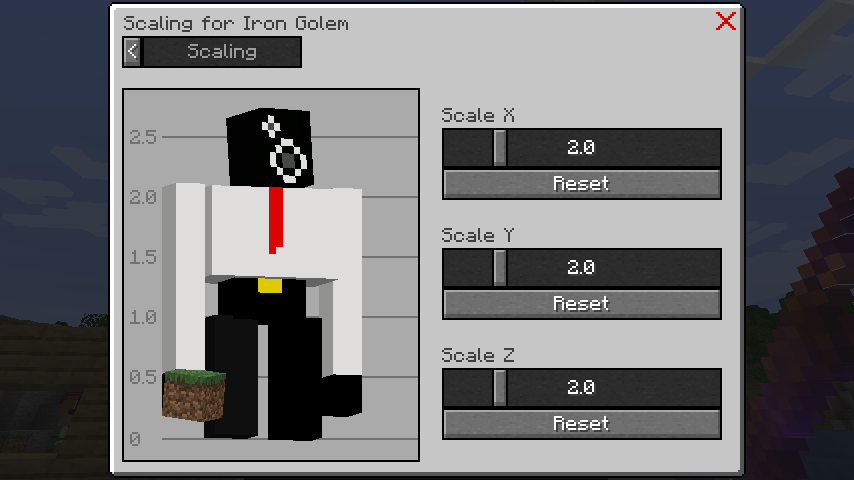
This process automatically adjusts the hitbox of the NPC to align with its new size, ensuring a proportional fit. 📦
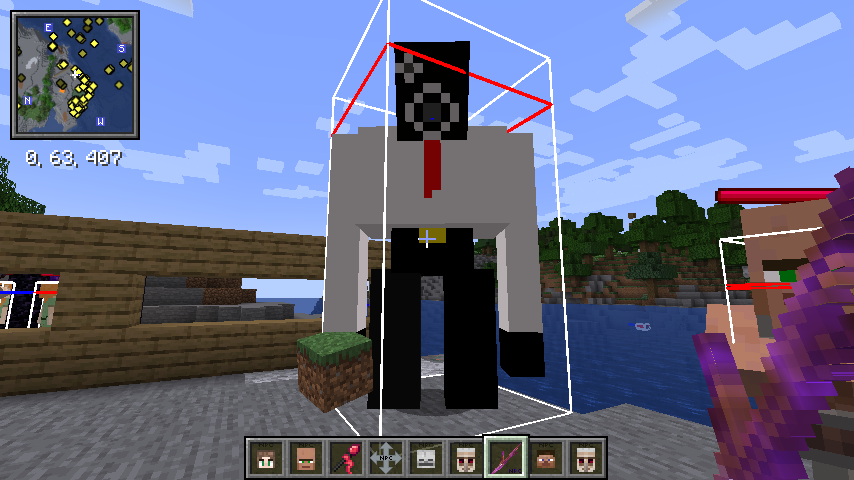
Keep in mind that for oversized NPCs, you may need to respawn them to ensure the correct hitbox size in certain scenarios. 🔄
✨ Since Version 6.x
You can now scale individual body parts of your NPC for even more customization! This allows you to create unique NPC appearances like large heads, long arms, or custom proportions.
Depending on your NPC model, you can scale different body parts:
Humanoid Models:
-
HEAD- The NPC's head -
BODY- Torso/body -
LEFT_ARM/RIGHT_ARM- Individual arms -
LEFT_LEG/RIGHT_LEG- Individual legs -
HAT- Hat layer (if applicable)
Other Models:
-
LEFT_FRONT_LEG/RIGHT_FRONT_LEG- Front legs (quadrupeds) -
LEFT_HIND_LEG/RIGHT_HIND_LEG- Hind legs (quadrupeds) -
TAIL- Tail (if applicable) -
LEFT_WING/RIGHT_WING- Wings (if applicable)
In the scaling configuration screen:
- Select the body part you want to scale
- Adjust the X, Y, and Z sliders for that specific part
- Enable Proportional Scaling to maintain aspect ratio while scaling
- Changes are applied in real-time for preview
✨ Since Version 6.x
The Proportional Scaling checkbox locks all three axes (X, Y, Z) together:
- ✅ Enabled: Adjusting one slider automatically adjusts the others proportionally
- ❌ Disabled: Scale each axis independently for unique shapes
This is useful when you want to maintain the NPC's proportions while making them larger or smaller.
✨ Since Version 6.x
You can scale individual body parts using commands for precise control:
Scale uniformly (same value for X, Y, Z):
/easy_npc scale <NPC> <ModelPart> <Scale>Scale with individual axis values:
/easy_npc scale <NPC> <ModelPart> <X> <Y> <Z>Examples:
Make the head twice as large:
/easy_npc scale @e[type=easy_npc:humanoid,limit=1] head 2.0Make arms longer (Y-axis stretched):
/easy_npc scale @e[type=easy_npc:humanoid,limit=1] left_arm 1.0 1.5 1.0
/easy_npc scale @e[type=easy_npc:humanoid,limit=1] right_arm 1.0 1.5 1.0
Make legs thicker (X and Z axes):
/easy_npc scale @e[type=easy_npc:humanoid,limit=1] left_leg 1.5 1.0 1.5Create a "chibi" style NPC (large head, normal body):
/easy_npc scale @e[type=easy_npc:humanoid,limit=1] head 1.5 1.5 1.5
/easy_npc scale @e[type=easy_npc:humanoid,limit=1] body 0.8 0.8 0.8- 🎨 Creative Designs: Combine different part scales to create unique NPC appearances
- ⚖️ Balance Proportions: Use proportional scaling for realistic size changes
- 🔧 Fine-Tuning: Use commands for precise, repeatable scaling values
- 💾 Save as Preset: Save your scaled NPC as a preset to reuse the configuration
⚠️ Model Compatibility: Not all model parts are available on all NPC types - the UI will show only compatible parts
- Scaling values range from 0.1 to 10.0 for each axis
- Very large or very small NPCs may have hitbox synchronization issues
- Custom model NPCs may have limited scaling support
- Some model parts may not be available depending on the NPC type