ManeStyle - ManeFunction/ManeTools-Unity GitHub Wiki
[ManeStyle] switches the default inspector to Mane layout: framed blocks, a fixed label column, and foldout groups. Put it on a MonoBehaviour, a ScriptableObject, or a custom inspector type. All ManeEditor subclasses inherit it.
using Mane.Unity;
using UnityEngine;

[ManeStyle]
public class TestComponent : MonoBehaviour
{
    [SerializeField] private string name;

    [Space]
    [SerializeField] private float health;

    [Header("Combat")]
    [SerializeField] private float damage;

    [Foldout("Advanced")]
    [SerializeField] private float critChance;
    [SerializeField] private float critMultiplier;
}
How blocks split
In a ManeStyle inspector:
Spacestarts a new visual block.Header("Title")starts a new block and adds a section title.NonBreakingSpaceadds the same gap asSpacebut does not split: the fields stay in the current block.Foldout("Title")starts aFoldoutBlock(persisted in EditorPrefs). Fields stay in that foldout until the nextSpace/Header/Foldout.
Without [ManeStyle], Foldout still draws a stock Unity foldout via the default inspector path.
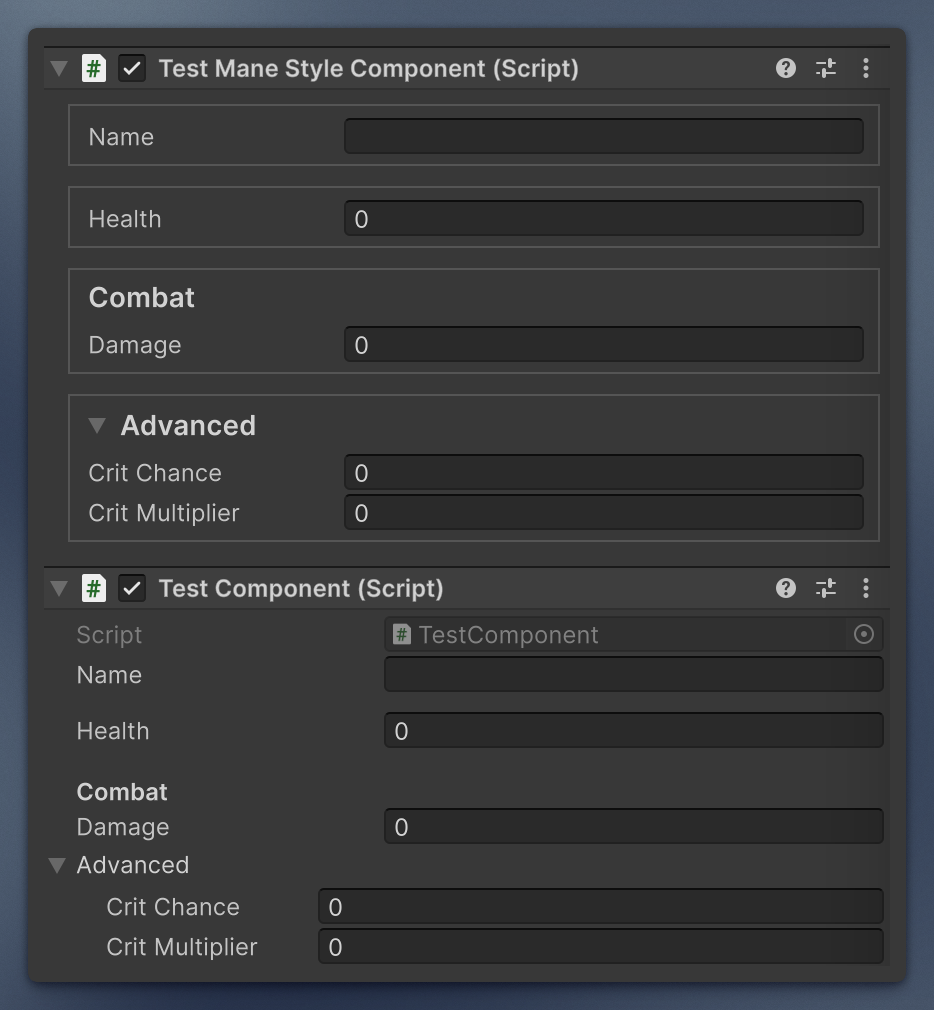
At first glance it can look bulkier and take more space, but for a large component it is a lifesaver that adds a strict visual structure. For a small one, use fewer splitters and you still gain that visual consistency.
Custom inspectors
Subclass ManeEditor (Mane.Unity.Editor), assign a UXML on the editor script, and override BuildInspector to bind controls. If the UXML field is empty, the inspector logs an error and stays empty.
using Mane.Unity.Editor;
using UnityEditor;
using UnityEngine.UIElements;

[CustomEditor(typeof(MyComponent))]
public class MyComponentEditor : ManeEditor
{
    protected override void BuildInspector(VisualElement root)
    {
        // Query named fields from the assigned UXML and bind them.
    }
}
Do not also put [ManeStyle] on a type that already has a custom ManeEditor with its own USS. The attribute is for default inspectors (or editors that should share Mane chrome).
Reusable editor controls
| Type | Use |
|---|---|
ManeEditorStyles.Apply(root) |
Attach USS (mie-root, optional field layout). |
ManeInspectorLayout.Fill(...) |
Build default Mane blocks from serialized properties. |
FoldoutBlock |
Framed foldout with persisted state. |
HeaderToggle |
Section checkbox that shows/hides content. |
LimitedIntField |
Int field with custom labels for 0 / negative. |
LimitedFloatField |
Same as LimitedIntField, but decimal. |
ChildFields.CreateRow(field, last) |
Row for a field that belongs to a parent field (see below). |
UIElementsTools.LoadUSS / LoadUXML load assets next to a script type.
Child fields
A field that belongs to the field above it, like the curve under an EasingCurve dropdown or the fields of a SerializeInterface instance, is drawn as a child field: a branch mark in a fixed 15px slot, then the field. ChildFields gives these the same layout everywhere.
This is the ManeStyle look. In a default inspector a SerializeInterface instance and the EasingCurve curve row follow Unity's own nested fields instead (no branch marks; for SerializeInterface also the fold arrow in the margin and indented children), so they sit next to a plain serializable class without looking different.
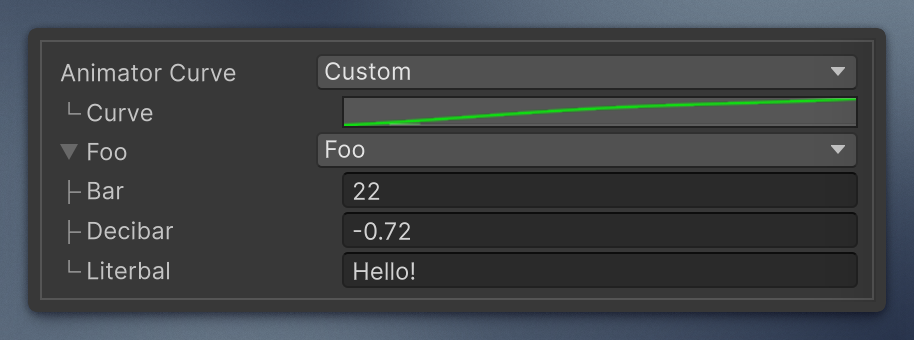
Wrap each child with ChildFields.CreateRow(field, last) and add the returned row where the child should go. The row attaches its own stylesheet, so nothing else is needed.
VisualElement parent = new();
parent.Add(ChildFields.CreateRow(new PropertyField(first), last: false)); // ├
parent.Add(ChildFields.CreateRow(new PropertyField(second), last: true));  // └
last: falsedraws├(ChildFields.MiddleMark) andlast: truedraws└(ChildFields.LastMark). A single child is alwayslast.- The mark is outside the layout flow, so a row is exactly as tall as its field and spacing matches standard fields.
- A wrapped
PropertyFielddrops its own left margin, so labels of every child start at the same x. Inside a ManeStyle inspector, its input also sits 6px further right than a standard input. - USS classes, if you need to style them:
mie-child-row,mie-child-branch,mie-child-content.