Amazon Kinesis Data Firehouse - MLKEREN/SOFTWARE-DOC-DEV-MIYA-KEREN GitHub Wiki
Use Amazon Kinesis Data Firehouse to easily capture, transform and deliver streaming data to Coralogix
As an AWS Partner Network (APN) Advanced Technology Partner with AWS Competencies in DevOps, we highly recommend using our services with the support of Amazon Kinesis Data Firehose. Amazon Kinesis Data Firehose is a fully managed service for delivering real-time streaming data to multiple data destinations, including Coralogix. You can use this service to easily transform logs and metrics to Coralogix through CloudWatch or CloudTrail without the need for structuring.
Enjoy the benefits of Amazon Kinesis Data Firehouse:
- Easily capture, transform and load streaming data without writing applications or managing resources.
- Enjoy built-in, fully managed error handling, transformation, conversion, aggregation and compression functionality.
- Benefit from unlimited delivery streaming of logs and metrics to Coralogix from multiple AWS services.
- Automatically provision and scale compute, memory, and network resources without ongoing administration.
- Save time with minimum maintenance and flawless integration.
With Amazon Kinesis Firehose, pricing is determined by the volume of data you ingest into the service. There are no set up fees or upfront commitments. There are four types of on demand usage with Kinesis Data Firehose: ingestion, format conversion, VPC delivery, and Dynamic Partitioning. Additional data transfer charges can apply.
In order to configure Amazon Kinesis Data Firehose, you will need your Coralogix Private Key.
Accessing your Coralogix Private Key
-
Access your Coralogix account at https://dashboard.coralogix.com/#/login/user.
-
Choose Data Flow in your toolbar, then API Keys in the dropdown menu.

-
On the API Keys page, copy the information in the Send Your Data field.

This section shows how to create a Kinesis Data Firehose delivery stream using the Kinesis Data Firehose console, with Coralogix as your destination.
Sign in to the AWS Management Console and open the Kinesis Data Firehose console at https://console.aws.amazon.com/firehose/.
- Choose Create Delivery Stream.
- On the Destination page, choose the following initial options.
- Source – Choose Direct PUT.
- Destination – Choose Coralogix.
- Delivery stream name – Type a name for the delivery stream.
- Scroll down to Destination settings and choose the following initial options.
- HTTP endpoint name – Type a name for the endpoint.
- HTTP endpoint URL – Choose the URL based on your region.
- Private Key – Enter your Coralogix Private Key.
- Content encoding – Select Disabled.
- Retry duration – Select 30 seconds.
- Parameters - optional. Click on the Add Parameters button to input optional and mandatory information. You will enter the parameter you want to change as the key and choose a new value.
- applicationName, subsystemName – In order to override the associated applicationName or subsystemName, enter the parameter you want to change as the key and choose a new value. The default is firehose.
- integrationType
- To send CloudWatch Metrics natively to Coralogix, set the value to CloudWatch_Metrics_OpenTelemetry070.
- To send CloudWatch Logs natively to Coralogix, set the value to CloudWatch_JSON.
- To send CloudTrail Logs natively to Coralogix, set the value for CloudWatch_CloudTrail.
- Content encoding – If using either CloudWatch Logs, CloudWatch Metrics or CloudTrail logs, change the content encoding to GZIP.
Find more information about configuring CloudWatch Logs on our Configure CloudWatch Logs page.
- Scroll down to Backup settings.
- Source record backup in Amazon S3 – We suggest selecting Failed data only.
- S3 backup bucket – Choose an existing bucket or create a new one.
- Buffer hints, compression, encryption – Leave these fields as is.
-
Scroll down to Advanced settings. Leave the fields in this section as is.
-
On the Review page, review your settings and then choose Create Delivery Stream.
This section shows how logs should be structured when sent directly to Coralogix through your Kinesis Data Firehouse delivery stream. Logs sent through CloudWatch or CloudTrail do not need any structure.
Structuring a log sent directly to Coralogix through your Kinesis Data Firehouse delivery stream
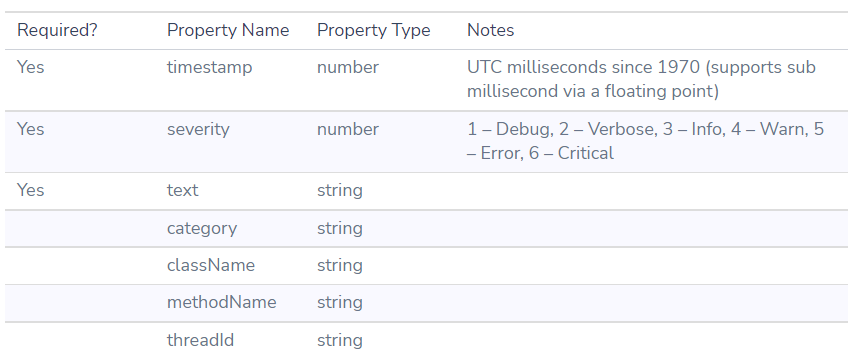
Find more information in our Coralogix Rest API documentation.