Implementation in Arduino IDE - LinjingZhang/XMC-for-Arduino GitHub Wiki
Overview
This repository contains the integration of Infineon's XMC microcontrollers into the Arduino IDE. Supported boards by this repository are listed under 'Microcontroller Boards' in the following section or in the sidebar. Boards currently in development are not listed here at the moment.
Installation Instructions
Prework for SEGGER J-Link
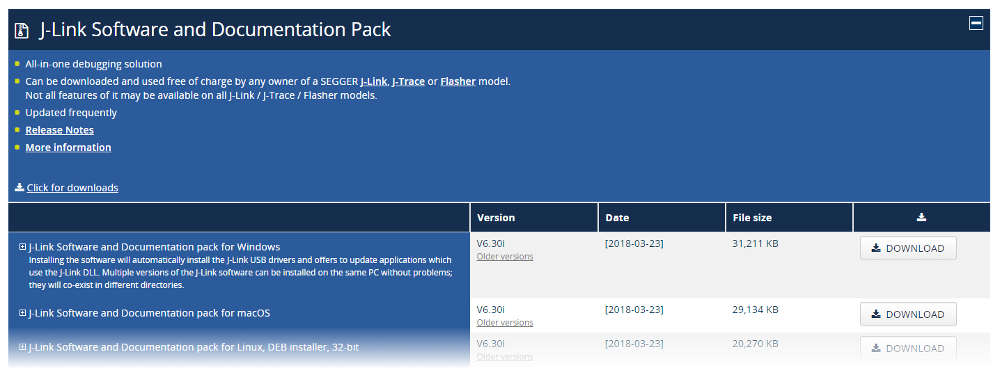
In order to use the Infineon XMC microcontrollers by this repository and program them, you need SEGGER J-Link installed on your PC. Please follow this link SEGGER J-Link and install the J-Link Software and Documentation Pack for your respective operating system (OS).
If you have already installed 'DAVE™ - Development Platform for XMC™ Microcontrollers', you might skip this step as you should have the respective drivers on your system.
Required tools
XMC-for-Arduino requires Python 3.x and the pyserial. Make sure Python is installed in your machine and available in the system path.
You can check if it was successfully installed by opening your command line or terminal and typing:
python --version
With pip available, install the mentioned packages from a terminal:
pip install pyserial
Integration in Arduino IDE
Please first download the Arduino IDE. This library only tested for Arduino IDE >=1.5, recommended to use Arduino IDE >=2.0.

Paste the following URL into the 'Additional Boards Manager URLs' input field under File > Preferences to add Infineon's microcontroller boards to the Arduino IDE.
https://github.com/Infineon/XMC-for-Arduino/releases/latest/download/package_infineon_index.json
Easier to copy (no clickable link):
https://github.com/Infineon/XMC-for-Arduino/releases/latest/download/package_infineon_index.json

To install the boards, please go now to Tools > Board > Boards Manager... and search for XMC. You will see options to install the board files for the microcontrollers. Click "Install" to add the boards to your Arduino IDE.

In the boards list Tools > Board, you will now find the supported XMC microcontroller boards.
Notes
- The differences of the boards included in this repository if compared to the Arduino boards
- Refer also to the LICENSE.md/txt file of the repositories for further information
- The Boot Kits have limitations if compared to the official Arduino boards (consult the XMC-for-Arduino Wiki for more information)
- XMC-for-Arduino support for 'arm-linux-gnueabihf' only until version 1.1.
Release packages from version 3.0.0 onwards
Certain obsolete boards (see wiki) and non-functional libraries were removed from the board support package for the release version 2.0.0, alongwith some other major changes (see release notes). After version 3.0.0, the release index will not include library before version 2.0.0.

Known Issues
- :warning: While using the pins connected to the LEDs configured as INPUT, there might be some abberation in behavior due to the presence of the series resistor of the LED, as it causes a voltage drop on the pin. In case of such an occurance, it is advised to desolder the series resistor and the LED and thereby using the pin as INPUT.
Using PlatformIO IDE
- What is PlatformIO?
- PlatformIO IDE
- PlatformIO Core (CLI) (command line tool)
- Integration with Cloud and Desktop IDEs - Cloud9, Codeanywhere, Eclipse Che (Codenvy), Atom, CLion, Eclipse, Emacs, NetBeans, Qt Creator, Sublime Text, VIM, Visual Studio, and VSCode
- Project Examples