Time settings - LGhassen/EnvironmentalVisualEnhancements GitHub Wiki
Time settings is a new node you can add to the Cloud object to enable/disable the layer in time cycles, it applies to the 2d cloud layer and the raymarched volumetrics. It doesn't apply to legacy particle volumetrics (for now).
Adding time settings
Add the timeSettings node to your cloud layer or add it via the UI.
Variables
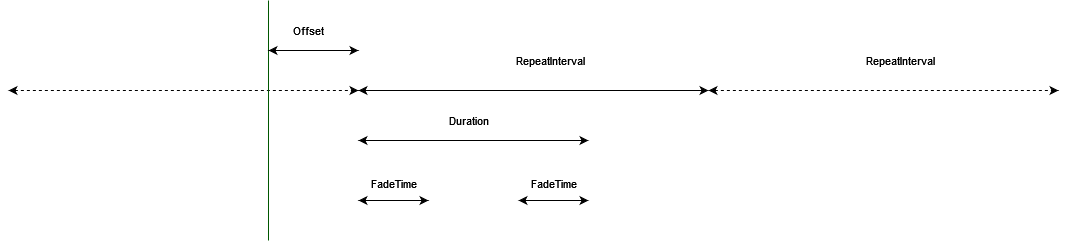
Time settings can be visualized like this:
The vertical line is time zero (when the game starts).
The horizontal axis is time.
-
Unit (added in Release 2): the time unit used, Seconds or Hours, seconds are used by default and kept for compatibility with configs made with Release 1.
-
RepeatInterval: How much time before the cycle (clouds being active then inactive) repeats
-
Duration: How long the clouds stay active, this is a subset of RepeatInterval
-
FadeTime: How long to fade the clouds in when they start being active, and to fade them out. These are subsets of Duration.
-
Offset: Offset the time at which the cycle starts.
-
FadeMode: Coverage or Density. See what they do here