Custom Spell Cards - KittenAqua/TrainworksModdingTools GitHub Wiki
These wiki pages are deprecated and are outdated. Please find the newer tutorials here
If you haven't yet, it's recommended that you at least read through the Modifying an Existing Card tutorial to familiarize yourself with how Monster Train handles cards.
In this tutorial, we'll be creating several spell cards of increasing complexity. For now we'll add them to Stygian. Once we finish the custom clan tutorial, we'll move them into that clan instead.
The first spell we're going to make is Not Horn Break. It's a card that deals 5 damage and has the Piercing trait. It will also use fully custom (non-animated) art.
If you don't have them already, make sure to add using statements for TrainworksModdingTools.Builders and TrainworksModdingTools.Constants.
Let's set up the art now. Navigate to your plugin's folder (the one your dll gets copied to when you build), and create an "assets" folder in it. Then we need art to put in there. Fortunately for you, I've already taken the liberty of preparing some for us. No need to thank me. Download this image and save it there.
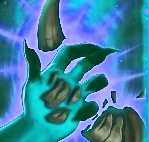
That's not the only thing I've prepared for us, though! Going through this line-by-line's a bit hard to follow, so I'm just gonna drop the whole darn card on you, and explain it after. Here:
new CardDataBuilder
{
    CardID = TestPlugin.GUID + "_NotHornBreak",
    Name = "Not Horn Break",
    Description = "Deal [effect0.power] damage",
    Cost = 1,
    Rarity = CollectableRarity.Common,
    TargetsRoom = true,
    Targetless = false,
    ClanID = VanillaClanIDs.Stygian,
    AssetPath = "assets/nothornbreak.png",
    CardPoolIDs = new List<string> { VanillaCardPoolIDs.MegaPool },
    EffectBuilders = new List<CardEffectDataBuilder>
    {
        new CardEffectDataBuilder
        {
            EffectStateName = "CardEffectDamage",
            ParamInt = 5,
            TargetMode = TargetMode.DropTargetCharacter
        }
    },
    TraitBuilders = new List<CardTraitDataBuilder>
    {
        new CardTraitDataBuilder
        {
            TraitStateName = "CardTraitIgnoreArmor"
        }
    }
}.BuildAndRegister();
This is very long and intimidating, but it's actually extremely simple. Promise. Let's go through one field at a time:
-
CardID: The biggest gotcha here is that this must be unique. I recommend putting your mod GUID at the start of the ID. If you recall, we made constants for the GUID, name, and version when we first set up the project. This is the reason why. -
Name: Whatever you want. Note that it'll be the same in all languages. If you want to do localization, find details on custom localization in the custom localization tutorial. -
Description: This is the card text, excluding traits like piercing (which add themselves). Note the[effect0.power]. This is how you get numbers to show up in your card description. Don't hardcode them! Get them from your effects instead. In this case, it'll get the power of the effect at index 0 in the card's effects list. -
Cost: The ember cost. Pretty self-explanatory. -
Rarity: The valid rarities are common, uncommon, rare, starter, and champion. -
TargetsRoomandTargetless: Values for these aren't always obvious. When in doubt, look up a card with a similar targeting mechanism in AssetStudio and copy it. -
ClanID: You can either get a vanilla clan ID from the framework constants or use a custom one. -
AssetPath: This is the path relative to the location of your plugin dll. For cards, it sets the card art. -
CardPoolIDs: The card pools the card can appear in. For most spell cards, you'll want the MegaPool, which is the one used by the game for most things. Monster cards are a bit different - see the dedicated monster card tutorial for details. -
EffectBuilders: Just like how there's a CardDataBuilder to help build CardData, there are also CardEffectDataBuilders to help build CardEffectData. Card effects all use their parameters differently; some effects might not useParamInt, for example. The best way to figure out how to make a given card effect is to look up a card with it in AssetStudio. Important Please use EffectStateName when using effects from the Base Game. There's alsoEffectStateType`` which setsEffectStateNamebut that should only be used when you created your own Custom CardEffect subclass explained later. If you useEffectStateType` to specify a class in the base game there's a bug that prevents upgrades from being applied to your custom cards (see #134). -
TraitBuilders: Same as above.
Once all the appropriate fields are set, we need to do two things:
- Build the CardData.
- Register the CardData with the CustomCardManager. If we don't do this, the card won't show up anywhere.
You could do these two steps separately, but since doing them together is so common, builders that need to register content provide a BuildAndRegister() method that saves you the trouble.
If you haven't already, take a look at the Using Harmony tutorial. The last patch in it shows all cards in the logbook, which is convenient for testing.
If you boot up the game, go to the logbook, and search for Not Horn Break, you should see it doing exactly what we expect it to. If not, check the log for errors, and read over the previous steps again to make sure you've done everything properly. If you can't figure it out, ask in the modding Discord and we can help.
Now, this raises the question: how can I test to make sure my card works? The easiest way is with another Harmony patch.
[HarmonyPatch(typeof(SaveManager), nameof(SaveManager.SetupRun))]
class AddCardToStartingDeckPatch
{
    static void Postfix(ref SaveManager __instance)
    {
        var id = TestPlugin.GUID + "_NotHornBreak";
        __instance.AddCardToDeck(CustomCardManager.GetCardDataByID(id));
    }
}
This will add the card to the starting deck for easy testing.
Our next card will be named "Give Everyone Armor." This spell has the wholly unique effect of giving everyone on the current floor 2 Armor. It serves as an introduction to creating cards that apply status effects.
Download the fully custom card art from here.

If you read through the Modifying an Existing Card tutorial, you may remember how annoying it was to add Frostbite to an existing card. That's because we had to do it from scratch, without many of the nice facilities the framework provides. This time it'll be much more pleasant. As before, we'll jump right into the finished product:
new CardDataBuilder
{
    CardID = TestPlugin.GUID + "_GiveEveryoneArmor",
    Name = "Give Everyone Armor",
    Description = "Give everyone <nobr><b>Armor</b> <b>{[effect0.status0.power]}</b></nobr>.",
    Cost = 0,
    Rarity = CollectableRarity.Uncommon,
    TargetsRoom = true,
    Targetless = true,
    ClanID = VanillaClanIDs.Stygian,
    AssetPath = "assets/giveeveryonearmor.png",
    CardPoolIDs = new List<string> { VanillaCardPoolIDs.MegaPool },
    EffectBuilders = new List<CardEffectDataBuilder>
    {
        new CardEffectDataBuilder
        {
            EffectStateName = "CardEffectAddStatusEffect",
            TargetMode = TargetMode.Room,
            TargetTeamType = Team.Type.Monsters | Team.Type.Heroes,
            ParamStatusEffects = new StatusEffectStackData[]
            {
                new StatusEffectStackData
                {
                    statusId = VanillaStatusEffectIDs.Armor,
                    count = 2
                }
            }
        }
    }
}.BuildAndRegister();
You'll note that not much is different from Not Horn Break. Let's discuss the things that are:
-
Description: How did I figure out what to put here? I used an existing Armor card as a base. I looked up Alloy'soverrideDescriptionKeyin AssetStudio and printed it to the console:Debug.Log(I2.Loc.LocalizationManager.GetTranslation("CardData_overrideDescriptionKey-26e01e44a11eff46-42c94d44efd339b4ba1b341db632ece6-v2"));At that point all I had to do was lightly rearrange it to fit the new card. If you're ever stumped as to how the base game created a given description, that's a good way to figure it out. -
Targetless: This card does not target anything specific, so it is targetless. If you're not sure what you should've put here (I wasn't), again, just reference an existing card. I looked up Inferno. -
EffectStateName: This is no different from when we put CardEffectDamage, but I'm calling attention to it regardless because I'd like to point out the obvious in how general this effect type is. All status effects use this same type. -
TargetMode: It targets the entire room, so it usesTargetMode.Room. Very sensible but not necessarily easy to find on your own. There are a lot of different TargetModes-- how did I even knowTargetMode.Roomwas a thing that existed? I didn't. I just copied Inferno. :) Again, when you're not sure how to build a card, AssetStudio is your best friend. -
TargetTeamType: Minor gotcha here. This card can target both monsters and heroes, so you might assume that you want to use the AND operator here, but not so! Think of it this way: if a unit is either a monster or a hero, this card will target it. Using AND would tell the game to only target units that are both monsters AND heroes, which is equivalent to "none" (an actual TargetTeamType that sees use ingame). -
ParamStatusEffects: Like ParamInt from Not Horn Break, except for status effects. EffectDataBuilders have tons and tons of param fields. Different effects make use of different ones. In this case we have no use for ParamInt, but we do want to tell AddStatusEffect which status effect to add, so we do that here.
Add it to your starter deck to make sure it works, then move on to the last card of this tutorial!
For this tutorial's magnum opus, we shall create the ominously-named-but-otherwise-innocent "Play Other Cards." For the low, low cost of 2 energy, you can give one of your monsters +2 attack per card played this battle. It serves as an introduction to scaling effects.
As usual, download the art from here, then gaze upon the code below.
new CardDataBuilder
{
    CardID = TestPlugin.GUID + "_PlayOtherCards",
    Name = "Play Other Cards",
    Description = "Give a friendly unit +<nobr>{[trait0.power]}<sprite name=\"Attack\"></nobr> for each card played this battle.",
    Cost = 2,
    Rarity = CollectableRarity.Rare,
    TargetsRoom = true,
    Targetless = false,
    ClanID = VanillaClanIDs.Stygian,
    AssetPath = "assets/playothercards.png",
    CardPoolIDs = new List<string> { VanillaCardPoolIDs.MegaPool },
    TraitBuilders = new List<CardTraitDataBuilder>
    {
        new CardTraitDataBuilder
        {
            TraitStateName = "CardTraitScalingBuffDamage",
            ParamTrackedValue = CardStatistics.TrackedValueType.AnyCardPlayed,
            ParamEntryDuration = CardStatistics.EntryDuration.ThisBattle,
            ParamInt = 1,
            ParamTeamType = Team.Type.Monsters
        }
    },
    EffectBuilders = new List<CardEffectDataBuilder>
    {
        new CardEffectDataBuilder
        {
            EffectStateName = "CardEffectBuffDamage",
            TargetMode = TargetMode.DropTargetCharacter,
            TargetTeamType = Team.Type.Monsters
        }
    }
}.BuildAndRegister();
This sort of scheme is generally how the game handles variable effects. Let's go over the things that changed:
-
Description: You know how some cards have sprites in their descriptions, like for, say, the attack symbol? This is how it's done. -
TraitBuilders: Now's a good time to point out that any builders nested inside of another builder will build automatically when the outermost one is built. That's why we didn't have to worry about callingBuild()on the EffectBuilder from Give Everyone Armor, and also why we don't have to do it here. -
ParamTrackedValue: This is the variable the card will use to scale its effect. If you want to use one that doesn't already exist in vanilla, you'll have to implement it yourself (which is not straightforward and will be covered in a future tutorial). In this case we use AnyCardPlayed, which you may be shocked to hear triggers any time a card is played. -
ParamEntryDuration: How long the value should be tracked for. This is where you put whether you want it to count cards played this turn or this battle. We want this battle. -
ParamInt: The purpose of this field, as with effects, varies by trait type. In this case it's how much damage the card gains when its trigger is triggered. -
EffectStateName: You'll note that the effect's type, CardEffectBuffDamage, is very similar to the trait's type, CardTraitScalingBuffDamage. This is important.
Add it to your starting deck, hop into a battle, play other cards, and notice how the card gradually ramps up in damage.
Next: Custom Monster Cards