Tut | Weapon - JasXSL/GoThongs GitHub Wiki
This tutorial will only cover how to add a custom weapon to game of thongs. I'll assume you have a mesh weapon ready to go.
The first part will cover how to make a custom weapon for you to use yourself.
- Create a box and align it roughly where you want the player's right hand to go. Then link your weapon to it so that the root prim is the box.
- Find the weapon script within the devtools template scripts library. The devtools are included with the GoT HUD package. Drop the got Weapon script into the root prim.
- Attach the weapon to your right hand and align it. Then edit linked parts on the root prim. Set the position and rotation to all zero. Then detach your weapon.
- Edit linked parts on the HUD and select the brown box (white nowadays, but it's named WEAPONS).
- Drop your weapon into the inventory of this box.
- Now go to the got website at http://jasx.org/lsl/got and select your mod. The Weapons section is at the bottom. Click New Weapon to bring up the editor.
- Name should be the name of your weapon that will show up on the website. Main Hand is the name of the weapon you dropped into the HUD. Off Hand can be a second prim set up the same way or blank if you don't want an offhand weapon. Icon should be a 128x128 transparent PNG screenshot of your weapon. You can upload it to imgur and put a direct link to the image in this field. Checking the Public option will show the weapon in the weapons inventory to anyone who has activated your mod. Checking the Default option will allow anyone who uses your mod to equip it immediately. Read the section on how to share your weapon in the next section of the tutorial. Unsheathable should be used for staves and things that cannot be put into your hands. Anim Set lets you pick an animation set to use for the weapon. Currently there's no way of adding your own custom anim set, I might get on that in the future. Description is what you will see on the HUD when inspecting the weapon. Acquire-description is a short description on how to acquire the weapon.
- The bottom part lets you configure where the weapon attaches when sheathed. Hit sounds is sounds that will play when using a weapon enabled attack.
- After hitting insert, the weapon will be added to your on HUD inventory, can you can now activate it.
- I'm not entirely happy with the position of the weapons on my back, so I'll be dropping the following script into each weapon.
- Then update the back attachment positions accordingly.


The weapon should now appear functioning in world. You can use it as it is, or you can add a proc or passive effect to it.
Procs/passives are effects the weapon might have when using it. Such as granting a buff, dealing extra direct damage or applying passive benefits. This is all added in the passives/procs section of the weapon editor.
Procs/passives is a 2-entry strided array with the values being (int)task, (var)data. For a list of all tasks, see got FXCompiler.lsl.
Passive:
[1,0.1, 4,0.1] // Passively increase max HP by 10%, increase dodge change by 10%
A proc has ID of -1 and expects data to be an array of [(int)targ, (str)script, (int)evt, (arr)args, (float)range]
To help build your proc, you can use the Passives_buildProc function. Please see got Passives.lsl
Example:
// This adds a 20% chance to heal the caster for 10% of their max HP when using a spell. And has a 10 second cooldown.
list triggers = [
    Passives_buildTrigger(Passives$TARG_SELF, "got SpellMan", SpellManEvt$complete, [], 0) // Proc from completing a spell cast
];
string proc = Passives_buildProc(
  triggers,  // Event listeners that trigger the proc
  1,         // Max 1 target (since it only procs on ourselves)
  0.1,       // 10% proc chance
  10,        // 10 seconds cooldown
  0,         // Flags are not currently used, always set it to 0
  wrapper    // This is where you want the effect to be applied. Look in your devtools template scripts in SL for scripts named FXSys Example. They are thorough examples of how to build an FX wrapper.
);

list out = [FXCUpd$PROC, proc]; // Add the proc to the list of passives added when the weapon is equipped

llOwnerSay(llList2Json(JSON_ARRAY, out])); // output the data to put in Passives & Procs textarea of the weapon editor.
Here I have applied the rally effect to my weapon.
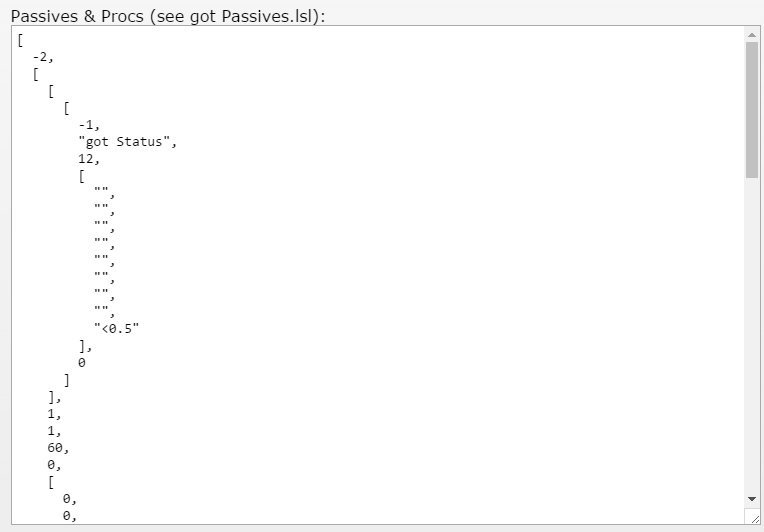
You will have to reload your HUD by re-attaching it or saying debug #ROOT to download your updated effect.
If you want other players to use your weapon, you'll have to do a few things.
- Follow the instructions to add your mod to the public mod page.
- Make sure your weapon is set to public.
To distribute your weapon, there are two options.
In the GoThongs quest editor is a dropdown where your weapon should now show up, so long as it's set to public and belongs to your selected mod.
At the top of the weapon editor is a field called ID. You can use this id to unlock the weapon via script. Ex:
Bridge$unlockWeapon(targ, idFromWeaponEditor);