Tut | Class - JasXSL/GoThongs GitHub Wiki
The first thing you'll want to do is plan and create your spells. Go to the devtools for your mod and find the spell section. Click New Spell.
Fill out the following information:
- Name : The name of your spell
- Mana : The mana cost of your spell. If negative it will restore mana.
- CD : Cooldown of your spell in seconds.
- Range : Range of your spell. Max is 10. Hitting melee or spell will set to the default melee or spell range.
- Cast Time : How long it takes to cast. 0 is instant cast. Can use fractions.
- Texture : Download got spells from http://jasx.org/lsl/generalmedia/Game%20Files/GoThongs/ for a template. This is the texture UUID that will be placed on the button on your HUD.
- Description : Enter a description of what you would like your spell to do. This is what will be shown to the players.
- Flags : See below.
Flags:
| Name | Meaning |
|---|---|
| Opponents | This spell can target opponents directly |
| Caster | This spell can target the caster |
| Friends | This spell can target friends |
| No Facing Req | This spell does not require you to look at the target |
| AoE | If used, uncheck all the values above. Makes the spell run on ALL players and NPCs within range. |
| No Global CD | Does not trigger the global cooldown |
| No Crits | Cannot critically hit |
Create 5 abilities for your class this way. We'll add the spell effects and visuals in a bit.
Go back to your mod page. Find the Classes section and hit New Class. Fill out the following fields:
- Name : The name of your class.
- Rarity : How rare it should be in crafting. 100 is default, lower is more rare and higher is more common. I suggest you just leave it at 100.
- Image : A URL to an icon that should be used for your class. Should be 128x128px. A Template can be found at http://jasx.org/lsl/generalmedia/Game%20Files/GoThongs/
- Global cooldown : Default 1.5, lets you speed up or slow down your class. I recommend putting it at either 1 for speedy classes or 1.5 for default classes.
- Description : Write a short description of your class. HTML not allowed.
- Public : Check this once your class is ready to be added to crafting (mod also needs to be public).
- Spells : Here you select the spells you created in the previous step. They will be added in the order they are displayed.
Hit insert to save your class. Once inserted, click Add to Inventory to add a copy of the thong to your game of thongs inventory.
Time to create some visual effects that will show up in SL. You can find the spell fx repo by editing linked parts on the HUD and scrolling down. The visuals are in the yellow box:
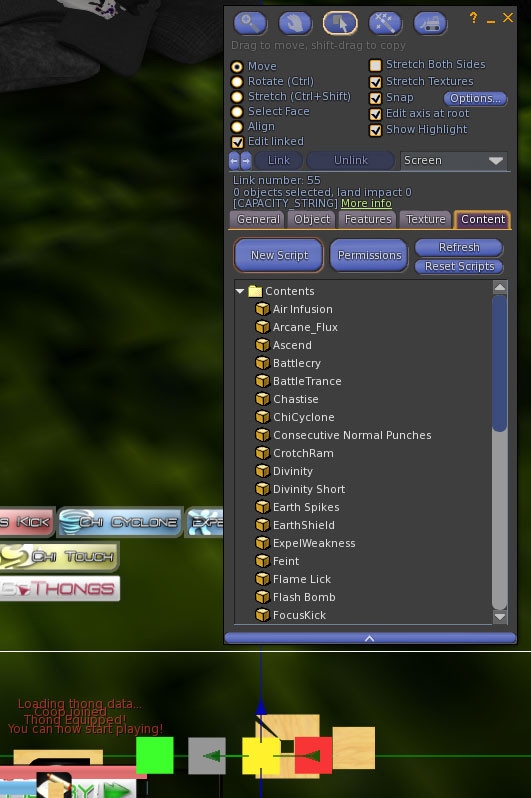
Feel free to write your own code as well. on_rez parameter will be positive when rezzed through the HUD. Drop your visuals into the yellow box once you're done.
Now we need to add our visuals to the spells on the website. So go to the mod editor and select a spell to edit. See https://github.com/JasXSL/GoThongs/blob/master/Spell%20Data%20Readme.txt for info on what goes where. Since I only need a visual effect, a sound and an animation on cast finish for the first bard spell. I'll put the following into the visual editor:
[
  [
    [
      "PacingSlash"
    ]
  ],
  "_WEAPON_",
  "b8fff2e0-ec03-701e-9c14-4ebf8635e372"
]
"WEAPON" gets translated to the proper animation for whatever weapon the player currently has equipped.
Healing hymn has a cast time. So it looks like this:
[
  [
    [
      "CrescendoStrike"
    ]
  ],
  "got_cast_finish",
  "b8fff2e0-ec03-701e-9c14-4ebf8635e372",
  [
    0,
    1,
    [
      7,
      1,
      0,
      291,
      1,
      "<0,.5,1>",
      3,
      "<1,1,1>",
      5,
      "<.1,.1,0>",
      6,
      "<.5,.5,0>",
      9,
      8,
      13,
      0.05,
      8,
      "<0,0,0>",
      15,
      1,
      16,
      0,
      17,
      0,
      18,
      1,
      21,
      "<0,0,0>",
      19,
      0,
      12,
      "458f9504-a8a3-3318-c090-bce409e013fa",
      2,
      1,
      4,
      0,
      26,
      0.3,
      27,
      0,
      22,
      1.070796,
      23,
      1.070796
    ]
  ],
  "got_cast_loop",
  "184d3c9b-cd8d-c76d-beb0-90ebe13bdefe"
]
Notice the particle system followed by a cast loop animation and the cast loop sound.
Time to create the actual spell data. For this, we'll use the FXSys examples that comes with the dev tools. You can simply paste the wrapper once you're done creating your effect into the Spell Wrapper textarea. In addition, you can paste another wrapper into selfcast if you want an effect to be run on the caster as well.
Another thing you should consider using is the FX_buildFX(fx$DAMAGE_DURABILITY, ["$MATH$D*7"])
This will make the first value of damage durability a mathematical formula (D*7). D is a multiplier constant representing damage done effects. Such as arousal, critical hits, passives & temporary effects etc.
Here's a list of all constants:
| Name | Explanation |
|---|---|
| D | Damage done multiplier |
| A | Arousal points |
| P | Pain points |
| B | (0/1) Is behind target |
| H | Cooldown multiplier |
| M | Damage done multiplier from fx$SPELL_DMG_DONE_MOD - This is baked into D, but can come in handy as a separate value for percentage based increases |
| h | Healing done modifier |