Build - JaapDanielse/AMG8833-Thermal-Camera GitHub Wiki
There is not much building required, just a few steps to setup the needed components
- Download the AMG8833 Thermal Camera sketch
- Connect the module (see schematics)
- Install the Melopero AMG8833 library
- Download and install VirtualPanel
- Compile and upload
- Start VirtualPanel
- Tada!
Details on each of the steps below.
Download the AMG8833_ThermalCamera sketch
- Download the AMG8833_ThermalCamera sketch from the GitHub release page: https://github.com/JaapDanielse/AMG8833-Thermal-Camera/releases
- Unpack the zipfile
Schematics
The schematics below show the connection to the UNO. I used this to start with. A similar setup can be made for other boards.
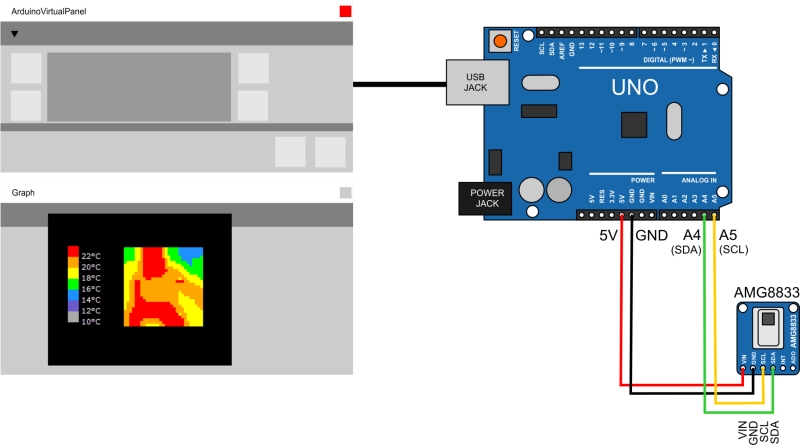 Uno schematics
- Connect the Sensor as described
Nano
For a more permanent setup I chose the Nano. This makes for a small (pocketsize) camera without all the loose wires of my first setup.
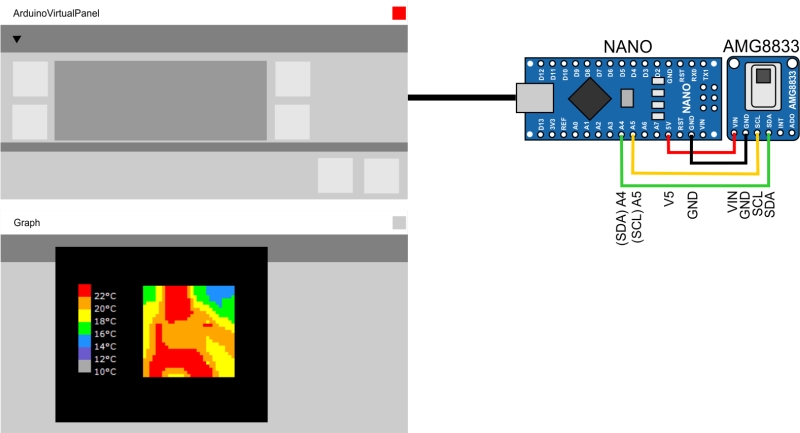 Nano schematics
Melopero_AMG8833 Library
This project uses the Melopero AMG8833 library: https://github.com/melopero/Melopero_AMG8833 Which handles the communication to and from the AMG8833 module. You can load this in the arduino IDE via the menu:
- Sketch > Include Libray > Manage Libraries
- Then search for "AMG8833".
- Select the Melopero AMG8833 entry.
- Press "Install".

VirtualPanel
The UI component used for this project is (my own) VirtualPanel. It is intended as a generic UI for Arduino experiments and prototyping so it can be used for much more than just this project. See the VirtualPanel documentation: https://github.com/JaapDanielse/VirtualPanel/wiki
Because VirtualPanel is not "just" a library but contains an executable too and therefore it cannot be installed via the ide but must be installed manually:
- Download the VirtualPanel release zip from https://github.com/JaapDanielse/VirtualPanel/releases (V1.5.1 or later).
- Open the zip and add the VirtualPanel and ArduinoPort folders to the Documents\Arduino\libraries folder.
- Add the VirtualPanelExe folder to the Documents\Arduino folder.
You can add VirtualPanel to start by right clicking and selecting "Pin to Start" then start from Start. Or start by double clicking the the VirtualPanel.exe file directly.
Compile
- Open the AMG8833_ThermalCamera sketch in the Arduino IDE compile and upload to your microcontroller
Start VirtualPanel
- Start the VirtualPanel executable as dicribed.
- The panel will automatically search for the arduino used and connect to it as soon as it's found.
Have fun!