Plugins - Inktomi93/OrbWeaver GitHub Wiki
A plugin is a small script that adds something to Orbweaver: a panel, a command, a tool the narrator can use, a mini-game. The plugin system and isolation layer under them got slightly out of hand, so this page is long. Every plugin runs in a sandbox, starts switched off, and can only do what you approve. → Privacy and security
Plugins belong to the person who installed them. Anyone with an account installs their own, and the panels and pages a plugin draws are shown to you only.
Nine example plugins are already installed on your account. All of them are off, and none is allowed to do anything yet.
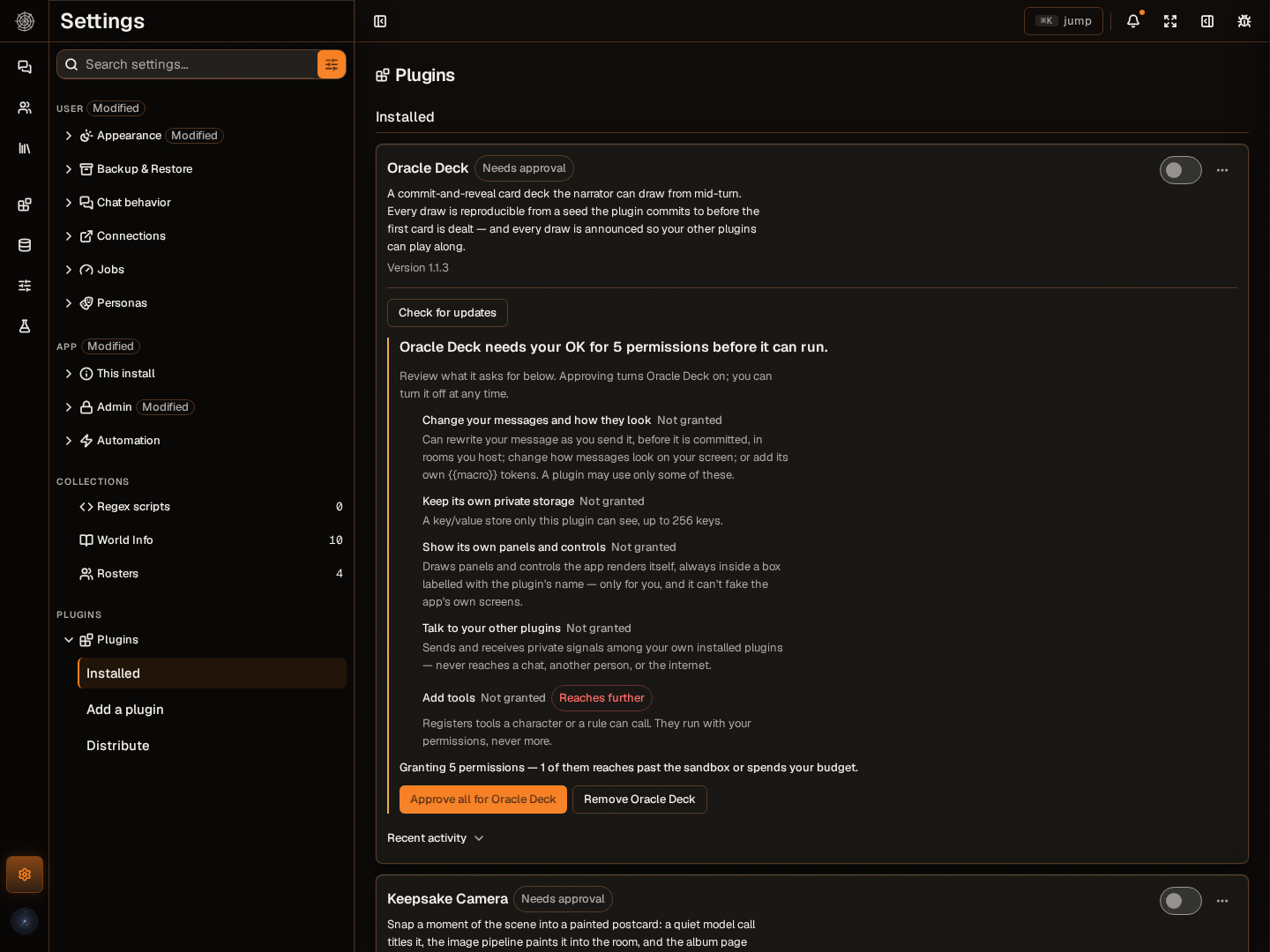
- Open Settings and go to Plugins. Each example is listed under Installed, marked as asking for more than you've allowed.
- Read the notice on the plugin. It lists every permission in plain words.
- Press Approve all for [plugin name]. Approving turns that plugin on. You can turn it off again from its row.
You can also open Plugin pages, choose a plugin marked Needs approval, and review its request there. Check the plugin name on the approval button before you press it.
Some examples call a model in the background. Those lines are called out below. They run on your Utility model, which your first connection asks you to pick. If you chose Not now there, see Connect a model.
| Plugin | What it does | Worth knowing |
|---|---|---|
| Card Atlas | Browse the big character card hubs without leaving the app, and add any card to your library, art included. | It reads the hubs' public APIs only, with no permission to call a model or see your connections, so it can't reach your keys. Its approval screen lists every site it talks to. Opens as a page under Plugin pages. Its SFW only switch starts off. |
| Story Clocks | Progress clocks for a room, up to four. The host starts and ticks them from the room's host controls, and the narrator ticks them as the story moves. When a tick from you fills a clock, the narrator is asked to take a turn and make it matter. | Rooms you host only. The narrator can only tick them if your Chat model supports tools. It asks to start replies on its own, which is marked Costs money. The clock readout is shown to you only, but the clocks are room variables, so rules and macros can read them. |
| Oracle Deck | A card deck. Draw with /plugin oracle-deck draw, or let the narrator draw mid-scene. It prints a commitment to its shuffle before the first card, then reveals the seed so you can check the order wasn't swapped. |
The check is a light one. For the narrator to draw, you need a Chat model that supports tools and a room you host. Its Rewrite your outgoing messages line is for an optional omen macro. |
| Keepsake Camera | Run /plugin keepsake-camera snapshot to paint a moment of the scene as a postcard. The postcard lands in the room, and keepsakes the camera catches in time are kept in its album page. |
Marked Costs money. Titling runs on your Utility model. Painting runs on your Image generation model, so set one first. In a room you don't host, painting becomes a request the host approves. |
| Research Familiar | Type ((lookup: topic)) in a room and it searches your documents, then Wikipedia, and files a short entry in a world book attached to that room. ((clip: topic)) keeps Wikipedia's full summary of the topic in your Databank. |
((lookup)) needs a one-time setup, below. Reaches Wikipedia. In a room you don't host, the entry becomes a request the host confirms. Its document search is marked Costs money because it may use your hosted embedding provider. |
| Affinity Tracker | Every so often it reads the last few messages, privately asks the model how warm the scene has become, and sends you a notice when the number jumps. | Runs on your Utility model, so it's marked Costs money. |
| Draft Polish | Choose Polish in the composer to tidy your visible draft before sending. It also typesets punctuation on your own screen without changing saved messages. | Read the replacement before sending. Undo Polish restores the previous draft until you edit, send, or change rooms. Narrow composers put Polish under Plugin actions. |
| Scene Chips | After a long reply in the story, offers a few quick-reply chips you can edit before sending. | Rooms you host only, and everyone in the room sees the chips. The closest thing to SillyTavern Quick Replies. → Coming from SillyTavern |
| Pocket Arcade | A playable 2048 beside the chat, for while the narrator types. | Draws in an isolated frame, which carries a stronger warning. See below. |
Research Familiar setup. Open Settings → Plugins → Research Familiar → Choose lore book and select one of your books. Then attach that book to each room where you want lookup results, using This chat → World books. Choosing the book does not attach it. ((clip: topic)) saves to your Databank and needs no lore-book destination.
Open Settings, go to Plugins, and find Add a plugin. Pick how you have it:
-
A .zip. Drop it on Drop a plugin bundle. It needs
manifest.jsonandmain.jsat its top level. - A folder. Use Choose an unpacked plugin folder for the same two files unzipped.
- A link. Paste the address of a plugin .zip under Install from a link and press Fetch. Orbweaver downloads it on the server, so the address must be HTTPS and addresses on your own network are refused.
- A Git repository. Paste its HTTPS address under Install from Git and press Fetch. The repository has to be public. Orbweaver reads the plugin's files from the top of the repository and never runs its build.
Orbweaver checks the manifest and keeps the plugin inside the sandbox. It does not read the code for you, so install plugins from people you trust.
Nothing is installed yet at this point. You get a review page:
- Read the description, the source and What it's asking for.
- Press Install, or Cancel.
- Switch the plugin on from Installed when you're ready.
If you already have that plugin, the review page says so and points you to Installed to check for an update instead.
Each permission is a plain-language line saying what the plugin gains. Two marks are worth looking for:
- Costs money. The plugin can use your model or image budget, or a hosted embedding provider.
- Reaches further. It changes shared or personal state, adds tools, rewrites your outgoing words, or leaves the sandbox for the internet.
A plugin that reaches the internet also lists the exact sites it may contact, and nowhere else.
It's all or nothing. You approve everything the plugin asks for, or you don't install it. There's no ticking some boxes and not others. Open What it's allowed to do on an installed plugin to see the list again at any time.
A plugin that asks a model for text runs on your Utility model. To give one plugin a different model, open its Model it uses fold-out and pick one under Text requests. It shows Not set until you do. The model you pick needs Allow background work on under Connections.
A plugin that draws its own screens in an isolated frame, like Pocket Arcade, says on its approval screen that it can send what it's allowed to read out through browser channels that no policy closes. Approve that only for a plugin you trust.
On Installed, each plugin has:
- Update. Pick a newer .zip of the same plugin.
- Check for updates. Shown for plugins installed from a link or Git, and for the examples. If something newer exists, press Update to ... (or Update from commit ... for Git).
Updates keep your approval, with one exception. If the new version asks for a permission or an internet site it didn't have before, the plugin is switched off, is marked as asking for more than you allowed, and shows what's new. Review the new request and approve it to turn the plugin back on, or remove it. An update that asks for less keeps its existing approval.
Other things on a plugin's row:
- Recent activity is its log. A plugin that crashed shows Stopped after an error and the reason.
- Remove, in the row's menu, deletes the plugin and its private storage. You'd have to install it again.
If you host a server for other people, an admin can publish a plugin to everyone from Distribute to everyone. Each person still gets it switched off and approves it themselves.
Plugins can add these, and each one is boxed and labelled with the plugin's name so it can't pass for part of the app:
- A page under Plugin pages, for plugins that bring a full screen.
- A panel beside a chat, and a settings block in a room's host controls.
- A strip under messages, and action buttons in the message box area.
- Cards in the transcript for the tools a plugin gives the model.
- Commands:
/plugin <plugin> <command>in the message box, rows in the Ctrl/Cmd+K menu, and a Plugin commands menu that only appears once a plugin has commands. On a phone they're listed in the You sheet. - A settings block inside the plugin's own row in Settings.
In Settings they're all under Plugins. A plugin is the thing you install; plugin pages are the full screens it brings, and they open from the Plugin pages section.
- It only does what you approved. Anything that changes a room needs you to host that room. In someone else's room it is refused, or can only ask the host to confirm.
- It can't repaint the app's own screens or put its own buttons in the app's top bar.
- SillyTavern extensions don't run in Orbweaver, and the SillyTavern import doesn't bring them over. Plugins use Orbweaver's own, smaller set of hooks. STscript doesn't run here either; macros cover the text side, and a plugin is how you'd build custom buttons or behavior. Want a provider that isn't in the list? Cool, go make the plugin for it. :D
Start from one of two template repositories on GitHub. OrbWeaver-plugin-template is for plugins that work behind the scenes: tools, commands and settings panels. OrbWeaver-plugin-template-scripted-ui is for plugins with their own visuals, and includes an isolated-frame example.
- On GitHub, press Use this template to make your own copy.
- Run
pnpm installin your copy. It downloads the versioned SDK and authoring toolchain from OrbWeaver's public release. - Give the plugin its own ID, name and version in
manifest.json, then write your code. The template's guide covers the hooks and what each permission allows. - Run the template's build, and commit your source together with the generated files it produces. Orbweaver installs the generated files and never runs your build.
- Paste your public repository's address under Install from Git, review what it asks for, and switch it on.
To ship a change, raise the version in manifest.json and push. Anyone who installed from Git sees it under Check for updates.
Each template can also pack a .zip, which installs the same way as any other.
The nine example plugins every account gets are also the teaching set: each one shows a different kind of plugin, and reading its source is the documentation for the permissions it uses. They live in packages/showcase-plugins/bundles, each with its own README, and the folder README is the plugin-writing guide.
| Example | What it teaches |
|---|---|
| Research Familiar | Reacting to what happens in the room, reaching the internet, and filing what it finds into world books and the Databank. |
| Oracle Deck | Giving the model tools, plus most of the screen-side pieces in one plugin: a tool card, a page, a dialog, commands, notices and a macro. |
| Affinity Tracker | Asking a model privately, keeping private state, sending notices, and drawing its own panel in the browser. |
| Draft Polish | Explicit composer actions with undo, and display-only text transforms. |
| Scene Chips | Quick-reply chips the whole room sees, and listening to another plugin (install it with Oracle Deck). |
| Story Clocks | Writing chat variables the room can see, host controls, a model tool, and starting a turn when a clock fills. |
| Keepsake Camera | Spending model calls: a structured request that turns into a generated picture, kept in an album page. |
| Pocket Arcade | Drawing its own pixels in an isolated frame (a playable 2048). |
| Card Atlas | The big one: a full product-sized plugin that searches the card hubs and imports cards with their provenance. |