How to clear DirectX shader cache - IGCIT/Intel-GPU-Community-Issue-Tracker-IGCIT GitHub Wiki
How to clear DirectX shader cache
When you install a driver update, you may want to clear DirectX cache to avoid issues and build a new clean cache for that driver version.
Follow these simple steps to do so:
Open Explorer

Go to This PC (Default Explorer setting is to open Recent Files)

Right click Local Disk (C:) disk

Open disk Properties

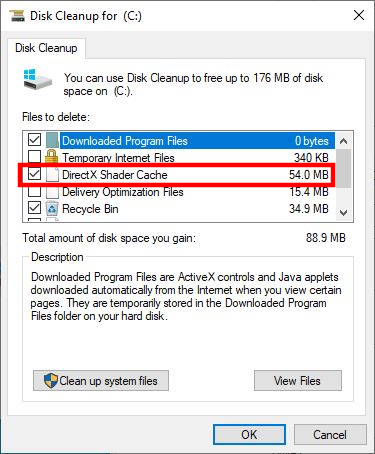
Click Disk Cleanup and wait for it to load

Once ready, you will see a list of options.
You can make a full disk cleanup, but it is outside the scope of this wiki.
We want to clear DirectX cache, so uncheck all the options except DirectX Shader Cache