Sprite Transparency and Visual References - Herbertofury/Advent-of-Ascension GitHub Wiki
Sprite transparency and faithful visual references
Weapon standard · Discharge Sniper example
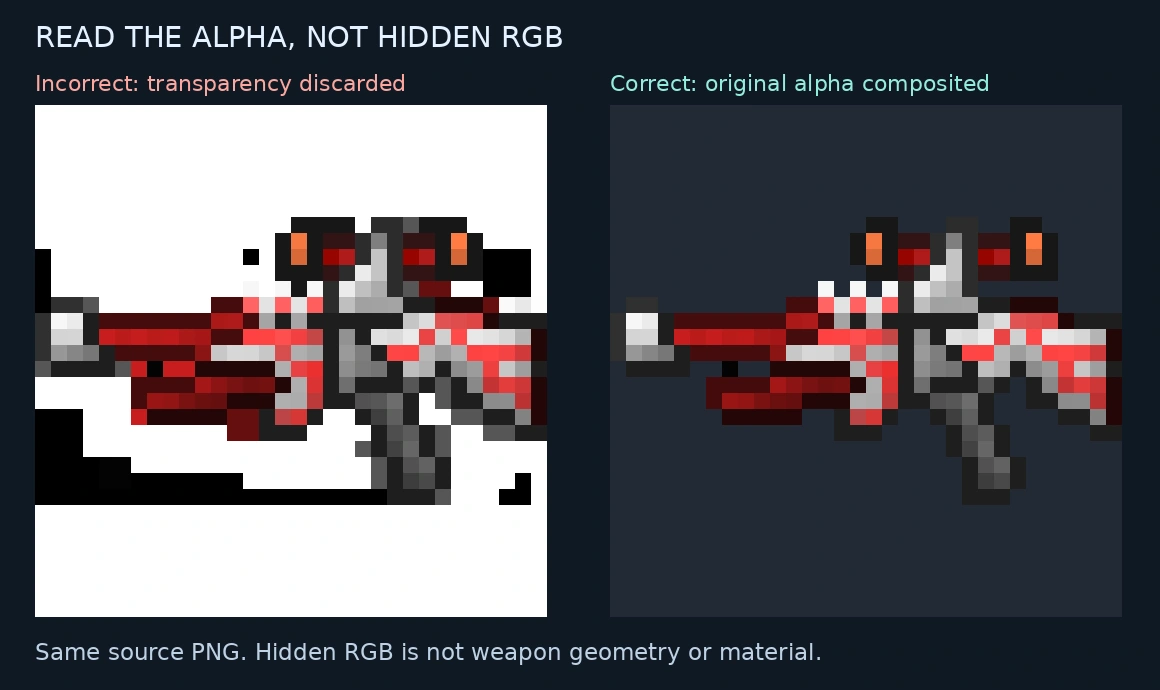
The trap
A PNG can contain black, white or colored RGB values in fully transparent pixels. Discarding its alpha channel can reveal those invisible values as apparent geometry or material. In the Discharge Sniper example, that creates a false dark lower silhouette and stray marks. These pixels are not part of the visible weapon.
The source PNG is not corrupt. The comparison deliberately shows an incorrect RGB-only interpretation beside the original image composited with its alpha onto a neutral background. No weapon pixels were painted or invented.
What was checked
A 54-file snapshot of the gallery sprite inventory was inspected. Forty-five files contain more than one RGB color among fully transparent pixels. This measures stored pixel data; it does not prove that 45 concepts are wrong or that every viewer discards transparency. Browser rendering normally honors the PNG alpha.
Three synthetic tests verify that changing hidden RGB cannot alter the composited result, opaque source colors are preserved, and partial-alpha blending has the expected result. Original file hashes and alpha counts are recorded in the audit.
Use the correct reference
- Retain the exact original PNG and its hash.
- Render it with alpha on a documented neutral background before supplying a flattened visual reference to an art/model workflow.
- Scale pixel art with nearest-neighbor sampling for source inspection. Keep that rendered preview clearly separate from an original in-game capture.
- Compare the visible shape and negative space, not hidden RGB values. Check both dark and light backgrounds when a dark outline is hard to see.
- Preserve the original texture for game use. A reference background must never be baked into the actual transparent item texture by accident.
Reproducible audit and tests use Python and Pillow. Run audit.py with --docs pointing to the repository docs directory; --sample chooses the example PNG. The script writes its audit and comparison beside itself and leaves source images unchanged.
This check supports visual fidelity. It does not certify meshes, texture quality, animation, gameplay or native performance.