Precasia Realmstone Walkthrough - Herbertofury/Advent-of-Ascension GitHub Wiki
Find your Precasia Realmstone: jungle archaeology
Checked edition: Minecraft 1.21.1 / AoA 3.7.16.1. This route is grounded in the released archaeology loot table and the exact configured/placed feature that assigns it. Do not substitute an older release's realmstone challenge.

What you are looking for
The target is Suspicious Gravel generated by AoA's jungle gravel feature, not ordinary gravel anywhere in the world. That feature assigns the aoa3:archaeology/jungle_gravel loot table, which includes a Precasia Realmstone among its possible rewards.
A plain-looking block with the right name can still have a different loot table. Vanilla archaeology sites and modded structures are not automatically the same source.
Bring these supplies
- A brush for archaeology
- Food, lighting and ordinary exploration tools
- Spare inventory space for rewards
- A marked route back to your portal frame
This is a preparation recommendation, not a crafting recipe for the realmstone. The inspected acquisition route is loot-based.
1. Search an Overworld jungle
The released biome modifier requires the Overworld biome tag and a jungle biome tag. A modded biome may qualify through tags, but its name alone does not establish compatibility. World-generation overrides can change the result.
Explore terrain generated with this AoA release and the relevant data enabled. If an area predates those world-generation definitions, do not assume installing the mod retroactively added the feature there.
2. Inspect near the surface, not only deep caves
The placed feature starts from the world-surface heightmap and applies a vertical offset of −3 to −1 blocks. Its configured targets are dirt-tag and grass-tag blocks, replacing eligible targets with Suspicious Gravel.
This is a world-generation rule, not a guarantee that every jungle surface has a deposit. The placement count is randomly 0 or 1, and the configured cluster size is 5; neither value means every searched patch contains five successful blocks.
Work carefully around suspicious blocks. The goal is to brush the archaeology block, not mine it like ordinary gravel or let it fall while clearing the area.
3. Brush and inspect each reward
Use the brush on the Suspicious Gravel and let the brushing action complete. A Precasia Realmstone is one possible result. Other entries in this exact table include pottery sherds, mossy cobblestone, a silver coin, jade, a stick and a bone.
Getting one of those alternatives does not prove the location is wrong. Conversely, getting common items is not sufficient by itself to prove this exact table is attached; the feature/loot evidence is the reliable reference.
Do not budget a guaranteed number of attempts. The table is randomized and modpacks can replace it.
4. Use the realmstone with your finished portal
Return to the 5 × 6 Ancient Rock/rune frame. Confirm the Power rune is at bottom centre and the opening is clear. Use the Precasia Realmstone on the Power rune.
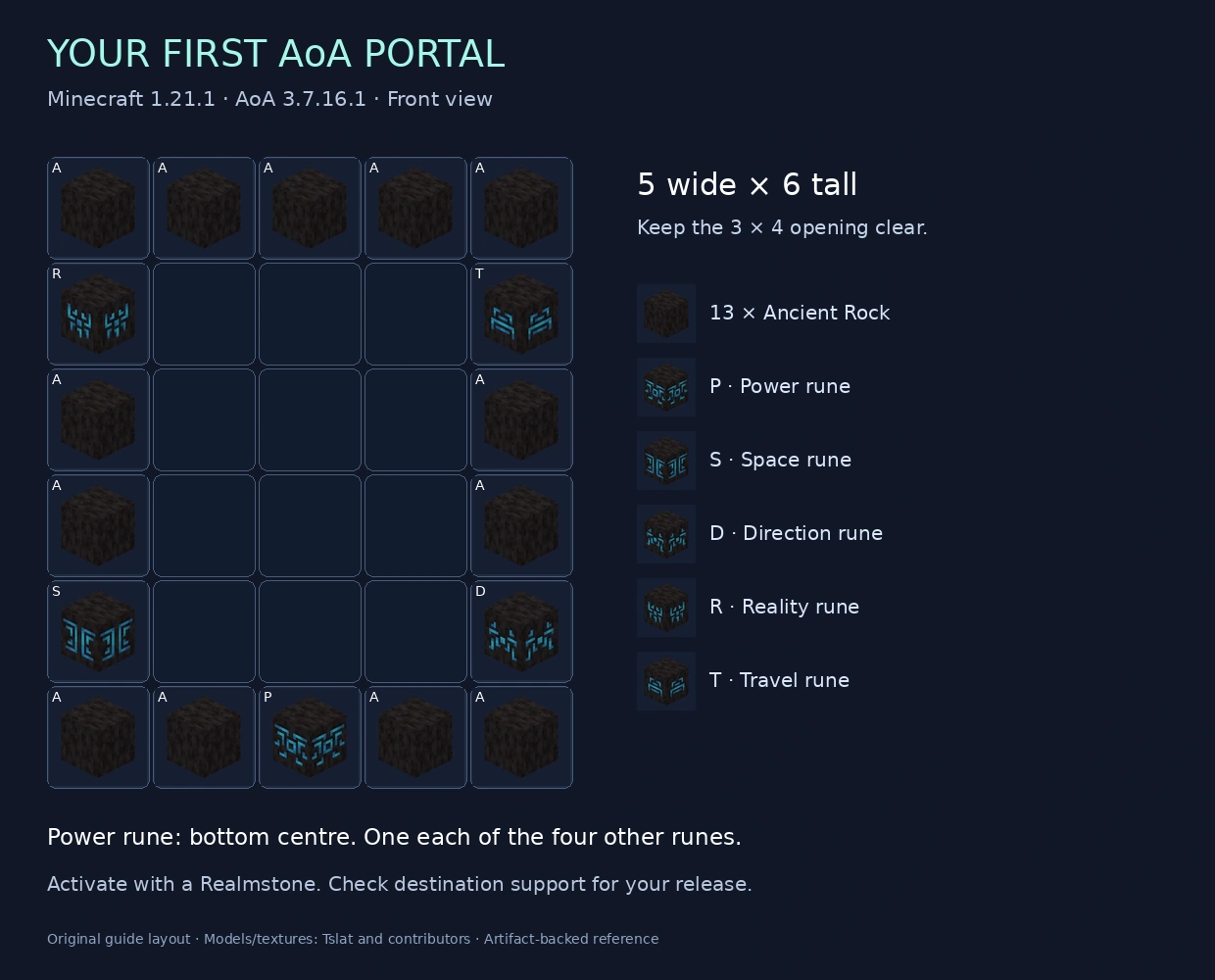
Build the frame step by step · Prepare for your first expedition
If you are stuck
| Symptom | Useful next check |
|---|---|
| Only ordinary gravel | Check the jungle/Overworld tags and near-surface feature placement; ordinary gravel is not the archaeology target |
| No deposits in old explored terrain | Compare a newly generated area with the same seed/settings; do not destroy an existing world to test a hypothesis |
| Repeated alternative rewards | Random rewards are expected; verify the actual loot-table source if your modpack provides inspection tools |
| The realmstone exists in the wiki but not in your version | Check the Minecraft/AoA pair before applying this route |
| Portal does not activate | Recheck the frame, Power rune, destination support and modpack changes |
Exact artifact evidence
data/aoa3/neoforge/biome_modifier/ore_brushable_jungle_gravel.json: biome selectors and feature insertiondata/aoa3/worldgen/configured_feature/ore_brushable_jungle_gravel.json: Suspicious Gravel replacement and assigned archaeology tabledata/aoa3/worldgen/placed_feature/ore_brushable_jungle_gravel.json: count, surface heightmap and vertical offsetdata/aoa3/loot_table/archaeology/jungle_gravel.json: reward entriesdata/aoa3/advancement/overworld/the_fossilised_key.json: inventory criterion for obtaining the realmstone
These are independently summarized artifact definitions. Custom Java feature behavior and live world generation have not been newly play-tested in this documentation pass. No copied upstream guide is presented as original work.
Plan the expedition after arrival
Precasia habitat and height checks explains seven monster spawn paths, including Attercopus’s split branch and Spinoledon’s separate altitude bands. Use it with the bestiary; passing a height predicate is not a guarantee of a spawn or a safe travel route.