Plugin Grid - HeikoGr/MMM-Webuntis GitHub Wiki
Grid Plugin
The grid plugin renders the timetable as a calendar-like grid with times on the left and days as columns. It is the most flexible plugin if you want a compact schedule overview.
Screenshot
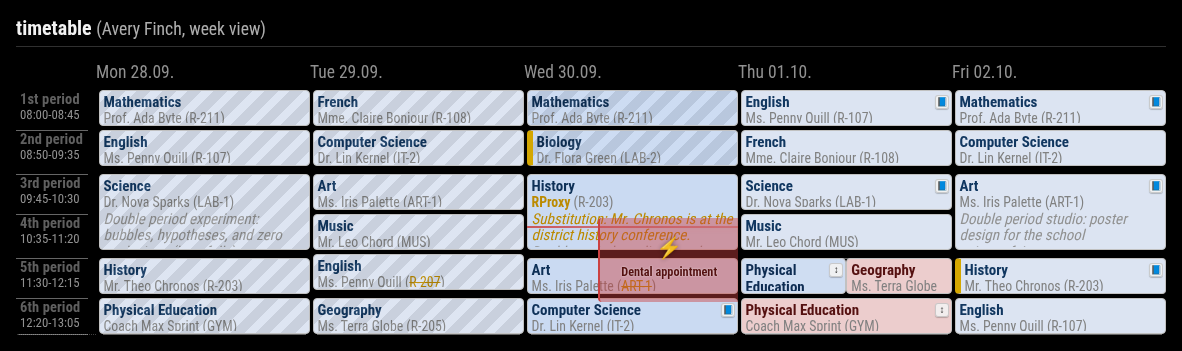
Enable The Plugin
Simple activation via displayMode:
displayMode: 'grid'
Canonical activation via plugins.grid:
plugins: {
  grid: {
    enabled: true,
    config: {
      nextDays: 4,
    },
  },
}
The old top-level namespace grid: { ... } is still accepted for compatibility, but plugins.grid.config is the canonical form.
All Configuration Options
| Option | Type / Values | Default | Effect |
|---|---|---|---|
nextDays |
number >= 0 |
4 |
Future days shown when weekView is false |
pastDays |
number >= 0 |
0 |
Previous days shown when weekView is false |
weekView |
boolean | false |
Shows a Monday-Friday work week instead of a rolling day window |
dateFormat |
string | EEE dd.MM. |
Date format for column headers |
hideWeekends |
boolean | false |
Hides weekend columns when possible |
showNowLine |
boolean | true |
Shows the live current-time marker |
mergeGap |
number >= 0 |
15 |
Merge nearby lesson blocks when the gap is small enough |
maxLessons |
number >= 0 |
0 |
Maximum visible lesson periods per day, 0 means unlimited |
pxPerMinute |
positive number | 0.8 |
Vertical grid density in pixels per minute |
naText |
string | N/A |
Fallback label for missing changed field values |
fields.primary |
subject, teacher, room, class, studentGroup, info, none |
subject |
Main text line inside lesson cells |
fields.secondary |
subject, teacher, room, class, studentGroup, info, none |
teacher |
Second text line inside lesson cells |
fields.additional |
array of field names | ['room'] |
Additional values appended to the lesson cell |
fields.format.subject |
short, long |
long |
Subject display format |
fields.format.teacher |
short, long |
long |
Teacher display format |
fields.format.class |
short, long |
short |
Class display format |
fields.format.room |
short, long |
short |
Room display format |
fields.format.studentGroup |
short, long |
short |
Student-group display format |
fields.format.info |
short, long |
short if set manually |
Optional formatting for the info field |
Notes On Behavior
weekView: truealways renders one school week from Monday to Friday.- In live mode,
weekViewautomatically advances to the next week on Friday late afternoon and during weekends. pxPerMinuteis supported even though it is not shown in every example config. Use smaller values for denser grids and larger values for taller grids.- Invalid
fields.*values fall back to the plugin defaults. hideWeekendsmatters mostly for rolling mode. InweekView, the plugin already uses Monday to Friday.- Lessons can be hidden with
excludeLessons(this also hides homework and exams of the same subject) and own lessons added withaddLessons, see Hiding and Adding Lessons.
Typical Config
plugins: {
  grid: {
    enabled: true,
    config: {
      weekView: true,
      showNowLine: true,
      maxLessons: 8,
      pxPerMinute: 0.65,
      fields: {
        primary: 'subject',
        secondary: 'teacher',
        additional: ['room'],
        format: {
          subject: 'long',
          teacher: 'short',
          room: 'short',
        },
      },
    },
  },
}
Per-Student Override Example
students: [
  {
    title: 'Alice',
    qrcode: 'untis://...',
    plugins: {
      grid: {
        config: {
          weekView: false,
          nextDays: 2,
          hideWeekends: true,
        },
      },
    },
  },
]