Plugin Absences - HeikoGr/MMM-Webuntis GitHub Wiki
Absences Plugin
The absences plugin lists absences including date, time range, subject, excuse state, and reason text.
Screenshot
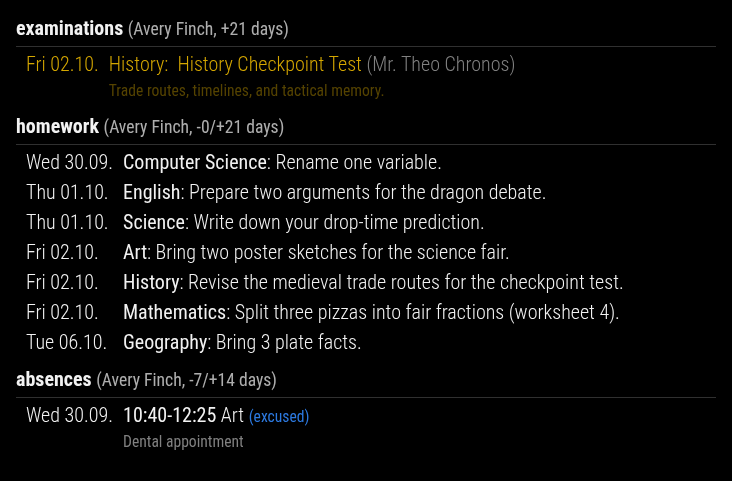
Enable The Plugin
Simple activation via displayMode:
displayMode: 'absences'
Canonical activation via plugins.absences:
plugins: {
  absences: {
    enabled: true,
    config: {
      pastDays: 21,
      nextDays: 7,
    },
  },
}
The old top-level namespace absences: { ... } is still accepted for compatibility, but plugins.absences.config is the canonical form.
All Configuration Options
| Option | Type / Values | Default | Effect |
|---|---|---|---|
pastDays |
number >= 0 |
21 |
Past absence window in days |
nextDays |
number >= 0 |
7 |
Future absence window in days |
dateFormat |
string | EEE dd.MM. |
Date format for the meta column |
showDate |
boolean | true |
Shows the absence date in the left meta column |
showExcused |
boolean | true |
Shows excused or unexcused state when known |
showReason |
boolean | true |
Shows the reason text below the absence entry |
maxItems |
null or number >= 1 |
null |
Maximum number of visible absence rows per student |
Notes On Behavior
- Absences are filtered against the current day using
pastDaysandnextDays. - If
maxItemsisnullor0, all filtered rows stay visible. Use a positive number to enforce a limit. - When WebUntis does not provide absences for a parent account, the plugin shows an informational warning above the widget.
- If a student has no absences in the visible window, the plugin renders a
no absencesplaceholder row.
Typical Config
plugins: {
  absences: {
    enabled: true,
    config: {
      pastDays: 14,
      nextDays: 3,
      dateFormat: 'dd.MM.',
      showExcused: true,
      showReason: false,
      maxItems: 10,
    },
  },
}