Welcome to the EnhancelyCompare wiki! - HDL34/EnhancelyCompare-wiki GitHub Wiki
EnhancelyCompare is a lightweight and intuitive web tool for comparing two images side by side from direct links. It enables precise visual analysis thanks to its zoom functions, offers light and dark themes, and switches between pasting links and uploading files directly from the interface. It was built with the help of Google Gemini and Claude (Sonnet 4.6, then Sonnet 5 for the multi-ratio adjustment panel). Claude AI has now become my number one coding tool for continuing to improve the image comparator.
View two images simultaneously to detect the slightest differences.
Explore the details with the built-in zoom function. A "Reset" button automatically appears to return to the initial view.
This mode allows you to compare images with different ratios. Useful for example to compare an original photo with an extended version that has more material, generated using an external AI tool, or with a different crop.
To do this, I created a panel with 4 sliders to precisely adjust the image on the left compared to the right.
You can set the values either from windowed
Either from the full screen
Depending on the image, the values will update between full screen and windowed. Logical because in full screen we are on 16:9 and in windowed, it is according to the final ratio of the image on the right.
All sliders (skip the opacity that goes from 0 to 100%) range from -100 to 100. You also have the arrows to be more precise. You can reset all sliders to their default values via the big "Reset all values" button or do one by one via the icons next to each slider.
Also works on smartphones and tablets with support for screen rotation (including full screen).
Search and edit your comparisons using the history in the sidebar.
You can delete or pin each comparison individually. Or delete everything using the red "Delete All" button. The entire list will be removed. You can also import and export the entire history list in JSON format.
If you import the history while you have entries identical to the json file, a pop-up window will appear asking if you want to "replace", "Add a copy" or simply "Cancel".
If you want to export or delete part of the history in 1 or 2 clicks, you can press and hold (+/- 2 seconds) on one of the entries and they will all go into selection mode.
You can then select one or more entries that you wish to export or delete. Example:
Of course, you have the "Select All" button to select all entries. This is ideal if you want to subtract a few entries (e.g., 2 or 3) from a large number of history entries.
And the 3rd button simply allows you to cancel by exiting selection mode.
If you accidentally reversed links or images, don't panic! No need to start all over again. A reverse button is available to correct reversed links or images and automatically updates the viewport after being clicked.
The image comparison is now the correct way around.
Works with Google Drive links, as well as with any external image hosting service, provided they are direct links: otherwise the comparison cannot be generated. Works perfectly on touch devices such as smartphones and tablets.
- Switch between dark and light mode according to your preferences.
- Smart theme control based on the browser's default theme.
- Built-in support to change the interface language with one click. Five languages available.
- French
- English
- German
- Italian
- Spanish
- Smart control of the default language based on the browser's selected language. If the browser's default language is not available in my comparison tool, it will default to English.
- Added a visit counter at the bottom of the page to the right of the credits (Note: If ad blockers are enabled, it will not be visible).
- Added a GitHub link to the image comparison tool documentation to the left of the credits.
Copy the URL of your images (Google Drive, Imgur, or other).
Paste the links into the corresponding fields and add a comparison title. It will be automatically translated into the other languages, in the relevant title fields.
Navigate to the folder containing the images you want to import. Or drag and drop your images directly.
Click the "Generate view" button to display the comparison if you're in "Paste URL links" mode, or click "Confirm upload" if you're in "Upload via ImgBB" mode.
Use the mouse to zoom in on specific areas if necessary.
Click on "Copy share link" to generate a sharing link.
Learn how to integrate your images and generate a comparison view in just a few clicks. This video shows you how to retrieve direct links from various compatible image hosting services.

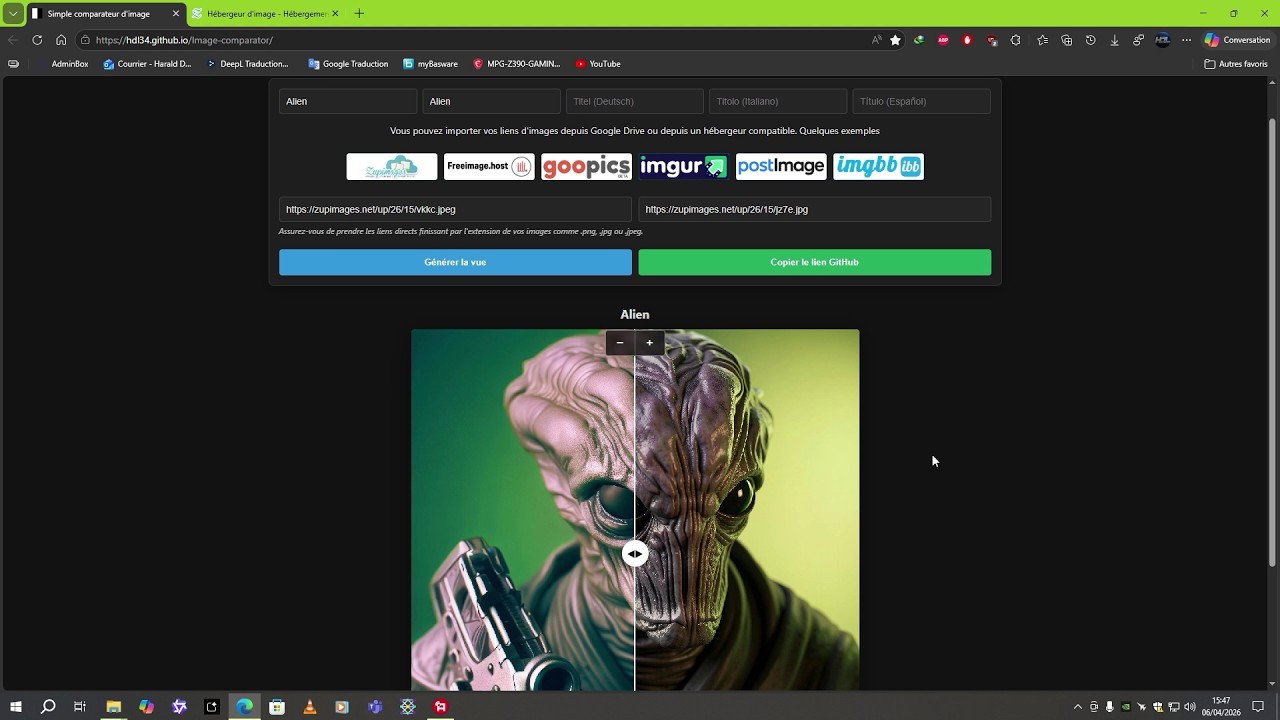
- Image Hosting: Using Zupimages, Freeimage.host, ImgBB, PostImage, and Imgur.
-
Direct Link Extraction: How to retrieve the URL ending in
.jpg,.png, or.webp(essential for display). - Customization: Editing titles (FR, EN, IT, ES, DE) and managing full-screen mode.
- Sharing: Generating a unique link to share your comparison. The TinyURL API automatically shortens this sharing link; a new window opens with a clickable preview area to access the comparison directly.
- Resolution: It easily supports high-resolution images. However, be aware that it takes a little longer to load before the images appear in the viewport.
No entries yet.
March 22, 2026
- Image Comparator created
- Renamed index to index.html
- Updated title and optimized image comparison links
- Updated title and optimized image rendering
- Updated title and fixed image display issues
- Redesigned HTML structure and style for the Image Comparator
- Updated HTML for the Dark Edition theme and features
- Upgraded to version 17 with Light Edition theme support
- Updated title in index.html
- Added favicon link to index.html
- Updated favicon link in index.html
- Updated favicon link with version query parameter
- Updated index.html
- Revised footer credits and translations
- Improved visibility and centering of masks and handles
- Redesigned CSS For the before-mask and handle elements:
- Improved handle visibility and centering
March 23, 2026
- Refactored the logic for calculating and updating the viewport size
- Added a reset button and improved the zoom function
- Added floating controls and improved layout management
- Refactored the HTML structure and improved the style
- Fixed the Italian translation and optimized the URL text
- Removed support for Italian and Spanish languages
- Added Italian and Spanish language options
- Refactored styles for better layout and responsiveness
- Improved touch interaction and performance in index.html
- Optimized the HTML structure and style of the image comparison tool
- Updated index.html
- Updated index.html
- Updated index.html
- Updated index.html
- Updated index.html
March 24, 2026
- 27 bug fixes and improvements.
March 25, 2026
- 5 bug fixes and improvements.
March 26, 2026
- 7 bug fixes and improvements.
March 27, 2026
- 4 bug fixes and improvements.
March 28, 2026
- 20 bug fixes and improvements.
March 29, 2026
- 9 bug fixes and improvements.
March 30, 2026
- 7 bug fixes and improvements.
March 31, 2026
- 13 bug fixes and improvements.
April 3, 2026
- 4 improvement fixes.
April 5, 2026
- 8 improvement fixes.
April 8, 2026
- 16 improvement fixes.
April 9, 2026
- 2 improvement fixes.
April 10, 2026
- 1 improvement fix.
April 12, 2026
- 4 improvement fixes.
April 24, 2026
- Update the Freeimage link to point to the download page.
April 25, 2026
- Change the upload service: from Freeimage.host to ImgBB.
- Improved HTML structure and style
April 26, 2026
- Moved the language dropdown menu button from the bottom left to the top right, next to the themes button.
- Adjusted the dropdown menu to switch between pasting links into text fields and uploading via ImgBB.
Now, when opening the interface, the "Upload via ImgBB" mode is the default. Hosting provider buttons are hidden in this mode.
April 28, 2026
- Updated the viewport to minimize the offset between normal and full-screen modes.
- Improved the style and functionality of the download button
- Added hover styles for the download buttons and improved the download functionality with drag-and-drop support.
- Added a download progress bar and button containers.
- Update progress bar and button styles during upload
29/04/2026
- Improve image rendering and transformation logic.
- Refactor render function for better image handling and transformations.
- Enhance viewport resizing logic and comments
- Refactor comments and improve zoom recalibration logic.
30/04/2026
- Update the style of the progress bar and buttons during loading.
- Added a progress percentage.
- Update progress bar behavior during upload.
- Minor update. Restored the cleanup bar that validates the upload.
- Update alert copy messages in multiple languages.
- Enhance button hover and active effects.
- Added hover and active effects for buttons to enhance UI consistency.
- Add language detection and initial translation.
- Allows you to have the correct default language depending on the browser language.
01/05/2026
- Refactor language detection and theme initialization.
- Added automatic switching between dark and light themes based on the browser's default theme.
- Added a listener for real-time system theme changes.
02/05/2026
- Implement an automatic preview and validation system for uploaded files.
- Added automatic preview and file validation features for image uploads, including user interface elements for displaying selected files and progress bars.
- Replace the old counter with the one from hitwebcounter.
- The old counter from freecounterstat.com appears to be broken.
03/05/2026
- Updated the meta title and viewport tags in index.html.
- Automated viewport generation.
- Real-time automation of title updates as each title field is filled.
- Changed the program title from "Simple Image Comparator" to "Welcome to EnhancelyCompare".
- Changed "Copy GitHub link" to "Copy share link
"
- Updated the title tag title with the name "EnhancelyCompare" for the preview in the browser tab.
- Added a header page and theme styling.
- Redesigned the header and command styles, and updated the theme colors.
- Updated home button styles and added header layout.
- Adjusting the position of the file delete button.
 "
"04/05/2026
- Fixed the header bar and made the name selectable.
- Fixed the floating header bar to make it fixed.
- Prevent text selection within the slider display area.
- The
user-selectproperty has been modified to prevent text selection, andwebkit-user-selecthas been added for compatibility.
- The
- Update footer link to GitHub wiki
- Removal of the automatic return of the viewport slide bar when released and addition of recentering of the bar on each viewport refresh.
- Add responsive styles for small screens
- Enhance header styles for alignment and padding.
- Added styles to header for better alignment and padding.
05/05/2026
- Replace home button with clickable brand name.
- Adjust styles and media query for main-title.
- Adjusting the height of the main title in portrait mode for smartphones.
06/05/2026
- Refactor language change logic and clean CSS.
- Updated the wiki link based on selected language in changeLang function and removed unnecessary !important declarations.
- Refactor header styles for small screens.
- Revise hostHelp messages for clarity.
- Updated help text for image link imports in multiple languages.
07/05/2026
- Add WebP compression functionality and UI updates.
- Implement language change with mouse wheel support.
- Added language change functionality using mouse wheel events.
- Update input placeholders for multilingual support.
- Updated placeholders for input fields in multiple languages.
08/05/2026
- Add wheel event listener for mode selection.
- It is now possible to scroll using the mode button.
- Fix indentation and reorder host-help-text paragraph.
10/05/2026
- Added a comparison history sidebar.
- Added a new feature: a
LocalStoragesidebar that allows you to retrieve comparisons and edit them. These can be links or titles. The edit will be reflected in your history. You can also delete each comparison individually or delete them all at once. Of course, since it'sLocalStorage, if you delete your browser history, you will lose all your comparisons.
- Added a new feature: a
- Implement thumbnail generation and update saveComparison.
- Added a function to generate a 40x40 thumbnail from an image URL, with fallback for CORS issues. Updated saveComparison function to use the generated thumbnail.
- Implement sharing mode detection in index.html.
- Added synchronous detection for sharing mode to prevent flash of the sidebar.
- Added reflection animation to the buttons when the mouse hovers over them.
11/05/2026
- Adjust the position and z-index of the sidebar.
- Adjust the height of the sidebar to be positioned just below the header.
- Implement fullscreen toggle with center preservation.
- Added fullscreen toggle functionality with preserved center position.
- Added a swap button for input fields.
- A swap button has been added to allow switching between input fields, and the styles have been updated.
13/05/2026
- Enhance sidebar styling with before pseudo-element.
- Added a pseudo-element to the sidebar for visual adjustment.
14/05/2026
- Enhance SVG transition effects in swap button.
- Add smooth transition effects for SVG in swap button.
15/05/2026
- Add rotation effect on hover for swap button.
- The SVG icon now rotates 180° on mouse hover.
16/05/2026
- Updated the index.html file with various style and display changes.
- Added a reflection effect to the viewport's internal buttons. Also, made minor adjustments to the spinner and its container.
- Refactor the layout and selection styles of the mode.
- Recenter the mode button for perfect vertical alignment between the title fields and the "Browse" buttons.
02/06/2026
- Add Google Analytics events for sidebar interactions.
03/05/2026
- Implement Google Analytics tracking for sidebar actions.
- Added Google Analytics event tracking for sidebar edits and pinning.
05/06/2026
- Added image format and resolution information to history entries.
- Updated translations for history entries and corrected formatting in index.html
08/06/2026
- Refactor sidebar buttons and import modal styles
- Modification of the "Delete all" button of the sidebar and addition of 2 new buttons to import and export the contents of the sidebar entries.
- Increase the size of the thumbnails in the history entries.
09/06/2026
- Fixed a bug in new history entries.
- When adding a new comparison, the resolution and format info was not displayed on the first try. You had to click on the entry for the acualization to be done. Now it's fixed.
10/06/2026
- Adjust the style of the icons of the sidebar history entries.
- The icons on the sidebar entries are now perfectly transparent and are aligned vertically instead of horizontally.
- Implement a multi-select mode with action bar.
- Added the ability to select one or more entries in order to be able to export or delete the selection. To do this, a 2-second press is enough to trigger the system. 2 new buttons will appear. A basket🗑 and a cross❌. The first to delete the selection, and the second to cancel the selection.
11/06/2026
- Add a button and full selection functionality.
- Improved zoom functionality and added an adaptive mask based on the theme under the image on the left.
- Added a background to the zoom container and updated the dimensions of zoomerB.
12/06/2026
- Bug fix: Unable to regenerate the comparison entry if it is deleted.
- If we create a new comparison and delete the entry from the history, we can now regenerate the entry.
13/06/2026
- Delete the API key and update the upload endpoint (New API key generated).
- Transfer of "enhancelycompare" to CloudFlare and hide the API key.
- Update GitHub links to the new repository.
- Updated the base URL for the file protocol.
14/06/2026
- Improved handling of local storage inputs and updates.
- Redesigned the input event handler for more efficient handling of local storage updates and proper separation of new entries.
- Refactor history item selectors in index.html
- 2 small minor fixes. Changed the order in which entries were recorded in descending order to the more logical ascending order and corrected titles that were not updated in real time when editing a history entry.
- Update confirmation messages and import error texts.
- Added the alert message "❌ Invalid JSON file." in the 5 languages of the interface.
15/06/2026
- Refactor date handling in history entries.
- Update title and add meta description in index.html.
- Enhance index.html with Open Graph meta tags.
- Added Open Graph meta tags for better social sharing.
16/06/2026
- Enhance local storage handling for swap entries.
- Added functionality to save swap details in local storage and update entry modification status.
17/06/2026
- Add Open Graph and Twitter meta tags to index.html.
- Added meta line to display a thumbnail under the link once it has been posted on other sites and social networks.
- Add Open Graph site name meta tag.
18/06/2026
- Update meta description and Open Graph tags.
19/06/2026
- Add danger button style for delete action.
- Replaced the trash 🗑 can icon for history entries with an SVG version used on the other buttons.
20/06/2026
- Add responsive donate section and translations.
21/06/2026
- Add custom language dropdown with flags.
- Added a flag to the left of each language in the language dropdown menu. This compresses the screen space in portrait mode because only the flag will be visible. If the button is clicked, the names will still be displayed next to them in the dropdown menu.
23/06/2026
- Add theme toggle button with tooltip functionality.
- The theme button has been improved with a sun and moon icon only on mobile and tablet to save a little space.
24/06/2026
- Fix theme icon visibility and button label logic.
- Reversal of the logic of the dark/light theme icons and names.
26/06/2026
- Integrate Freeimage uploader functionality
- Added support for Freeimage uploader via API in the HTML file, including new buttons and functionality for handling uploads via Freeimage.
- Integrate Freeimage SDK for image uploads and updated upload button functionality.
- Added Freeimage SDK integration and updated upload button functionality.
- Refactor image upload logic and clean up HTML.
- Removed unused contenteditable divs and adjusted button attributes for image upload functionality. Updated the upload endpoint logic and cleaned up the code by removing the initPupObserver function.
27/06/2026
- Refactor image loading and resolution saving logic.
- Add URL comparison logic in saveAndInit function.
- Fix localStorage update condition in input event.
28/06/2026
- Refactoring of the ID management for saving sidebar entries.
- Before, when you created a new comparison on top of the previous one without refreshing the page, the entry already present in the sidebar was overwritten by the new one. It was then necessary to refresh the page to get around the problem. I've fixed this problem: from now on, you don't need to reload the page to make a new comparison, and the new ones will no longer overwrite the previous ones in the sidebar.
29/06/2026
- Enable multiple file import in importHistory function and reversing them during import.
- You can now import multiple files at once, plus a small correction to the import order. Previously, imported files were placed above the previous ones. Now they will be placed below, which is more logical.
30/06/2026
- Enhance file size handling and resolution saving.
- Added file size display functionality and improved resolution saving logic.
01/07/2026
- Refactor image resolution logic in index.html.
- Refactor image resolution handling to use targetId and added size checks before fetching file sizes. Specifically, this allows you to update old sidebar entries that do not contain the new file size information added as a result of updating the image comparator. Simply click on each entry in the sidebar to update with the new image weight information.
04/07/2026
- Modify image validation criteria in index.html.
- Updated allowed image types and increased max file size limit.
07/07/2026
- Add Google site verification meta tag.
09/07/2026
-
Added a multi ratio adjustment panel for the left image
- Added an adjustment panel if the ratio of the left image differs from the ratio of the right image by means of 4 sliders.
- A slider for zooming
- A slider for opacity
- A slider for horizontal
- A slider for the vertical.
- Added an adjustment panel if the ratio of the left image differs from the ratio of the right image by means of 4 sliders.
10/07/2026
- Add adjustments parsing and URL handling logic.
- Added saving of values from the multi-ratio adjustment panel to the sharing URL.
11/07/2026
- Update the viewport meta tag for responsive design.
12/07/2026
- Improve the handling of full-screen transitions
- Refactor the full-screen transition logic to properly handle authentic transitions...
14/07/2026
- Enhance input field width and alignment for larger screens.
- Added media query for wider input fields on larger screens and adjusted flex properties for alignment.
15/07/2026
- Modify input field width and save target ID handling.
- Updated input field width for better visibility and adjusted save target ID logic.
17/07/2026
- Fixed the "EnhancelyCompare" name being slightly cut off on the Home button in portrait mode on mobile.
- Implemented theme detection and storage.
- Added synchronous theme detection and localStorage support for light and dark themes.
- Improved light theme styles and the switching functionality.
- Updated light theme styles and removed the anti-flash class after theme switching.
- Fixed file chips lagging when switching upload modes.
- In upload mode, after selecting a file (visible chip), switching from "ImgBB" to "Freeimage.host" (or vice versa) would make the .file-preview chips go down — the Browse button would reappear above the chip instead of being hidden. This issue is now resolved.
18/07/2026
- Improved loading of hosting logos.
- Improved loading of sidebar thumbnails.
- Improved flag loading for different languages.
- Improved the loading of the visit counter.
- Improved index.html file with pre-login and lazy loading.
- Added pre-connection links to optimize performance and updated language options images to use lazy loading.
- Reduction of CORS in the 3 js files (upload.js, upload-freeimage.js and filesize.js).
- Improve accessibility with aria-labels attributes in HTML.
- Buttons and dropdowns have been updated with aria-labels attributes for better accessibility.
19/07/2026
- Add aria-label to language selector for accessibility.
- Added a "robots.txt" file
- Added a "robots.txt" file for better indexing.
- Added a llms.txt for inference.
- Provides information that allows LLMs to use a website at the time of inference.
20/07/2026
- Refactor styles for mobile layout and header spacing.
21/07/2026
- Remove Google Analytics tracking from index.html.
- Removed Google Analytics event tracking scripts and calls from the sidebar functionality in favor of the CloudFlare version.
24/07/2026
- Refactor event handling for improved security.
- Removed inline event handlers and added event listeners for better CSP compliance.
25/07/2026
- Remove preconnect link to freeimage.host.
- Removal of the Freeimage SDK which was not being used.
26/07/2026
- Fix validate button click handler to call function.
- Refactor fullscreen adjustment logic.
- Refactor fullscreen adjustment handling to ensure live values are converted symmetrically during entry and exit, replacing the previous snapshot restoration method.
29/07/2026
- Refactor fullscreen rotation handling and resize listeners.
- Merged separate resize listeners for fullscreen rotation handling to ensure correct rendering order and prevent layout jumps.
31/07/2026
- Implement IP rate limiting in filesize.js API.
- Added IP rate limiting to the onRequestGet function and refactored the code for clarity.
- Implement rate limiting and image size check in the upload-freeimage.js file.
- Added rate limiting and image size validation to the upload function.
- Implement rate limiting and image size check in the upload.js file.
- Added rate limiting by IP and image size validation.
02/08/2026
- Remove Freeimage option and update mode selection.
- Freeimage.host has been removed from the dropdown menu. It was no longer working due to an HTTP 400 block and a console message stating "You have been forbidden to use this website." Apparently, it no longer accepts requests from Cloudflare.
10/08/2026
- Add translations for "createdOn" and improve EXIF handling.
- Added "createdOn" translation for multiple languages and updated the handling of EXIF date extraction for uploaded files.
- Update security headers in _headers file.
Example:

11/08/2026
- Fix French and Spanish translation for (modified) and change the location of (modified) downwards.
- Update wiki links to point to markdown files.
12/08/2026
- Enhance responsive design and update visit counter image.
- Added a media query for smaller screens and updated the visit counter image properties.
- Update image attributes and fix HTML structure.
- Adjust visit counter image size for mobile view.
14/08/2026
- Enhance image compression and add auto-translation.
- Increased image compression quality from 0.75 to 0.85. Added automatic translation feature using DeepL API for multiple languages.
- Refactor translation API to use JSON format.
- Updated the translation API to use JSON format for requests and responses, improving compatibility with the DeepL API.
15/08/2026
- Implement missing title translation filling logic.
- Added a function to fill missing title translations based on existing inputs. Updated translation logic to dispatch input events after setting values.
- Update security headers in _headers file.
- Refactor input event handling for auto-translation.
- Updated event listener to ignore programmatic dispatches and handle auto-filled inputs correctly.
16/08/2026
- Refactor translation input event handling.
- Refactor input event handling for translation fields to improve clarity and functionality. Integration of auto-update for title fields.

mise.a.jour.des.titres.des.entrees.de.la.side.bar.via.l.auto.update.des.champs.titres.webm
17/08/2026
- Increase rate limit to 150 requests per IP on exifdate.js file.
- Increase the number of queries to cover 20 close comparisons with a safety margin: threshold at 150 over the 10-minute window.
- Increase rate limit for IP requests on filesize.js file.
- Updated rate limit from 20 to 150 requests per IP per window.
- Increase the number of queries to cover 20 close comparisons with a safety margin: threshold at 150 over the 10-minute window.
- Increase rate limit for translation API on translate.js file.
- Updated rate limit to allow 80 requests per IP per window to cover 20 close comparisons with a safety margin over a period of 10 minutes.
- If you exceed the limit, the auto-translation of the other title fields will stop working for 10 minutes with this console error:


- I am using a free DeepL account for the API. So I'm entitled to 500,000 characters per month. So if at some point the auto translation no longer works at a given time, it means that the quota is exhausted for the month.
- Increase rate limit for image upload on upload.js file.
- Updated rate limit to allow 150 requests per IP per window to cover 20 close comparisons with a safety margin over a period of 10 minutes.
24/08/2026
- Fix HTML structure and update script handling.
- Fixed an issue where the fullscreen and windowed values would crescendo on images with different aspect ratios when using the physical "Esc" key to exit fullscreen or the native crosshair that appears when hovering the mouse over the top of the screen. The fullscreen values would remain stuck and override the windowed values. This is now fixed.
06/09/2026
- Simplify getFactorH calculations in index.html.
- Refactor getFactorH functions to simplify calculations and remove unnecessary orientation checks.
08/09206
- Enhance import modal with close button and toggle.
- Added styles for modal close button and toggle functionality.


09/09/2026*
- Add a minimum width constraint for Windowed responsive design.
12/09/2026
- Prevent sidebar retraction when modal is active.
- Added a check to prevent sidebar retraction when modal is open.
13/09/2026
- Implement drag-and-drop for history items.
- Add drag-and-drop functionality for history items with visual indicators.

23/09/2026
- Update the URL shortening API endpoint in index.html.
- Updated the "tinyurl.com" API endpoint with a new function to prevent future silent blocks.
30/09/2026
- Add image-rendering style for #img-after.
- Improved rendering of the style for #img-after element to achieve a softer look instead of a hard edge.
03/10/2026
- Fix image rendering and preload logic in index.html.
- Improved loading speed for comparisons.
- Testing a link shared by another person to a comparison.
vitesse.webm
04/010/2026
- Enhance image loading with preconnect and preload.
- Added preloading and preconnecting for images based on URL parameters.
09/10/2026
- Add ARD configuration for EnhancelyCompare.
- Add a link to the ARD JSON file in index.html.
- Add the link to the AI catalog in index.html.
- Add the link to the AI catalog JSON in index.html.
13/10/2026
- Implement the edit mode exit button.
- Added functionality and styling of the "Exit dit mode" button in all 5 languages.

- Refactor drag ghost positioning logic.
14/10/2026
- Replace the handle text with SVG icons.
- Replaced slider handle icons with SVG versions to avoid variations across browsers and operating systems.
- Implement WebGL bicubic rendering for after image.
- Added WebGL bicubic rendering for the 'after' image with a fallback to CSS rendering. Updated HTML structure to include a canvas element for rendering.
15/10/2026
- Update styles for file preview elements.
- Add styles to prevent overflow in file previews.
16/10/2026
- Fix formatting and add a tooltip for truncated filenames.
17/10/2026
- Implement file name tooltip functionality.
- Add tooltip for truncated file names on hover or tap.