UI Components and HUD Components - GuidebeeGameEngine/Raindrop GitHub Wiki
Beside game scenes, games normally also have menus ,settings ,dialog ,when use Guidebee Android Game Engine, you can mix with native Android Activity Window. The GameActivity is just an ordinary Activity on Android platform. Alternatively ,you can also use UI components like Button, ImageButton, Later, Table ,Tree etc defined com.guidebee.game.ui to define your game high-level UI (like dialog, menus). We’ll cover UI Widgets in more details later.
Another very important usage of the UI package is for HUD components . HUD stands for heads-up display. HUD for a game normally are scores , player’s health, also the one we have used before the GameController. normally these components will stay the same position on screen, no matter how player move his character on screen even when scene scrolls.
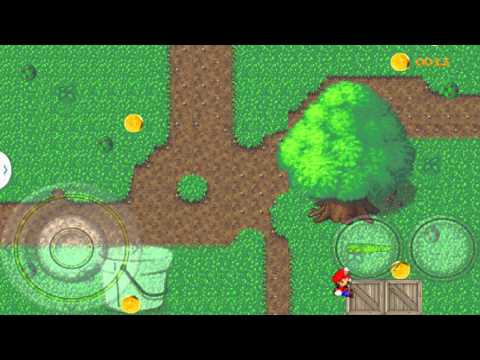
We’ll add a score board for Mario, to show how many golden coins Mario has collected:

The score board is displayed top right side of screen, include a golden coin images and a number to show current sore. we also put some space between the coin and number to make it looks nicer.
We add the numbers image

in the texture Atlas for later use.
Now can define our Score HUD component ,it’s derived from Table UI components , Table make it easier to manage multiple UI components .
package com.mapdigit.game.tutorial.drop.hud;

import com.guidebee.game.graphics.Texture;
import com.guidebee.game.graphics.TextureAtlas;
import com.guidebee.game.graphics.TextureRegion;
import com.guidebee.game.ui.HorizontalGroup;
import com.guidebee.game.ui.Image;
import com.guidebee.game.ui.Table;
import com.guidebee.game.ui.drawable.TextureRegionDrawable;

import static com.guidebee.game.GameEngine.assetManager;


public class Score extends Table{

    private final Image goldCoin;
    private final Image thousands;
    private final Image hundreds;
    private final Image tens;
    private final Image units;


    private final TextureRegionDrawable [] numberDrawables;


    public Score(){
        TextureAtlas textureAtlas=assetManager.get("raindrop.atlas",
                TextureAtlas.class);
        goldCoin=new Image(assetManager.get("coin.png", Texture.class));
        TextureRegion numbers=textureAtlas.findRegion("numbers");
        numberDrawables=new TextureRegionDrawable[11];
        for(int i=0;i<10;i++){
            numberDrawables[i]
                    =new TextureRegionDrawable(
                    new TextureRegion(numbers,i*14,0,14,14));
        }
        thousands=new Image(numberDrawables[0]);
        hundreds =new Image(numberDrawables[0]);
        tens=new Image(numberDrawables[0]);
        units=new Image(numberDrawables[0]);
        HorizontalGroup space=new HorizontalGroup();
        space.padLeft(10);

        add(goldCoin);
        add(space);
        add(thousands);
        add(hundreds);
        add(tens);
        add(units);
        setSize(200, 40);
        setPosition(600, 430);
    }


    public void setScore(int score){
        int newScore= score % 10000;
        int thousandsNum = newScore / 1000;

        int hundredsNum = (newScore % 1000) / 100;
        int tensNum =(newScore % 100) /10;
        int unitsNum = (newScore % 10);

        thousands.setDrawable(numberDrawables[thousandsNum]);
        hundreds.setDrawable(numberDrawables[hundredsNum]);
        tens.setDrawable(numberDrawables[tensNum]);
        units.setDrawable(numberDrawables[unitsNum]);
    }
}
We used 5 image components , 1 for the golden coin, 4 for the numbers .also we used HorizontalGroup as the space between coin and the number.
Then we can call stage’s addHUDComponent to add the Score to the stage.
private final Score score;
...
sceneStage.addHUDComponent(score);

sceneStage.setCollisionListener(new CollisionDirector(score));
we also made some change for the CollisionDirector to update the score when Mario catches the coins:
package com.mapdigit.game.tutorial.drop.director;

import com.guidebee.game.Collidable;
import com.guidebee.game.audio.Sound;
import com.guidebee.game.scene.Actor;
import com.guidebee.game.scene.collision.Collision;
import com.guidebee.game.scene.collision.CollisionListener;
import com.mapdigit.game.tutorial.drop.actor.Mario;
import com.mapdigit.game.tutorial.drop.actor.RainDrop;
import com.mapdigit.game.tutorial.drop.hud.Score;

import static com.guidebee.game.GameEngine.assetManager;


public class CollisionDirector implements CollisionListener {

    private Sound dropSound=assetManager.get("drop.wav",Sound.class);

    private int score =0;

    private final Score scoreBoard;

    public CollisionDirector(Score score){
        scoreBoard=score;
    }


    @Override
    public void collisionDetected(Collision collision) {

        if(collision!=null){
            Collidable objectA=collision.getObjectA();
            Collidable objectB=collision.getObjectB();
            if(objectA instanceof Mario){
                if(objectB instanceof RainDrop){
                    ((Actor)objectB).getParent().removeActor((Actor) objectB);
                    score++;
                    dropSound.play();
                    scoreBoard.setScore(score);
                }
            }else if(objectA instanceof RainDrop){
                if(objectB instanceof Mario){
                    ((Actor)objectA).getParent().removeActor((Actor) objectA);
                    dropSound.play();
                    score++;
                    scoreBoard.setScore(score);
                }
            }

        }


    }
}